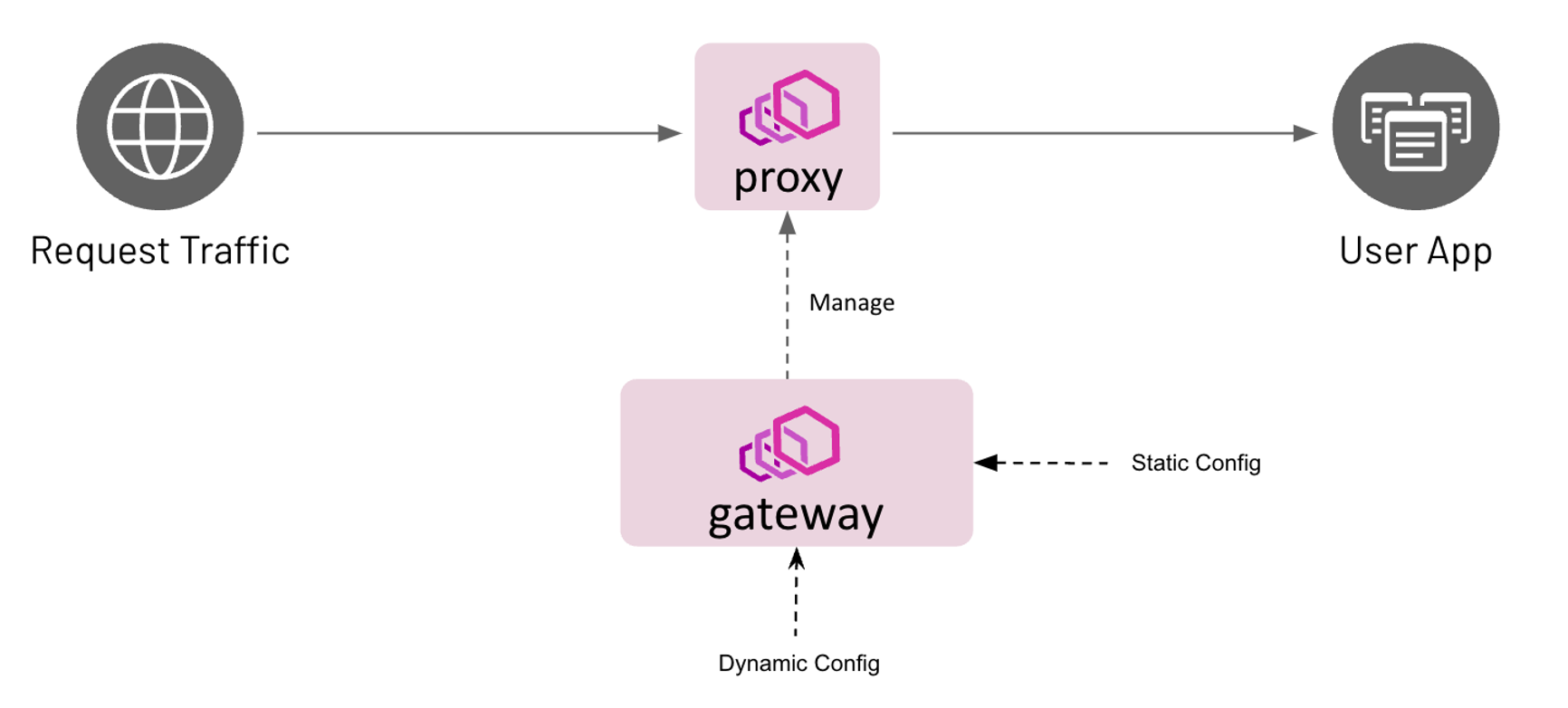
Envoy Gateway is an open source project for managing Envoy Proxy as a standalone or Kubernetes-based application gateway. Gateway API resources are used to dynamically provision and configure the managed Envoy Proxies.
This is the multi-page printable view of this section. Click here to print.
Envoy Gateway is an open source project for managing Envoy Proxy as a standalone or Kubernetes-based application gateway. Gateway API resources are used to dynamically provision and configure the managed Envoy Proxies.
This “quick start” will help you get started with Envoy Gateway in a few simple steps.
A Kubernetes cluster.
Note: Refer to the Compatibility Matrix for supported Kubernetes versions.
Note: In case your Kubernetes cluster, does not have a LoadBalancer implementation, we recommend installing one
so the Gateway resource has an Address associated with it. We recommend using MetalLB.
Install the Gateway API CRDs and Envoy Gateway:
helm install eg oci://docker.io/envoyproxy/gateway-helm --version v1.0.2 -n envoy-gateway-system --create-namespace
Wait for Envoy Gateway to become available:
kubectl wait --timeout=5m -n envoy-gateway-system deployment/envoy-gateway --for=condition=Available
Install the GatewayClass, Gateway, HTTPRoute and example app:
kubectl apply -f https://github.com/envoyproxy/gateway/releases/download/v1.0.2/quickstart.yaml -n default
Note: quickstart.yaml defines that Envoy Gateway will listen for
traffic on port 80 on its globally-routable IP address, to make it easy to use
browsers to test Envoy Gateway. When Envoy Gateway sees that its Listener is
using a privileged port (<1024), it will map this internally to an
unprivileged port, so that Envoy Gateway doesn’t need additional privileges.
It’s important to be aware of this mapping, since you may need to take it into
consideration when debugging.
You can also test the same functionality by sending traffic to the External IP. To get the external IP of the Envoy service, run:
export GATEWAY_HOST=$(kubectl get gateway/eg -o jsonpath='{.status.addresses[0].value}')
In certain environments, the load balancer may be exposed using a hostname, instead of an IP address. If so, replace
ip in the above command with hostname.
Curl the example app through Envoy proxy:
curl --verbose --header "Host: www.example.com" http://$GATEWAY_HOST/get
Get the name of the Envoy service created the by the example Gateway:
export ENVOY_SERVICE=$(kubectl get svc -n envoy-gateway-system --selector=gateway.envoyproxy.io/owning-gateway-namespace=default,gateway.envoyproxy.io/owning-gateway-name=eg -o jsonpath='{.items[0].metadata.name}')
Port forward to the Envoy service:
kubectl -n envoy-gateway-system port-forward service/${ENVOY_SERVICE} 8888:80 &
Curl the example app through Envoy proxy:
curl --verbose --header "Host: www.example.com" http://localhost:8888/get
In this quickstart, you have:
Here is a suggested list of follow-on tasks to guide you in your exploration of Envoy Gateway:
Review the Tasks section for the scenario matching your use case. The Envoy Gateway tasks are organized by category: traffic management, security, extensibility, observability, and operations.
Use the steps in this section to uninstall everything from the quickstart.
Delete the GatewayClass, Gateway, HTTPRoute and Example App:
kubectl delete -f https://github.com/envoyproxy/gateway/releases/download/v1.0.2/quickstart.yaml --ignore-not-found=true
Delete the Gateway API CRDs and Envoy Gateway:
helm uninstall eg -n envoy-gateway-system
Checkout the Developer Guide to get involved in the project.
Envoy circuit breakers can be used to fail quickly and apply back-pressure in response to upstream service degradation.
Envoy Gateway supports the following circuit breaker thresholds:
503 status code.Envoy’s circuit breakers are distributed: counters are not synchronized across different Envoy processes. The default Envoy and Envoy Gateway circuit breaker threshold values (1024) may be too strict for high-throughput systems.
Envoy Gateway introduces a new CRD called BackendTrafficPolicy that allows the user to describe their desired circuit breaker thresholds. This instantiated resource can be linked to a Gateway, HTTPRoute or GRPCRoute resource.
Note: There are distinct circuit breaker counters for each BackendReference in an xRoute rule. Even if a BackendTrafficPolicy targets a Gateway, each BackendReference in that gateway still has separate circuit breaker counter.
hey CLI will be used to generate load and measure response times. Follow the installation instruction from the Hey project docs.This example will simulate a degraded backend that responds within 10 seconds by adding the ?delay=10s query parameter to API calls. The hey tool will be used to generate 100 concurrent requests.
hey -n 100 -c 100 -host "www.example.com" http://${GATEWAY_HOST}/?delay=10s
Summary:
  Total:	10.3426 secs
  Slowest:	10.3420 secs
  Fastest:	10.0664 secs
  Average:	10.2145 secs
  Requests/sec:	9.6687

  Total data:	36600 bytes
  Size/request:	366 bytes

Response time histogram:
  10.066 [1]	|■■■■
  10.094 [4]	|■■■■■■■■■■■■■■■
  10.122 [9]	|■■■■■■■■■■■■■■■■■■■■■■■■■■■■■■■■■
  10.149 [10]	|■■■■■■■■■■■■■■■■■■■■■■■■■■■■■■■■■■■■
  10.177 [10]	|■■■■■■■■■■■■■■■■■■■■■■■■■■■■■■■■■■■■
  10.204 [11]	|■■■■■■■■■■■■■■■■■■■■■■■■■■■■■■■■■■■■■■■■
  10.232 [11]	|■■■■■■■■■■■■■■■■■■■■■■■■■■■■■■■■■■■■■■■■
  10.259 [11]	|■■■■■■■■■■■■■■■■■■■■■■■■■■■■■■■■■■■■■■■■
  10.287 [11]	|■■■■■■■■■■■■■■■■■■■■■■■■■■■■■■■■■■■■■■■■
  10.314 [11]	|■■■■■■■■■■■■■■■■■■■■■■■■■■■■■■■■■■■■■■■■
  10.342 [11]	|■■■■■■■■■■■■■■■■■■■■■■■■■■■■■■■■■■■■■■■■
The default circuit breaker threshold (1024) is not met. As a result, requests do not overflow: all requests are proxied upstream and both Envoy and clients wait for 10s.
In order to fail fast, apply a BackendTrafficPolicy that limits concurrent requests to 10 and pending requests to 0.
cat <<EOF | kubectl apply -f -
apiVersion: gateway.envoyproxy.io/v1alpha1
kind: BackendTrafficPolicy
metadata:
  name: circuitbreaker-for-route
spec:
  targetRef:
    group: gateway.networking.k8s.io
    kind: HTTPRoute
    name: backend
    namespace: default
  circuitBreaker:
    maxPendingRequests: 0
    maxParallelRequests: 10
EOF
Execute the load simulation again.
hey -n 100 -c 100 -host "www.example.com" http://${GATEWAY_HOST}/?delay=10s
Summary:
  Total:	10.1230 secs
  Slowest:	10.1224 secs
  Fastest:	0.0529 secs
  Average:	1.0677 secs
  Requests/sec:	9.8785

  Total data:	10940 bytes
  Size/request:	109 bytes

Response time histogram:
  0.053 [1]	|
  1.060 [89]	|■■■■■■■■■■■■■■■■■■■■■■■■■■■■■■■■■■■■■■■■
  2.067 [0]	|
  3.074 [0]	|
  4.081 [0]	|
  5.088 [0]	|
  6.095 [0]	|
  7.102 [0]	|
  8.109 [0]	|
  9.115 [0]	|
  10.122 [10]	|■■■■
With the new circuit breaker settings, and due to the slowness of the backend, only the first 10 concurrent requests were proxied, while the other 90 overflowed.
This guide explains the usage of the ClientTrafficPolicy API.
The ClientTrafficPolicy API allows system administrators to configure the behavior for how the Envoy Proxy server behaves with downstream clients.
This API was added as a new policy attachment resource that can be applied to Gateway resources and it is meant to hold settings for configuring behavior of the connection between the downstream client and Envoy Proxy listener. It is the counterpart to the BackendTrafficPolicy API resource.
cat <<EOF | kubectl apply -f -
apiVersion: gateway.envoyproxy.io/v1alpha1
kind: ClientTrafficPolicy
metadata:
  name: enable-tcp-keepalive-policy
  namespace: default
spec:
  targetRef:
    group: gateway.networking.k8s.io
    kind: Gateway
    name: eg
    namespace: default
  tcpKeepalive:
    idleTime: 20m
    interval: 60s
    probes: 3
EOF
Verify that ClientTrafficPolicy is Accepted:
kubectl get clienttrafficpolicies.gateway.envoyproxy.io -n default
You should see the policy marked as accepted like this:
NAME                          STATUS     AGE
enable-tcp-keepalive-policy   Accepted   5s
Curl the example app through Envoy proxy once again:
curl --verbose --header "Host: www.example.com" http://$GATEWAY_HOST/get --next --header "Host: www.example.com" http://$GATEWAY_HOST/get
You should see the output like this:
*   Trying 172.18.255.202:80...
* Connected to 172.18.255.202 (172.18.255.202) port 80 (#0)
> GET /get HTTP/1.1
> Host: www.example.com
> User-Agent: curl/8.1.2
> Accept: */*
>
< HTTP/1.1 200 OK
< content-type: application/json
< x-content-type-options: nosniff
< date: Fri, 01 Dec 2023 10:17:04 GMT
< content-length: 507
< x-envoy-upstream-service-time: 0
< server: envoy
<
{
 "path": "/get",
 "host": "www.example.com",
 "method": "GET",
 "proto": "HTTP/1.1",
 "headers": {
  "Accept": [
   "*/*"
  ],
  "User-Agent": [
   "curl/8.1.2"
  ],
  "X-Envoy-Expected-Rq-Timeout-Ms": [
   "15000"
  ],
  "X-Envoy-Internal": [
   "true"
  ],
  "X-Forwarded-For": [
   "172.18.0.2"
  ],
  "X-Forwarded-Proto": [
   "http"
  ],
  "X-Request-Id": [
   "4d0d33e8-d611-41f0-9da0-6458eec20fa5"
  ]
 },
 "namespace": "default",
 "ingress": "",
 "service": "",
 "pod": "backend-58d58f745-2zwvn"
* Connection #0 to host 172.18.255.202 left intact
}* Found bundle for host: 0x7fb9f5204ea0 [serially]
* Can not multiplex, even if we wanted to
* Reusing existing connection #0 with host 172.18.255.202
> GET /headers HTTP/1.1
> Host: www.example.com
> User-Agent: curl/8.1.2
> Accept: */*
>
< HTTP/1.1 200 OK
< content-type: application/json
< x-content-type-options: nosniff
< date: Fri, 01 Dec 2023 10:17:04 GMT
< content-length: 511
< x-envoy-upstream-service-time: 0
< server: envoy
<
{
 "path": "/headers",
 "host": "www.example.com",
 "method": "GET",
 "proto": "HTTP/1.1",
 "headers": {
  "Accept": [
   "*/*"
  ],
  "User-Agent": [
   "curl/8.1.2"
  ],
  "X-Envoy-Expected-Rq-Timeout-Ms": [
   "15000"
  ],
  "X-Envoy-Internal": [
   "true"
  ],
  "X-Forwarded-For": [
   "172.18.0.2"
  ],
  "X-Forwarded-Proto": [
   "http"
  ],
  "X-Request-Id": [
   "9a8874c0-c117-481c-9b04-933571732ca5"
  ]
 },
 "namespace": "default",
 "ingress": "",
 "service": "",
 "pod": "backend-58d58f745-2zwvn"
* Connection #0 to host 172.18.255.202 left intact
}
You can see keepalive connection marked by the output in:
* Connection #0 to host 172.18.255.202 left intact
* Reusing existing connection #0 with host 172.18.255.202
This example configures Proxy Protocol for downstream clients.
cat <<EOF | kubectl apply -f -
apiVersion: gateway.envoyproxy.io/v1alpha1
kind: ClientTrafficPolicy
metadata:
  name: enable-proxy-protocol-policy
  namespace: default
spec:
  targetRef:
    group: gateway.networking.k8s.io
    kind: Gateway
    name: eg
    namespace: default
  enableProxyProtocol: true
EOF
Verify that ClientTrafficPolicy is Accepted:
kubectl get clienttrafficpolicies.gateway.envoyproxy.io -n default
You should see the policy marked as accepted like this:
NAME                          STATUS     AGE
enable-proxy-protocol-policy   Accepted   5s
Try the endpoint without using PROXY protocol with curl:
curl -v --header "Host: www.example.com" http://$GATEWAY_HOST/get
*   Trying 172.18.255.202:80...
* Connected to 172.18.255.202 (172.18.255.202) port 80 (#0)
> GET /get HTTP/1.1
> Host: www.example.com
> User-Agent: curl/8.1.2
> Accept: */*
>
* Recv failure: Connection reset by peer
* Closing connection 0
curl: (56) Recv failure: Connection reset by peer
Curl the example app through Envoy proxy once again, now sending HAProxy PROXY protocol header at the beginning of the connection with –haproxy-protocol flag:
curl --verbose --haproxy-protocol --header "Host: www.example.com" http://$GATEWAY_HOST/get
You should now expect 200 response status and also see that source IP was preserved in the X-Forwarded-For header.
*   Trying 172.18.255.202:80...
* Connected to 172.18.255.202 (172.18.255.202) port 80 (#0)
> GET /get HTTP/1.1
> Host: www.example.com
> User-Agent: curl/8.1.2
> Accept: */*
>
< HTTP/1.1 200 OK
< content-type: application/json
< x-content-type-options: nosniff
< date: Mon, 04 Dec 2023 21:11:43 GMT
< content-length: 510
< x-envoy-upstream-service-time: 0
< server: envoy
<
{
 "path": "/get",
 "host": "www.example.com",
 "method": "GET",
 "proto": "HTTP/1.1",
 "headers": {
  "Accept": [
   "*/*"
  ],
  "User-Agent": [
   "curl/8.1.2"
  ],
  "X-Envoy-Expected-Rq-Timeout-Ms": [
   "15000"
  ],
  "X-Envoy-Internal": [
   "true"
  ],
  "X-Forwarded-For": [
   "192.168.255.6"
  ],
  "X-Forwarded-Proto": [
   "http"
  ],
  "X-Request-Id": [
   "290e4b61-44b7-4e5c-a39c-0ec76784e897"
  ]
 },
 "namespace": "default",
 "ingress": "",
 "service": "",
 "pod": "backend-58d58f745-2zwvn"
* Connection #0 to host 172.18.255.202 left intact
}
This example configures the number of additional ingress proxy hops from the right side of XFF HTTP headers to trust when determining the origin client’s IP address and determines whether or not x-forwarded-proto headers will be trusted. Refer to https://www.envoyproxy.io/docs/envoy/latest/configuration/http/http_conn_man/headers#x-forwarded-for for details.
cat <<EOF | kubectl apply -f -
apiVersion: gateway.envoyproxy.io/v1alpha1
kind: ClientTrafficPolicy
metadata:
  name: http-client-ip-detection
  namespace: default
spec:
  targetRef:
    group: gateway.networking.k8s.io
    kind: Gateway
    name: eg
    namespace: default
  clientIPDetection:
    xForwardedFor:
      numTrustedHops: 2
EOF
Verify that ClientTrafficPolicy is Accepted:
kubectl get clienttrafficpolicies.gateway.envoyproxy.io -n default
You should see the policy marked as accepted like this:
NAME                          STATUS     AGE
http-client-ip-detection   Accepted   5s
Open port-forward to the admin interface port:
kubectl port-forward deploy/${ENVOY_DEPLOYMENT} -n envoy-gateway-system 19000:19000
Curl the admin interface port to fetch the configured value for xff_num_trusted_hops:
curl -s 'http://localhost:19000/config_dump?resource=dynamic_listeners' \
  | jq -r '.configs[0].active_state.listener.default_filter_chain.filters[0].typed_config
      | with_entries(select(.key | match("xff|remote_address|original_ip")))'
You should expect to see the following:
{
  "use_remote_address": true,
  "xff_num_trusted_hops": 2
}
Curl the example app through Envoy proxy:
curl -v http://$GATEWAY_HOST/get \
  -H "Host: www.example.com" \
  -H "X-Forwarded-Proto: https" \
  -H "X-Forwarded-For: 1.1.1.1,2.2.2.2"
You should expect 200 response status, see that X-Forwarded-Proto was preserved and X-Envoy-External-Address was set to the leftmost address in the X-Forwarded-For header:
*   Trying [::1]:8888...
* Connected to localhost (::1) port 8888
> GET /get HTTP/1.1
> Host: www.example.com
> User-Agent: curl/8.4.0
> Accept: */*
> X-Forwarded-Proto: https
> X-Forwarded-For: 1.1.1.1,2.2.2.2
>
Handling connection for 8888
< HTTP/1.1 200 OK
< content-type: application/json
< x-content-type-options: nosniff
< date: Tue, 30 Jan 2024 15:19:22 GMT
< content-length: 535
< x-envoy-upstream-service-time: 0
< server: envoy
<
{
 "path": "/get",
 "host": "www.example.com",
 "method": "GET",
 "proto": "HTTP/1.1",
 "headers": {
  "Accept": [
   "*/*"
  ],
  "User-Agent": [
   "curl/8.4.0"
  ],
  "X-Envoy-Expected-Rq-Timeout-Ms": [
   "15000"
  ],
  "X-Envoy-External-Address": [
   "1.1.1.1"
  ],
  "X-Forwarded-For": [
   "1.1.1.1,2.2.2.2,10.244.0.9"
  ],
  "X-Forwarded-Proto": [
   "https"
  ],
  "X-Request-Id": [
   "53ccfad7-1899-40fa-9322-ddb833aa1ac3"
  ]
 },
 "namespace": "default",
 "ingress": "",
 "service": "",
 "pod": "backend-58d58f745-8psnc"
* Connection #0 to host localhost left intact
}
This feature allows you to limit the time taken by the Envoy Proxy fleet to receive the entire request from the client, which is useful in preventing certain clients from consuming too much memory in Envoy This example configures the HTTP request timeout for the client, please check out the details here.
cat <<EOF | kubectl apply -f -
apiVersion: gateway.envoyproxy.io/v1alpha1
kind: ClientTrafficPolicy
metadata:
  name: client-timeout
spec:
  targetRef:
    group: gateway.networking.k8s.io
    kind: Gateway
    name: eg
  timeout:
    http:
      requestReceivedTimeout: 2s
EOF
Curl the example app through Envoy proxy:
curl -v http://$GATEWAY_HOST/get \
  -H "Host: www.example.com" \
  -H "Content-Length: 10000"
You should expect 428 response status after 2s:
curl -v http://$GATEWAY_HOST/get \
  -H "Host: www.example.com" \
  -H "Content-Length: 10000"
*   Trying 172.18.255.200:80...
* Connected to 172.18.255.200 (172.18.255.200) port 80
> GET /get HTTP/1.1
> Host: www.example.com
> User-Agent: curl/8.4.0
> Accept: */*
> Content-Length: 10000
>
< HTTP/1.1 408 Request Timeout
< content-length: 15
< content-type: text/plain
< date: Tue, 27 Feb 2024 07:38:27 GMT
< connection: close
<
* Closing connection
request timeout
Envoy fault injection can be used to inject delays and abort requests to mimic failure scenarios such as service failures and overloads.
Envoy Gateway supports the following fault scenarios:
Envoy Gateway introduces a new CRD called BackendTrafficPolicy that allows the user to describe their desired fault scenarios. This instantiated resource can be linked to a Gateway, HTTPRoute or GRPCRoute resource.
Follow the steps from the Quickstart guide to install Envoy Gateway and the example manifest. For GRPC - follow the steps from the GRPC Routing example. Before proceeding, you should be able to query the example backend using HTTP or GRPC.
hey CLI will be used to generate load and measure response times. Follow the installation instruction from the Hey project docs.Allow requests with a valid faultInjection by creating an BackendTrafficPolicy and attaching it to the example HTTPRoute or GRPCRoute.
cat <<EOF | kubectl apply -f -
apiVersion: gateway.envoyproxy.io/v1alpha1
kind: BackendTrafficPolicy
metadata:
  name: fault-injection-50-percent-abort
spec:
  targetRef:
    group: gateway.networking.k8s.io
    kind: HTTPRoute
    name: foo
  faultInjection:
    abort:
      httpStatus: 501
      percentage: 50
---
apiVersion: gateway.envoyproxy.io/v1alpha1
kind: BackendTrafficPolicy
metadata:
  name: fault-injection-delay
spec:
  targetRef:
    group: gateway.networking.k8s.io
    kind: HTTPRoute
    name: bar
  faultInjection:
    delay:
      fixedDelay: 2s
---
apiVersion: gateway.networking.k8s.io/v1
kind: HTTPRoute
metadata:
  name: foo
spec:
  parentRefs:
  - name: eg
  hostnames:
  - "www.example.com"
  rules:
  - backendRefs:
    - group: ""
      kind: Service
      name: backend
      port: 3000
      weight: 1
    matches:
    - path:
        type: PathPrefix
        value: /foo
---
apiVersion: gateway.networking.k8s.io/v1
kind: HTTPRoute
metadata:
  name: bar
spec:
  parentRefs:
  - name: eg
  hostnames:
  - "www.example.com"
  rules:
  - backendRefs:
    - group: ""
      kind: Service
      name: backend
      port: 3000
      weight: 1
    matches:
    - path:
        type: PathPrefix
        value: /bar

EOF
Two HTTPRoute has been created, one for /foo and another for /bar. fault-injection-abort BackendTrafficPolicy has been created and targeted HTTPRoute foo to abort requests for /foo. fault-injection-delay BackendTrafficPolicy has been created and targeted HTTPRoute foo to delay 2s requests for /bar.
Verify the HTTPRoute configuration and status:
kubectl get httproute/foo -o yaml
kubectl get httproute/bar -o yaml
Verify the BackendTrafficPolicy configuration:
kubectl get backendtrafficpolicy/fault-injection-50-percent-abort -o yaml
kubectl get backendtrafficpolicy/fault-injection-delay -o yaml
cat <<EOF | kubectl apply -f -
apiVersion: gateway.envoyproxy.io/v1alpha1
kind: BackendTrafficPolicy
metadata:
  name: fault-injection-abort
spec:
  targetRef:
    group: gateway.networking.k8s.io
    kind: GRPCRoute
    name: yages
  faultInjection:
    abort:
      grpcStatus: 14
---
apiVersion: gateway.networking.k8s.io/v1alpha2
kind: GRPCRoute
metadata:
  name: yages
  labels:
    example: grpc-routing
spec:
  parentRefs:
  - name: example-gateway
  hostnames:
  - "grpc-example.com"
  rules:
  - backendRefs:
    - group: ""
      kind: Service
      name: yages
      port: 9000
      weight: 1
EOF
A BackendTrafficPolicy has been created and targeted GRPCRoute yages to abort requests for yages service..
Verify the GRPCRoute configuration and status:
kubectl get grpcroute/yages -o yaml
Verify the SecurityPolicy configuration:
kubectl get backendtrafficpolicy/fault-injection-abort -o yaml
Ensure the GATEWAY_HOST environment variable from the Quickstart guide is set. If not, follow the
Quickstart instructions to set the variable.
echo $GATEWAY_HOST
Verify that requests to foo route are aborted.
hey -n 1000 -c 100 -host "www.example.com" http://${GATEWAY_HOST}/foo
Status code distribution:
  [200]	501 responses
  [501]	499 responses
Verify that requests to bar route are delayed.
hey -n 1000 -c 100 -host "www.example.com" http://${GATEWAY_HOST}/bar
Summary:
  Total:	20.1493 secs
  Slowest:	2.1020 secs
  Fastest:	1.9940 secs
  Average:	2.0123 secs
  Requests/sec:	49.6295

  Total data:	557000 bytes
  Size/request:	557 bytes

Response time histogram:
  1.994 [1]	|
  2.005 [475]	|■■■■■■■■■■■■■■■■■■■■■■■■■■■■■■■■■■■■■■■■
  2.016 [419]	|■■■■■■■■■■■■■■■■■■■■■■■■■■■■■■■■■■■
  2.026 [5]	|
  2.037 [0]	|
  2.048 [0]	|
  2.059 [30]	|■■■
  2.070 [0]	|
  2.080 [0]	|
  2.091 [11]	|■
  2.102 [59]	|■■■■■
Verify that requests to yagesservice are aborted.
grpcurl -plaintext -authority=grpc-example.com ${GATEWAY_HOST}:80 yages.Echo/Ping
You should see the below response
Error invoking method "yages.Echo/Ping": rpc error: code = Unavailable desc = failed to query for service descriptor "yages.Echo": fault filter abort
Follow the steps from the Quickstart guide to uninstall Envoy Gateway and the example manifest.
Delete the BackendTrafficPolicy:
kubectl delete BackendTrafficPolicy/fault-injection-abort
The Gateway API provides an optional Addresses field through which Envoy Gateway can set addresses for Envoy Proxy Service. Depending on the Service Type, the addresses of gateway can be used as:
Follow the steps from the Quickstart to install Envoy Gateway and the example manifest.
Using the addresses in Gateway.Spec.Addresses as the External IPs of Envoy Proxy Service,
this will require the address to be of type IPAddress and the ServiceType to be of LoadBalancer or NodePort.
The Envoy Gateway deploys Envoy Proxy Service as LoadBalancer by default,
so you can set the address of the Gateway directly (the address settings here are for reference only):
kubectl patch gateway eg --type=json --patch '
- op: add
  path: /spec/addresses
  value:
   - type: IPAddress
     value: 1.2.3.4
'
Verify the Gateway status:
kubectl get gateway
NAME   CLASS   ADDRESS   PROGRAMMED   AGE
eg     eg      1.2.3.4   True         14m
Verify the Envoy Proxy Service status:
kubectl get service -n envoy-gateway-system
NAME                            TYPE           CLUSTER-IP      EXTERNAL-IP   PORT(S)        AGE
envoy-default-eg-64656661       LoadBalancer   10.96.236.219   1.2.3.4       80:31017/TCP   15m
envoy-gateway                   ClusterIP      10.96.192.76    <none>        18000/TCP      15m
envoy-gateway-metrics-service   ClusterIP      10.96.124.73    <none>        8443/TCP       15m
Note: If the Gateway.Spec.Addresses is explicitly set, it will be the only addresses that populates the Gateway status.
Using the addresses in Gateway.Spec.Addresses as the Cluster IP of Envoy Proxy Service,
this will require the address to be of type IPAddress and the ServiceType to be of ClusterIP.
As mentioned in the system design document, Envoy Gateway’s managed data plane is configured dynamically through Kubernetes resources, primarily Gateway API objects. Envoy Gateway supports configuration using the following Gateway API resources.
A GatewayClass represents a “class” of gateways, i.e. which Gateways should be managed by Envoy Gateway.
Envoy Gateway supports managing a single GatewayClass resource that matches its configured controllerName and
follows Gateway API guidelines for resolving conflicts when multiple GatewayClasses exist with a matching
controllerName.
Note: If specifying GatewayClass parameters reference, it must refer to an EnvoyProxy resource.
When a Gateway resource is created that references the managed GatewayClass, Envoy Gateway will create and manage a new Envoy Proxy deployment. Gateway API resources that reference this Gateway will configure this managed Envoy Proxy deployment.
A HTTPRoute configures routing of HTTP traffic through one or more Gateways. The following HTTPRoute filters are supported by Envoy Gateway:
requestHeaderModifier: RequestHeaderModifiers
can be used to modify or add request headers before the request is proxied to its destination.responseHeaderModifier: ResponseHeaderModifiers
can be used to modify or add response headers before the response is sent back to the client.requestMirror: RequestMirrors
configure destinations where the requests should also be mirrored to. Responses to mirrored requests will be ignored.requestRedirect: RequestRedirects
configure policied for how requests that match the HTTPRoute should be modified and then redirected.urlRewrite: UrlRewrites
allow for modification of the request’s hostname and path before it is proxied to its destination.extensionRef: ExtensionRefs are used by Envoy Gateway to implement extended filters. Currently, Envoy Gateway
supports rate limiting and request authentication filters. For more information about these filters, refer to the
rate limiting and request authentication documentation.Notes:
filters field within HTTPBackendRef is not supported.A TCPRoute configures routing of raw TCP traffic through one or more Gateways. Traffic can be forwarded to the desired BackendRefs based on a TCP port number.
Note: A TCPRoute only supports proxying in non-transparent mode, i.e. the backend will see the source IP and port of the Envoy Proxy instance instead of the client.
A UDPRoute configures routing of raw UDP traffic through one or more Gateways. Traffic can be forwarded to the desired BackendRefs based on a UDP port number.
Note: Similar to TCPRoutes, UDPRoutes only support proxying in non-transparent mode i.e. the backend will see the source IP and port of the Envoy Proxy instance instead of the client.
A GRPCRoute configures routing of gRPC requests through one or more Gateways. They offer request matching by hostname, gRPC service, gRPC method, or HTTP/2 Header. Envoy Gateway supports the following filters on GRPCRoutes to provide additional traffic processing:
requestHeaderModifier: RequestHeaderModifiers
can be used to modify or add request headers before the request is proxied to its destination.responseHeaderModifier: ResponseHeaderModifiers
can be used to modify or add response headers before the response is sent back to the client.requestMirror: RequestMirrors
configure destinations where the requests should also be mirrored to. Responses to mirrored requests will be ignored.Notes:
filters field within HTTPBackendRef is not supported.A TLSRoute configures routing of TCP traffic through one or more Gateways. However, unlike TCPRoutes, TLSRoutes can match against TLS-specific metadata.
A ReferenceGrant is used to allow a resource to reference another resource in a different namespace. Normally an
HTTPRoute created in namespace foo is not allowed to reference a Service in namespace bar. A ReferenceGrant permits
these types of cross-namespace references. Envoy Gateway supports the following ReferenceGrant use-cases:
requestMirror filter to include a BackendRef that references a Service in a different
namespace.Rate limit is a feature that allows the user to limit the number of incoming requests to a predefined value based on attributes within the traffic flow.
Here are some reasons why you may want to implement Rate limits
Envoy Gateway supports two types of rate limiting: Global rate limiting and Local rate limiting.
Global rate limiting applies a shared rate limit to the traffic flowing through all the instances of Envoy proxies where it is configured. i.e. if the data plane has 2 replicas of Envoy running, and the rate limit is 10 requests/second, this limit is shared and will be hit if 5 requests pass through the first replica and 5 requests pass through the second replica within the same second.
Envoy Gateway introduces a new CRD called BackendTrafficPolicy that allows the user to describe their rate limit intent. This instantiated resource can be linked to a Gateway, HTTPRoute or GRPCRoute resource.
Note: Limit is applied per route. Even if a BackendTrafficPolicy targets a gateway, each route in that gateway still has a separate rate limit bucket. For example, if a gateway has 2 routes, and the limit is 100r/s, then each route has its own 100r/s rate limit bucket.
redis-system namespce.cat <<EOF | kubectl apply -f -
kind: Namespace
apiVersion: v1
metadata:
name: redis-system
---
apiVersion: apps/v1
kind: Deployment
metadata:
name: redis
namespace: redis-system
labels:
app: redis
spec:
replicas: 1
selector:
matchLabels:
app: redis
template:
metadata:
labels:
app: redis
spec:
containers:
- image: redis:6.0.6
imagePullPolicy: IfNotPresent
name: redis
resources:
limits:
cpu: 1500m
memory: 512Mi
requests:
cpu: 200m
memory: 256Mi
---
apiVersion: v1
kind: Service
metadata:
name: redis
namespace: redis-system
labels:
app: redis
annotations:
spec:
ports:
- name: redis
port: 6379
protocol: TCP
targetPort: 6379
selector:
app: redis
---
EOF
ConfigMap. In the next step, we will update this resource to enable rate limit in Envoy Gateway
as well as configure the URL for the Redis instance used for Global rate limiting.cat <<EOF | kubectl apply -f -
apiVersion: v1
kind: ConfigMap
metadata:
name: envoy-gateway-config
namespace: envoy-gateway-system
data:
envoy-gateway.yaml: |
apiVersion: gateway.envoyproxy.io/v1alpha1
kind: EnvoyGateway
provider:
type: Kubernetes
gateway:
controllerName: gateway.envoyproxy.io/gatewayclass-controller
rateLimit:
backend:
type: Redis
redis:
url: redis.redis-system.svc.cluster.local:6379
EOF
ConfigMap, you will need to restart the envoy-gateway deployment so the configuration kicks inkubectl rollout restart deployment envoy-gateway -n envoy-gateway-system
Here is an example of a rate limit implemented by the application developer to limit a specific user by matching on a custom x-user-id header
with a value set to one.
cat <<EOF | kubectl apply -f -
apiVersion: gateway.envoyproxy.io/v1alpha1
kind: BackendTrafficPolicy
metadata:
  name: policy-httproute
spec:
  targetRef:
    group: gateway.networking.k8s.io
    kind: HTTPRoute
    name: http-ratelimit
    namespace: default
  rateLimit:
    type: Global
    global:
      rules:
      - clientSelectors:
        - headers:
          - name: x-user-id
            value: one
        limit:
          requests: 3
          unit: Hour
EOF
cat <<EOF | kubectl apply -f -
apiVersion: gateway.networking.k8s.io/v1
kind: HTTPRoute
metadata:
  name: http-ratelimit
spec:
  parentRefs:
  - name: eg
  hostnames:
  - ratelimit.example
  rules:
  - matches:
    - path:
        type: PathPrefix
        value: /
    backendRefs:
    - group: ""
      kind: Service
      name: backend
      port: 3000
EOF
The HTTPRoute status should indicate that it has been accepted and is bound to the example Gateway.
kubectl get httproute/http-ratelimit -o yaml
Get the Gateway’s address:
export GATEWAY_HOST=$(kubectl get gateway/eg -o jsonpath='{.status.addresses[0].value}')
Let’s query ratelimit.example/get 4 times. We should receive a 200 response from the example Gateway for the first 3 requests
and then receive a 429 status code for the 4th request since the limit is set at 3 requests/Hour for the request which contains the header x-user-id
and value one.
for i in {1..4}; do curl -I --header "Host: ratelimit.example" --header "x-user-id: one" http://${GATEWAY_HOST}/get ; sleep 1; done
HTTP/1.1 200 OK
content-type: application/json
x-content-type-options: nosniff
date: Wed, 08 Feb 2023 02:33:31 GMT
content-length: 460
x-envoy-upstream-service-time: 4
server: envoy

HTTP/1.1 200 OK
content-type: application/json
x-content-type-options: nosniff
date: Wed, 08 Feb 2023 02:33:32 GMT
content-length: 460
x-envoy-upstream-service-time: 2
server: envoy

HTTP/1.1 200 OK
content-type: application/json
x-content-type-options: nosniff
date: Wed, 08 Feb 2023 02:33:33 GMT
content-length: 460
x-envoy-upstream-service-time: 0
server: envoy

HTTP/1.1 429 Too Many Requests
x-envoy-ratelimited: true
date: Wed, 08 Feb 2023 02:33:34 GMT
server: envoy
transfer-encoding: chunked
You should be able to send requests with the x-user-id header and a different value and receive successful responses from the server.
for i in {1..4}; do curl -I --header "Host: ratelimit.example" --header "x-user-id: two" http://${GATEWAY_HOST}/get ; sleep 1; done
HTTP/1.1 200 OK
content-type: application/json
x-content-type-options: nosniff
date: Wed, 08 Feb 2023 02:34:36 GMT
content-length: 460
x-envoy-upstream-service-time: 0
server: envoy

HTTP/1.1 200 OK
content-type: application/json
x-content-type-options: nosniff
date: Wed, 08 Feb 2023 02:34:37 GMT
content-length: 460
x-envoy-upstream-service-time: 0
server: envoy

HTTP/1.1 200 OK
content-type: application/json
x-content-type-options: nosniff
date: Wed, 08 Feb 2023 02:34:38 GMT
content-length: 460
x-envoy-upstream-service-time: 0
server: envoy

HTTP/1.1 200 OK
content-type: application/json
x-content-type-options: nosniff
date: Wed, 08 Feb 2023 02:34:39 GMT
content-length: 460
x-envoy-upstream-service-time: 0
server: envoy
Here is an example of a rate limit implemented by the application developer to limit distinct users who can be differentiated based on the
value in the x-user-id header. Here, user one (recognised from the traffic flow using the header x-user-id and value one) will be rate limited at 3 requests/hour
and so will user two (recognised from the traffic flow using the header x-user-id and value two).
cat <<EOF | kubectl apply -f -
apiVersion: gateway.envoyproxy.io/v1alpha1
kind: BackendTrafficPolicy
metadata:
  name: policy-httproute
spec:
  targetRef:
    group: gateway.networking.k8s.io
    kind: HTTPRoute
    name: http-ratelimit
    namespace: default
  rateLimit:
    type: Global
    global:
      rules:
      - clientSelectors:
        - headers:
          - type: Distinct
            name: x-user-id
        limit:
          requests: 3
          unit: Hour
EOF
cat <<EOF | kubectl apply -f -
apiVersion: gateway.networking.k8s.io/v1
kind: HTTPRoute
metadata:
  name: http-ratelimit
spec:
  parentRefs:
  - name: eg
  hostnames:
  - ratelimit.example
  rules:
  - matches:
    - path:
        type: PathPrefix
        value: /
    backendRefs:
    - group: ""
      kind: Service
      name: backend
      port: 3000
EOF
Lets run the same command again with the header x-user-id and value one set in the request. We should the first 3 requests succeeding and
the 4th request being rate limited.
for i in {1..4}; do curl -I --header "Host: ratelimit.example" --header "x-user-id: one" http://${GATEWAY_HOST}/get ; sleep 1; done
HTTP/1.1 200 OK
content-type: application/json
x-content-type-options: nosniff
date: Wed, 08 Feb 2023 02:33:31 GMT
content-length: 460
x-envoy-upstream-service-time: 4
server: envoy

HTTP/1.1 200 OK
content-type: application/json
x-content-type-options: nosniff
date: Wed, 08 Feb 2023 02:33:32 GMT
content-length: 460
x-envoy-upstream-service-time: 2
server: envoy

HTTP/1.1 200 OK
content-type: application/json
x-content-type-options: nosniff
date: Wed, 08 Feb 2023 02:33:33 GMT
content-length: 460
x-envoy-upstream-service-time: 0
server: envoy

HTTP/1.1 429 Too Many Requests
x-envoy-ratelimited: true
date: Wed, 08 Feb 2023 02:33:34 GMT
server: envoy
transfer-encoding: chunked
You should see the same behavior when the value for header x-user-id is set to two and 4 requests are sent.
for i in {1..4}; do curl -I --header "Host: ratelimit.example" --header "x-user-id: two" http://${GATEWAY_HOST}/get ; sleep 1; done
HTTP/1.1 200 OK
content-type: application/json
x-content-type-options: nosniff
date: Wed, 08 Feb 2023 02:33:31 GMT
content-length: 460
x-envoy-upstream-service-time: 4
server: envoy

HTTP/1.1 200 OK
content-type: application/json
x-content-type-options: nosniff
date: Wed, 08 Feb 2023 02:33:32 GMT
content-length: 460
x-envoy-upstream-service-time: 2
server: envoy

HTTP/1.1 200 OK
content-type: application/json
x-content-type-options: nosniff
date: Wed, 08 Feb 2023 02:33:33 GMT
content-length: 460
x-envoy-upstream-service-time: 0
server: envoy

HTTP/1.1 429 Too Many Requests
x-envoy-ratelimited: true
date: Wed, 08 Feb 2023 02:33:34 GMT
server: envoy
transfer-encoding: chunked
This example shows you how to rate limit all requests matching the HTTPRoute rule at 3 requests/Hour by leaving the clientSelectors field unset.
cat <<EOF | kubectl apply -f -
apiVersion: gateway.envoyproxy.io/v1alpha1
kind: BackendTrafficPolicy
metadata:
  name: policy-httproute
spec:
  targetRef:
    group: gateway.networking.k8s.io
    kind: HTTPRoute
    name: http-ratelimit
    namespace: default
  rateLimit:
    type: Global
    global:
      rules:
      - limit:
          requests: 3
          unit: Hour
EOF
cat <<EOF | kubectl apply -f -
apiVersion: gateway.networking.k8s.io/v1
kind: HTTPRoute
metadata:
  name: http-ratelimit
spec:
  parentRefs:
  - name: eg
  hostnames:
  - ratelimit.example
  rules:
  - matches:
    - path:
        type: PathPrefix
        value: /
    backendRefs:
    - group: ""
      kind: Service
      name: backend
      port: 3000
EOF
for i in {1..4}; do curl -I --header "Host: ratelimit.example" http://${GATEWAY_HOST}/get ; sleep 1; done
HTTP/1.1 200 OK
content-type: application/json
x-content-type-options: nosniff
date: Wed, 08 Feb 2023 02:33:31 GMT
content-length: 460
x-envoy-upstream-service-time: 4
server: envoy

HTTP/1.1 200 OK
content-type: application/json
x-content-type-options: nosniff
date: Wed, 08 Feb 2023 02:33:32 GMT
content-length: 460
x-envoy-upstream-service-time: 2
server: envoy

HTTP/1.1 200 OK
content-type: application/json
x-content-type-options: nosniff
date: Wed, 08 Feb 2023 02:33:33 GMT
content-length: 460
x-envoy-upstream-service-time: 0
server: envoy

HTTP/1.1 429 Too Many Requests
x-envoy-ratelimited: true
date: Wed, 08 Feb 2023 02:33:34 GMT
server: envoy
transfer-encoding: chunked
Here is an example of a rate limit implemented by the application developer to limit distinct users who can be differentiated based on their
IP address (also reflected in the X-Forwarded-For header).
Note: EG supports two kinds of rate limit for the IP address: Exact and Distinct.
cat <<EOF | kubectl apply -f -
apiVersion: gateway.envoyproxy.io/v1alpha1
kind: BackendTrafficPolicy
metadata:
  name: policy-httproute
spec:
  targetRef:
    group: gateway.networking.k8s.io
    kind: HTTPRoute
    name: http-ratelimit
    namespace: default
  rateLimit:
    type: Global
    global:
      rules:
      - clientSelectors:
        - sourceCIDR:
            value: 0.0.0.0/0
            type: Distinct
        limit:
          requests: 3
          unit: Hour
---
apiVersion: gateway.networking.k8s.io/v1
kind: HTTPRoute
metadata:
  name: http-ratelimit
spec:
  parentRefs:
  - name: eg
  hostnames:
  - ratelimit.example
  rules:
  - matches:
    - path:
        type: PathPrefix
        value: /
    backendRefs:
    - group: ""
      kind: Service
      name: backend
      port: 3000
EOF
for i in {1..4}; do curl -I --header "Host: ratelimit.example" http://${GATEWAY_HOST}/get ; sleep 1; done
HTTP/1.1 200 OK
content-type: application/json
x-content-type-options: nosniff
date: Tue, 28 Mar 2023 08:28:45 GMT
content-length: 512
x-envoy-upstream-service-time: 0
server: envoy

HTTP/1.1 200 OK
content-type: application/json
x-content-type-options: nosniff
date: Tue, 28 Mar 2023 08:28:46 GMT
content-length: 512
x-envoy-upstream-service-time: 0
server: envoy

HTTP/1.1 200 OK
content-type: application/json
x-content-type-options: nosniff
date: Tue, 28 Mar 2023 08:28:48 GMT
content-length: 512
x-envoy-upstream-service-time: 0
server: envoy

HTTP/1.1 429 Too Many Requests
x-envoy-ratelimited: true
date: Tue, 28 Mar 2023 08:28:48 GMT
server: envoy
transfer-encoding: chunked
Here is an example of a rate limit implemented by the application developer to limit distinct users who can be differentiated based on the value of the Jwt claims carried.
cat <<EOF | kubectl apply -f -
apiVersion: gateway.envoyproxy.io/v1alpha1
kind: SecurityPolicy
metadata:
  name: jwt-example
spec:
  targetRef:
    group: gateway.networking.k8s.io
    kind: HTTPRoute
    name: example
  jwt:
    providers:
    - name: example
      remoteJWKS:
        uri: https://raw.githubusercontent.com/envoyproxy/gateway/main/examples/kubernetes/jwt/jwks.json
      claimToHeaders:
      - claim: name
        header: x-claim-name
---
apiVersion: gateway.envoyproxy.io/v1alpha1
kind: BackendTrafficPolicy
metadata:
  name: policy-httproute
spec:
  targetRef:
    group: gateway.networking.k8s.io
    kind: HTTPRoute
    name: example
  rateLimit:
    type: Global
    global:
      rules:
      - clientSelectors:
        - headers:
          - name: x-claim-name
            value: John Doe
        limit:
          requests: 3
          unit: Hour
---
apiVersion: gateway.networking.k8s.io/v1
kind: HTTPRoute
metadata:
  name: example
spec:
  parentRefs:
  - name: eg
  hostnames:
  - ratelimit.example
  rules:
  - backendRefs:
    - group: ""
      kind: Service
      name: backend
      port: 3000
      weight: 1
    matches:
    - path:
        type: PathPrefix
        value: /foo
EOF
Get the JWT used for testing request authentication:
TOKEN=$(curl https://raw.githubusercontent.com/envoyproxy/gateway/main/examples/kubernetes/jwt/test.jwt -s) && echo "$TOKEN" | cut -d '.' -f2 - | base64 --decode
TOKEN1=$(curl https://raw.githubusercontent.com/envoyproxy/gateway/main/examples/kubernetes/jwt/with-different-claim.jwt -s) && echo "$TOKEN1" | cut -d '.' -f2 - | base64 --decode
TOKENfor i in {1..4}; do curl -I --header "Host: ratelimit.example" --header "Authorization: Bearer $TOKEN" http://${GATEWAY_HOST}/foo ; sleep 1; done
HTTP/1.1 200 OK
content-type: application/json
x-content-type-options: nosniff
date: Mon, 12 Jun 2023 12:00:25 GMT
content-length: 561
x-envoy-upstream-service-time: 0
server: envoy


HTTP/1.1 200 OK
content-type: application/json
x-content-type-options: nosniff
date: Mon, 12 Jun 2023 12:00:26 GMT
content-length: 561
x-envoy-upstream-service-time: 0
server: envoy


HTTP/1.1 200 OK
content-type: application/json
x-content-type-options: nosniff
date: Mon, 12 Jun 2023 12:00:27 GMT
content-length: 561
x-envoy-upstream-service-time: 0
server: envoy


HTTP/1.1 429 Too Many Requests
x-envoy-ratelimited: true
date: Mon, 12 Jun 2023 12:00:28 GMT
server: envoy
transfer-encoding: chunked
TOKEN1for i in {1..4}; do curl -I --header "Host: ratelimit.example" --header "Authorization: Bearer $TOKEN1" http://${GATEWAY_HOST}/foo ; sleep 1; done
HTTP/1.1 200 OK
content-type: application/json
x-content-type-options: nosniff
date: Mon, 12 Jun 2023 12:02:34 GMT
content-length: 556
x-envoy-upstream-service-time: 0
server: envoy

HTTP/1.1 200 OK
content-type: application/json
x-content-type-options: nosniff
date: Mon, 12 Jun 2023 12:02:35 GMT
content-length: 556
x-envoy-upstream-service-time: 0
server: envoy

HTTP/1.1 200 OK
content-type: application/json
x-content-type-options: nosniff
date: Mon, 12 Jun 2023 12:02:36 GMT
content-length: 556
x-envoy-upstream-service-time: 1
server: envoy

HTTP/1.1 200 OK
content-type: application/json
x-content-type-options: nosniff
date: Mon, 12 Jun 2023 12:02:37 GMT
content-length: 556
x-envoy-upstream-service-time: 0
server: envoy
The default installation of Envoy Gateway installs a default EnvoyGateway configuration and provides the initial rate
limit kubernetes resources settings. such as replicas is 1, requests resources cpu is 100m, memory is 512Mi. the others
like container image, securityContext, env and pod annotations and securityContext can be modified by modifying the ConfigMap.
tls.certificateRef set the client certificate for redis server TLS connections.
cat <<EOF | kubectl apply -f -
apiVersion: v1
kind: ConfigMap
metadata:
  name: envoy-gateway-config
  namespace: envoy-gateway-system
data:
  envoy-gateway.yaml: |
    apiVersion: gateway.envoyproxy.io/v1alpha1
    kind: EnvoyGateway
    provider:
      type: Kubernetes
      kubernetes:
        rateLimitDeployment:
          replicas: 1
          container:
            image: envoyproxy/ratelimit:master
            env:
            - name: CACHE_KEY_PREFIX
              value: "eg:rl:"
            resources:
              requests:
                cpu: 100m
                memory: 512Mi
            securityContext:
              runAsUser: 2000
              allowPrivilegeEscalation: false
          pod:
            annotations:
              key1: val1
              key2: val2
            securityContext:
              runAsUser: 1000
              runAsGroup: 3000
              fsGroup: 2000
              fsGroupChangePolicy: "OnRootMismatch"
    gateway:
      controllerName: gateway.envoyproxy.io/gatewayclass-controller
    rateLimit:
      backend:
        type: Redis
        redis:
          url: redis.redis-system.svc.cluster.local:6379
          tls:
            certificateRef:
              name: ratelimit-cert
EOF
ConfigMap, you will need to restart the envoy-gateway deployment so the configuration kicks inkubectl rollout restart deployment envoy-gateway -n envoy-gateway-system
The GRPCRoute resource allows users to configure gRPC routing by matching HTTP/2 traffic and forwarding it to backend gRPC servers. To learn more about gRPC routing, refer to the Gateway API documentation.
Follow the steps from the Quickstart guide to install Envoy Gateway and the example manifest. Before proceeding, you should be able to query the example backend using HTTP.
Install the gRPC routing example resources:
kubectl apply -f https://raw.githubusercontent.com/envoyproxy/gateway/latest/examples/kubernetes/grpc-routing.yaml
The manifest installs a GatewayClass, Gateway, a Deployment, a Service, and a GRPCRoute resource. The GatewayClass is a cluster-scoped resource that represents a class of Gateways that can be instantiated.
Note: Envoy Gateway is configured by default to manage a GatewayClass with
controllerName: gateway.envoyproxy.io/gatewayclass-controller.
Check the status of the GatewayClass:
kubectl get gc --selector=example=grpc-routing
The status should reflect “Accepted=True”, indicating Envoy Gateway is managing the GatewayClass.
A Gateway represents configuration of infrastructure. When a Gateway is created, Envoy proxy infrastructure is
provisioned or configured by Envoy Gateway. The gatewayClassName defines the name of a GatewayClass used by this
Gateway. Check the status of the Gateway:
kubectl get gateways --selector=example=grpc-routing
The status should reflect “Ready=True”, indicating the Envoy proxy infrastructure has been provisioned. The status also provides the address of the Gateway. This address is used later in the guide to test connectivity to proxied backend services.
Check the status of the GRPCRoute:
kubectl get grpcroutes --selector=example=grpc-routing -o yaml
The status for the GRPCRoute should surface “Accepted=True” and a parentRef that references the example Gateway.
The example-route matches any traffic for “grpc-example.com” and forwards it to the “yages” Service.
Before testing GRPC routing to the yages backend, get the Gateway’s address.
export GATEWAY_HOST=$(kubectl get gateway/example-gateway -o jsonpath='{.status.addresses[0].value}')
Test GRPC routing to the yages backend using the grpcurl command.
grpcurl -plaintext -authority=grpc-example.com ${GATEWAY_HOST}:80 yages.Echo/Ping
You should see the below response
{
  "text": "pong"
}
Envoy Gateway also supports gRPC-Web requests for this configuration. The below curl command can be used to send a grpc-Web request with over HTTP/2. You should receive the same response seen in the previous command.
The data in the body AAAAAAA= is a base64 encoded representation of an empty message (data length 0) that the Ping RPC accepts.
curl --http2-prior-knowledge -s ${GATEWAY_HOST}:80/yages.Echo/Ping -H 'Host: grpc-example.com' -H 'Content-Type: application/grpc-web-text' -H 'Accept: application/grpc-web-text' -XPOST -d'AAAAAAA=' | base64 -d
The matches field can be used to restrict the route to a specific set of requests based on GRPC’s service and/or method names.
It supports two match types: Exact and RegularExpression.
Exact match is the default match type.
The following example shows how to match a request based on the service and method names for grpc.reflection.v1alpha.ServerReflection/ServerReflectionInfo,
as well as a match for all services with a method name Ping which matches yages.Echo/Ping in our deployment.
cat <<EOF | kubectl apply -f -
apiVersion: gateway.networking.k8s.io/v1alpha2
kind: GRPCRoute
metadata:
  name: yages
  labels:
    example: grpc-routing
spec:
  parentRefs:
    - name: example-gateway
  hostnames:
    - "grpc-example.com"
  rules:
    - matches:
      - method:
          method: ServerReflectionInfo
          service: grpc.reflection.v1alpha.ServerReflection
      - method:
          method: Ping
      backendRefs:
        - group: ""
          kind: Service
          name: yages
          port: 9000
          weight: 1
EOF
Verify the GRPCRoute status:
kubectl get grpcroutes --selector=example=grpc-routing -o yaml
Test GRPC routing to the yages backend using the grpcurl command.
grpcurl -plaintext -authority=grpc-example.com ${GATEWAY_HOST}:80 yages.Echo/Ping
The following example shows how to match a request based on the service and method names
with match type RegularExpression. It matches all the services and methods with pattern
/.*.Echo/Pin.+, which matches yages.Echo/Ping in our deployment.
cat <<EOF | kubectl apply -f -
apiVersion: gateway.networking.k8s.io/v1alpha2
kind: GRPCRoute
metadata:
  name: yages
  labels:
    example: grpc-routing
spec:
  parentRefs:
    - name: example-gateway
  hostnames:
    - "grpc-example.com"
  rules:
    - matches:
      - method:
          method: ServerReflectionInfo
          service: grpc.reflection.v1alpha.ServerReflection
      - method:
          method: "Pin.+"
          service: ".*.Echo"
          type: RegularExpression
      backendRefs:
        - group: ""
          kind: Service
          name: yages
          port: 9000
          weight: 1
EOF
Verify the GRPCRoute status:
kubectl get grpcroutes --selector=example=grpc-routing -o yaml
Test GRPC routing to the yages backend using the grpcurl command.
grpcurl -plaintext -authority=grpc-example.com ${GATEWAY_HOST}:80 yages.Echo/Ping
The HTTPRoute resource can issue redirects to clients or rewrite paths sent upstream using filters. Note that
HTTPRoute rules cannot use both filter types at once. Currently, Envoy Gateway only supports core
HTTPRoute filters which consist of RequestRedirect and RequestHeaderModifier at the time of this writing. To
learn more about HTTP routing, refer to the Gateway API documentation.
Follow the steps from the Quickstart to install Envoy Gateway and the example manifest. Before proceeding, you should be able to query the example backend using HTTPS.
Redirects return HTTP 3XX responses to a client, instructing it to retrieve a different resource. A
RequestRedirect filter instructs Gateways to emit a redirect response to requests that match the rule.
For example, to issue a permanent redirect (301) from HTTP to HTTPS, configure requestRedirect.statusCode=301 and
requestRedirect.scheme="https":
cat <<EOF | kubectl apply -f -
apiVersion: gateway.networking.k8s.io/v1
kind: HTTPRoute
metadata:
  name: http-to-https-filter-redirect
spec:
  parentRefs:
    - name: eg
  hostnames:
    - redirect.example
  rules:
    - filters:
      - type: RequestRedirect
        requestRedirect:
          scheme: https
          statusCode: 301
          hostname: www.example.com
EOF
Save and apply the following resource to your cluster:
---
apiVersion: gateway.networking.k8s.io/v1
kind: HTTPRoute
metadata:
  name: http-to-https-filter-redirect
spec:
  parentRefs:
    - name: eg
  hostnames:
    - redirect.example
  rules:
    - filters:
      - type: RequestRedirect
        requestRedirect:
          scheme: https
          statusCode: 301
          hostname: www.example.com
Note: 301 (default) and 302 are the only supported statusCodes.
The HTTPRoute status should indicate that it has been accepted and is bound to the example Gateway.
kubectl get httproute/http-to-https-filter-redirect -o yaml
Get the Gateway’s address:
export GATEWAY_HOST=$(kubectl get gateway/eg -o jsonpath='{.status.addresses[0].value}')
Querying redirect.example/get should result in a 301 response from the example Gateway and redirecting to the
configured redirect hostname.
$ curl -L -vvv --header "Host: redirect.example" "http://${GATEWAY_HOST}/get"
...
< HTTP/1.1 301 Moved Permanently
< location: https://www.example.com/get
...
If you followed the steps in the Secure Gateways task, you should be able to curl the redirect location.
Listeners expose the TLS setting on a per domain or subdomain basis. TLS settings of a listener are applied to all domains that satisfy the hostname criteria.
Create a root certificate and private key to sign certificates:
openssl req -x509 -sha256 -nodes -days 365 -newkey rsa:2048 -subj '/CN=example.com' -keyout CA.key -out CA.crt
openssl req -out example.com.csr -newkey rsa:2048 -nodes -keyout tls.key -subj "/CN=example.com"
Generate a self-signed wildcard certificate for example.com with *.example.com extension
cat <<EOF | openssl x509 -req -days 365 -CA CA.crt -CAkey CA.key -set_serial 0 \
-subj "/CN=example.com" \
-in example.com.csr -out tls.crt -extensions v3_req  -extfile -
[v3_req]
keyUsage = keyEncipherment, dataEncipherment
extendedKeyUsage = serverAuth
subjectAltName = @alt_names
[alt_names]
DNS.1   = example.com
DNS.2   = *.example.com
EOF
Create the kubernetes tls secret
kubectl create secret tls example-com --key=tls.key --cert=tls.crt
Define a https listener on the existing gateway
cat <<EOF | kubectl apply -f -
apiVersion: gateway.networking.k8s.io/v1
kind: Gateway
metadata:
  name: eg
spec:
  gatewayClassName: eg
  listeners:
  - name: http
    port: 80
    protocol: HTTP
    # hostname: "*.example.com"
  - name: https
    port: 443
    protocol: HTTPS
    # hostname: "*.example.com"
    tls:
      mode: Terminate
      certificateRefs:
      - kind: Secret
        name: example-com
EOF
Save and apply the following resource to your cluster:
---
apiVersion: gateway.networking.k8s.io/v1
kind: Gateway
metadata:
  name: eg
spec:
  gatewayClassName: eg
  listeners:
  - name: http
    port: 80
    protocol: HTTP
    # hostname: "*.example.com"
  - name: https
    port: 443
    protocol: HTTPS
    # hostname: "*.example.com"
    tls:
      mode: Terminate
      certificateRefs:
      - kind: Secret
        name: example-com
Check for any TLS certificate issues on the gateway.
kubectl -n default describe gateway eg
Create two HTTPRoutes and attach them to the HTTP and HTTPS listeners using the sectionName field.
cat <<EOF | kubectl apply -f -
apiVersion: gateway.networking.k8s.io/v1
kind: HTTPRoute
metadata:
  name: tls-redirect
spec:
  parentRefs:
    - name: eg
      sectionName: http
  hostnames:
    # - "*.example.com" # catch all hostnames
    - "www.example.com"
  rules:
    - filters:
        - type: RequestRedirect
          requestRedirect:
            scheme: https
---
apiVersion: gateway.networking.k8s.io/v1
kind: HTTPRoute
metadata:
  name: backend
spec:
  parentRefs:
    - name: eg
      sectionName: https
  hostnames:
    - "www.example.com"
  rules:
    - backendRefs:
        - group: ""
          kind: Service
          name: backend
          port: 3000
          weight: 1
      matches:
        - path:
            type: PathPrefix
            value: /
EOF
Save and apply the following resources to your cluster:
---
apiVersion: gateway.networking.k8s.io/v1
kind: HTTPRoute
metadata:
  name: tls-redirect
spec:
  parentRefs:
    - name: eg
      sectionName: http
  hostnames:
    # - "*.example.com" # catch all hostnames
    - "www.example.com"
  rules:
    - filters:
        - type: RequestRedirect
          requestRedirect:
            scheme: https
---
apiVersion: gateway.networking.k8s.io/v1
kind: HTTPRoute
metadata:
  name: backend
spec:
  parentRefs:
    - name: eg
      sectionName: https
  hostnames:
    - "www.example.com"
  rules:
    - backendRefs:
        - group: ""
          kind: Service
          name: backend
          port: 3000
          weight: 1
      matches:
        - path:
            type: PathPrefix
            value: /
Curl the example app through http listener:
curl --verbose --header "Host: www.example.com" http://$GATEWAY_HOST/get
Curl the example app through https listener:
curl -v -H 'Host:www.example.com' --resolve "www.example.com:443:$GATEWAY_HOST" \
--cacert CA.crt https://www.example.com:443/get
Path redirects use an HTTP Path Modifier to replace either entire paths or path prefixes. For example, the HTTPRoute
below will issue a 302 redirect to all path.redirect.example requests whose path begins with /get to /status/200.
cat <<EOF | kubectl apply -f -
apiVersion: gateway.networking.k8s.io/v1
kind: HTTPRoute
metadata:
  name: http-filter-path-redirect
spec:
  parentRefs:
    - name: eg
  hostnames:
    - path.redirect.example
  rules:
    - matches:
      - path:
          type: PathPrefix
          value: /get
      filters:
      - type: RequestRedirect
        requestRedirect:
          path:
            type: ReplaceFullPath
            replaceFullPath: /status/200
          statusCode: 302
EOF
Save and apply the following resource to your cluster:
---
apiVersion: gateway.networking.k8s.io/v1
kind: HTTPRoute
metadata:
  name: http-filter-path-redirect
spec:
  parentRefs:
    - name: eg
  hostnames:
    - path.redirect.example
  rules:
    - matches:
      - path:
          type: PathPrefix
          value: /get
      filters:
      - type: RequestRedirect
        requestRedirect:
          path:
            type: ReplaceFullPath
            replaceFullPath: /status/200
          statusCode: 302
The HTTPRoute status should indicate that it has been accepted and is bound to the example Gateway.
kubectl get httproute/http-filter-path-redirect -o yaml
Querying path.redirect.example should result in a 302 response from the example Gateway and a redirect location
containing the configured redirect path.
Query the path.redirect.example host:
curl -vvv --header "Host: path.redirect.example" "http://${GATEWAY_HOST}/get"
You should receive a 302 with a redirect location of http://path.redirect.example/status/200.
The HTTPRoute resource can modify the headers of a request before forwarding it to the upstream service. HTTPRoute
rules cannot use both filter types at once. Currently, Envoy Gateway only supports core HTTPRoute filters which
consist of RequestRedirect and RequestHeaderModifier at the time of this writing. To learn more about HTTP routing,
refer to the Gateway API documentation.
A RequestHeaderModifier filter instructs Gateways to modify the headers in requests that match the rule
before forwarding the request upstream. Note that the RequestHeaderModifier filter will only modify headers before the
request is sent from Envoy to the upstream service and will not affect response headers returned to the downstream
client.
Follow the steps from the Quickstart to install Envoy Gateway and the example manifest. Before proceeding, you should be able to query the example backend using HTTP.
The RequestHeaderModifier filter can add new headers to a request before it is sent to the upstream. If the request
does not have the header configured by the filter, then that header will be added to the request. If the request already
has the header configured by the filter, then the value of the header in the filter will be appended to the value of the
header in the request.
cat <<EOF | kubectl apply -f -
apiVersion: gateway.networking.k8s.io/v1
kind: HTTPRoute
metadata:
  name: http-headers
spec:
  parentRefs:
  - name: eg
  hostnames:
  - headers.example
  rules:
  - matches:
    - path:
        type: PathPrefix
        value: /
    backendRefs:
    - group: ""
      kind: Service
      name: backend
      port: 3000
      weight: 1
    filters:
    - type: RequestHeaderModifier
      requestHeaderModifier:
        add:
        - name: "add-header"
          value: "foo"
EOF
The HTTPRoute status should indicate that it has been accepted and is bound to the example Gateway.
kubectl get httproute/http-headers -o yaml
Get the Gateway’s address:
export GATEWAY_HOST=$(kubectl get gateway/eg -o jsonpath='{.status.addresses[0].value}')
Querying headers.example/get should result in a 200 response from the example Gateway and the output from the
example app should indicate that the upstream example app received the header add-header with the value:
something,foo
$ curl -vvv --header "Host: headers.example" "http://${GATEWAY_HOST}/get" --header "add-header: something"
...
> GET /get HTTP/1.1
> Host: headers.example
> User-Agent: curl/7.81.0
> Accept: */*
> add-header: something
>
* Mark bundle as not supporting multiuse
< HTTP/1.1 200 OK
< content-type: application/json
< x-content-type-options: nosniff
< content-length: 474
< x-envoy-upstream-service-time: 0
< server: envoy
<
...
 "headers": {
  "Accept": [
   "*/*"
  ],
  "Add-Header": [
   "something",
   "foo"
  ],
...
Setting headers is similar to adding headers. If the request does not have the header configured by the filter, then it will be added, but unlike adding request headers which will append the value of the header if the request already contains it, setting a header will cause the value to be replaced by the value configured in the filter.
cat <<EOF | kubectl apply -f -
apiVersion: gateway.networking.k8s.io/v1
kind: HTTPRoute
metadata:
  name: http-headers
spec:
  parentRefs:
  - name: eg
  hostnames:
  - headers.example
  rules:
  - backendRefs:
    - group: ""
      kind: Service
      name: backend
      port: 3000
      weight: 1
    matches:
    - path:
        type: PathPrefix
        value: /
    filters:
    - type: RequestHeaderModifier
      requestHeaderModifier:
        set:
        - name: "set-header"
          value: "foo"
EOF
Querying headers.example/get should result in a 200 response from the example Gateway and the output from the
example app should indicate that the upstream example app received the header add-header with the original value
something replaced by foo.
$ curl -vvv --header "Host: headers.example" "http://${GATEWAY_HOST}/get" --header "set-header: something"
...
> GET /get HTTP/1.1
> Host: headers.example
> User-Agent: curl/7.81.0
> Accept: */*
> add-header: something
>
* Mark bundle as not supporting multiuse
< HTTP/1.1 200 OK
< content-type: application/json
< x-content-type-options: nosniff
< content-length: 474
< x-envoy-upstream-service-time: 0
< server: envoy
<
 "headers": {
  "Accept": [
   "*/*"
  ],
  "Set-Header": [
   "foo"
  ],
...
Headers can be removed from a request by simply supplying a list of header names.
Setting headers is similar to adding headers. If the request does not have the header configured by the filter, then it will be added, but unlike adding request headers which will append the value of the header if the request already contains it, setting a header will cause the value to be replaced by the value configured in the filter.
cat <<EOF | kubectl apply -f -
apiVersion: gateway.networking.k8s.io/v1
kind: HTTPRoute
metadata:
  name: http-headers
spec:
  parentRefs:
  - name: eg
  hostnames:
  - headers.example
  rules:
  - matches:
    - path:
        type: PathPrefix
        value: /
    backendRefs:
    - group: ""
      name: backend
      port: 3000
      weight: 1
    filters:
    - type: RequestHeaderModifier
      requestHeaderModifier:
        remove:
        - "remove-header"
EOF
Querying headers.example/get should result in a 200 response from the example Gateway and the output from the
example app should indicate that the upstream example app received the header add-header, but the header
remove-header that was sent by curl was removed before the upstream received the request.
$ curl -vvv --header "Host: headers.example" "http://${GATEWAY_HOST}/get" --header "add-header: something" --header "remove-header: foo"
...
> GET /get HTTP/1.1
> Host: headers.example
> User-Agent: curl/7.81.0
> Accept: */*
> add-header: something
>
* Mark bundle as not supporting multiuse
< HTTP/1.1 200 OK
< content-type: application/json
< x-content-type-options: nosniff
< content-length: 474
< x-envoy-upstream-service-time: 0
< server: envoy
<

 "headers": {
  "Accept": [
   "*/*"
  ],
  "Add-Header": [
   "something"
  ],
...
Headers can be added/set/removed in a single filter on the same HTTPRoute and they will all perform as expected
cat <<EOF | kubectl apply -f -
apiVersion: gateway.networking.k8s.io/v1
kind: HTTPRoute
metadata:
  name: http-headers
spec:
  parentRefs:
  - name: eg
  hostnames:
  - headers.example
  rules:
  - matches:
    - path:
        type: PathPrefix
        value: /
    backendRefs:
    - group: ""
      kind: Service
      name: backend
      port: 3000
      weight: 1
    filters:
    - type: RequestHeaderModifier
      requestHeaderModifier:
        add:
        - name: "add-header-1"
          value: "foo"
        set:
        - name: "set-header-1"
          value: "bar"
        remove:
        - "removed-header"
EOF
The HTTPRoute resource can modify the headers of a response before responding it to the downstream service. To learn more about HTTP routing, refer to the Gateway API documentation.
A ResponseHeaderModifier filter instructs Gateways to modify the headers in responses that match the
rule before responding to the downstream. Note that the ResponseHeaderModifier filter will only modify headers before
the response is returned from Envoy to the downstream client and will not affect request headers forwarding to the
upstream service.
Follow the steps from the Quickstart to install Envoy Gateway and the example manifest. Before proceeding, you should be able to query the example backend using HTTP.
The ResponseHeaderModifier filter can add new headers to a response before it is sent to the upstream. If the response
does not have the header configured by the filter, then that header will be added to the response. If the response
already has the header configured by the filter, then the value of the header in the filter will be appended to the
value of the header in the response.
cat <<EOF | kubectl apply -f -
apiVersion: gateway.networking.k8s.io/v1
kind: HTTPRoute
metadata:
  name: http-headers
spec:
  parentRefs:
  - name: eg
  hostnames:
  - headers.example
  rules:
  - matches:
    - path:
        type: PathPrefix
        value: /
    backendRefs:
    - group: ""
      kind: Service
      name: backend
      port: 3000
      weight: 1
    filters:
    - type: ResponseHeaderModifier
      responseHeaderModifier:
        add:
        - name: "add-header"
          value: "foo"
EOF
The HTTPRoute status should indicate that it has been accepted and is bound to the example Gateway.
kubectl get httproute/http-headers -o yaml
Get the Gateway’s address:
export GATEWAY_HOST=$(kubectl get gateway/eg -o jsonpath='{.status.addresses[0].value}')
Querying headers.example/get should result in a 200 response from the example Gateway and the output from the
example app should indicate that the downstream client received the header add-header with the value: foo
$ curl -vvv --header "Host: headers.example" "http://${GATEWAY_HOST}/get" -H 'X-Echo-Set-Header: X-Foo: value1'
...
> GET /get HTTP/1.1
> Host: headers.example
> User-Agent: curl/7.81.0
> Accept: */*
> X-Echo-Set-Header: X-Foo: value1
>
* Mark bundle as not supporting multiuse
< HTTP/1.1 200 OK
< content-type: application/json
< x-content-type-options: nosniff
< content-length: 474
< x-envoy-upstream-service-time: 0
< server: envoy
< x-foo: value1
< add-header: foo
<
...
 "headers": {
  "Accept": [
   "*/*"
  ],
  "X-Echo-Set-Header": [
   "X-Foo: value1"
  ]
...
Setting headers is similar to adding headers. If the response does not have the header configured by the filter, then it will be added, but unlike adding response headers which will append the value of the header if the response already contains it, setting a header will cause the value to be replaced by the value configured in the filter.
cat <<EOF | kubectl apply -f -
apiVersion: gateway.networking.k8s.io/v1
kind: HTTPRoute
metadata:
  name: http-headers
spec:
  parentRefs:
  - name: eg
  hostnames:
  - headers.example
  rules:
  - backendRefs:
    - group: ""
      kind: Service
      name: backend
      port: 3000
      weight: 1
    matches:
    - path:
        type: PathPrefix
        value: /
    filters:
    - type: ResponseHeaderModifier
      responseHeaderModifier:
        set:
        - name: "set-header"
          value: "foo"
EOF
Querying headers.example/get should result in a 200 response from the example Gateway and the output from the
example app should indicate that the downstream client received the header set-header with the original value value1
replaced by foo.
$ curl -vvv --header "Host: headers.example" "http://${GATEWAY_HOST}/get" -H 'X-Echo-Set-Header: set-header: value1'
...
> GET /get HTTP/1.1
> Host: headers.example
> User-Agent: curl/7.81.0
> Accept: */*
> X-Echo-Set-Header: set-header: value1
>
* Mark bundle as not supporting multiuse
< HTTP/1.1 200 OK
< content-type: application/json
< x-content-type-options: nosniff
< content-length: 474
< x-envoy-upstream-service-time: 0
< server: envoy
< set-header: foo
<
 "headers": {
  "Accept": [
   "*/*"
  ],
  "X-Echo-Set-Header": [
    "set-header": value1"
  ]
...
Headers can be removed from a response by simply supplying a list of header names.
Setting headers is similar to adding headers. If the response does not have the header configured by the filter, then it will be added, but unlike adding response headers which will append the value of the header if the response already contains it, setting a header will cause the value to be replaced by the value configured in the filter.
cat <<EOF | kubectl apply -f -
apiVersion: gateway.networking.k8s.io/v1
kind: HTTPRoute
metadata:
  name: http-headers
spec:
  parentRefs:
  - name: eg
  hostnames:
  - headers.example
  rules:
  - matches:
    - path:
        type: PathPrefix
        value: /
    backendRefs:
    - group: ""
      name: backend
      port: 3000
      weight: 1
    filters:
    - type: ResponseHeaderModifier
      responseHeaderModifier:
        remove:
        - "remove-header"
EOF
Querying headers.example/get should result in a 200 response from the example Gateway and the output from the
example app should indicate that the header remove-header that was sent by curl was removed before the upstream
received the response.
$ curl -vvv --header "Host: headers.example" "http://${GATEWAY_HOST}/get" -H 'X-Echo-Set-Header: remove-header: value1'
...
> GET /get HTTP/1.1
> Host: headers.example
> User-Agent: curl/7.81.0
> Accept: */*
> X-Echo-Set-Header: remove-header: value1
>
* Mark bundle as not supporting multiuse
< HTTP/1.1 200 OK
< content-type: application/json
< x-content-type-options: nosniff
< content-length: 474
< x-envoy-upstream-service-time: 0
< server: envoy
<

 "headers": {
  "Accept": [
   "*/*"
  ],
  "X-Echo-Set-Header": [
    "remove-header": value1"
  ]
...
Headers can be added/set/removed in a single filter on the same HTTPRoute and they will all perform as expected
cat <<EOF | kubectl apply -f -
apiVersion: gateway.networking.k8s.io/v1
kind: HTTPRoute
metadata:
  name: http-headers
spec:
  parentRefs:
  - name: eg
  hostnames:
  - headers.example
  rules:
  - matches:
    - path:
        type: PathPrefix
        value: /
    backendRefs:
    - group: ""
      kind: Service
      name: backend
      port: 3000
      weight: 1
    filters:
    - type: ResponseHeaderModifier
      responseHeaderModifier:
        add:
        - name: "add-header-1"
          value: "foo"
        set:
        - name: "set-header-1"
          value: "bar"
        remove:
        - "removed-header"
EOF
The HTTPRoute resource allows users to configure HTTP routing by matching HTTP traffic and forwarding it to Kubernetes backends. Currently, the only supported backend supported by Envoy Gateway is a Service resource. This guide shows how to route traffic based on host, header, and path fields and forward the traffic to different Kubernetes Services. To learn more about HTTP routing, refer to the Gateway API documentation.
Follow the steps from the Quickstart guide to install Envoy Gateway and the example manifest. Before proceeding, you should be able to query the example backend using HTTP.
Install the HTTP routing example resources:
kubectl apply -f https://raw.githubusercontent.com/envoyproxy/gateway/latest/examples/kubernetes/http-routing.yaml
The manifest installs a GatewayClass, Gateway, four Deployments, four Services, and three HTTPRoute resources. The GatewayClass is a cluster-scoped resource that represents a class of Gateways that can be instantiated.
Note: Envoy Gateway is configured by default to manage a GatewayClass with
controllerName: gateway.envoyproxy.io/gatewayclass-controller.
Check the status of the GatewayClass:
kubectl get gc --selector=example=http-routing
The status should reflect “Accepted=True”, indicating Envoy Gateway is managing the GatewayClass.
A Gateway represents configuration of infrastructure. When a Gateway is created, Envoy proxy infrastructure is
provisioned or configured by Envoy Gateway. The gatewayClassName defines the name of a GatewayClass used by this
Gateway. Check the status of the Gateway:
kubectl get gateways --selector=example=http-routing
The status should reflect “Ready=True”, indicating the Envoy proxy infrastructure has been provisioned. The status also provides the address of the Gateway. This address is used later in the guide to test connectivity to proxied backend services.
The three HTTPRoute resources create routing rules on the Gateway. In order to receive traffic from a Gateway,
an HTTPRoute must be configured with parentRefs which reference the parent Gateway(s) that it should be attached to.
An HTTPRoute can match against a single set of hostnames. These hostnames are matched before any other matching
within the HTTPRoute takes place. Since example.com, foo.example.com, and bar.example.com are separate hosts with
different routing requirements, each is deployed as its own HTTPRoute - example-route, ``foo-route, and bar-route.
Check the status of the HTTPRoutes:
kubectl get httproutes --selector=example=http-routing -o yaml
The status for each HTTPRoute should surface “Accepted=True” and a parentRef that references the example Gateway.
The example-route matches any traffic for “example.com” and forwards it to the “example-svc” Service.
Before testing HTTP routing to the example-svc backend, get the Gateway’s address.
export GATEWAY_HOST=$(kubectl get gateway/example-gateway -o jsonpath='{.status.addresses[0].value}')
Test HTTP routing to the example-svc backend.
curl -vvv --header "Host: example.com" "http://${GATEWAY_HOST}/"
A 200 status code should be returned and the body should include "pod": "example-backend-*" indicating the traffic
was routed to the example backend service. If you change the hostname to a hostname not represented in any of the
HTTPRoutes, e.g. “www.example.com”, the HTTP traffic will not be routed and a 404 should be returned.
The foo-route matches any traffic for foo.example.com and applies its routing rules to forward the traffic to the
“foo-svc” Service. Since there is only one path prefix match for /login, only foo.example.com/login/* traffic will
be forwarded. Test HTTP routing to the foo-svc backend.
curl -vvv --header "Host: foo.example.com" "http://${GATEWAY_HOST}/login"
A 200 status code should be returned and the body should include "pod": "foo-backend-*" indicating the traffic
was routed to the foo backend service. Traffic to any other paths that do not begin with /login will not be matched by
this HTTPRoute. Test this by removing /login from the request.
curl -vvv --header "Host: foo.example.com" "http://${GATEWAY_HOST}/"
The HTTP traffic will not be routed and a 404 should be returned.
Similarly, the bar-route HTTPRoute matches traffic for bar.example.com. All traffic for this hostname will be
evaluated against the routing rules. The most specific match will take precedence which means that any traffic with the
env:canary header will be forwarded to bar-svc-canary and if the header is missing or not canary then it’ll be
forwarded to bar-svc. Test HTTP routing to the bar-svc backend.
curl -vvv --header "Host: bar.example.com" "http://${GATEWAY_HOST}/"
A 200 status code should be returned and the body should include "pod": "bar-backend-*" indicating the traffic
was routed to the foo backend service.
Test HTTP routing to the bar-canary-svc backend by adding the env: canary header to the request.
curl -vvv --header "Host: bar.example.com" --header "env: canary" "http://${GATEWAY_HOST}/"
A 200 status code should be returned and the body should include "pod": "bar-canary-backend-*" indicating the
traffic was routed to the foo backend service.
Users can route to a specific backend by matching on JWT claims. This can be achieved, by defining a SecurityPolicy with a jwt configuration that does the following
true. This is required so that the incoming request matches on a fallback/catch all route where the JWT can be authenticated, the claims from the JWT can be converted to headers, and then the route match can be recomputed to match based on the updated headers.For this feature to work please make sure
cat <<EOF | kubectl apply -f -
apiVersion: gateway.envoyproxy.io/v1alpha1
kind: SecurityPolicy
metadata:
  name: jwt-example
spec:
  targetRef:
    group: gateway.networking.k8s.io
    kind: HTTPRoute
    name: jwt-claim-routing
  jwt:
    providers:
      - name: example
        recomputeRoute: true
        claimToHeaders:
          - claim: sub
            header: x-sub
          - claim: admin
            header: x-admin
          - claim: name
            header: x-name
        remoteJWKS:
          uri: https://raw.githubusercontent.com/envoyproxy/gateway/main/examples/kubernetes/jwt/jwks.json
---
apiVersion: gateway.networking.k8s.io/v1
kind: HTTPRoute
metadata:
  name: jwt-claim-routing
spec:
  parentRefs:
    - name: eg
  rules:
    - backendRefs:
        - kind: Service
          name: foo-svc
          port: 8080
          weight: 1
      matches:
        - headers:
            - name: x-name
              value: John Doe
    - backendRefs:
        - kind: Service
          name: bar-svc
          port: 8080
          weight: 1
      matches:
        - headers:
            - name: x-name
              value: Tom
    # catch all
    - backendRefs:
        - kind: Service
          name: infra-backend-invalid
          port: 8080
          weight: 1
      matches:
        - path:
            type: PathPrefix
            value: /
EOF
Get the JWT used for testing request authentication:
TOKEN=$(curl https://raw.githubusercontent.com/envoyproxy/gateway/main/examples/kubernetes/jwt/test.jwt -s) && echo "$TOKEN" | cut -d '.' -f2 - | base64 --decode
Test routing to the foo-svc backend by specifying a JWT Token with a claim name: John Doe.
curl -sS -H "Host: foo.example.com" -H "Authorization: Bearer $TOKEN" "http://${GATEWAY_HOST}/login" | jq .pod
"foo-backend-6df8cc6b9f-fmwcg"
Get another JWT used for testing request authentication:
TOKEN=$(curl https://raw.githubusercontent.com/envoyproxy/gateway/main/examples/kubernetes/jwt/with-different-claim.jwt -s) && echo "$TOKEN" | cut -d '.' -f2 - | base64 --decode
Test HTTP routing to the bar-svc backend by specifying a JWT Token with a claim name: Tom.
curl -sS -H "Host: bar.example.com" -H "Authorization: Bearer $TOKEN" "http://${GATEWAY_HOST}/" | jq .pod
"bar-backend-6688b8944c-s8htr"
The default request timeout is set to 15 seconds in Envoy Proxy. The HTTPRouteTimeouts resource allows users to configure request timeouts for an HTTPRouteRule. This task shows you how to configure timeouts.
The HTTPRouteTimeouts supports two kinds of timeouts:
Note: The Request duration must be >= BackendRequest duration
Follow the steps from the Quickstart to install Envoy Gateway and the example manifest. Before proceeding, you should be able to query the example backend using HTTP.
backend has the ability to delay responses; we use it as the backend to control response time.
We configure the backend to delay responses by 3 seconds, then we set the request timeout to 4 seconds. Envoy Gateway will successfully respond to the request.
cat <<EOF | kubectl apply -f -
apiVersion: gateway.networking.k8s.io/v1
kind: HTTPRoute
metadata:
  name: backend
spec:
  hostnames:
  - timeout.example.com
  parentRefs:
  - group: gateway.networking.k8s.io
    kind: Gateway
    name: eg
  rules:
  - backendRefs:
    - group: ""
      kind: Service
      name: backend
      port: 3000
      weight: 1
    matches:
    - path:
        type: PathPrefix
        value: /
    timeouts:
      request: "4s"
EOF
Save and apply the following resource to your cluster:
---
apiVersion: gateway.networking.k8s.io/v1
kind: HTTPRoute
metadata:
  name: backend
spec:
  hostnames:
  - timeout.example.com
  parentRefs:
  - group: gateway.networking.k8s.io
    kind: Gateway
    name: eg
  rules:
  - backendRefs:
    - group: ""
      kind: Service
      name: backend
      port: 3000
      weight: 1
    matches:
    - path:
        type: PathPrefix
        value: /
    timeouts:
      request: "4s"
curl --header "Host: timeout.example.com" http://${GATEWAY_HOST}/?delay=3s -I
HTTP/1.1 200 OK
content-type: application/json
x-content-type-options: nosniff
date: Mon, 04 Mar 2024 02:34:21 GMT
content-length: 480
Then we set the request timeout to 2 seconds. In this case, Envoy Gateway will respond with a timeout.
cat <<EOF | kubectl apply -f -
apiVersion: gateway.networking.k8s.io/v1
kind: HTTPRoute
metadata:
  name: backend
spec:
  hostnames:
  - timeout.example.com
  parentRefs:
  - group: gateway.networking.k8s.io
    kind: Gateway
    name: eg
  rules:
  - backendRefs:
    - group: ""
      kind: Service
      name: backend
      port: 3000
      weight: 1
    matches:
    - path:
        type: PathPrefix
        value: /
    timeouts:
      request: "2s"
EOF
Save and apply the following resource to your cluster:
---
apiVersion: gateway.networking.k8s.io/v1
kind: HTTPRoute
metadata:
  name: backend
spec:
  hostnames:
  - timeout.example.com
  parentRefs:
  - group: gateway.networking.k8s.io
    kind: Gateway
    name: eg
  rules:
  - backendRefs:
    - group: ""
      kind: Service
      name: backend
      port: 3000
      weight: 1
    matches:
    - path:
        type: PathPrefix
        value: /
    timeouts:
      request: "2s"
curl --header "Host: timeout.example.com" http://${GATEWAY_HOST}/?delay=3s -v
*   Trying 127.0.0.1:80...
* Connected to 127.0.0.1 (127.0.0.1) port 80
> GET /?delay=3s HTTP/1.1
> Host: timeout.example.com
> User-Agent: curl/8.6.0
> Accept: */*
>


< HTTP/1.1 504 Gateway Timeout
< content-length: 24
< content-type: text/plain
< date: Mon, 04 Mar 2024 02:35:03 GMT
<
* Connection #0 to host 127.0.0.1 left intact
upstream request timeout
HTTPURLRewriteFilter defines a filter that modifies a request during forwarding. At most one of these filters may be used on a Route rule. This MUST NOT be used on the same Route rule as a HTTPRequestRedirect filter.
Follow the steps from the Quickstart to install Envoy Gateway and the example manifest. Before proceeding, you should be able to query the example backend using HTTP.
You can configure to rewrite the prefix in the url like below. In this example, any curls to
http://${GATEWAY_HOST}/get/xxx will be rewritten to http://${GATEWAY_HOST}/replace/xxx.
cat <<EOF | kubectl apply -f -
apiVersion: gateway.networking.k8s.io/v1
kind: HTTPRoute
metadata:
  name: http-filter-url-rewrite
spec:
  parentRefs:
    - name: eg
  hostnames:
    - path.rewrite.example
  rules:
    - matches:
      - path:
          value: "/get"
      filters:
      - type: URLRewrite
        urlRewrite:
          path:
            type: ReplacePrefixMatch
            replacePrefixMatch: /replace
      backendRefs:
      - name: backend
        port: 3000
EOF
The HTTPRoute status should indicate that it has been accepted and is bound to the example Gateway.
kubectl get httproute/http-filter-url-rewrite -o yaml
Get the Gateway’s address:
export GATEWAY_HOST=$(kubectl get gateway/eg -o jsonpath='{.status.addresses[0].value}')
Querying http://${GATEWAY_HOST}/get/origin/path should rewrite to
http://${GATEWAY_HOST}/replace/origin/path.
$ curl -L -vvv --header "Host: path.rewrite.example" "http://${GATEWAY_HOST}/get/origin/path"
...
> GET /get/origin/path HTTP/1.1
> Host: path.rewrite.example
> User-Agent: curl/7.85.0
> Accept: */*
>

< HTTP/1.1 200 OK
< content-type: application/json
< x-content-type-options: nosniff
< date: Wed, 21 Dec 2022 11:03:28 GMT
< content-length: 503
< x-envoy-upstream-service-time: 0
< server: envoy
<
{
 "path": "/replace/origin/path",
 "host": "path.rewrite.example",
 "method": "GET",
 "proto": "HTTP/1.1",
 "headers": {
  "Accept": [
   "*/*"
  ],
  "User-Agent": [
   "curl/7.85.0"
  ],
  "X-Envoy-Expected-Rq-Timeout-Ms": [
   "15000"
  ],
  "X-Envoy-Original-Path": [
   "/get/origin/path"
  ],
  "X-Forwarded-Proto": [
   "http"
  ],
  "X-Request-Id": [
   "fd84b842-9937-4fb5-83c7-61470d854b90"
  ]
 },
 "namespace": "default",
 "ingress": "",
 "service": "",
 "pod": "backend-6fdd4b9bd8-8vlc5"
...
You can see that the X-Envoy-Original-Path is /get/origin/path, but the actual path is /replace/origin/path.
You can configure to rewrite the fullpath in the url like below. In this example, any request sent to
http://${GATEWAY_HOST}/get/origin/path/xxxx will be rewritten to
http://${GATEWAY_HOST}/force/replace/fullpath.
cat <<EOF | kubectl apply -f -
apiVersion: gateway.networking.k8s.io/v1
kind: HTTPRoute
metadata:
  name: http-filter-url-rewrite
spec:
  parentRefs:
    - name: eg
  hostnames:
    - path.rewrite.example
  rules:
    - matches:
      - path:
          type: PathPrefix
          value: "/get/origin/path"
      filters:
      - type: URLRewrite
        urlRewrite:
          path:
            type: ReplaceFullPath
            replaceFullPath: /force/replace/fullpath
      backendRefs:
      - name: backend
        port: 3000
EOF
The HTTPRoute status should indicate that it has been accepted and is bound to the example Gateway.
kubectl get httproute/http-filter-url-rewrite -o yaml
Querying http://${GATEWAY_HOST}/get/origin/path/extra should rewrite the request to
http://${GATEWAY_HOST}/force/replace/fullpath.
$ curl -L -vvv --header "Host: path.rewrite.example" "http://${GATEWAY_HOST}/get/origin/path/extra"
...
> GET /get/origin/path/extra HTTP/1.1
> Host: path.rewrite.example
> User-Agent: curl/7.85.0
> Accept: */*
>
* Mark bundle as not supporting multiuse
< HTTP/1.1 200 OK
< content-type: application/json
< x-content-type-options: nosniff
< date: Wed, 21 Dec 2022 11:09:31 GMT
< content-length: 512
< x-envoy-upstream-service-time: 0
< server: envoy
<
{
 "path": "/force/replace/fullpath",
 "host": "path.rewrite.example",
 "method": "GET",
 "proto": "HTTP/1.1",
 "headers": {
  "Accept": [
   "*/*"
  ],
  "User-Agent": [
   "curl/7.85.0"
  ],
  "X-Envoy-Expected-Rq-Timeout-Ms": [
   "15000"
  ],
  "X-Envoy-Original-Path": [
   "/get/origin/path/extra"
  ],
  "X-Forwarded-Proto": [
   "http"
  ],
  "X-Request-Id": [
   "8ab774d6-9ffa-4faa-abbb-f45b0db00895"
  ]
 },
 "namespace": "default",
 "ingress": "",
 "service": "",
 "pod": "backend-6fdd4b9bd8-8vlc5"
...
You can see that the X-Envoy-Original-Path is /get/origin/path/extra, but the actual path is
/force/replace/fullpath.
You can configure to rewrite the hostname like below. In this example, any requests sent to
http://${GATEWAY_HOST}/get with --header "Host: path.rewrite.example" will rewrite host into envoygateway.io.
cat <<EOF | kubectl apply -f -
apiVersion: gateway.networking.k8s.io/v1
kind: HTTPRoute
metadata:
  name: http-filter-url-rewrite
spec:
  parentRefs:
    - name: eg
  hostnames:
    - path.rewrite.example
  rules:
    - matches:
      - path:
          type: PathPrefix
          value: "/get"
      filters:
      - type: URLRewrite
        urlRewrite:
          hostname: "envoygateway.io"
      backendRefs:
      - name: backend
        port: 3000
EOF
The HTTPRoute status should indicate that it has been accepted and is bound to the example Gateway.
kubectl get httproute/http-filter-url-rewrite -o yaml
Querying http://${GATEWAY_HOST}/get with --header "Host: path.rewrite.example" will rewrite host into
envoygateway.io.
$ curl -L -vvv --header "Host: path.rewrite.example" "http://${GATEWAY_HOST}/get"
...
> GET /get HTTP/1.1
> Host: path.rewrite.example
> User-Agent: curl/7.85.0
> Accept: */*
>
* Mark bundle as not supporting multiuse
< HTTP/1.1 200 OK
< content-type: application/json
< x-content-type-options: nosniff
< date: Wed, 21 Dec 2022 11:15:15 GMT
< content-length: 481
< x-envoy-upstream-service-time: 0
< server: envoy
<
{
 "path": "/get",
 "host": "envoygateway.io",
 "method": "GET",
 "proto": "HTTP/1.1",
 "headers": {
  "Accept": [
   "*/*"
  ],
  "User-Agent": [
   "curl/7.85.0"
  ],
  "X-Envoy-Expected-Rq-Timeout-Ms": [
   "15000"
  ],
  "X-Forwarded-Host": [
   "path.rewrite.example"
  ],
  "X-Forwarded-Proto": [
   "http"
  ],
  "X-Request-Id": [
   "39aa447c-97b9-45a3-a675-9fb266ab1af0"
  ]
 },
 "namespace": "default",
 "ingress": "",
 "service": "",
 "pod": "backend-6fdd4b9bd8-8vlc5"
...
You can see that the X-Forwarded-Host is path.rewrite.example, but the actual host is envoygateway.io.
This task will help you get started using HTTP3 using EG. This task uses a self-signed CA, so it should be used for testing and demonstration purposes only.
Follow the steps from the Quickstart to install Envoy Gateway and the example manifest. Before proceeding, you should be able to query the example backend using HTTP.
Generate the certificates and keys used by the Gateway to terminate client TLS connections.
Create a root certificate and private key to sign certificates:
openssl req -x509 -sha256 -nodes -days 365 -newkey rsa:2048 -subj '/O=example Inc./CN=example.com' -keyout example.com.key -out example.com.crt
Create a certificate and a private key for www.example.com:
openssl req -out www.example.com.csr -newkey rsa:2048 -nodes -keyout www.example.com.key -subj "/CN=www.example.com/O=example organization"
openssl x509 -req -days 365 -CA example.com.crt -CAkey example.com.key -set_serial 0 -in www.example.com.csr -out www.example.com.crt
Store the cert/key in a Secret:
kubectl create secret tls example-cert --key=www.example.com.key --cert=www.example.com.crt
Update the Gateway from the Quickstart to include an HTTPS listener that listens on port 443 and references the
example-cert Secret:
kubectl patch gateway eg --type=json --patch '
  - op: add
    path: /spec/listeners/-
    value:
      name: https
      protocol: HTTPS
      port: 443
      tls:
        mode: Terminate
        certificateRefs:
        - kind: Secret
          group: ""
          name: example-cert
  '
Apply the following ClientTrafficPolicy to enable HTTP3
kubectl apply -f - <<EOF
apiVersion: gateway.envoyproxy.io/v1alpha1
kind: ClientTrafficPolicy
metadata:
  name: enable-http3
spec:
  http3: {}
  targetRef:
    group: gateway.networking.k8s.io
    kind: Gateway
    name: eg
    namespace: default
EOF
Verify the Gateway status:
kubectl get gateway/eg -o yaml
It is not possible at the moment to port-forward UDP protocol in kubernetes service check out https://github.com/kubernetes/kubernetes/issues/47862. Hence we need external loadbalancer to test this feature out.
Get the External IP of the Gateway:
export GATEWAY_HOST=$(kubectl get gateway/eg -o jsonpath='{.status.addresses[0].value}')
Query the example app through the Gateway:
Below example uses a custom docker image with custom curl binary with built-in http3.
docker run --net=host --rm ghcr.io/macbre/curl-http3 curl -kv --http3 -HHost:www.example.com --resolve "www.example.com:443:${GATEWAY_HOST}" https://www.example.com/get
The HTTPRoute resource allows one or more backendRefs to be provided. Requests will be routed to these upstreams. It is possible to divide the traffic between these backends using Traffic Splitting, but it is also possible to mirror requests to another Service instead. Request mirroring is accomplished using Gateway API’s HTTPRequestMirrorFilter on the HTTPRoute.
When requests are made to a HTTPRoute that uses a HTTPRequestMirrorFilter, the response will never come from the backendRef defined in the filter. Responses from the mirror backendRef are always ignored.
Follow the steps from the Quickstart to install Envoy Gateway and the example manifest. Before proceeding, you should be able to query the example backend using HTTP.
Next, create a new Deployment and Service to mirror requests to. The following example will use
a second instance of the application deployed in the quickstart.
kubectl apply -f - <<EOF
---
apiVersion: v1
kind: ServiceAccount
metadata:
  name: backend-2
---
apiVersion: v1
kind: Service
metadata:
  name: backend-2
  labels:
    app: backend-2
    service: backend-2
spec:
  ports:
    - name: http
      port: 3000
      targetPort: 3000
  selector:
    app: backend-2
---
apiVersion: apps/v1
kind: Deployment
metadata:
  name: backend-2
spec:
  replicas: 1
  selector:
    matchLabels:
      app: backend-2
      version: v1
  template:
    metadata:
      labels:
        app: backend-2
        version: v1
    spec:
      serviceAccountName: backend-2
      containers:
        - image: gcr.io/k8s-staging-gateway-api/echo-basic:v20231214-v1.0.0-140-gf544a46e
          imagePullPolicy: IfNotPresent
          name: backend-2
          ports:
            - containerPort: 3000
          env:
            - name: POD_NAME
              valueFrom:
                fieldRef:
                  fieldPath: metadata.name
            - name: NAMESPACE
              valueFrom:
                fieldRef:
                  fieldPath: metadata.namespace
EOF
Then create an HTTPRoute that uses a HTTPRequestMirrorFilter to send requests to the original
service from the quickstart, and mirror request to the service that was just deployed.
kubectl apply -f - <<EOF
apiVersion: gateway.networking.k8s.io/v1
kind: HTTPRoute
metadata:
  name: http-mirror
spec:
  parentRefs:
  - name: eg
  hostnames:
  - backends.example
  rules:
  - matches:
    - path:
        type: PathPrefix
        value: /
    filters:
    - type: RequestMirror
      requestMirror:
        backendRef:
          kind: Service
          name: backend-2
          port: 3000
    backendRefs:
    - group: ""
      kind: Service
      name: backend
      port: 3000
EOF
The HTTPRoute status should indicate that it has been accepted and is bound to the example Gateway.
kubectl get httproute/http-mirror -o yaml
Get the Gateway’s address:
export GATEWAY_HOST=$(kubectl get gateway/eg -o jsonpath='{.status.addresses[0].value}')
Querying backends.example/get should result in a 200 response from the example Gateway and the output from the
example app should indicate which pod handled the request. There is only one pod in the deployment for the example app
from the quickstart, so it will be the same on all subsequent requests.
$ curl -v --header "Host: backends.example" "http://${GATEWAY_HOST}/get"
...
> GET /get HTTP/1.1
> Host: backends.example
> User-Agent: curl/7.81.0
> Accept: */*
> add-header: something
>
* Mark bundle as not supporting multiuse
< HTTP/1.1 200 OK
< content-type: application/json
< x-content-type-options: nosniff
< content-length: 474
< x-envoy-upstream-service-time: 0
< server: envoy
<
...
 "namespace": "default",
 "ingress": "",
 "service": "",
 "pod": "backend-79665566f5-s589f"
...
Check the logs of the pods and you will see that the original deployment and the new deployment each got a request:
$ kubectl logs deploy/backend && kubectl logs deploy/backend-2
...
Starting server, listening on port 3000 (http)
Echoing back request made to /get to client (10.42.0.10:41566)
Starting server, listening on port 3000 (http)
Echoing back request made to /get to client (10.42.0.10:45096)
When an HTTPRoute has multiple backendRefs and an HTTPRequestMirrorFilter, traffic splitting will still behave the same as it normally would for the main backendRefs while the backendRef of the HTTPRequestMirrorFilter will continue receiving mirrored copies of the incoming requests.
cat <<EOF | kubectl apply -f -
apiVersion: gateway.networking.k8s.io/v1
kind: HTTPRoute
metadata:
  name: http-mirror
spec:
  parentRefs:
  - name: eg
  hostnames:
  - backends.example
  rules:
  - matches:
    - path:
        type: PathPrefix
        value: /
    filters:
    - type: RequestMirror
      requestMirror:
        backendRef:
          kind: Service
          name: backend-2
          port: 3000
    backendRefs:
    - group: ""
      kind: Service
      name: backend
      port: 3000
    - group: ""
      kind: Service
      name: backend-3
      port: 3000
EOF
Multiple HTTPRequestMirrorFilters are not supported on the same HTTPRoute rule. When attempting to do so, the admission webhook will reject the configuration.
cat <<EOF | kubectl apply -f -
apiVersion: gateway.networking.k8s.io/v1
kind: HTTPRoute
metadata:
  name: http-mirror
spec:
  parentRefs:
  - name: eg
  hostnames:
  - backends.example
  rules:
  - matches:
    - path:
        type: PathPrefix
        value: /
    filters:
    - type: RequestMirror
      requestMirror:
        backendRef:
          kind: Service
          name: backend-2
          port: 3000
    - type: RequestMirror
      requestMirror:
        backendRef:
          kind: Service
          name: backend-3
          port: 3000
    backendRefs:
    - group: ""
      kind: Service
      name: backend
      port: 3000
EOF
Error from server: error when creating "STDIN": admission webhook "validate.gateway.networking.k8s.io" denied the request: spec.rules[0].filters: Invalid value: "RequestMirror": cannot be used multiple times in the same rule
The HTTPRoute resource allows one or more backendRefs to be provided. Requests will be routed to these upstreams
if they match the rules of the HTTPRoute. If an invalid backendRef is configured, then HTTP responses will be returned
with status code 500 for all requests that would have been sent to that backend.
Follow the steps from the Quickstart to install Envoy Gateway and the example manifest. Before proceeding, you should be able to query the example backend using HTTP.
When a single backendRef is configured in a HTTPRoute, it will receive 100% of the traffic.
cat <<EOF | kubectl apply -f -
apiVersion: gateway.networking.k8s.io/v1
kind: HTTPRoute
metadata:
  name: http-headers
spec:
  parentRefs:
  - name: eg
  hostnames:
  - backends.example
  rules:
  - matches:
    - path:
        type: PathPrefix
        value: /
    backendRefs:
    - group: ""
      kind: Service
      name: backend
      port: 3000
EOF
The HTTPRoute status should indicate that it has been accepted and is bound to the example Gateway.
kubectl get httproute/http-headers -o yaml
Get the Gateway’s address:
export GATEWAY_HOST=$(kubectl get gateway/eg -o jsonpath='{.status.addresses[0].value}')
Querying backends.example/get should result in a 200 response from the example Gateway and the output from the
example app should indicate which pod handled the request. There is only one pod in the deployment for the example app
from the quickstart, so it will be the same on all subsequent requests.
$ curl -vvv --header "Host: backends.example" "http://${GATEWAY_HOST}/get"
...
> GET /get HTTP/1.1
> Host: backends.example
> User-Agent: curl/7.81.0
> Accept: */*
> add-header: something
>
* Mark bundle as not supporting multiuse
< HTTP/1.1 200 OK
< content-type: application/json
< x-content-type-options: nosniff
< content-length: 474
< x-envoy-upstream-service-time: 0
< server: envoy
<
...
 "namespace": "default",
 "ingress": "",
 "service": "",
 "pod": "backend-79665566f5-s589f"
...
If multiple backendRefs are configured, then traffic will be split between the backendRefs equally unless a weight is configured.
First, create a second instance of the example app from the quickstart:
cat <<EOF | kubectl apply -f -
---
apiVersion: v1
kind: ServiceAccount
metadata:
  name: backend-2
---
apiVersion: v1
kind: Service
metadata:
  name: backend-2
  labels:
    app: backend-2
    service: backend-2
spec:
  ports:
    - name: http
      port: 3000
      targetPort: 3000
  selector:
    app: backend-2
---
apiVersion: apps/v1
kind: Deployment
metadata:
  name: backend-2
spec:
  replicas: 1
  selector:
    matchLabels:
      app: backend-2
      version: v1
  template:
    metadata:
      labels:
        app: backend-2
        version: v1
    spec:
      serviceAccountName: backend-2
      containers:
        - image: gcr.io/k8s-staging-gateway-api/echo-basic:v20231214-v1.0.0-140-gf544a46e
          imagePullPolicy: IfNotPresent
          name: backend-2
          ports:
            - containerPort: 3000
          env:
            - name: POD_NAME
              valueFrom:
                fieldRef:
                  fieldPath: metadata.name
            - name: NAMESPACE
              valueFrom:
                fieldRef:
                  fieldPath: metadata.namespace
EOF
Then create an HTTPRoute that uses both the app from the quickstart and the second instance that was just created
cat <<EOF | kubectl apply -f -
apiVersion: gateway.networking.k8s.io/v1
kind: HTTPRoute
metadata:
  name: http-headers
spec:
  parentRefs:
  - name: eg
  hostnames:
  - backends.example
  rules:
  - matches:
    - path:
        type: PathPrefix
        value: /
    backendRefs:
    - group: ""
      kind: Service
      name: backend
      port: 3000
    - group: ""
      kind: Service
      name: backend-2
      port: 3000
EOF
Querying backends.example/get should result in 200 responses from the example Gateway and the output from the
example app that indicates which pod handled the request should switch between the first pod and the second one from the
new deployment on subsequent requests.
$ curl -vvv --header "Host: backends.example" "http://${GATEWAY_HOST}/get"
...
> GET /get HTTP/1.1
> Host: backends.example
> User-Agent: curl/7.81.0
> Accept: */*
> add-header: something
>
* Mark bundle as not supporting multiuse
< HTTP/1.1 200 OK
< content-type: application/json
< x-content-type-options: nosniff
< content-length: 474
< x-envoy-upstream-service-time: 0
< server: envoy
<
...
 "namespace": "default",
 "ingress": "",
 "service": "",
 "pod": "backend-75bcd4c969-lsxpz"
...
If multiple backendRefs are configured and an un-even traffic split between the backends is desired, then the weight
field can be used to control the weight of requests to each backend. If weight is not configured for a backendRef it is
assumed to be 1.
The weight field in a backendRef controls the distribution of the traffic split. The proportion of
requests to a single backendRef is calculated by dividing its weight by the sum of all backendRef weights in the
HTTPRoute. The weight is not a percentage and the sum of all weights does not need to add up to 100.
The HTTPRoute below will configure the gateway to send 80% of the traffic to the backend service, and 20% to the backend-2 service.
cat <<EOF | kubectl apply -f -
apiVersion: gateway.networking.k8s.io/v1
kind: HTTPRoute
metadata:
  name: http-headers
spec:
  parentRefs:
  - name: eg
  hostnames:
  - backends.example
  rules:
  - matches:
    - path:
        type: PathPrefix
        value: /
    backendRefs:
    - group: ""
      kind: Service
      name: backend
      port: 3000
      weight: 8
    - group: ""
      kind: Service
      name: backend-2
      port: 3000
      weight: 2
EOF
backendRefs can be considered invalid for the following reasons:
group field is configured to something other than "". Currently, only the core API group (specified by
omitting the group field or setting it to an empty string) is supportedkind field is configured to anything other than Service. Envoy Gateway currently only supports Kubernetes
Service backendRefsnamespace not permitted by any existing ReferenceGrantsport field is not configured or is configured to a port that does not exist on the ServiceModifying the above example to make the backend-2 backendRef invalid by using a port that does not exist on the Service
will result in 80% of the traffic being sent to the backend service, and 20% of the traffic receiving an HTTP response
with status code 500.
cat <<EOF | kubectl apply -f -
apiVersion: gateway.networking.k8s.io/v1
kind: HTTPRoute
metadata:
  name: http-headers
spec:
  parentRefs:
  - name: eg
  hostnames:
  - backends.example
  rules:
  - matches:
    - path:
        type: PathPrefix
        value: /
    backendRefs:
    - group: ""
      kind: Service
      name: backend
      port: 3000
      weight: 8
    - group: ""
      kind: Service
      name: backend-2
      port: 9000
      weight: 2
EOF
Querying backends.example/get should result in 200 responses 80% of the time, and 500 responses 20% of the time.
$ curl -vvv --header "Host: backends.example" "http://${GATEWAY_HOST}/get"
> GET /get HTTP/1.1
> Host: backends.example
> User-Agent: curl/7.81.0
> Accept: */*
>
* Mark bundle as not supporting multiuse
< HTTP/1.1 500 Internal Server Error
< server: envoy
< content-length: 0
<
Rate limit is a feature that allows the user to limit the number of incoming requests to a predefined value based on attributes within the traffic flow.
Here are some reasons why you may want to implement Rate limits
Envoy Gateway supports two types of rate limiting: Global rate limiting and Local rate limiting.
Local rate limiting applies rate limits to the traffic flowing through a single instance of Envoy proxy. This means that if the data plane has 2 replicas of Envoy running, and the rate limit is 10 requests/second, each replica will allow 10 requests/second. This is in contrast to Global Rate Limiting which applies rate limits to the traffic flowing through all instances of Envoy proxy.
Envoy Gateway introduces a new CRD called BackendTrafficPolicy that allows the user to describe their rate limit intent. This instantiated resource can be linked to a Gateway, HTTPRoute or GRPCRoute resource.
Note: Limit is applied per route. Even if a BackendTrafficPolicy targets a gateway, each route in that gateway still has a separate rate limit bucket. For example, if a gateway has 2 routes, and the limit is 100r/s, then each route has its own 100r/s rate limit bucket.
Here is an example of a rate limit implemented by the application developer to limit a specific user by matching on a custom x-user-id header
with a value set to one.
cat <<EOF | kubectl apply -f -
apiVersion: gateway.envoyproxy.io/v1alpha1
kind: BackendTrafficPolicy
metadata:
  name: policy-httproute
spec:
  targetRef:
    group: gateway.networking.k8s.io
    kind: HTTPRoute
    name: http-ratelimit
    namespace: default
  rateLimit:
    type: Local
    local:
      rules:
      - clientSelectors:
        - headers:
          - name: x-user-id
            value: one
        limit:
          requests: 3
          unit: Hour
EOF
cat <<EOF | kubectl apply -f -
apiVersion: gateway.networking.k8s.io/v1
kind: HTTPRoute
metadata:
  name: http-ratelimit
spec:
  parentRefs:
  - name: eg
  hostnames:
  - ratelimit.example
  rules:
  - matches:
    - path:
        type: PathPrefix
        value: /
    backendRefs:
    - group: ""
      kind: Service
      name: backend
      port: 3000
EOF
The HTTPRoute status should indicate that it has been accepted and is bound to the example Gateway.
kubectl get httproute/http-ratelimit -o yaml
Get the Gateway’s address:
export GATEWAY_HOST=$(kubectl get gateway/eg -o jsonpath='{.status.addresses[0].value}')
Let’s query ratelimit.example/get 4 times. We should receive a 200 response from the example Gateway for the first 3 requests
and then receive a 429 status code for the 4th request since the limit is set at 3 requests/Hour for the request which contains the header x-user-id
and value one.
for i in {1..4}; do curl -I --header "Host: ratelimit.example" --header "x-user-id: one" http://${GATEWAY_HOST}/get ; sleep 1; done
HTTP/1.1 200 OK
content-type: application/json
x-content-type-options: nosniff
date: Wed, 08 Feb 2023 02:33:31 GMT
content-length: 460
x-envoy-upstream-service-time: 4
server: envoy

HTTP/1.1 200 OK
content-type: application/json
x-content-type-options: nosniff
date: Wed, 08 Feb 2023 02:33:32 GMT
content-length: 460
x-envoy-upstream-service-time: 2
server: envoy

HTTP/1.1 200 OK
content-type: application/json
x-content-type-options: nosniff
date: Wed, 08 Feb 2023 02:33:33 GMT
content-length: 460
x-envoy-upstream-service-time: 0
server: envoy

HTTP/1.1 429 Too Many Requests
x-envoy-ratelimited: true
date: Wed, 08 Feb 2023 02:33:34 GMT
server: envoy
transfer-encoding: chunked
You should be able to send requests with the x-user-id header and a different value and receive successful responses from the server.
for i in {1..4}; do curl -I --header "Host: ratelimit.example" --header "x-user-id: two" http://${GATEWAY_HOST}/get ; sleep 1; done
HTTP/1.1 200 OK
content-type: application/json
x-content-type-options: nosniff
date: Wed, 08 Feb 2023 02:34:36 GMT
content-length: 460
x-envoy-upstream-service-time: 0
server: envoy

HTTP/1.1 200 OK
content-type: application/json
x-content-type-options: nosniff
date: Wed, 08 Feb 2023 02:34:37 GMT
content-length: 460
x-envoy-upstream-service-time: 0
server: envoy

HTTP/1.1 200 OK
content-type: application/json
x-content-type-options: nosniff
date: Wed, 08 Feb 2023 02:34:38 GMT
content-length: 460
x-envoy-upstream-service-time: 0
server: envoy

HTTP/1.1 200 OK
content-type: application/json
x-content-type-options: nosniff
date: Wed, 08 Feb 2023 02:34:39 GMT
content-length: 460
x-envoy-upstream-service-time: 0
server: envoy
This example shows you how to rate limit all requests matching the HTTPRoute rule at 3 requests/Hour by leaving the clientSelectors field unset.
cat <<EOF | kubectl apply -f -
apiVersion: gateway.envoyproxy.io/v1alpha1
kind: BackendTrafficPolicy
metadata:
  name: policy-httproute
spec:
  targetRef:
    group: gateway.networking.k8s.io
    kind: HTTPRoute
    name: http-ratelimit
    namespace: default
  rateLimit:
    type: Local
    local:
      rules:
      - limit:
          requests: 3
          unit: Hour
EOF
cat <<EOF | kubectl apply -f -
apiVersion: gateway.networking.k8s.io/v1
kind: HTTPRoute
metadata:
  name: http-ratelimit
spec:
  parentRefs:
  - name: eg
  hostnames:
  - ratelimit.example
  rules:
  - matches:
    - path:
        type: PathPrefix
        value: /
    backendRefs:
    - group: ""
      kind: Service
      name: backend
      port: 3000
EOF
for i in {1..4}; do curl -I --header "Host: ratelimit.example" http://${GATEWAY_HOST}/get ; sleep 1; done
HTTP/1.1 200 OK
content-type: application/json
x-content-type-options: nosniff
date: Wed, 08 Feb 2023 02:33:31 GMT
content-length: 460
x-envoy-upstream-service-time: 4
server: envoy

HTTP/1.1 200 OK
content-type: application/json
x-content-type-options: nosniff
date: Wed, 08 Feb 2023 02:33:32 GMT
content-length: 460
x-envoy-upstream-service-time: 2
server: envoy

HTTP/1.1 200 OK
content-type: application/json
x-content-type-options: nosniff
date: Wed, 08 Feb 2023 02:33:33 GMT
content-length: 460
x-envoy-upstream-service-time: 0
server: envoy

HTTP/1.1 429 Too Many Requests
x-envoy-ratelimited: true
date: Wed, 08 Feb 2023 02:33:34 GMT
server: envoy
transfer-encoding: chunked
Note: Local rate limiting does not support distinct matching. If you want to rate limit based on distinct values,
you should use Global Rate Limiting.
The Multicluster Service API ServiceImport object can be used as part of the GatewayAPI backendRef for configuring routes. For more information about multicluster service API follow sig documentation.
We will use Submariner project for setting up the multicluster environment for exporting the service to be routed from peer clusters.
git clone https://github.com/submariner-io/submariner-operator
cd submariner-operator
make clusters
Note: remain in submariner-operator directory for the rest of the steps in this section
curl -Ls https://get.submariner.io | VERSION=v0.14.6 bash
subctl deploy-broker --kubeconfig output/kubeconfigs/kind-config-cluster1 --globalnet
subctl join --kubeconfig output/kubeconfigs/kind-config-cluster1 broker-info.subm --clusterid cluster1 --natt=false
subctl join --kubeconfig output/kubeconfigs/kind-config-cluster2 broker-info.subm --clusterid cluster2 --natt=false
Once the above steps are done and all the pods are up in both the clusters. We are ready for installing envoy gateway.
Install the Gateway API CRDs and Envoy Gateway in cluster1:
helm install eg oci://docker.io/envoyproxy/gateway-helm --version v1.0.2 -n envoy-gateway-system --create-namespace --kubeconfig output/kubeconfigs/kind-config-cluster1
Wait for Envoy Gateway to become available:
kubectl wait --timeout=5m -n envoy-gateway-system deployment/envoy-gateway --for=condition=Available --kubeconfig output/kubeconfigs/kind-config-cluster1
Install the backend application in cluster2 and export it through subctl command.
kubectl apply -f https://raw.githubusercontent.com/envoyproxy/gateway/latest/examples/kubernetes/application.yaml --kubeconfig output/kubeconfigs/kind-config-cluster2
subctl export service backend --namespace default --kubeconfig output/kubeconfigs/kind-config-cluster2
Create the Gateway API objects GatewayClass, Gateway and HTTPRoute in cluster1 to set up the routing.
kubectl apply -f https://raw.githubusercontent.com/envoyproxy/gateway/latest/examples/kubernetes/multicluster-service.yaml --kubeconfig output/kubeconfigs/kind-config-cluster1
Get the name of the Envoy service created the by the example Gateway:
export ENVOY_SERVICE=$(kubectl get svc -n envoy-gateway-system --selector=gateway.envoyproxy.io/owning-gateway-namespace=default,gateway.envoyproxy.io/owning-gateway-name=eg -o jsonpath='{.items[0].metadata.name}')
Port forward to the Envoy service:
kubectl -n envoy-gateway-system port-forward service/${ENVOY_SERVICE} 8888:80 &
Curl the example app through Envoy proxy:
curl --verbose --header "Host: www.example.com" http://localhost:8888/get
A retry setting specifies the maximum number of times an Envoy proxy attempts to connect to a service if the initial call fails. Retries can enhance service availability and application performance by making sure that calls don’t fail permanently because of transient problems such as a temporarily overloaded service or network. The interval between retries prevents the called service from being overwhelmed with requests.
Envoy Gateway supports the following retry settings:
Envoy Gateway introduces a new CRD called BackendTrafficPolicy that allows the user to describe their desired retry settings. This instantiated resource can be linked to a Gateway, HTTPRoute or GRPCRoute resource.
Note: There are distinct circuit breaker counters for each BackendReference in an xRoute rule. Even if a BackendTrafficPolicy targets a Gateway, each BackendReference in that gateway still has separate circuit breaker counter.
Follow the installation step from the Quickstart to install Envoy Gateway and sample resources.
Before applying a BackendTrafficPolicy with retry setting to a route, let’s test the default retry settings.
curl -v -H "Host: www.example.com" "http://${GATEWAY_HOST}/status/500"
It will return 500 response immediately.
*   Trying 172.18.255.200:80...
* Connected to 172.18.255.200 (172.18.255.200) port 80
> GET /status/500 HTTP/1.1
> Host: www.example.com
> User-Agent: curl/8.4.0
> Accept: */*
>
< HTTP/1.1 500 Internal Server Error
< date: Fri, 01 Mar 2024 15:12:55 GMT
< content-length: 0
<
* Connection #0 to host 172.18.255.200 left intact
Let’s create a BackendTrafficPolicy with a retry setting.
The request will be retried 5 times with a 100ms base interval and a 10s maximum interval.
cat <<EOF | kubectl apply -f -
apiVersion: gateway.envoyproxy.io/v1alpha1
kind: BackendTrafficPolicy
metadata:
  name: retry-for-route
spec:
  targetRef:
    group: gateway.networking.k8s.io
    kind: HTTPRoute
    name: backend
    namespace: default
  retry:
    numRetries: 5
    perRetry:
      backOff:
        baseInterval: 100ms
        maxInterval: 10s
      timeout: 250ms
    retryOn:
      httpStatusCodes:
        - 500
      triggers:
        - connect-failure
        - retriable-status-codes
EOF
Execute the test again.
curl -v -H "Host: www.example.com" "http://${GATEWAY_HOST}/status/500"
It will return 500 response after a few while.
*   Trying 172.18.255.200:80...
* Connected to 172.18.255.200 (172.18.255.200) port 80
> GET /status/500 HTTP/1.1
> Host: www.example.com
> User-Agent: curl/8.4.0
> Accept: */*
>
< HTTP/1.1 500 Internal Server Error
< date: Fri, 01 Mar 2024 15:15:53 GMT
< content-length: 0
<
* Connection #0 to host 172.18.255.200 left intact
Let’s check the stats to see the retry behavior.
egctl x stats envoy-proxy -n envoy-gateway-system -l gateway.envoyproxy.io/owning-gateway-name=eg,gateway.envoyproxy.io/owning-gateway-namespace=default | grep "envoy_cluster_upstream_rq_retry{envoy_cluster_name=\"httproute/default/backend/rule/0\"}"
You will expect to see the stats.
envoy_cluster_upstream_rq_retry{envoy_cluster_name="httproute/default/backend/rule/0"} 5
Routing to endpoints outside the Kubernetes cluster where Envoy Gateway and its corresponding Envoy Proxy fleet is running is a common use case. This can be achieved by defining FQDN addresses in a EndpointSlice.
Follow the steps from the Quickstart to install Envoy Gateway and the example manifest. Before proceeding, you should be able to query the example backend using HTTP.
Define a Service and EndpointSlice that represents https://httpbin.org
cat <<EOF | kubectl apply -f -
apiVersion: v1
kind: Service
metadata:
  name: httpbin
  namespace: default
spec:
  ports:
    - port: 443
      protocol: TCP
      targetPort: 443
      name: https
---
apiVersion: discovery.k8s.io/v1
kind: EndpointSlice
metadata:
  name: httpbin
  namespace: default
  labels:
    kubernetes.io/service-name: httpbin
addressType: FQDN
ports:
- name: https
  protocol: TCP
  port: 443
endpoints:
- addresses:
  - "httpbin.org"
EOF
Update the Gateway to include a TLS Listener on port 443
kubectl patch gateway eg --type=json --patch '
  - op: add
    path: /spec/listeners/-
    value:
      name: tls
      protocol: TLS
      port: 443
      tls:
        mode: Passthrough
  '
Add a TLSRoute that can route incoming traffic to the above backend that we created
cat <<EOF | kubectl apply -f -
apiVersion: gateway.networking.k8s.io/v1alpha2
kind: TLSRoute
metadata:
  name: httpbin
spec:
  parentRefs:
  - name: eg
    sectionName: tls
  rules:
  - backendRefs:
    - name: httpbin
      port: 443
EOF
Get the Gateway address:
export GATEWAY_HOST=$(kubectl get gateway/eg -o jsonpath='{.status.addresses[0].value}')
Send a request and view the response:
curl -I -HHost:httpbin.org --resolve "httpbin.org:443:${GATEWAY_HOST}" https://httpbin.org/
TCPRoute provides a way to route TCP requests. When combined with a Gateway listener, it can be used to forward connections on the port specified by the listener to a set of backends specified by the TCPRoute. To learn more about HTTP routing, refer to the Gateway API documentation.
Follow the steps from the Quickstart guide to install Envoy Gateway and the example manifest. Before proceeding, you should be able to query the example backend using HTTP.
In this example, we have one Gateway resource and two TCPRoute resources that distribute the traffic with the following rules:
All TCP streams on port 8088 of the Gateway are forwarded to port 3001 of foo Kubernetes Service.
All TCP streams on port 8089 of the Gateway are forwarded to port 3002 of bar Kubernetes Service.
In this example two TCP listeners will be applied to the Gateway in order to route them to two separate backend
TCPRoutes, note that the protocol set for the listeners on the Gateway is TCP:
Install the GatewayClass and a tcp-gateway Gateway first.
cat <<EOF | kubectl apply -f -
kind: GatewayClass
apiVersion: gateway.networking.k8s.io/v1
metadata:
  name: eg
spec:
  controllerName: gateway.envoyproxy.io/gatewayclass-controller
---
apiVersion: gateway.networking.k8s.io/v1
kind: Gateway
metadata:
  name: tcp-gateway
spec:
  gatewayClassName: eg
  listeners:
  - name: foo
    protocol: TCP
    port: 8088
    allowedRoutes:
      kinds:
      - kind: TCPRoute
  - name: bar
    protocol: TCP
    port: 8089
    allowedRoutes:
      kinds:
      - kind: TCPRoute
EOF
Install two services foo and bar, which are binded to backend-1 and backend-2.
cat <<EOF | kubectl apply -f -
apiVersion: v1
kind: Service
metadata:
  name: foo
  labels:
    app: backend-1
spec:
  ports:
    - name: http
      port: 3001
      targetPort: 3000
  selector:
    app: backend-1
---
apiVersion: v1
kind: Service
metadata:
  name: bar
  labels:
    app: backend-2
spec:
  ports:
    - name: http
      port: 3002
      targetPort: 3000
  selector:
    app: backend-2
---
apiVersion: apps/v1
kind: Deployment
metadata:
  name: backend-1
spec:
  replicas: 1
  selector:
    matchLabels:
      app: backend-1
      version: v1
  template:
    metadata:
      labels:
        app: backend-1
        version: v1
    spec:
      containers:
        - image: gcr.io/k8s-staging-gateway-api/echo-basic:v20231214-v1.0.0-140-gf544a46e
          imagePullPolicy: IfNotPresent
          name: backend-1
          ports:
            - containerPort: 3000
          env:
            - name: POD_NAME
              valueFrom:
                fieldRef:
                  fieldPath: metadata.name
            - name: NAMESPACE
              valueFrom:
                fieldRef:
                  fieldPath: metadata.namespace
            - name: SERVICE_NAME
              value: foo
---
apiVersion: apps/v1
kind: Deployment
metadata:
  name: backend-2
spec:
  replicas: 1
  selector:
    matchLabels:
      app: backend-2
      version: v1
  template:
    metadata:
      labels:
        app: backend-2
        version: v1
    spec:
      containers:
        - image: gcr.io/k8s-staging-gateway-api/echo-basic:v20231214-v1.0.0-140-gf544a46e
          imagePullPolicy: IfNotPresent
          name: backend-2
          ports:
            - containerPort: 3000
          env:
            - name: POD_NAME
              valueFrom:
                fieldRef:
                  fieldPath: metadata.name
            - name: NAMESPACE
              valueFrom:
                fieldRef:
                  fieldPath: metadata.namespace
            - name: SERVICE_NAME
              value: bar
EOF
Install two TCPRoutes tcp-app-1 and tcp-app-2 with different sectionName:
cat <<EOF | kubectl apply -f -
apiVersion: gateway.networking.k8s.io/v1alpha2
kind: TCPRoute
metadata:
  name: tcp-app-1
spec:
  parentRefs:
  - name: tcp-gateway
    sectionName: foo
  rules:
  - backendRefs:
    - name: foo
      port: 3001
---
apiVersion: gateway.networking.k8s.io/v1alpha2
kind: TCPRoute
metadata:
  name: tcp-app-2
spec:
  parentRefs:
  - name: tcp-gateway
    sectionName: bar
  rules:
  - backendRefs:
    - name: bar
      port: 3002
EOF
In the above example we separate the traffic for the two separate backend TCP Services by using the sectionName field in the parentRefs:
spec:
  parentRefs:
  - name: tcp-gateway
    sectionName: foo
This corresponds directly with the name in the listeners in the Gateway:
  listeners:
  - name: foo
    protocol: TCP
    port: 8088
  - name: bar
    protocol: TCP
    port: 8089
In this way each TCPRoute “attaches” itself to a different port on the Gateway so that the foo service
is taking traffic for port 8088 from outside the cluster and bar service takes the port 8089 traffic.
Before testing, please get the tcp-gateway Gateway’s address first:
export GATEWAY_HOST=$(kubectl get gateway/tcp-gateway -o jsonpath='{.status.addresses[0].value}')
You can try to use nc to test the TCP connections of envoy gateway with different ports, and you can see them succeeded:
nc -zv ${GATEWAY_HOST} 8088

nc -zv ${GATEWAY_HOST} 8089
You can also try to send requests to envoy gateway and get responses as shown below:
curl -i "http://${GATEWAY_HOST}:8088"

HTTP/1.1 200 OK
Content-Type: application/json
X-Content-Type-Options: nosniff
Date: Tue, 03 Jan 2023 10:18:36 GMT
Content-Length: 267

{
 "path": "/",
 "host": "xxx.xxx.xxx.xxx:8088",
 "method": "GET",
 "proto": "HTTP/1.1",
 "headers": {
  "Accept": [
   "*/*"
  ],
  "User-Agent": [
   "curl/7.85.0"
  ]
 },
 "namespace": "default",
 "ingress": "",
 "service": "foo",
 "pod": "backend-1-c6c5fb958-dl8vl"
}
You can see that the traffic routing to foo service when sending request to 8088 port.
curl -i "http://${GATEWAY_HOST}:8089"

HTTP/1.1 200 OK
Content-Type: application/json
X-Content-Type-Options: nosniff
Date: Tue, 03 Jan 2023 10:19:28 GMT
Content-Length: 267

{
 "path": "/",
 "host": "xxx.xxx.xxx.xxx:8089",
 "method": "GET",
 "proto": "HTTP/1.1",
 "headers": {
  "Accept": [
   "*/*"
  ],
  "User-Agent": [
   "curl/7.85.0"
  ]
 },
 "namespace": "default",
 "ingress": "",
 "service": "bar",
 "pod": "backend-2-98fcff498-hcmgb"
}
You can see that the traffic routing to bar service when sending request to 8089 port.
The UDPRoute resource allows users to configure UDP routing by matching UDP traffic and forwarding it to Kubernetes backends. This task will use CoreDNS example to walk you through the steps required to configure UDPRoute on Envoy Gateway.
Note: UDPRoute allows Envoy Gateway to operate as a non-transparent proxy between a UDP client and server. The lack of transparency means that the upstream server will see the source IP and port of the Gateway instead of the client. For additional information, refer to Envoy’s UDP proxy documentation.
Follow the steps from the Quickstart to install Envoy Gateway and the example manifest. Before proceeding, you should be able to query the example backend using HTTP.
Install CoreDNS in the Kubernetes cluster as the example backend. The installed CoreDNS is listening on UDP port 53 for DNS lookups.
kubectl apply -f https://raw.githubusercontent.com/envoyproxy/gateway/latest/examples/kubernetes/udp-routing-example-backend.yaml
Wait for the CoreDNS deployment to become available:
kubectl wait --timeout=5m deployment/coredns --for=condition=Available
Update the Gateway from the Quickstart to include a UDP listener that listens on UDP port 5300:
kubectl patch gateway eg --type=json --patch '
  - op: add
    path: /spec/listeners/-
    value:
      name: coredns
      protocol: UDP
      port: 5300
      allowedRoutes:
        kinds:
        - kind: UDPRoute
  '
Verify the Gateway status:
kubectl get gateway/eg -o yaml
Create a UDPRoute resource to route UDP traffic received on Gateway port 5300 to the CoredDNS backend.
cat <<EOF | kubectl apply -f -
apiVersion: gateway.networking.k8s.io/v1alpha2
kind: UDPRoute
metadata:
  name: coredns
spec:
  parentRefs:
    - name: eg
      sectionName: coredns
  rules:
    - backendRefs:
        - name: coredns
          port: 53
EOF
Verify the UDPRoute status:
kubectl get udproute/coredns -o yaml
Get the External IP of the Gateway:
export GATEWAY_HOST=$(kubectl get gateway/eg -o jsonpath='{.status.addresses[0].value}')
Use dig command to query the dns entry foo.bar.com through the Gateway.
dig @${GATEWAY_HOST} -p 5300 foo.bar.com
You should see the result of the dns query as the below output, which means that the dns query has been successfully routed to the backend CoreDNS.
Note: 49.51.177.138 is the resolved address of GATEWAY_HOST.
; <<>> DiG 9.18.1-1ubuntu1.1-Ubuntu <<>> @49.51.177.138 -p 5300 foo.bar.com
; (1 server found)
;; global options: +cmd
;; Got answer:
;; ->>HEADER<<- opcode: QUERY, status: NOERROR, id: 58125
;; flags: qr aa rd; QUERY: 1, ANSWER: 0, AUTHORITY: 0, ADDITIONAL: 3
;; WARNING: recursion requested but not available

;; OPT PSEUDOSECTION:
; EDNS: version: 0, flags:; udp: 1232
; COOKIE: 24fb86eba96ebf62 (echoed)
;; QUESTION SECTION:
;foo.bar.com.			IN	A

;; ADDITIONAL SECTION:
foo.bar.com.		0	IN	A	10.244.0.19
_udp.foo.bar.com.	0	IN	SRV	0 0 42376 .

;; Query time: 1 msec
;; SERVER: 49.51.177.138#5300(49.51.177.138) (UDP)
;; WHEN: Fri Jan 13 10:20:34 UTC 2023
;; MSG SIZE  rcvd: 114
Follow the steps from the Quickstart to uninstall Envoy Gateway.
Delete the CoreDNS example manifest and the UDPRoute:
kubectl delete deploy/coredns
kubectl delete service/coredns
kubectl delete cm/coredns
kubectl delete udproute/coredns
Checkout the Developer Guide to get involved in the project.
This task demonstrates how TLS can be achieved between the Gateway and a backend. This task uses a self-signed CA, so it should be used for testing and demonstration purposes only.
Envoy Gateway supports the Gateway-API defined BackendTLSPolicy.
Follow the steps from the Quickstart to install Envoy Gateway and the example manifest.
Generate the certificates and keys used by the backend to terminate TLS connections from the Gateways.
Create a root certificate and private key to sign certificates:
openssl req -x509 -sha256 -nodes -days 365 -newkey rsa:2048 -subj '/O=example Inc./CN=example.com' -keyout ca.key -out ca.crt
Create a certificate and a private key for www.example.com.
First, create an openssl configuration file:
cat > openssl.conf  <<EOF
[req]
req_extensions = v3_req
prompt = no

[v3_req]
keyUsage = keyEncipherment, digitalSignature
extendedKeyUsage = serverAuth
subjectAltName = @alt_names
[alt_names]
DNS.1 = www.example.com
EOF
Then create a certificate using this openssl configuration file:
openssl req -out www.example.com.csr -newkey rsa:2048 -nodes -keyout www.example.com.key -subj "/CN=www.example.com/O=example organization"
openssl x509 -req -days 365 -CA ca.crt -CAkey ca.key -set_serial 0 -in www.example.com.csr -out www.example.com.crt -extfile openssl.conf -extensions v3_req
Store the cert/key in a Secret:
kubectl create secret tls example-cert --key=www.example.com.key --cert=www.example.com.crt
Store the CA Cert in another Secret:
kubectl create configmap example-ca --from-file=ca.crt
Patch the existing quickstart backend to enable TLS. The patch will mount the TLS certificate secret into the backend as volume.
kubectl patch deployment backend --type=json --patch '
  - op: add
    path: /spec/template/spec/containers/0/volumeMounts
    value:
    - name: secret-volume
      mountPath: /etc/secret-volume
  - op: add
    path: /spec/template/spec/volumes
    value:
    - name: secret-volume
      secret:
        secretName: example-cert
        items:
        - key: tls.crt
          path: crt
        - key: tls.key
          path: key
  - op: add
    path: /spec/template/spec/containers/0/env/-
    value:
      name: TLS_SERVER_CERT
      value: /etc/secret-volume/crt
  - op: add
    path: /spec/template/spec/containers/0/env/-
    value:
      name: TLS_SERVER_PRIVKEY
      value: /etc/secret-volume/key
  '
Create a service that exposes port 443 on the backend service.
cat <<EOF | kubectl apply -f -
apiVersion: v1
kind: Service
metadata:
  labels:
    app: backend
    service: backend
  name: tls-backend
  namespace: default
spec:
  selector:
    app: backend
  ports:
  - name: https
    port: 443
    protocol: TCP
    targetPort: 8443
EOF
Create a BackendTLSPolicy instructing Envoy Gateway to establish a TLS connection with the backend and validate the backend certificate is issued by a trusted CA and contains an appropriate DNS SAN.
cat <<EOF | kubectl apply -f -
apiVersion: gateway.networking.k8s.io/v1alpha2
kind: BackendTLSPolicy
metadata:
  name: enable-backend-tls
  namespace: default
spec:
  targetRef:
    group: ''
    kind: Service
    name: tls-backend
    sectionName: "443"
  tls:
    caCertRefs:
    - name: example-ca
      group: ''
      kind: ConfigMap
    hostname: www.example.com
EOF
Patch the HTTPRoute’s backend reference, so that it refers to the new TLS-enabled service:
kubectl patch HTTPRoute backend --type=json --patch '
  - op: replace
    path: /spec/rules/0/backendRefs/0/port
    value: 443
  - op: replace
    path: /spec/rules/0/backendRefs/0/name
    value: tls-backend
  '
Verify the HTTPRoute status:
kubectl get HTTPRoute backend -o yaml
Get the name of the Envoy service created the by the example Gateway:
export ENVOY_SERVICE=$(kubectl get svc -n envoy-gateway-system --selector=gateway.envoyproxy.io/owning-gateway-namespace=default,gateway.envoyproxy.io/owning-gateway-name=eg -o jsonpath='{.items[0].metadata.name}')
Port forward to the Envoy service:
kubectl -n envoy-gateway-system port-forward service/${ENVOY_SERVICE} 80:80 &
Query the TLS-enabled backend through Envoy proxy:
curl -v -HHost:www.example.com --resolve "www.example.com:80:127.0.0.1" \
http://www.example.com:80/get
Inspect the output and see that the response contains the details of the TLS handshake between Envoy and the backend:
< HTTP/1.1 200 OK
[...]
 "tls": {
  "version": "TLSv1.2",
  "serverName": "www.example.com",
  "negotiatedProtocol": "http/1.1",
  "cipherSuite": "TLS_ECDHE_RSA_WITH_AES_128_GCM_SHA256"
 }
Get the External IP of the Gateway:
export GATEWAY_HOST=$(kubectl get gateway/eg -o jsonpath='{.status.addresses[0].value}')
Query the example app through the Gateway:
curl -v -HHost:www.example.com --resolve "www.example.com:80:${GATEWAY_HOST}" \
http://www.example.com:80/get
Inspect the output and see that the response contains the details of the TLS handshake between Envoy and the backend:
< HTTP/1.1 200 OK
[...]
 "tls": {
  "version": "TLSv1.2",
  "serverName": "www.example.com",
  "negotiatedProtocol": "http/1.1",
  "cipherSuite": "TLS_ECDHE_RSA_WITH_AES_128_GCM_SHA256"
 }
This task provides instructions for configuring HTTP Basic authentication. HTTP Basic authentication checks if an incoming request has a valid username and password before routing the request to a backend service.
Envoy Gateway introduces a new CRD called SecurityPolicy that allows the user to configure HTTP Basic authentication. This instantiated resource can be linked to a Gateway, HTTPRoute or GRPCRoute resource.
Follow the steps from the Quickstart to install Envoy Gateway and the example manifest. Before proceeding, you should be able to query the example backend using HTTP.
Envoy Gateway uses .htpasswd format to store the username-password pairs for authentication. The file must be stored in a kubernetes secret and referenced in the SecurityPolicy configuration. The secret is an Opaque secret, and the username-password pairs must be stored in the key “.htpasswd”.
Create a root certificate and private key to sign certificates:
openssl req -x509 -sha256 -nodes -days 365 -newkey rsa:2048 -subj '/O=example Inc./CN=example.com' -keyout example.com.key -out example.com.crt
Create a certificate and a private key for www.example.com:
openssl req -out www.example.com.csr -newkey rsa:2048 -nodes -keyout www.example.com.key -subj "/CN=www.example.com/O=example organization"
openssl x509 -req -days 365 -CA example.com.crt -CAkey example.com.key -set_serial 0 -in www.example.com.csr -out www.example.com.crt
kubectl create secret tls example-cert --key=www.example.com.key --cert=www.example.com.crt
Update the Gateway from the Quickstart to include an HTTPS listener that listens on port 443 and references the
example-cert Secret:
kubectl patch gateway eg --type=json --patch '
  - op: add
    path: /spec/listeners/-
    value:
      name: https
      protocol: HTTPS
      port: 443
      tls:
        mode: Terminate
        certificateRefs:
          - kind: Secret
            group: ""
            name: example-cert
  '
First, create a .htpasswd file with the username and password you want to use for authentication.
Note: Please always use HTTPS with Basic Authentication. This prevents credentials from being transmitted in plain text.
The input password won’t be saved, instead, a hash will be generated and saved in the output file. When a request tries to access protected resources, the password in the “Authorization” HTTP header will be hashed and compared with the saved hash.
Note: only SHA hash algorithm is supported for now.
htpasswd -cbs .htpasswd foo bar
You can also add more users to the file:
htpasswd -bs .htpasswd foo1 bar1
Next, create a kubernetes secret with the generated .htpasswd file in the previous step.
kubectl create secret generic basic-auth --from-file=.htpasswd
The below example defines a SecurityPolicy that authenticates requests against the user list in the kubernetes secret generated in the previous step.
cat <<EOF | kubectl apply -f -
apiVersion: gateway.envoyproxy.io/v1alpha1
kind: SecurityPolicy
metadata:
  name: basic-auth-example
spec:
  targetRef:
    group: gateway.networking.k8s.io
    kind: HTTPRoute
    name: backend
  basicAuth:
    users:
      name: "basic-auth"
EOF
Verify the SecurityPolicy configuration:
kubectl get securitypolicy/basic-auth-example -o yaml
Ensure the GATEWAY_HOST environment variable from the Quickstart is set. If not, follow the
Quickstart instructions to set the variable.
echo $GATEWAY_HOST
Send a request to the backend service without Authentication header:
curl -v -H "Host: www.example.com" "http://${GATEWAY_HOST}/"
You should see 401 Unauthorized in the response, indicating that the request is not allowed without authentication.
* Connected to 127.0.0.1 (127.0.0.1) port 443
...
* Server certificate:
*  subject: CN=www.example.com; O=example organization
*  issuer: O=example Inc.; CN=example.com
> GET / HTTP/2
> Host: www.example.com
> User-Agent: curl/8.6.0
> Accept: */*
...
< HTTP/2 401
< content-length: 58
< content-type: text/plain
< date: Wed, 06 Mar 2024 15:59:36 GMT
<

* Connection #0 to host 127.0.0.1 left intact
User authentication failed. Missing username and password.
Send a request to the backend service with Authentication header:
curl -kv -H "Host: www.example.com" -u 'foo:bar' "https://${GATEWAY_HOST}/"
The request should be allowed and you should see the response from the backend service.
Follow the steps from the Quickstart to uninstall Envoy Gateway and the example manifest.
Delete the SecurityPolicy and the secret
kubectl delete securitypolicy/basic-auth-example
kubectl delete secret/basic-auth
kubectl delete secret/example-cert
Checkout the Developer Guide to get involved in the project.
This guide provides instructions for configuring Cross-Origin Resource Sharing (CORS) on Envoy Gateway. CORS defines a way for client web applications that are loaded in one domain to interact with resources in a different domain.
Envoy Gateway introduces a new CRD called SecurityPolicy that allows the user to configure CORS. This instantiated resource can be linked to a Gateway, HTTPRoute or GRPCRoute resource.
Follow the steps from the Quickstart guide to install Envoy Gateway and the example manifest. Before proceeding, you should be able to query the example backend using HTTP.
When configuring CORS either an origin with a precise hostname can be configured or an hostname containing a wildcard prefix, allowing all subdomains of the specified hostname. In addition to that the entire origin (with or without specifying a scheme) can be a wildcard to allow all origins.
The below example defines a SecurityPolicy that allows CORS for all HTTP requests originating from www.foo.com.
cat <<EOF | kubectl apply -f -
apiVersion: gateway.envoyproxy.io/v1alpha1
kind: SecurityPolicy
metadata:
  name: cors-example
spec:
  targetRef:
    group: gateway.networking.k8s.io
    kind: HTTPRoute
    name: backend
  cors:
    allowOrigins:
    - "http://*.foo.com"
    - "http://*.foo.com:80"
    allowMethods:
    - GET
    - POST
    allowHeaders:
    - "x-header-1"
    - "x-header-2"
    exposeHeaders:
    - "x-header-3"
    - "x-header-4"
EOF
Verify the SecurityPolicy configuration:
kubectl get securitypolicy/cors-example -o yaml
Ensure the GATEWAY_HOST environment variable from the Quickstart guide is set. If not, follow the
Quickstart instructions to set the variable.
echo $GATEWAY_HOST
Verify that the CORS headers are present in the response of the OPTIONS request from http://www.foo.com:
curl -H "Origin: http://www.foo.com" \
  -H "Host: www.example.com" \
  -H "Access-Control-Request-Method: GET" \
  -X OPTIONS -v -s \
  http://$GATEWAY_HOST \
  1> /dev/null
You should see the below response, indicating that the request from http://www.foo.com is allowed:
< access-control-allow-origin: http://www.foo.com
< access-control-allow-methods: GET, POST
< access-control-allow-headers: x-header-1, x-header-2
< access-control-max-age: 86400
< access-control-expose-headers: x-header-3, x-header-4
If you try to send a request from http://www.bar.com, you should see the below response:
curl -H "Origin: http://www.bar.com" \
  -H "Host: www.example.com" \
  -H "Access-Control-Request-Method: GET" \
  -X OPTIONS -v -s \
  http://$GATEWAY_HOST \
  1> /dev/null
You won’t see any CORS headers in the response, indicating that the request from http://www.bar.com was not allowed.
If you try to send a request from http://www.foo.com:8080, you should also see similar response because the port number
8080 is not included in the allowed origins.
```shell
curl -H "Origin: http://www.foo.com:8080" \
  -H "Host: www.example.com" \
  -H "Access-Control-Request-Method: GET" \
  -X OPTIONS -v -s \
  http://$GATEWAY_HOST \
  1> /dev/null
Note:
Follow the steps from the Quickstart guide to uninstall Envoy Gateway and the example manifest.
Delete the SecurityPolicy:
kubectl delete securitypolicy/cors-example
Checkout the Developer Guide to get involved in the project.
This guide provides instructions for configuring external authentication.
External authorization calls an external HTTP or gRPC service to check whether an incoming HTTP request is authorized or not. If the request is deemed unauthorized, then the request will be denied with a 403 (Forbidden) response. If the request is authorized, then the request will be allowed to proceed to the backend service.
Envoy Gateway introduces a new CRD called SecurityPolicy that allows the user to configure external authorization. This instantiated resource can be linked to a Gateway and HTTPRoute resource.
Follow the steps from the Quickstart guide to install Envoy Gateway and the example manifest. Before proceeding, you should be able to query the example backend using HTTP.
Verify the Gateway status:
kubectl get gateway/eg -o yaml
Install a demo HTTP service that will be used as the external authorization service:
kubectl apply -f https://raw.githubusercontent.com/envoyproxy/gateway/latest/examples/kubernetes/ext-auth-http-service.yaml
Create a new HTTPRoute resource to route traffic on the path /myapp to the backend service.
cat <<EOF | kubectl apply -f -
apiVersion: gateway.networking.k8s.io/v1
kind: HTTPRoute
metadata:
  name: myapp
spec:
  parentRefs:
  - name: eg
  hostnames:
  - "www.example.com"
  rules:
  - matches:
    - path:
        type: PathPrefix
        value: /myapp
    backendRefs:
    - name: backend
      port: 3000
EOF
Verify the HTTPRoute status:
kubectl get httproute/myapp -o yaml
Create a new SecurityPolicy resource to configure the external authorization. This SecurityPolicy targets the HTTPRoute
“myApp” created in the previous step. It calls the HTTP external authorization service “http-ext-auth” on port 9002 for
authorization. The headersToBackend field specifies the headers that will be sent to the backend service if the request
is successfully authorized.
cat <<EOF | kubectl apply -f -
apiVersion: gateway.envoyproxy.io/v1alpha1
kind: SecurityPolicy
metadata:
  name: ext-auth-example
spec:
  targetRef:
    group: gateway.networking.k8s.io
    kind: HTTPRoute
    name: myapp
  extAuth:
    http:
      backendRef:
        name: http-ext-auth
        port: 9002
      headersToBackend: ["x-current-user"]
EOF
Verify the SecurityPolicy configuration:
kubectl get securitypolicy/ext-auth-example -o yaml
Ensure the GATEWAY_HOST environment variable from the Quickstart guide is set. If not, follow the
Quickstart instructions to set the variable.
echo $GATEWAY_HOST
Send a request to the backend service without Authentication header:
curl -v -H "Host: www.example.com" "http://${GATEWAY_HOST}/myapp"
You should see 403 Forbidden in the response, indicating that the request is not allowed without authentication.
* Connected to 172.18.255.200 (172.18.255.200) port 80 (#0)
> GET /myapp HTTP/1.1
> Host: www.example.com
> User-Agent: curl/7.68.0
> Accept: */*
...
< HTTP/1.1 403 Forbidden
< date: Mon, 11 Mar 2024 03:41:15 GMT
< x-envoy-upstream-service-time: 0
< content-length: 0
<
* Connection #0 to host 172.18.255.200 left intact
Send a request to the backend service with Authentication header:
curl -v -H "Host: www.example.com" -H "Authorization: Bearer token1" "http://${GATEWAY_HOST}/myapp"
The request should be allowed and you should see the response from the backend service.
Because the x-current-user header from the auth response has been sent to the backend service,
you should see the x-current-user header in the response.
"X-Current-User": [
   "user1"
  ],
Install a demo gRPC service that will be used as the external authorization service. The demo gRPC service is enabled with TLS and a BackendTLSConfig is created to configure the communication between the Envoy proxy and the gRPC service.
Note: TLS is optional for HTTP or gRPC external authorization services. However, enabling TLS is recommended for enhanced security in production environments.
kubectl apply -f https://raw.githubusercontent.com/envoyproxy/gateway/latest/examples/kubernetes/ext-auth-grpc-service.yaml
The HTTPRoute created in the previous section is still valid and can be used with the gRPC auth service, but if you have not created the HTTPRoute, you can create it now.
Create a new HTTPRoute resource to route traffic on the path /myapp to the backend service.
cat <<EOF | kubectl apply -f -
apiVersion: gateway.networking.k8s.io/v1
kind: HTTPRoute
metadata:
  name: myapp
spec:
  parentRefs:
  - name: eg
  hostnames:
  - "www.example.com"
  rules:
  - matches:
    - path:
        type: PathPrefix
        value: /myapp
    backendRefs:
    - name: backend
      port: 3000
EOF
Verify the HTTPRoute status:
kubectl get httproute/myapp -o yaml
Update the SecurityPolicy that was created in the previous section to use the gRPC external authorization service. It calls the gRPC external authorization service “grpc-ext-auth” on port 9002 for authorization.
cat <<EOF | kubectl apply -f -
apiVersion: gateway.envoyproxy.io/v1alpha1
kind: SecurityPolicy
metadata:
  name: ext-auth-example
spec:
  targetRef:
    group: gateway.networking.k8s.io
    kind: HTTPRoute
    name: myapp
  extAuth:
    grpc:
      backendRef:
        name: grpc-ext-auth
        port: 9002
EOF
Verify the SecurityPolicy configuration:
kubectl get securitypolicy/ext-auth-example -o yaml
Because the gRPC external authorization service is enabled with TLS, a BackendTLSConfig needs to be created to configure the communication between the Envoy proxy and the gRPC auth service.
cat <<EOF | kubectl apply -f -
apiVersion: gateway.networking.k8s.io/v1alpha2
kind: BackendTLSPolicy
metadata:
  name: grpc-ext-auth-btls
spec:
  targetRef:
    group: ''
    kind: Service
    name: grpc-ext-auth
    sectionName: "9002"
  tls:
    caCertRefs:
    - name: grpc-ext-auth-ca
      group: ''
      kind: ConfigMap
    hostname: grpc-ext-auth
EOF
Verify the BackendTLSPolicy configuration:
kubectl get backendtlspolicy/grpc-ext-auth-btls -o yaml
Ensure the GATEWAY_HOST environment variable from the Quickstart guide is set. If not, follow the
Quickstart instructions to set the variable.
echo $GATEWAY_HOST
Send a request to the backend service without Authentication header:
curl -v -H "Host: www.example.com" "http://${GATEWAY_HOST}/myapp"
You should see 403 Forbidden in the response, indicating that the request is not allowed without authentication.
* Connected to 172.18.255.200 (172.18.255.200) port 80 (#0)
> GET /myapp HTTP/1.1
> Host: www.example.com
> User-Agent: curl/7.68.0
> Accept: */*
...
< HTTP/1.1 403 Forbidden
< date: Mon, 11 Mar 2024 03:41:15 GMT
< x-envoy-upstream-service-time: 0
< content-length: 0
<
* Connection #0 to host 172.18.255.200 left intact
Send a request to the backend service with Authentication header:
curl -v -H "Host: www.example.com" -H "Authorization: Bearer token1" "http://${GATEWAY_HOST}/myapp"
Follow the steps from the Quickstart guide to uninstall Envoy Gateway and the example manifest.
Delete the demo auth services, HTTPRoute, SecurityPolicy and BackendTLSPolicy:
kubectl delete -f https://raw.githubusercontent.com/envoyproxy/gateway/latest/examples/kubernetes/ext-auth-http-service.yaml
kubectl delete -f https://raw.githubusercontent.com/envoyproxy/gateway/latest/examples/kubernetes/ext-auth-grpc-service.yaml
kubectl delete httproute/myapp
kubectl delete securitypolicy/ext-auth-example
kubectl delete backendtlspolicy/grpc-ext-auth-btls
Checkout the Developer Guide to get involved in the project.
This guide provides instructions for configuring JSON Web Token (JWT) authentication. JWT authentication checks
if an incoming request has a valid JWT before routing the request to a backend service. Currently, Envoy Gateway only
supports validating a JWT from an HTTP header, e.g. Authorization: Bearer <token>.
Envoy Gateway introduces a new CRD called SecurityPolicy that allows the user to configure JWT authentication. This instantiated resource can be linked to a Gateway, HTTPRoute or GRPCRoute resource.
Follow the steps from the Quickstart guide to install Envoy Gateway and the example manifest. For GRPC - follow the steps from the GRPC Routing example. Before proceeding, you should be able to query the example backend using HTTP or GRPC.
Allow requests with a valid JWT by creating an SecurityPolicy and attaching it to the example HTTPRoute or GRPCRoute.
kubectl apply -f https://raw.githubusercontent.com/envoyproxy/gateway/latest/examples/kubernetes/jwt/jwt.yaml
Two HTTPRoute has been created, one for /foo and another for /bar. A SecurityPolicy has been created and targeted
HTTPRoute foo to authenticate requests for /foo. The HTTPRoute bar is not targeted by the SecurityPolicy and will allow
unauthenticated requests to /bar.
Verify the HTTPRoute configuration and status:
kubectl get httproute/foo -o yaml
kubectl get httproute/bar -o yaml
The SecurityPolicy is configured for JWT authentication and uses a single JSON Web Key Set (JWKS) provider for authenticating the JWT.
Verify the SecurityPolicy configuration:
kubectl get securitypolicy/jwt-example -o yaml
kubectl apply -f https://raw.githubusercontent.com/envoyproxy/gateway/latest/examples/kubernetes/jwt/grpc-jwt.yaml
A SecurityPolicy has been created and targeted GRPCRoute yages to authenticate all requests for yages service..
Verify the GRPCRoute configuration and status:
kubectl get grpcroute/yages -o yaml
The SecurityPolicy is configured for JWT authentication and uses a single JSON Web Key Set (JWKS) provider for authenticating the JWT.
Verify the SecurityPolicy configuration:
kubectl get securitypolicy/jwt-example -o yaml
Ensure the GATEWAY_HOST environment variable from the Quickstart guide is set. If not, follow the
Quickstart instructions to set the variable.
echo $GATEWAY_HOST
Verify that requests to /foo are denied without a JWT:
curl -sS -o /dev/null -H "Host: www.example.com" -w "%{http_code}\n" http://$GATEWAY_HOST/foo
A 401 HTTP response code should be returned.
Get the JWT used for testing request authentication:
TOKEN=$(curl https://raw.githubusercontent.com/envoyproxy/gateway/main/examples/kubernetes/jwt/test.jwt -s) && echo "$TOKEN" | cut -d '.' -f2 - | base64 --decode
Note: The above command decodes and returns the token’s payload. You can replace f2 with f1 to view the token’s
header.
Verify that a request to /foo with a valid JWT is allowed:
curl -sS -o /dev/null -H "Host: www.example.com" -H "Authorization: Bearer $TOKEN" -w "%{http_code}\n" http://$GATEWAY_HOST/foo
A 200 HTTP response code should be returned.
Verify that requests to /bar are allowed without a JWT:
curl -sS -o /dev/null -H "Host: www.example.com" -w "%{http_code}\n" http://$GATEWAY_HOST/bar
Verify that requests to yagesservice are denied without a JWT:
grpcurl -plaintext -authority=grpc-example.com ${GATEWAY_HOST}:80 yages.Echo/Ping
You should see the below response
Error invoking method "yages.Echo/Ping": rpc error: code = Unauthenticated desc = failed to query for service descriptor "yages.Echo": Jwt is missing
Get the JWT used for testing request authentication:
TOKEN=$(curl https://raw.githubusercontent.com/envoyproxy/gateway/main/examples/kubernetes/jwt/test.jwt -s) && echo "$TOKEN" | cut -d '.' -f2 - | base64 --decode
Note: The above command decodes and returns the token’s payload. You can replace f2 with f1 to view the token’s
header.
Verify that a request to yages service with a valid JWT is allowed:
grpcurl -plaintext -H "authorization: Bearer $TOKEN" -authority=grpc-example.com ${GATEWAY_HOST}:80 yages.Echo/Ping
You should see the below response
{
  "text": "pong"
}
Follow the steps from the Quickstart guide to uninstall Envoy Gateway and the example manifest.
Delete the SecurityPolicy:
kubectl delete securitypolicy/jwt-example
Checkout the Developer Guide to get involved in the project.
This task demonstrates how mutual TLS can be achieved between external clients and the Gateway. This task uses a self-signed CA, so it should be used for testing and demonstration purposes only.
Follow the steps from the Quickstart to install Envoy Gateway and the example manifest. Before proceeding, you should be able to query the example backend using HTTP.
Generate the certificates and keys used by the Gateway to terminate client TLS connections.
Create a root certificate and private key to sign certificates:
openssl req -x509 -sha256 -nodes -days 365 -newkey rsa:2048 -subj '/O=example Inc./CN=example.com' -keyout example.com.key -out example.com.crt
Create a certificate and a private key for www.example.com:
openssl req -out www.example.com.csr -newkey rsa:2048 -nodes -keyout www.example.com.key -subj "/CN=www.example.com/O=example organization"
openssl x509 -req -days 365 -CA example.com.crt -CAkey example.com.key -set_serial 0 -in www.example.com.csr -out www.example.com.crt
Store the cert/key in a Secret:
kubectl create secret tls example-cert --key=www.example.com.key --cert=www.example.com.crt --certificate-authority=example.com.crt
Store the CA Cert in another Secret:
kubectl create secret generic example-ca-cert --from-file=ca.crt=example.com.crt
Create a certificate and a private key for the client client.example.com:
openssl req -out client.example.com.csr -newkey rsa:2048 -nodes -keyout client.example.com.key -subj "/CN=client.example.com/O=example organization"
openssl x509 -req -days 365 -CA example.com.crt -CAkey example.com.key -set_serial 0 -in client.example.com.csr -out client.example.com.crt
Update the Gateway from the Quickstart to include an HTTPS listener that listens on port 443 and references the
example-cert Secret:
kubectl patch gateway eg --type=json --patch '
  - op: add
    path: /spec/listeners/-
    value:
      name: https
      protocol: HTTPS
      port: 443
      tls:
        mode: Terminate
        certificateRefs:
          - kind: Secret
            group: ""
            name: example-cert
  '
Verify the Gateway status:
kubectl get gateway/eg -o yaml
Create a ClientTrafficPolicy to enforce client validation using the CA Certificate as a trusted anchor.
cat <<EOF | kubectl apply -f -
apiVersion: gateway.envoyproxy.io/v1alpha1
kind: ClientTrafficPolicy
metadata:
  name: enable-mtls
  namespace: default
spec:
  targetRef:
    group: gateway.networking.k8s.io
    kind: Gateway
    name: eg
    namespace: default
  tls:
    clientValidation:
      caCertificateRefs:
      - kind: "Secret"
        group: ""
        name: "example-ca-cert"
EOF
Get the name of the Envoy service created the by the example Gateway:
export ENVOY_SERVICE=$(kubectl get svc -n envoy-gateway-system --selector=gateway.envoyproxy.io/owning-gateway-namespace=default,gateway.envoyproxy.io/owning-gateway-name=eg -o jsonpath='{.items[0].metadata.name}')
Port forward to the Envoy service:
kubectl -n envoy-gateway-system port-forward service/${ENVOY_SERVICE} 8443:443 &
Query the example app through Envoy proxy:
curl -v -HHost:www.example.com --resolve "www.example.com:8443:127.0.0.1" \
--cert client.example.com.crt --key client.example.com.key \
--cacert example.com.crt https://www.example.com:8443/get
Get the External IP of the Gateway:
export GATEWAY_HOST=$(kubectl get gateway/eg -o jsonpath='{.status.addresses[0].value}')
Query the example app through the Gateway:
curl -v -HHost:www.example.com --resolve "www.example.com:443:${GATEWAY_HOST}" \
--cert client.example.com.crt --key client.example.com.key \
--cacert example.com.crt https://www.example.com/get
Dont specify the client key and certificate in the above command, and ensure that the connection fails
curl -v -HHost:www.example.com --resolve "www.example.com:443:${GATEWAY_HOST}" \
--cacert example.com.crt https://www.example.com/get
Follow the steps from the Quickstart to uninstall Envoy Gateway and the example manifest.
Delete the ClientTrafficPolicy and the secrets:
kubectl delete clienttrafficpolicy/enable-mtls
kubectl delete secret/example-cert
kubectl delete secret/example-ca-cert
Delete the certificates and keys:
rm example.com.crt example.com.key
rm www.example.com.crt www.example.com.key www.example.com.csr
rm client.example.com.crt client.example.com.key client.example.com.csr
Checkout the Developer Guide to get involved in the project.
This task provides instructions for configuring OpenID Connect (OIDC) authentication. OpenID Connect (OIDC) is an authentication standard built on top of OAuth 2.0. It enables EG to rely on authentication that is performed by an OpenID Connect Provider (OP) to verify the identity of a user.
Envoy Gateway introduces a new CRD called SecurityPolicy that allows the user to configure OIDC authentication. This instantiated resource can be linked to a Gateway and HTTPRoute resource.
Follow the steps from the Quickstart to install Envoy Gateway and the example manifest. Before proceeding, you should be able to query the example backend using HTTP.
EG OIDC authentication requires the redirect URL to be HTTPS. Follow the Secure Gateways guide to generate the TLS certificates and update the Gateway configuration to add an HTTPS listener.
Verify the Gateway status:
kubectl get gateway/eg -o yaml
Let’s create an HTTPRoute that represents an application protected by OIDC.
cat <<EOF | kubectl apply -f -
apiVersion: gateway.networking.k8s.io/v1
kind: HTTPRoute
metadata:
  name: myapp
spec:
  parentRefs:
  - name: eg
  hostnames: ["www.example.com"]
  rules:
  - matches:
    - path:
        type: PathPrefix
        value: /myapp
    backendRefs:
    - name: backend
      port: 3000
EOF
Save and apply the following resource to your cluster:
---
apiVersion: gateway.networking.k8s.io/v1
kind: HTTPRoute
metadata:
  name: myapp
spec:
  parentRefs:
  - name: eg
  hostnames: ["www.example.com"]
  rules:
  - matches:
    - path:
        type: PathPrefix
        value: /myapp
    backendRefs:
    - name: backend
      port: 3000
Verify the HTTPRoute status:
kubectl get httproute/myapp -o yaml
OIDC can be configured at the Gateway level to authenticate all the HTTPRoutes that are associated with the Gateway with the same OIDC configuration, or at the HTTPRoute level to authenticate each HTTPRoute with different OIDC configurations.
This section demonstrates how to configure OIDC authentication for a specific HTTPRoute.
This task uses Google as the OIDC provider to demonstrate the configuration of OIDC. However, EG works with any OIDC providers, including Auth0, Azure AD, Keycloak, Okta, OneLogin, Salesforce, UAA, etc.
Follow the steps in the Google OIDC documentation to register an OIDC application. Please make sure the
redirect URL is set to the one you configured in the SecurityPolicy that you will create in the step below. In this example,
the redirect URL is http://www.example.com:8443/myapp/oauth2/callback.
After registering the application, you should have the following information:
Next, create a kubernetes secret with the Client Secret created in the previous step. The secret is an Opaque secret, and the Client Secret must be stored in the key “client-secret”.
Note: please replace the ${CLIENT_SECRET} with the actual Client Secret that you got from the previous step.
kubectl create secret generic my-app-client-secret --from-literal=client-secret=${CLIENT_SECRET}
Please notice that the redirectURL and logoutPath must match the target HTTPRoute. In this example, the target
HTTPRoute is configured to match the host www.example.com and the path /myapp, so the redirectURL must be prefixed
with https://www.example.com:8443/myapp, and logoutPath must be prefixed with/myapp, otherwise the OIDC authentication
will fail because the redirect and logout requests will not match the target HTTPRoute and therefore can’t be processed
by the OAuth2 filter on that HTTPRoute.
Note: please replace the ${CLIENT_ID} in the below yaml snippet with the actual Client ID that you got from the OIDC provider.
cat <<EOF | kubectl apply -f -
apiVersion: gateway.envoyproxy.io/v1alpha1
kind: SecurityPolicy
metadata:
  name: oidc-example
spec:
  targetRef:
    group: gateway.networking.k8s.io
    kind: HTTPRoute
    name: myapp
  oidc:
    provider:
      issuer: "https://accounts.google.com"
    clientID: "${CLIENT_ID}"
    clientSecret:
      name: "my-app-client-secret"
    redirectURL: "https://www.example.com:8443/myapp/oauth2/callback"
    logoutPath: "/myapp/logout"
EOF
Save and apply the following resource to your cluster:
---
apiVersion: gateway.envoyproxy.io/v1alpha1
kind: SecurityPolicy
metadata:
  name: oidc-example
spec:
  targetRef:
    group: gateway.networking.k8s.io
    kind: HTTPRoute
    name: myapp
  oidc:
    provider:
      issuer: "https://accounts.google.com"
    clientID: "${CLIENT_ID}"
    clientSecret:
      name: "my-app-client-secret"
    redirectURL: "https://www.example.com:8443/myapp/oauth2/callback"
    logoutPath: "/myapp/logout"
Verify the SecurityPolicy configuration:
kubectl get securitypolicy/oidc-example -o yaml
Port forward gateway port to localhost:
export ENVOY_SERVICE=$(kubectl get svc -n envoy-gateway-system --selector=gateway.envoyproxy.io/owning-gateway-namespace=default,gateway.envoyproxy.io/owning-gateway-name=eg -o jsonpath='{.items[0].metadata.name}')

kubectl -n envoy-gateway-system port-forward service/${ENVOY_SERVICE} 8443:443
Put www.example.com in the /etc/hosts file in your test machine, so we can use this host name to access the gateway from a browser:
...
127.0.0.1 www.example.com
Open a browser and navigate to the https://www.example.com:8443/myapp address. You should be redirected to the Google
login page. After you successfully login, you should see the response from the backend service.
Clean the cookies in the browser and try to access https://www.example.com:8443/foo address. You should be able to see
this page since the path /foo is not protected by the OIDC policy.
OIDC can be configured at the Gateway level to authenticate all the HTTPRoutes that are associated with the Gateway with the same OIDC configuration, or at the HTTPRoute level to authenticate each HTTPRoute with different OIDC configurations.
This section demonstrates how to configure OIDC authentication for a Gateway.
If you haven’t registered an OIDC application, follow the steps in the previous section to register an OIDC application.
If you haven’t created a kubernetes secret, follow the steps in the previous section to create a kubernetes secret.
Create or update the SecurityPolicy to target the Gateway instead of the HTTPRoute. Please notice that the redirectURL
and logoutPath must match one of the HTTPRoutes associated with the Gateway. In this example, the target Gateway has
two HTTPRoutes associated with it, one with the host www.example.com and the path /myapp, and the other with the host
www.example.com and the path /. Either one of the HTTPRoutes can be used to match the redirectURL and logoutPath.
cat <<EOF | kubectl apply -f -
apiVersion: gateway.envoyproxy.io/v1alpha1
kind: SecurityPolicy
metadata:
  name: oidc-example
spec:
  targetRef:
    group: gateway.networking.k8s.io
    kind: Gateway
    name: eg
  oidc:
    provider:
      issuer: "https://accounts.google.com"
    clientID: "${CLIENT_ID}"
    clientSecret:
      name: "my-app-client-secret"
    redirectURL: "https://www.example.com:8443/myapp/oauth2/callback"
    logoutPath: "/myapp/logout"
EOF
Save and apply the following resource to your cluster:
---
apiVersion: gateway.envoyproxy.io/v1alpha1
kind: SecurityPolicy
metadata:
  name: oidc-example
spec:
  targetRef:
    group: gateway.networking.k8s.io
    kind: Gateway
    name: eg
  oidc:
    provider:
      issuer: "https://accounts.google.com"
    clientID: "${CLIENT_ID}"
    clientSecret:
      name: "my-app-client-secret"
    redirectURL: "https://www.example.com:8443/myapp/oauth2/callback"
    logoutPath: "/myapp/logout"
Verify the SecurityPolicy configuration:
kubectl get securitypolicy/oidc-example -o yaml
If you haven’t done so, follow the steps in the previous section to port forward gateway port to localhost and put www.example.com in the /etc/hosts file in your test machine.
Open a browser and navigate to the https://www.example.com:8443/foo address. You should be redirected to the Google
login page. After you successfully login, you should see the response from the backend service.
You can also try to access https://www.example.com:8443/myapp address. You should be able to see this page since the
path /myapp is protected by the same OIDC policy.
Follow the steps from the Quickstart to uninstall Envoy Gateway and the example manifest.
Delete the SecurityPolicy, the secret and the HTTPRoute:
kubectl delete securitypolicy/oidc-example
kubectl delete secret/my-app-client-secret
kubectl delete httproute/myapp
Checkout the Developer Guide to get involved in the project.
This task will help you get started using secure Gateways. This task uses a self-signed CA, so it should be used for testing and demonstration purposes only.
Follow the steps from the Quickstart to install Envoy Gateway and the example manifest. Before proceeding, you should be able to query the example backend using HTTP.
Generate the certificates and keys used by the Gateway to terminate client TLS connections.
Create a root certificate and private key to sign certificates:
openssl req -x509 -sha256 -nodes -days 365 -newkey rsa:2048 -subj '/O=example Inc./CN=example.com' -keyout example.com.key -out example.com.crt
Create a certificate and a private key for www.example.com:
openssl req -out www.example.com.csr -newkey rsa:2048 -nodes -keyout www.example.com.key -subj "/CN=www.example.com/O=example organization"
openssl x509 -req -days 365 -CA example.com.crt -CAkey example.com.key -set_serial 0 -in www.example.com.csr -out www.example.com.crt
Store the cert/key in a Secret:
kubectl create secret tls example-cert --key=www.example.com.key --cert=www.example.com.crt
Update the Gateway from the Quickstart to include an HTTPS listener that listens on port 443 and references the
example-cert Secret:
kubectl patch gateway eg --type=json --patch '
  - op: add
    path: /spec/listeners/-
    value:
      name: https
      protocol: HTTPS
      port: 443
      tls:
        mode: Terminate
        certificateRefs:
        - kind: Secret
          group: ""
          name: example-cert
  '
Verify the Gateway status:
kubectl get gateway/eg -o yaml
Get the name of the Envoy service created the by the example Gateway:
export ENVOY_SERVICE=$(kubectl get svc -n envoy-gateway-system --selector=gateway.envoyproxy.io/owning-gateway-namespace=default,gateway.envoyproxy.io/owning-gateway-name=eg -o jsonpath='{.items[0].metadata.name}')
Port forward to the Envoy service:
kubectl -n envoy-gateway-system port-forward service/${ENVOY_SERVICE} 8443:443 &
Query the example app through Envoy proxy:
curl -v -HHost:www.example.com --resolve "www.example.com:8443:127.0.0.1" \
--cacert example.com.crt https://www.example.com:8443/get
Get the External IP of the Gateway:
export GATEWAY_HOST=$(kubectl get gateway/eg -o jsonpath='{.status.addresses[0].value}')
Query the example app through the Gateway:
curl -v -HHost:www.example.com --resolve "www.example.com:443:${GATEWAY_HOST}" \
--cacert example.com.crt https://www.example.com/get
Create a TLS cert/key for the additional HTTPS listener:
openssl req -out foo.example.com.csr -newkey rsa:2048 -nodes -keyout foo.example.com.key -subj "/CN=foo.example.com/O=example organization"
openssl x509 -req -days 365 -CA example.com.crt -CAkey example.com.key -set_serial 0 -in foo.example.com.csr -out foo.example.com.crt
Store the cert/key in a Secret:
kubectl create secret tls foo-cert --key=foo.example.com.key --cert=foo.example.com.crt
Create another HTTPS listener on the example Gateway:
kubectl patch gateway eg --type=json --patch '
  - op: add
    path: /spec/listeners/-
    value:
      name: https-foo
      protocol: HTTPS
      port: 443
      hostname: foo.example.com
      tls:
        mode: Terminate
        certificateRefs:
        - kind: Secret
          group: ""
          name: foo-cert
  '
Update the HTTPRoute to route traffic for hostname foo.example.com to the example backend service:
kubectl patch httproute backend --type=json --patch '
  - op: add
    path: /spec/hostnames/-
    value: foo.example.com
  '
Verify the Gateway status:
kubectl get gateway/eg -o yaml
Follow the steps in the Testing section to test connectivity to the backend app through both Gateway
listeners. Replace www.example.com with foo.example.com to test the new HTTPS listener.
A Gateway can be configured to reference a certificate in a different namespace. This is allowed by a ReferenceGrant created in the target namespace. Without the ReferenceGrant, a cross-namespace reference is invalid.
Before proceeding, ensure you can query the HTTPS backend service from the Testing section.
To demonstrate cross namespace certificate references, create a ReferenceGrant that allows Gateways from the “default” namespace to reference Secrets in the “envoy-gateway-system” namespace:
cat <<EOF | kubectl apply -f -
apiVersion: gateway.networking.k8s.io/v1beta1
kind: ReferenceGrant
metadata:
  name: example
  namespace: envoy-gateway-system
spec:
  from:
  - group: gateway.networking.k8s.io
    kind: Gateway
    namespace: default
  to:
  - group: ""
    kind: Secret
EOF
Delete the previously created Secret:
kubectl delete secret/example-cert
The Gateway HTTPS listener should now surface the Ready: False status condition and the example HTTPS backend should
no longer be reachable through the Gateway.
kubectl get gateway/eg -o yaml
Recreate the example Secret in the envoy-gateway-system namespace:
kubectl create secret tls example-cert -n envoy-gateway-system --key=www.example.com.key --cert=www.example.com.crt
Update the Gateway HTTPS listener with namespace: envoy-gateway-system, for example:
cat <<EOF | kubectl apply -f -
apiVersion: gateway.networking.k8s.io/v1
kind: Gateway
metadata:
  name: eg
spec:
  gatewayClassName: eg
  listeners:
    - name: http
      protocol: HTTP
      port: 80
    - name: https
      protocol: HTTPS
      port: 443
      tls:
        mode: Terminate
        certificateRefs:
          - kind: Secret
            group: ""
            name: example-cert
            namespace: envoy-gateway-system
EOF
The Gateway HTTPS listener status should now surface the Ready: True condition and you should once again be able to
query the HTTPS backend through the Gateway.
Lastly, test connectivity using the above Testing section.
Follow the steps from the Quickstart to uninstall Envoy Gateway and the example manifest.
Delete the Secrets:
kubectl delete secret/example-cert
kubectl delete secret/foo-cert
This section gives a walkthrough to generate RSA and ECDSA derived certificates and keys for the Server, which can then be configured in the Gateway listener, to terminate TLS traffic.
Follow the steps from the Quickstart to install Envoy Gateway and the example manifest. Before proceeding, you should be able to query the example backend using HTTP.
Follow the steps in the TLS Certificates section to generate self-signed RSA derived Server certificate and private key, and configure those in the Gateway listener configuration to terminate HTTPS traffic.
While testing in Cluster without External LoadBalancer Support, we can query the example app through Envoy proxy while enforcing an RSA cipher, as shown below:
curl -v -HHost:www.example.com --resolve "www.example.com:8443:127.0.0.1" \
--cacert example.com.crt https://www.example.com:8443/get  -Isv --ciphers ECDHE-RSA-CHACHA20-POLY1305 --tlsv1.2 --tls-max 1.2
Since the Secret configured at this point is an RSA based Secret, if we enforce the usage of an ECDSA cipher, the call should fail as follows
$ curl -v -HHost:www.example.com --resolve "www.example.com:8443:127.0.0.1" \
--cacert example.com.crt https://www.example.com:8443/get  -Isv --ciphers ECDHE-ECDSA-CHACHA20-POLY1305 --tlsv1.2 --tls-max 1.2

* Added www.example.com:8443:127.0.0.1 to DNS cache
* Hostname www.example.com was found in DNS cache
*   Trying 127.0.0.1:8443...
* Connected to www.example.com (127.0.0.1) port 8443 (#0)
* ALPN: offers h2
* ALPN: offers http/1.1
* Cipher selection: ECDHE-ECDSA-CHACHA20-POLY1305
*  CAfile: example.com.crt
*  CApath: none
* (304) (OUT), TLS handshake, Client hello (1):
* error:1404B410:SSL routines:ST_CONNECT:sslv3 alert handshake failure
* Closing connection 0
Moving forward in the doc, we will be configuring the existing Gateway listener to accept both kinds of ciphers.
Reuse the CA certificate and key pair generated in the Secure Gateways task and use this CA to sign both RSA and ECDSA Server certificates.
Note the CA certificate and key names are example.com.crt and example.com.key respectively.
Create an ECDSA certificate and a private key for www.example.com:
openssl ecparam -noout -genkey -name prime256v1 -out www.example.com.ecdsa.key
openssl req -new -SHA384 -key www.example.com.ecdsa.key -nodes -out www.example.com.ecdsa.csr -subj "/CN=www.example.com/O=example organization"
openssl x509 -req -SHA384  -days 365 -in www.example.com.ecdsa.csr -CA example.com.crt -CAkey example.com.key -CAcreateserial -out www.example.com.ecdsa.crt
Store the cert/key in a Secret:
kubectl create secret tls example-cert-ecdsa --key=www.example.com.ecdsa.key --cert=www.example.com.ecdsa.crt
Patch the Gateway with this additional ECDSA Secret:
kubectl patch gateway eg --type=json --patch '
  - op: add
    path: /spec/listeners/1/tls/certificateRefs/-
    value:
      name: example-cert-ecdsa
  '
Verify the Gateway status:
kubectl get gateway/eg -o yaml
Again, while testing in Cluster without External LoadBalancer Support, we can query the example app through Envoy proxy while enforcing an RSA cipher, which should work as it did before:
curl -v -HHost:www.example.com --resolve "www.example.com:8443:127.0.0.1" \
--cacert example.com.crt https://www.example.com:8443/get -Isv --ciphers ECDHE-RSA-CHACHA20-POLY1305 --tlsv1.2 --tls-max 1.2
...
* TLSv1.2 (IN), TLS change cipher, Change cipher spec (1):
* TLSv1.2 (IN), TLS handshake, Finished (20):
* SSL connection using TLSv1.2 / ECDHE-RSA-CHACHA20-POLY1305
...
Additionally, querying the example app while enforcing an ECDSA cipher should also work now:
curl -v -HHost:www.example.com --resolve "www.example.com:8443:127.0.0.1" \
--cacert example.com.crt https://www.example.com:8443/get -Isv --ciphers ECDHE-ECDSA-CHACHA20-POLY1305 --tlsv1.2 --tls-max 1.2
...
* TLSv1.2 (IN), TLS change cipher, Change cipher spec (1):
* TLSv1.2 (IN), TLS handshake, Finished (20):
* SSL connection using TLSv1.2 / ECDHE-ECDSA-CHACHA20-POLY1305
...
This sections gives a walkthrough to generate multiple certificates corresponding to different FQDNs. The same Gateway listener can then be configured to terminate TLS traffic for multiple FQDNs based on the SNI matching.
Follow the steps from the Quickstart to install Envoy Gateway and the example manifest. Before proceeding, you should be able to query the example backend using HTTP.
Follow the steps in the TLS Certificates section to generate self-signed RSA derived Server certificate and private key, and configure those in the Gateway listener configuration to terminate HTTPS traffic.
Using the TLS Certificates section, we first generate additional Secret for another Host www.sample.com.
openssl req -x509 -sha256 -nodes -days 365 -newkey rsa:2048 -subj '/O=sample Inc./CN=sample.com' -keyout sample.com.key -out sample.com.crt
openssl req -out www.sample.com.csr -newkey rsa:2048 -nodes -keyout www.sample.com.key -subj "/CN=www.sample.com/O=sample organization"
openssl x509 -req -days 365 -CA sample.com.crt -CAkey sample.com.key -set_serial 0 -in www.sample.com.csr -out www.sample.com.crt
kubectl create secret tls sample-cert --key=www.sample.com.key --cert=www.sample.com.crt
Note that all occurrences of example.com were just replaced with sample.com
Next we update the Gateway configuration to accommodate the new Certificate which will be used to Terminate TLS traffic:
kubectl patch gateway eg --type=json --patch '
- op: add
path: /spec/listeners/1/tls/certificateRefs/-
value:
name: sample-cert
'
Finally, we update the HTTPRoute to route traffic for hostname www.sample.com to the example backend service:
kubectl patch httproute backend --type=json --patch '
- op: add
path: /spec/hostnames/-
value: www.sample.com
'
Get the name of the Envoy service created the by the example Gateway:
export ENVOY_SERVICE=$(kubectl get svc -n envoy-gateway-system --selector=gateway.envoyproxy.io/owning-gateway-namespace=default,gateway.envoyproxy.io/owning-gateway-name=eg -o jsonpath='{.items[0].metadata.name}')
Port forward to the Envoy service:
kubectl -n envoy-gateway-system port-forward service/${ENVOY_SERVICE} 8443:443 &
Query the example app through Envoy proxy:
curl -v -HHost:www.example.com --resolve "www.example.com:8443:127.0.0.1" \
--cacert example.com.crt https://www.example.com:8443/get -I
Similarly, query the sample app through the same Envoy proxy:
curl -v -HHost:www.sample.com --resolve "www.sample.com:8443:127.0.0.1" \
--cacert sample.com.crt https://www.sample.com:8443/get -I
Since the multiple certificates are configured on the same Gateway listener, Envoy was able to provide the client with appropriate certificate based on the SNI in the client request.
Refer to the steps mentioned earlier under Testing in clusters with External LoadBalancer Support
Checkout the Developer Guide to get involved in the project.
This work was performed by ControlPlane and commissioned by the Linux Foundation. ControlPlane is a global cloud native and open source cybersecurity consultancy, trusted as the partner of choice in securing: multinational banks; major public clouds; international financial institutions; critical national infrastructure programs; multinational oil and gas companies, healthcare and insurance providers; and global media firms.
James Callaghan, Torin van den Bulk, Eduardo Olarte
Arko Dasgupta, Matt Turner, Zack Butcher, Marco De Benedictis
As we embrace the proliferation of microservice-based architectures in the cloud-native landscape, simplicity in setup and configuration becomes paramount as DevOps teams face the challenge of choosing between numerous similar technologies. One such choice which every team deploying to Kubernetes faces is what to use as an ingress controller. With a plethora of options available, and the existence of vendor-specific annotations leading to small inconsistencies between implementations, the Gateway API project was introduced by the SIG-NETWORK community, with the goal of eventually replacing the Ingress resource.
Envoy Gateway is configured by Gateway API resources, and serves as an intuitive and feature-rich wrapper over the widely acclaimed Envoy Proxy. With a convenient setup based on Kubernetes (K8s) manifests, Envoy Gateway streamlines the management of Envoy Proxy instances in an edge-proxy setting, reducing the operational overhead of managing low-level Envoy configurations. Envoy Gateway benefits cloud-native DevOps teams through its role-oriented configuration, providing granular control based on Role-Based Access Control (RBAC) principles. These features form the basis of our exploration into Envoy Gateway and the rich feature set it brings to the table.
In this threat model, we aim to provide an analysis of Envoy Gateway’s design components and their capabilities (at version 1.0) through a threat-driven approach. It should be noted that this does not constitute a security audit of the Envoy Gateway project, but instead focuses on different possible deployment topologies for Envoy Gateway with the goal of deriving recommendations and best practice guidance for end users.
The Envoy Gateway project recommends a multi-tenancy model whereby each tenant deploys their own Envoy Gateway controller in a namespace which they own. We will also explore the implications and risks associated with multiple tenants using a shared controller.
The primary focus of this threat model is to identify and assess security risks associated with deploying and operating Envoy Gateway within a multi-tenant Kubernetes (K8s) cluster. This model aims to provide a comprehensive understanding of the system, its transmission points, and potential vulnerabilities to enumerated threats.
Envoy Gateway: As the primary focus of this threat model, all aspects of Envoy Gateway, including its configuration, deployment, and operation will be analysed. This includes how the gateway manages TLS certificates, authentication, service-to-service traffic routing, and more.
Kubernetes Cluster: Configuration and operation of the underlying Kubernetes cluster, including how it manages network policies, access control, and resource isolation for different namespaces/tenants in relation to Envoy will be considered.
Tenant Workloads: Tenant workloads (and the pods they run on) will be considered, focusing on how they interact with the Envoy Gateway and potential vulnerabilities that could be exploited.
This threat model will not consider security risks associated with the underlying infrastructure (e.g., EC2 compute instances and S3 buckets) or non-Envoy related components within the Kubernetes Cluster. It will focus solely on the Envoy Gateway and its interaction with the Kubernetes cluster and tenant workloads.
Implementation of Envoy Gateway as an egress traffic controller is out of scope for this threat model and will not be considered in the report’s findings.
Configuring Envoy as an Edge Proxy
Kubernetes Gateway API Security Model
To provide an in-depth look into both the system design and end-user deployment of Envoy Gateway, we will be focusing on the Deployment Architecture Diagram below.
The Deployment Architecture Diagram provides a high-level model of an end-user deployment of Envoy Gateway. For simplicity, we will look at different deployment topologies on a single multi-tenant Kubernetes cluster. Envoy Gateway operates as an edge proxy within this environment, handling the traffic flow between external interfaces and services within the cluster. The example will use two Envoy Gateway controllers - one dedicated controller for a single tenant, and one shared controller for two other tenants. Each Envoy Gateway controller will accept a single GatewayClass resource.
As Envoy Gateway implements the Kubernetes GatewayAPI, this threat model will focus on the key objects in the Gateway API resource model:
GatewayClass: defines a set of gateways with a commonconfiguration and behaviour. It is a cluster scoped resource.
Gateway: requests a point where traffic can be translated to Services within the cluster.
Routes: describe how traffic coming via the Gateway maps to theServices.
At the time of writing, Envoy Gateway only supports a Kubernetes provider. As such, we will consider a reference architecture where multiple teams are working on the same Kubernetes cluster within different namespaces (Tenant A, B, & C). We will assume that some teams have similar security and performance needs, and a decision has been made to use a shared Gateway. However, we will also consider the case that some teams require dedicated Gateways, perhaps for compliance reasons or requirements driven by an internal threat model.
We will consider the following organisational roles, as per the Gateway API security model:
Infrastructure provider: The infrastructure provider (infra) is responsible for the overall environment that the cluster(s) are operating in. Examples include: the cloud provider (AWS, Azure, GCP, …) or the PaaS provider in a company.
Cluster operator: The cluster operator (ops) is responsible for administration of entire clusters. They manage policies, network access, application permissions.
Application developer: The application developer (dev) is responsible for defining their application configuration (e.g. timeouts, request matching/filter) and Service composition (e.g. path routing to backends).
Application admin: The application admin has administrative access to some namespaces within a cluster, but not the cluster as a whole.
Our threat model will be based on the high-level setup shown below, where Envoy is used in an edge-proxy scenario:
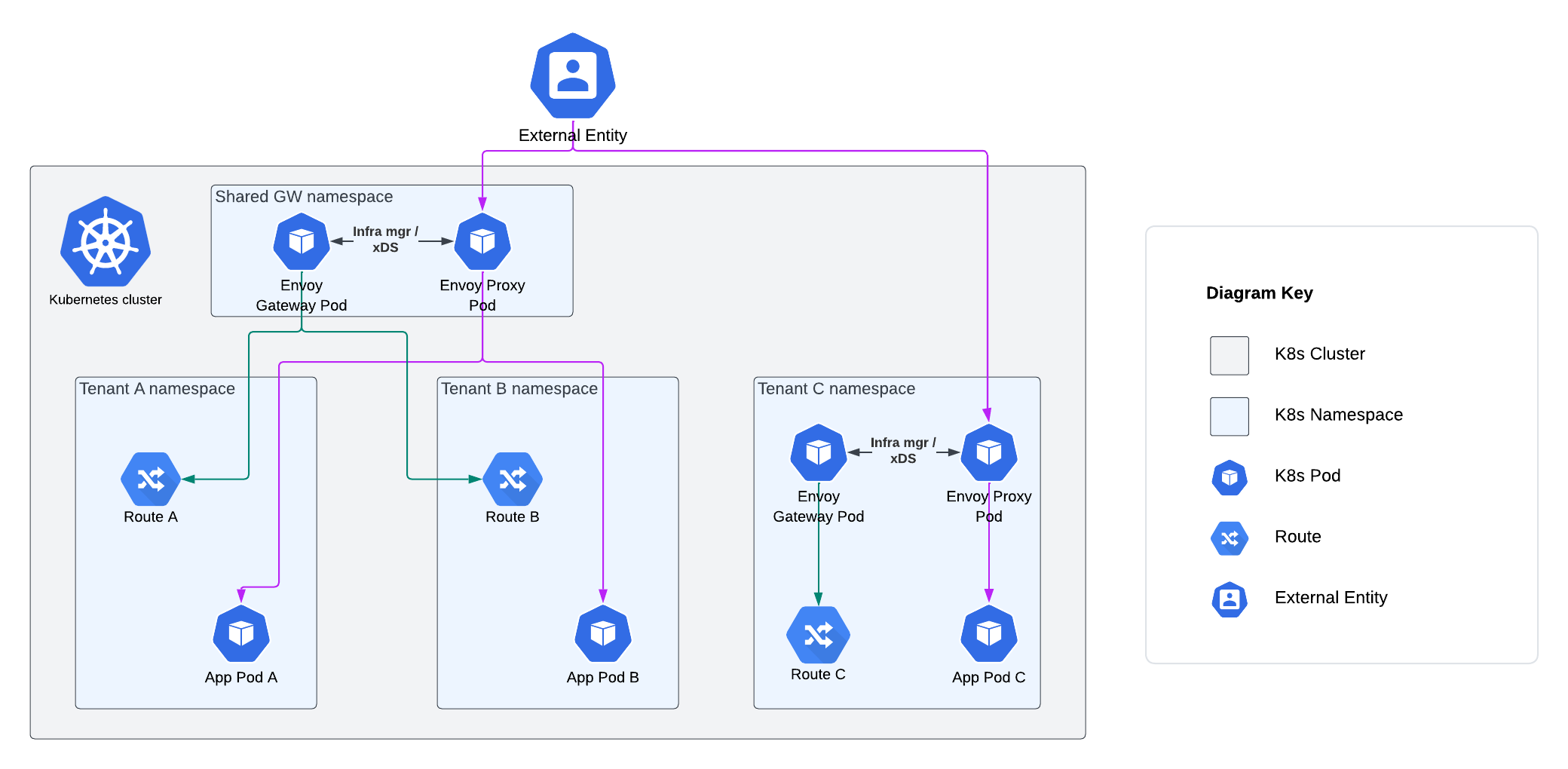
The following use cases will be considered, in line with the Envoy Gateway Tasks:
This section outlines the foundational premises that shape our analysis and recommendations for the deployment and management of Envoy Gateway within an organisation. The key assumptions are as follows:
1. Kubernetes Provider: For the purposes of this analysis, we assume that a K8s provider will be used to host the cluster.
2. Multi-tenant cluster: In order to produce a broad set of recommendations, it is assumed that within the single cluster, there is:
A dedicated cluster operation (ops) team responsible for maintaining the core cluster infrastructure.
Multiple application teams who wish to define their own Gateway resources, which will route traffic to their respective applications.
3. Soft multi-tenancy model: It is assumed that co-tenants will have some level of trust between themselves, and will not act in an overtly hostile manner to each other.
4. Ingress Control: It’s assumed that Envoy Gateway is the only ingress controller in the K8s cluster as multiple controllers can lead to complex routing challenges and introduce out-of-scope security vulnerabilities.
5. Container Security: This threat model focuses on evaluating the security of the Envoy Gateway and Envoy Proxy images. All other container images running in tenant clusters, not associated with the edge proxy deployment, are assumed to be secure and obtained from trusted registries such as Docker Hub or Google Container Registry (GCR).
6. Cloud Provider Security: It is assumed that the K8s cluster is running on secure cloud infrastructure provided by a trusted Cloud Service Provider (CSP) such as AWS, GCP, or Azure Cloud.
Ultimately, the data of interest in a threat model is the business data processed by the system in question. However, in the case of this threat model, we are looking at a generic deployment architecture involving Envoy Gateway in order to draw out a set of generalised threats which can be considered by teams looking to adopt an implementation of Gateway API. As such, we do not know the business impacts of a compromise of confidentiality, integrity or availability that would typically be captured in a data impact assessment. Instead, will we base our threat assessment on high-level groupings of data structures used in the configuration and operation of the general use cases considered (e.g. HTTP routing, TLS termination, request authentication etc.). We will then assign a confidentiality, integrity and availability impact based on a worst-case scenario of how each compromise could potentially affect business data processed by the generic deployment.
| Data Name / Type | Notes | Confidentiality | Integrity | Availability |
|---|---|---|---|---|
| Static Configuration Data | Static configuration data is used to configure Envoy Gateway at startup. This data structure allows for a Provider to be set, which Envoy Gateway calls to establish its runtime configuration, resolve services and persist data. Unauthorised modification of static configuration data could enable the Envoy Gateway admin interface to be configured, logging parameters to be modified, global rate limiting configuration to be misconfigured, or malicious extensions registered for the Envoy Gateway Control Plane. A compromise of confidentiality could potentially give an attacker some useful reconnaissance information. A compromise of the availability of this information at startup time would result in Envoy Gateway starting with default parameters. | Medium | High | Low |
| Dynamic Configuration Data | Dynamic configuration data represents the desired state of the Data Plane, and is defined through Envoy Gateway and Gateway API Kubernetes resources. Unauthorised modification of this data could lead to vulnerabilities in an organisation’s Data Plane infrastructure via misconfiguration of an EnvoyProxy custom resource. Misconfiguration of Gateway API objects such as HTTPRoutes or TLSRoutes could result in traffic being directed to incorrect backends. A compromise of confidentiality could potentially give an attacker some useful reconnaissance information. A compromise of the availability of this information could result in tenant application traffic not being routable until the configuration is recovered and reapplied. | Medium | High | Medium |
| TLS Private Keys | TLS Private Keys, typically in PEM format, are used to initiate secure connections and encrypt communications. In the context of this threat model, private keys will be associated with the server side of an inbound TLS connection being terminated at a secure gateway configured through Envoy Gateway. Unauthorised exposure could lead to security threats such as person-in-the-middle attacks, whereby the confidentiality or integrity of business data could be compromised. A compromise of integrity may lead to similar consequences if an attacker could insert their own key material. An availability compromise could lead to tenant services being unavailable until new key material is generated and an appropriate CSR submitted. | High | High | Medium |
| TLS Certificates | X.509 certificates represent the binding of a public key (associated with the private key described above) to an identity in a TLS handshake. If an attacker could compromise the integrity of a certificate, they may be able to bind the identity of a TLS termination point to a key pair under their control, enabling person-in-the middle attacks. An availability compromise could lead to tenant services being unavailable until new key material is generated and an appropriate CSR submitted. | Low | High | Medium |
| JWKs | JWK (JSON Web Key) containing a public key used to validate JWTs for the client authentication use case considered in this threat model. If an attacker could compromise the integrity of a JWK or JSON web key set (JWKS), they could potentially authenticate to a service maliciously. Unavailability of an endpoint exposing JWKs could lead to client requests which require authentication being denied. | Low | High | Medium |
| JWTs | JWTs, formatted as compact, URL-safe JSON data structures, are utilised for the client authentication use case considered in this threat model. Maintaining their confidentiality and integrity is vital to prevent unauthorised access and ensure correct user identification. | High | High | Low |
| OIDC credentials | In OIDC authentication scenarios, the application credentials are represented by a client ID and a client secret. A compromise of its confidentiality or integrity could allow malicious actors to impersonate the application, potentially being able to access resources on behalf of the application and request ID tokens on behalf of users. Unavailability of this data would produce a rejection of the requests coming from legitimate users. | High | High | Medium |
| Basic authentiation password hashes | In basic authentication scenarios, passwords are stored as Kubernetes secrets in htpasswd format, where each entry is formed by the username and the hashed password. A compromise of these credentials’ confidentiality and integrity could lead to unauthorised access to the application. Unavailability of these credentials will cause login failures from the application users. | High | High | Medium |
| Priority | Description |
|---|---|
| Confidentiality | |
| High | Compromise of sensitive client data |
| Medium | Information leaked which could be useful for attacker reconnaissance |
| Low | Non-sensitive information leakage |
| Integrity | |
| High | Compromise of source code repositories and gateway deployments |
| Medium | Traffic routing fails due to misconfiguration / invalid configuration |
| Low | Non-critical operation is blocked due to misconfiguration / invalid configuration |
| Availability | |
| High | Large scale DoS |
| Medium | Tenant application is blocked for a significant period |
| Low | Tenant application is blocked for a short period |
The Data Flow Diagrams (DFDs) below describe the flow of data between the various processes, entities and data stores in a system, as well as the trust boundaries between different user roles and network interfaces. The DFDs are drawn at two different levels, starting at L0 (high-level system view) and increasing in granularity (to L1).
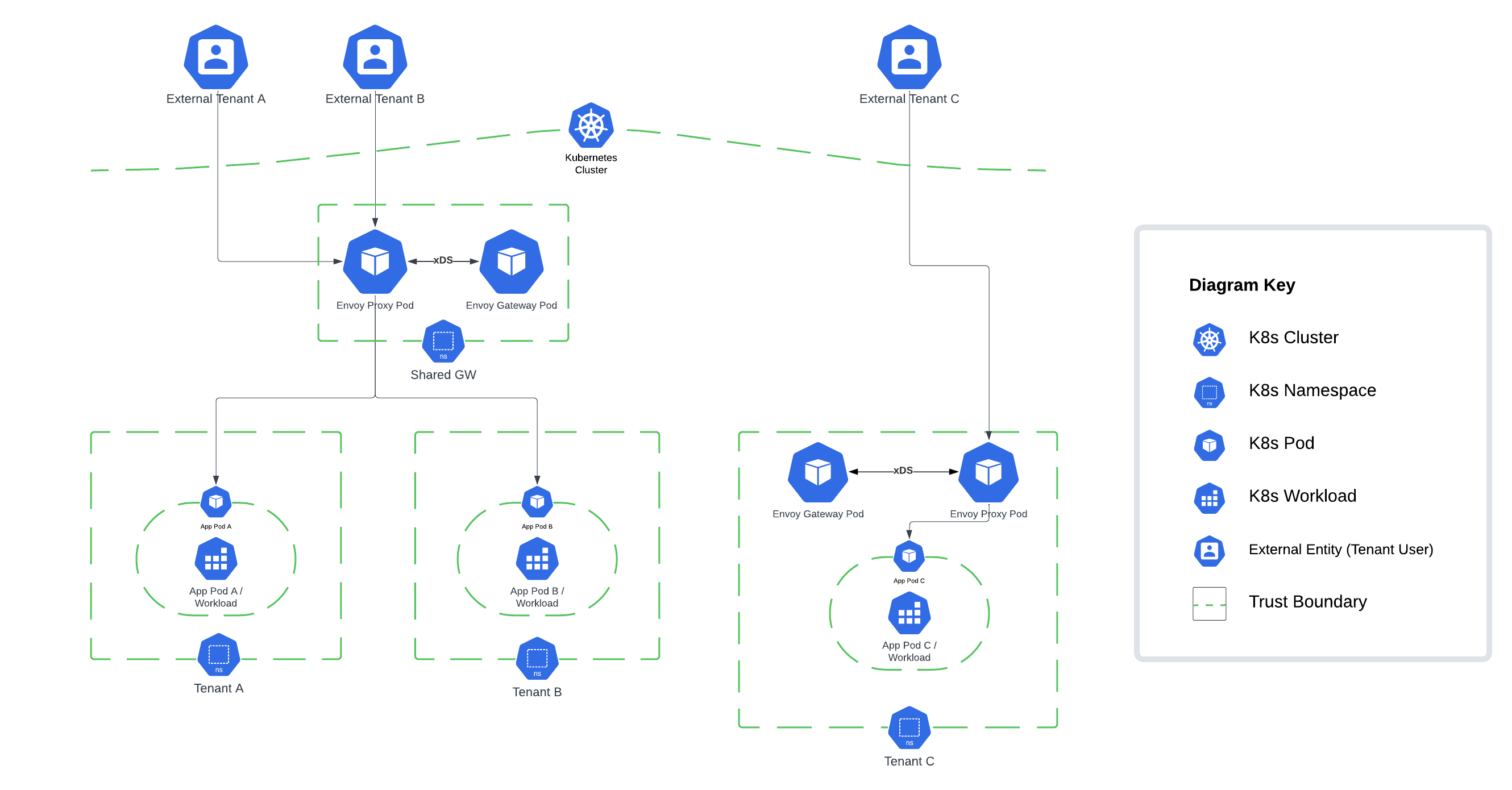
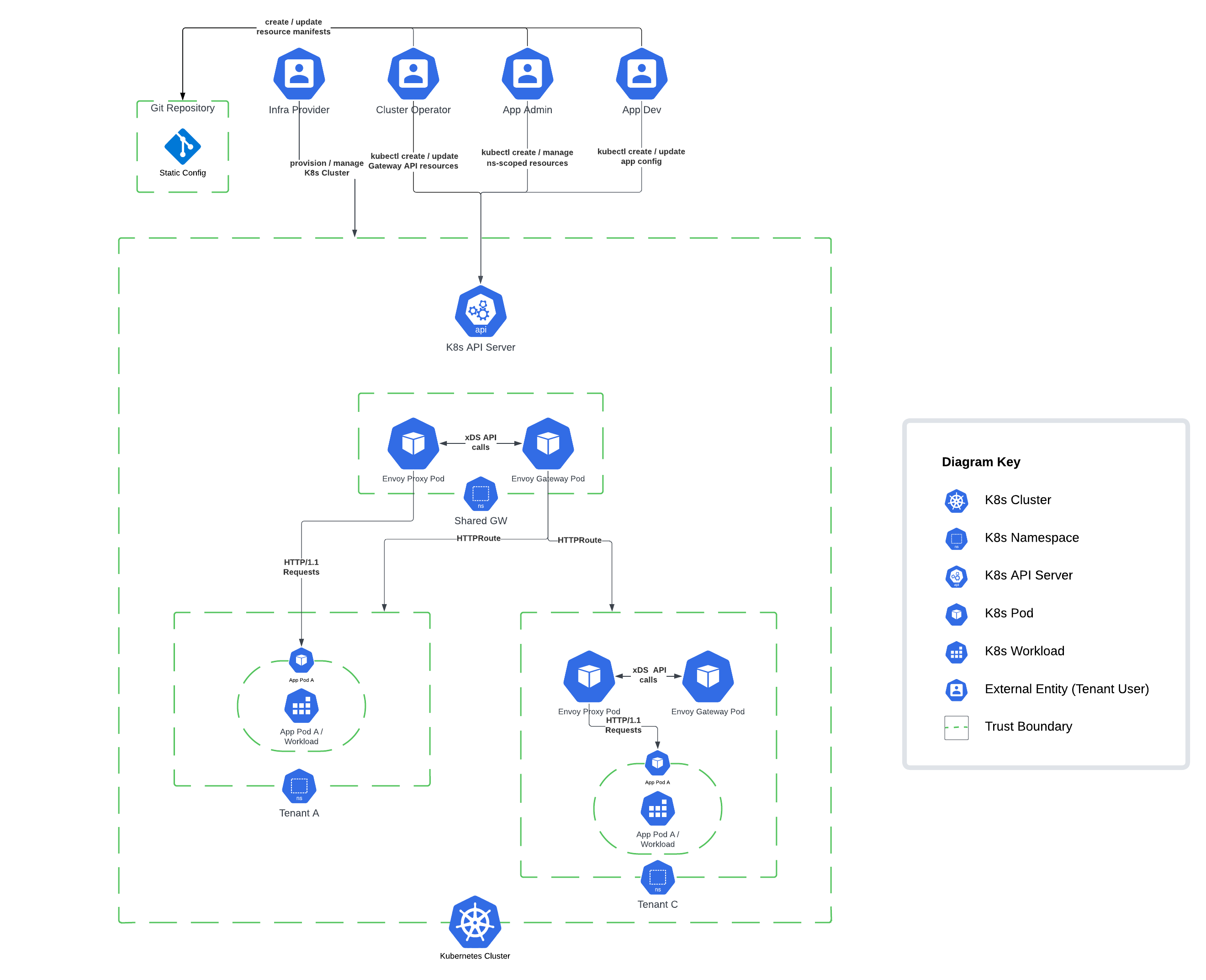
The scope of this threat model led to us categorising threats into priorities of High, Medium or Low; notably in a production implementation some of the threats’ prioritisation may be upgraded or downgraded depending on the business context and data classification.
For every finding, the risk and threat are stated. Risk defines the potential for negative outcome while threat defines the event that causes the negative outcome.
Throughout this threat model, we categorised threats into different areas based on their origin and the segment of the system that they impact. Here’s an overview of each category:
Container Security (CS): These threats are general to containerised applications. Therefore, they are not associated with Envoy Gateway or the Gateway API and could occur in most containerised workloads. They can originate from misconfigurations or vulnerabilities in the orchestrator or the container.
Gateway API (GW): These are threats related to the Gateway API that could affect any of its implementations. Malicious actors could benefit from misconfigurations or excessive permissions on the Gateway API resources (e.g. xRoutes or Gateways) to compromise the confidentiality, integrity, or availability of the application.
Envoy Gateway (EG): These threats are associated with specific configurations or features from Envoy Gateway or Envoy Proxy. If not set properly, these features could be leveraged to gain unauthorised access to protected resources.
In order to provide a realistic set of threats that is applicable to most organisations, we de-scoped the most advanced and hard to mitigate threat actors as described below:
When considering internal threat actors, we chose to follow the security model of the Kubernetes Gateway API.
Cluster Operator: The cluster operator (ops) is responsible for administration of entire clusters. They manage policies, network access, application permissions.
Application Developer: The application developer (dev) is responsible for defining their application configuration (e.g. timeouts, request matching/filter) and Service composition (e.g. path routing to backends).
Application Administrator: The application admin has administrative access to some namespaces within a cluster, but not the cluster as a whole.
Vandal: Script kiddie, trespasser
Motivated Individual: Political activist, thief, terrorist
Organised Crime: Syndicates, state-affiliated groups
Infrastructure Provider: The infrastructure provider (infra) is responsible for the overall environment that the cluster(s) are operating in. Examples include: the cloud provider, or the PaaS provider in a company.
Cloud Service Insider: Employee, external contractor, temporary worker
Foreign Intelligence Services (FIS): Nation states
| ID | UID | Category | Priority |
|---|---|---|---|
| EGTM-001 | EGTM-GW-001 | Gateway API | High |
Risk: Self-signed certificates (which do not comply with PKI best practices) could lead to unauthorised access to the private key associated with the certificate used for inbound TLS termination at Envoy Proxy, compromising the confidentiality and integrity of proxied traffic.
Threat: Compromise of the private key associated with the certificate used for inbound TLS terminating at Envoy Proxy.
Recommendation: The Envoy Gateway quickstart demonstrates how to set up a Secure Gateway using an example where a self-signed root certificate is created using openssl. As stated in the Envoy Gateway documentation, this is not a suitable configuration for Production usage. It is recommended that PKI best practices are followed, whereby certificates are signed by an Intermediary CA which sits underneath an organisational 'offline' Root CA.
PKI best practices should also apply to the management of client certificates when using mTLS. The Envoy Gateway mTLS guide shows how to set up client certificates using self-signed certificates. In the same way as gateway certificates and, as mentioned in the documentation, this configuration should not be used in production environments.
| ID | UID | Category | Priority |
|---|---|---|---|
| EGTM-002 | EGTM-CS-001 | Container Security | High |
Risk: There is a risk that a threat actor could compromise the Kubernetes secret containing the Envoy private key, allowing the attacker to decrypt Envoy Proxy traffic, compromising the confidentiality of proxied traffic.
Threat: Kubernetes secret containing the Envoy private key is compromised and used to decrypt proxied traffic.
Recommendation: Certificate management best practices mandate short-lived key material where practical, meaning that a mechanism for rotation of private keys and certificates is required, along with a way for certificates to be mounted into Envoy containers. If Kubernetes secrets are used, when a certificate expires, the associated secret must be updated, and Envoy containers must be redeployed. Instead of a manual configuration, it is recommended that cert-manager is used.
| ID | UID | Category | Priority |
|---|---|---|---|
| EGTM-004 | EGTM-K8-002 | Container Security | High |
Risk: There is a risk that a threat actor could abuse misconfigured RBAC to access the Envoy Gateway ClusterRole (envoy-gateway-role) and use it to expose all secrets across the cluster, thus compromising the confidentiality and integrity of tenant data.
Threat: Compromised Envoy Gateway or misconfigured ClusterRoleBinding (envoy-gateway-rolebinding) to Envoy Gateway ClusterRole (envoy-gateway-role), provides access to resources and secrets in different namespaces.
Recommendation: Users should be aware that Envoy Gateway uses a ClusterRole (envoy-gateway-role) when deployed via the Helm chart, to allow management of Envoy Proxies across different namespaces. This ClusterRole is powerful and includes the ability to read secrets in namespaces which may not be within the purview of Envoy Gateway.
Kubernetes best-practices involve restriction of ClusterRoleBindings, with the use of RoleBindings where possible to limit access per namespace by specifying the namespace in metadata. Namespace isolation reduces the impact of compromise from cluster-scoped roles. Ideally, fine-grained K8s roles should be created per the principle of least privilege to ensure they have the minimum access necessary for role functions.
The pull request #1656 introduced the use of Roles and RoleBindings in namespaced mode. This feature can be leveraged to reduce the amount of permissions required by the Envoy Gateway.
| ID | UID | Category | Priority |
|---|---|---|---|
| EGTM-007 | EGTM-EG-002 | Envoy Gateway | High |
Risk: There is a risk that a threat actor could exploit misconfigured Kubernetes RBAC to create or modify Gateway API resources with no business need, potentially leading to the compromise of the confidentiality, integrity, and availability of resources and traffic within the cluster.
Threat: Unauthorised creation or misconfiguration of Gateway API resources by a threat actor with cluster-scoped access.
Recommendation: Configure the apiGroup and resource fields in RBAC policies to restrict access to Gateway and GatewayClass resources. Enable namespace isolation by using the namespace field, preventing unauthorised access to gateways in other namespaces.
| ID | UID | Category | Priority |
|---|---|---|---|
| EGTM-009 | EGTM-GW-002 | Gateway API | High |
Risk: There is a risk that a co-tenant misconfigures Gateway or Route resources, compromising the confidentiality, integrity, and availability of routed traffic through Envoy Gateway.
Threat: Malicious or accidental co-tenant misconfiguration of Gateways and Routes associated with other application teams.
Recommendation: Dedicated Envoy Gateways should be provided to each tenant within their respective namespace. A one-to-one relationship should be established between GatewayClass and Gateway resources, meaning that each tenant namespace should have their own GatewayClass watched by a unique Envoy Gateway Controller as defined here in the Deployment Mode documentation.
Application Admins should have write permissions on the Gateway resource, but only in their specific namespaces, and Application Developers should only hold write permissions on Route resources. To enact this access control schema, follow the Write Permissions for Advanced 4 Tier Model described in the Kubernetes Gateway API security model. Examples of secured gateway-route topologies can be found here within the Kubernetes Gateway API docs.
Optionally, consider a GitOps model, where only the GitOps operator has the permission to deploy or modify custom resources in production.
| ID | UID | Category | Priority |
|---|---|---|---|
| EGTM-014 | EGTM-CS-006 | Container Security | High |
Risk: There is a risk that a supply chain attack on Envoy Gateway results in an arbitrary compromise of the confidentiality, integrity or availability of tenant data.
Threat: Supply chain threat actor introduces malicious code into Envoy Gateway or Proxy.
Recommendation: The Envoy Gateway project should continue to work towards conformance with supply-chain security best practices throughout the project lifecycle (for example, as set out in the CNCF Software Supply Chain Best Practices Whitepaper). Adherence to Supply-chain Levels for Software Artefacts (SLSA) standards is crucial for maintaining the security of the system. Employ version control systems to monitor the source and build platforms and assign responsibility to a specific stakeholder.
Integrate a supply chain security tool such as Sigstore, which provides native capabilities for signing and verifying container images and software artefacts. Software Bill of Materials (SBOM), Vulnerability Exploitability eXchange (VEX), and signed artefacts should also be incorporated into the security protocol.
| ID | UID | Category | Priority |
|---|---|---|---|
| EGTM-020 | EGTM-CS-009 | Container Security | High |
Risk: There is a risk that a threat actor exploits an Envoy Proxy vulnerability to remote code execution (RCE) due to out of date or misconfigured Envoy Proxy pod deployment, compromising the confidentiality and integrity of Envoy Proxy along with the availability of the proxy service.
Threat: Deployment of an Envoy Proxy or Gateway image containing exploitable CVEs.
Recommendation: Always use the latest version of the Envoy Proxy image. Regularly check for updates and patch the system as soon as updates become available. Implement a CI/CD pipeline that includes security checks for images and prevents deployment of insecure configurations. A suitable tool should be chosen to provide container vulnerability scanning to mitigate the risk of known vulnerabilities.
Utilise the Pod Security Admission controller to enforce Pod Security Standards and configure the pod security context to limit its capabilities per the principle of least privilege.
| ID | UID | Category | Priority |
|---|---|---|---|
| EGTM-022 | EGTM-CS-010 | Container Security | High |
Risk: There is a risk that the OIDC client secret (for OIDC authentication) and user password hashes (for basic authentication) get leaked due to misconfigured RBAC permissions.
Threat: Unauthorised access to the application due to credential leakage.
Recommendation: Ensure that only authorised users and service accounts are able to access secrets. This is especially important in namespaces where SecurityPolicy objects are configured, since those namespaces are the ones to store secrets containing the client secret (in OIDC scenarios) and user password hashes (in basic authentication scenarios).
To do so, minimise the use of ClusterRoles and Roles allowing listing and getting secrets. Perform periodic audits of RBAC permissions.
| ID | UID | Category | Priority |
|---|---|---|---|
| EGTM-023 | EGTM-EG-007 | Envoy Gateway | High |
Risk: There is a risk of unauthorised access due to the use of basic authentication, which does not enforce any password restriction in terms of complexity and length. In addition, password hashes are stored in SHA1 format, which is a deprecated hashing function.
Threat: Unauthorised access to the application due to weak authentication mechanisms.
Recommendation: It is recommended to make use of stronger authentication mechanisms (i.e. JWT authentication and OIDC authentication) instead of basic authentication. These authentication mechanisms have many advantages, such as the use of short-lived credentials and a central management of security policies through the identity provider.
| ID | UID | Category | Priority |
|---|---|---|---|
| EGTM-008 | EGTM-EG-003 | Envoy Gateway | Medium |
Risk: There is a risk of a threat actor misconfiguring static config and compromising the integrity of Envoy Gateway, ultimately leading to the compromised confidentiality, integrity, or availability of tenant data and cluster resources.
Threat: Accidental or deliberate misconfiguration of static configuration leads to a misconfigured deployment of Envoy Gateway, for example logging parameters could be modified or global rate limiting configuration misconfigured.
Recommendation: Implement a GitOps model, utilising Kubernetes' Role-Based Access Control (RBAC) and adhering to the principle of least privilege to minimise human intervention on the cluster. For instance, tools like Flux and ArgoCD can be used for declarative GitOps deployments, ensuring all changes are tracked and reviewed. Additionally, configure your source control management (SCM) system to include mandatory pull request (PR) reviews, commit signing, and protected branches to ensure only authorised changes can be committed to the start-up configuration.
| ID | UID | Category | Priority |
|---|---|---|---|
| EGTM-010 | EGTM-CS-005 | Container Security | Medium |
Risk: There is a risk that a threat actor exploits a weak pod security context, compromising the CIA of a node and the resources / services which run on it.
Threat: Threat Actor who has compromised a pod exploits weak security context to escape to a node, potentially leading to the compromise of Envoy Proxy or Gateway running on the same node.
Recommendation: To mitigate this risk, apply Pod Security Standards at a minimum of Baseline level to all namespaces, especially those containing Envoy Gateway and Proxy Pods. Pod security standards are implemented through K8s Pod Security Admission to provide admission control modes (enforce, audit, and warn) for namespaces. Pod security standards can be enforced by namespace labels as shown here, to enforce a baseline level of pod security to specific namespaces.
Further enhance the security by implementing a sandboxing solution such as gVisor for Envoy Gateway and Proxy Pods to isolate the application from the host kernel. This can be set within the runtimeClassName of the Pod specification.
| ID | UID | Category | Priority |
|---|---|---|---|
| EGTM-012 | EGTM-GW-004 | Gateway API | Medium |
Risk: There is a risk that a threat actor could abuse excessive RBAC privileges to create ReferenceGrant resources. These resources could then be used to create cross-namespace communication, leading to unauthorised access to the application. This could compromise the confidentiality and integrity of resources and configuration in the affected namespaces and potentially disrupt the availability of services that rely on these object references.
Threat: A ReferenceGrant is created, which validates traffic to cross namespace trust boundaries without a valid business reason, such as a route in one tenant's namespace referencing a backend in another.
Recommendation: Ensure that the ability to create ReferenceGrant resources is restricted to the minimum number of people. Pay special attention to ClusterRoles that allow that action.
| ID | UID | Category | Priority |
|---|---|---|---|
| EGTM-018 | EGTM-GW-006 | Gateway API | Medium |
Risk: There is a risk that malicious requests could lead to a Denial of Service (DoS) attack, thereby reducing API gateway availability due to misconfigurations in rate-limiting or load balancing controls, or a lack of route timeout enforcement.
Threat: Reduced API gateway availability due to an attacker's maliciously crafted request (e.g., QoD) potentially inducing a Denial of Service (DoS) attack.
Recommendation: To ensure high availability and to mitigate potential security threats, adhere to the Envoy Gateway documentation for the configuration of a rate-limiting filter and load balancing.
Further, adhere to best practices for configuring Envoy Proxy as an edge proxy documented here within the EnvoyProxy docs. This involves configuring TCP and HTTP proxies with specific settings, including restricting access to the admin endpoint, setting the overload manager and listener / cluster buffer limits, enabling use_remote_address, setting connection and stream timeouts, limiting maximum concurrent streams, setting initial stream window size limit, and configuring action on headers_with_underscores.
Path normalisation should be enabled to minimise path confusion vulnerabilities. These measures help protect against volumetric threats such as Denial of Service (DoS) attacks. Utilise custom resources to implement policy attachment, thereby exposing request limit configuration for route types.
| ID | UID | Category | Priority |
|---|---|---|---|
| EGTM-019 | EGTM-DP-004 | Container Security | Medium |
Risk: There is a risk that replay attacks using stolen or reused JSON Web Tokens (JWTs) can compromise transmission integrity, thereby undermining the confidentiality and integrity of the data plane.
Threat: Transmission integrity is compromised due to replay attacks using stolen or reused JSON Web Tokens (JWTs).
Recommendation: Comply with JWT best practices for enhanced security, paying special attention to the use of short-lived tokens, which reduce the window of opportunity for a replay attack. The exp claim can be used to set token expiration times.
| ID | UID | Category | Priority |
|---|---|---|---|
| EGTM-024 | EGTM-EG-008 | Envoy Gateway | Medium |
Risk: There is a risk of developers getting more privileges than required due to the use of SecurityPolicy, ClientTrafficPolicy, EnvoyPatchPolicy and BackendTrafficPolicy. These resources can be attached to a Gateway resource. Therefore, a developer with permission to deploy them would be able to modify a Gateway configuration by targeting the gateway in the policy manifest. This conflicts with the Advanced 4 Tier Model, where developers do not have write permissions on Gateways.
Threat: Excessive developer permissions lead to a misconfiguration and/or unauthorised access.
Recommendation: Considering the Tenant C scenario (represented in the Architecture Diagram), if a developer can create SecurityPolicy, ClientTrafficPolicy, EnvoyPatchPolicy or BackendTrafficPolicy objects in namespace C, they would be able to modify a Gateway configuration by attaching the policy to the gateway. In such scenarios, it is recommended to either:
a. Create a separate namespace, where developers have no permissions, to host tenant C's gateway. Note that, due to design decisions, the SecurityPolicy/EnvoyPatchPolicy/ClientTrafficPolicy/BackendTrafficPolicy object can only target resources deployed in the same namespace. Therefore, having a separate namespace for the gateway would prevent developers from attaching the policy to the gateway.
b. Forbid the creation of these policies for developers in namespace C.
On the other hand, in scenarios similar to tenants A and B, where a shared gateway namespace is in place, this issue is more limited. Note that in this scenario, developers don't have access to the shared gateway namespace.
In addition, it is important to mention that EnvoyPatchPolicy resources can also be attached to GatewayClass resources. This means that, in order to comply with the Advanced 4 Tier model, individuals with the Application Administrator role should not have access to this resource either.
| ID | UID | Category | Priority |
|---|---|---|---|
| EGTM-003 | EGTM-EG-001 | Envoy Gateway | Low |
Risk: There is a risk that a threat actor could downgrade the security of proxied connections by configuring a weak set of cipher suites, compromising the confidentiality and integrity of proxied traffic.
Threat: Exploit weak cipher suite configuration to downgrade security of proxied connections.
Recommendation: Users operating in highly regulated environments may need to tightly control the TLS protocol and associated cipher suites, blocking non-conforming incoming connections to the gateway.
EnvoyProxy bootstrap config can be customised as per the customise EnvoyProxy documentation. In addition, from v.1.0.0, it is possible to configure common TLS properties for a Gateway or XRoute through the ClientTrafficPolicy object.
| ID | UID | Category | Priority |
|---|---|---|---|
| EGTM-005 | EGTM-CP-002 | Container Security | Low |
Risk: Threat actor who has obtained access to Envoy Gateway pod could exploit the lack of AppArmor and Seccomp profiles in the Envoy Gateway deployment to attempt a container breakout, given the presence of an exploitable vulnerability, potentially impacting the confidentiality and integrity node resources.
Threat: Unauthorised syscalls and malicious code running in the Envoy Gateway pod.
Recommendation: Implement AppArmor policies by setting <container_name>: <profile_ref> within container.apparmor.security.beta.kubernetes.io (note, this config is set per container). Well-defined AppArmor policies may provide greater protection from unknown threats.
Enforce Seccomp profiles by setting the seccompProfile under securityContext. Ideally, a fine-grained profile should be used to restrict access to only necessary syscalls, however the --seccomp-default flag can be set to resort to RuntimeDefault which provides a container runtime specific. Example seccomp profiles can be found here.
To further enhance pod security, consider implementing SELinux via seLinuxOptions for additional syscall attack surface reduction. Setting readOnlyRootFilesystem == true enforces an immutable root filesystem, preventing the addition of malicious binaries to the PATH and increasing the attack cost. Together, these configuration items improve the pods Security Context.
| ID | UID | Category | Priority |
|---|---|---|---|
| EGTM-006 | EGTM-CS-004 | Container Security | Low |
Risk: There is a risk that a threat actor exploits a vulnerability in Envoy Proxy to expose a reverse shell, enabling them to compromise the confidentiality, integrity and availability of tenant data via a secondary attack.
Threat: If an external attacker managed to exploit a vulnerability in Envoy, the presence of a shell would be greatly helpful for the attacker in terms of potentially pivoting, escalating, or establishing some form of persistence.
Recommendation: By default, Envoy uses a distroless image since v.0.6.0, which does not ship a shell. Therefore, ensure EnvoyProxy image is up-to-date and patched with the latest stable version.
If using private EnvoyProxy images, use a lightweight EnvoyProxy image without a shell or debugging tool(s) which may be useful for an attacker.
An AuditPolicy (audit.k8s.io/v1beta1) can be configured to record API calls made within your cluster, allowing for identification of malicious traffic and enabling incident response. Requests are recorded based on stages which delineate between the lifecycle stage of the request made (e.g., RequestReceived, ResponseStarted, & ResponseComplete).
| ID | UID | Category | Priority |
|---|---|---|---|
| EGTM-011 | EGTM-GW-003 | Gateway API | Low |
Risk: There is a risk that a gateway owner (or someone with the ability to set namespace labels) maliciously or accidentally binds routes across namespace boundaries, potentially compromising the confidentiality and integrity of traffic in a multitenant scenario.
Threat: If a Route Binding within a Gateway Listener is configured based on a custom label, it could allow a malicious internal actor with the ability to label namespaces to change the set of namespaces supported by the Gateway.
Recommendation: Consider the use of custom admission control to restrict what labels can be set on namespaces through tooling such as Kubewarden, Kyverno, and OPA Gatekeeper. Route binding should follow the Kubernetes Gateway API security model, as shown here, to connect gateways in different namespaces.
| ID | UID | Category | Priority |
|---|---|---|---|
| EGTM-013 | EGTM-GW-005 | Gateway API | Low |
Risk: There is a risk that an unauthorised actor deploys an unauthorised GatewayClass due to GatewayClass namespace validation not being configured, leading to non-compliance with business and security requirements.
Threat: Unauthorised deployment of Gateway resource via GatewayClass template which crosses namespace trust boundaries.
Recommendation: Leverage GatewayClass namespace validation to limit the namespaces where GatewayClasses can be run through a tool such as OPA Gatekeeper. Reference pull request #24 within gatekeeper-library which outlines how to add GatewayClass namespace validation through a GatewayClassNamespaces API resource kind within the constraints.gatekeeper.sh/v1beta1 apiGroup.
| ID | UID | Category | Priority |
|---|---|---|---|
| EGTM-015 | EGTM-CS-007 | Container Security | Low |
Risk: There is a risk that threat actors could exploit ServiceAccount tokens for illegitimate authentication, thereby leading to privilege escalation and the undermining of gateway API resources' integrity, confidentiality, and availability.
Threat: The threat arises from threat actors impersonating the envoy-gateway ServiceAccount through the replay of ServiceAccount tokens, thereby achieving escalated privileges and gaining unauthorised access to Kubernetes resources.
Recommendation: Limit the creation of ServiceAccounts to only when necessary, specifically refraining from using default service account tokens, especially for high-privilege service accounts. For legacy clusters running Kubernetes version 1.21 or earlier, note that ServiceAccount tokens are long-lived by default. To disable the automatic mounting of the service account token, set automountServiceAccountToken: false in the PodSpec.
| ID | UID | Category | Priority |
|---|---|---|---|
| EGTM-016 | EGTM-EG-004 | Envoy Gateway | Low |
Risk: There is a risk that threat actors establish persistence and move laterally through the cluster unnoticed due to limited visibility into access and application-level activity.
Threat: Threat actors establish persistence and move laterally through the cluster unnoticed.
Recommendation: Configure access logging in the EnvoyProxy. Use ProxyAccessLogFormatType (Text or JSON) to specify the log format and ensure that the logs are sent to the desired sink types by setting the ProxyAccessLogSinkType. Make use of FileEnvoyProxyAccessLog or OpenTelemetryEnvoyProxyAccessLog to configure File and OpenTelemetry sinks, respectively. If the settings aren't defined, the default format is sent to stdout.
Additionally, consider leveraging a central logging mechanism such as Fluentd to enhance visibility into access activity and enable effective incident response (IR).
| ID | UID | Category | Priority |
|---|---|---|---|
| EGTM-017 | EGTM-EG-005 | Envoy Gateway | Low |
Risk: There is a risk that an insider misconfigures an envoy gateway component and goes unnoticed due to a low-touch logging configuration (via default) which responsible stakeholders are not aptly aware of or have immediate access to.
Threat: The threat emerges from an insider misconfiguring an Envoy Gateway component without detection.
Recommendation: Configure the logging level of the Envoy Gateway using the 'level' field in EnvoyGatewayLogging. Ensure the appropriate logging levels are set for relevant components such as 'gateway-api', 'xds-translator', or 'global-ratelimit'. If left unspecified, the logging level defaults to "info", which may not provide sufficient detail for security monitoring.
Employ a centralised logging mechanism, like Fluentd, to enhance visibility into application-level activity and to enable efficient incident response.
| ID | UID | Category | Priority |
|---|---|---|---|
| EGTM-021 | EGTM-EG-006 | Envoy Gateway | Low |
Risk: There is a risk that the admin interface is exposed without valid business reason, increasing the attack surface.
Threat: Exposed admin interfaces give internal attackers the option to affect production traffic in unauthorised ways, and the option to exploit any vulnerabilities which may be present in the admin interface (e.g. by orchestrating malicious GET requests to the admin interface through CSRF, compromising Envoy Proxy global configuration or shutting off the service entirely e.g. /quitquitquit).
Recommendation: The Envoy Proxy admin interface is only exposed to localhost, meaning that it is secure by default. However, due to the risk of misconfiguration, this recommendation is included.
Due to the importance of the admin interface, it is recommended to ensure that Envoy Proxies have not been accidentally misconfigured to expose the admin interface to untrusted networks.
| ID | UID | Category | Priority |
|---|---|---|---|
| EGTM-025 | EGTM-CS-011 | Container Security | Low |
Risk: The presence of a vulnerability, be it in the kernel or another system component, when coupled with containers running as root, could enable a threat actor to escape the container, thereby compromising the confidentiality, integrity, or availability of cluster resources
Threat: The Envoy Proxy container’s root-user configuration can be leveraged by an attacker to escalate privileges, execute a container breakout, and traverse across trust boundaries.
Recommendation: By default, Envoy Gateway deployments do not use root users. Nonetheless, in case a custom image or deployment manifest is to be used, make sure Envoy Proxy pods run as a non-root user with a high UID within the container.
Set runAsUser and runAsGroup security context options to specific UIDs (e.g., runAsUser: 1000 & runAsGroup: 3000) to ensure the container operates with the stipulated non-root user and group ID. If using helm chart deployment, define the user and group ID in the values.yaml file or via the command line during helm install / upgrade.
| Threat Actor | Capability | Personal Motivation | Envoy Gateway Attack Samples |
|---|---|---|---|
| Application Developer | Leverage internal knowledge and personal access to the Envoy Gateway infrastructure to move laterally and transit trust boundaries | Disgruntled / personal grievances. Financial incentives | Misconfigure XRoute resources to expose internal applications. Misconfigure SecurityPolicy objects, reducing the security posture of an application. |
| Application Administrator | Abuse privileged status to disrupt operations and tenant cluster services through Envoy Gateway misconfig | Disgruntled / personal grievances. Financial incentives | Create malicious routes to internal applications. Introduce malicious Envoy Proxy images. Expose the Envoy Proxy Admin interface. |
| Cluster Operator | Alter application-level deployments by misconfiguring resource dependencies & SCM to introduce vulnerabilities | Disgruntled / personal grievances. Financial incentives. Notoriety | Deploy malicious resources to expose internal applications. Access authentication secrets. Fall victim to phishing attacks and inadvertently share authentication credentials to cloud infrastructure or Kubernetes clusters. |
| Vandal: Script Kiddie, Trespasser | Uses publicly available tools and applications (Nmap,Metasploit, CVE PoCs) | Curiosity. Personal fame through defacement / denial of service of prominent public facing web resources | Small scale DOS. Launches prepackaged exploits, runs crypto mining tools. Exploit public-facing application services such as the bastion host to gain an initial foothold in the environment |
| Motivated individual: Political activist, Thief, Terrorist | Write tools and exploits required for their means if sufficiently motivated. Tend to use these in a targeted fashion against specific organisations. May combine publicly available exploits in a targeted fashion. Tamper with open source supply chains | Personal Gain (Political or Ideological) | Phishing, DDOS, exploit known vulnerabilities. Compromise third-party components such as Helm charts and container images to inject malicious codes to propagate access throughout the environment. |
| Organised crime: syndicates, state-affiliated groups | Write tools and exploits required for their means. Tend to use these in a non-targeted fashion, unless motivation is sufficiently high. Devotes considerable resources, writes exploits, can bribe/coerce, can launch targeted attacks | Ransom. Mass extraction of PII / credentials / PCI data. Financial incentives | Social Engineering, phishing, ransomware, coordinated attacks. Intercept and replay JWT tokens (via MiTM) between tenant user(s) and envoy gateway to modify app configs in-transit |
| ID | UID | Category | Risk | Threat | Priority | Recommendation |
|---|---|---|---|---|---|---|
| EGTM-001 | EGTM-GW-001 | Gateway API | Self-signed certificates (which do not comply with PKI best practices) could lead to unauthorised access to the private key associated with the certificate used for inbound TLS termination at Envoy Proxy, compromising the confidentiality and integrity of proxied traffic. | Compromise of the private key associated with the certificate used for inbound TLS terminating at Envoy Proxy. | High | The Envoy Gateway quickstart guide demonstrates how to set up a Secure Gateway using an example where a self-signed root certificate is created using openssl. As stated in the Envoy Gateway documentation, this is not a suitable configuration for Production usage. It is recommended that PKI best practices are followed, whereby certificates are signed by an Intermediary CA which sits underneath an organisational 'offline' Root CA. PKI best practices should also apply to the management of client certificates when using mTLS. The Envoy Gateway mTLS guide shows how to set up client certificates using self-signed certificates. In the same way as gateway certificates and, as mentioned in the documentation, this configuration should not be used in production environments. |
| EGTM-002 | EGTM-CS-001 | Container Security | There is a risk that a threat actor could compromise the Kubernetes secret containing the Envoy private key, allowing the attacker to decrypt Envoy Proxy traffic, compromising the confidentiality of proxied traffic. | Kubernetes secret containing the Envoy private key is compromised and used to decrypt proxied traffic. | High | Certificate management best practices mandate short-lived key material where practical, meaning that a mechanism for rotation of private keys and certificates is required, along with a way for certificates to be mounted into Envoy containers. If Kubernetes secrets are used, when a certificate expires, the associated secret must be updated, and Envoy containers must be redeployed. Instead of a manual configuration, it is recommended that cert-manager is used. |
| EGTM-004 | EGTM-K8-002 | Container Security | There is a risk that a threat actor could abuse misconfigured RBAC to access the Envoy Gateway ClusterRole (envoy-gateway-role) and use it to expose all secrets across the cluster, thus compromising the confidentiality and integrity of tenant data. | Compromised Envoy Gateway or misconfigured ClusterRoleBinding (envoy-gateway-rolebinding) to Envoy Gateway ClusterRole (envoy-gateway-role), provides access to resources and secrets in different namespaces. | High | Users should be aware that Envoy Gateway uses a ClusterRole (envoy-gateway-role) when deployed via the Helm chart, to allow management of Envoy Proxies across different namespaces. This ClusterRole is powerful and includes the ability to read secrets in namespaces which may not be within the purview of Envoy Gateway. Kubernetes best-practices involve restriction of ClusterRoleBindings, with the use of RoleBindings where possible to limit access per namespace by specifying the namespace in metadata. Namespace isolation reduces the impact of compromise from cluster-scoped roles. Ideally, fine-grained K8s roles should be created per the principle of least privilege to ensure they have the minimum access necessary for role functions. The pull request #1656 introduced the use of Roles and RoleBindings in namespaced mode. This feature can be leveraged to reduce the amount of permissions required by the Envoy Gateway. |
| EGTM-007 | EGTM-EG-002 | Envoy Gateway | There is a risk that a threat actor could exploit misconfigured Kubernetes RBAC to create or modify Gateway API resources with no business need, potentially leading to the compromise of the confidentiality, integrity, and availability of resources and traffic within the cluster. | Unauthorised creation or misconfiguration of Gateway API resources by a threat actor with cluster-scoped access. | High | Configure the apiGroup and resource fields in RBAC policies to restrict access to Gateway and GatewayClass resources. Enable namespace isolation by using the namespace field, preventing unauthorised access to gateways in other namespaces. |
| EGTM-009 | EGTM-GW-002 | Gateway API | There is a risk that a co-tenant misconfigures Gateway or Route resources, compromising the confidentiality, integrity, and availability of routed traffic through Envoy Gateway. | Malicious or accidental co-tenant misconfiguration of Gateways and Routes associated with other application teams. | High | Dedicated Envoy Gateways should be provided to each tenant within their respective namespace. A one-to-one relationship should be established between GatewayClass and Gateway resources, meaning that each tenant namespace should have their own GatewayClass watched by a unique Envoy Gateway Controller as defined here in the Deployment Mode documentation. Application Admins should have write permissions on the Gateway resource, but only in their specific namespaces, and Application Developers should only hold write permissions on Route resources. To enact this access control schema, follow the Write Permissions for Advanced 4 Tier Model described in the Kubernetes Gateway API security model. Examples of secured gateway-route topologies can be found here within the Kubernetes Gateway API docs. Optionally, consider a GitOps model, where only the GitOps operator has the permission to deploy or modify custom resources in production. |
| EGTM-014 | EGTM-CS-006 | Container Security | There is a risk that a supply chain attack on Envoy Gateway results in an arbitrary compromise of the confidentiality, integrity or availability of tenant data. | Supply chain threat actor introduces malicious code into Envoy Gateway or Proxy. | High | The Envoy Gateway project should continue to work towards conformance with supply-chain security best practices throughout the project lifecycle (for example, as set out in the CNCF Software Supply Chain Best Practices Whitepaper. Adherence to Supply-chain Levels for Software Artefacts (SLSA) standards is crucial for maintaining the security of the system. Employ version control systems to monitor the source and build platforms and assign responsibility to a specific stakeholder. Integrate a supply chain security tool such as Sigstore, which provides native capabilities for signing and verifying container images and software artefacts. Software Bill of Materials (SBOM), Vulnerability Exploitability eXchange (VEX), and signed artefacts should also be incorporated into the security protocol. |
| EGTM-020 | EGTM-CS-009 | Container Security | There is a risk that a threat actor exploits an Envoy Proxy vulnerability to remote code execution (RCE) due to out of date or misconfigured Envoy Proxy pod deployment, compromising the confidentiality and integrity of Envoy Proxy along with the availability of the proxy service. | Deployment of an Envoy Proxy or Gateway image containing exploitable CVEs. | High | Always use the latest version of the Envoy Proxy image. Regularly check for updates and patch the system as soon as updates become available. Implement a CI/CD pipeline that includes security checks for images and prevents deployment of insecure configurations. A tool such as Snyk can be used to provide container vulnerability scanning to mitigate the risk of known vulnerabilities. Utilise the Pod Security Admission controller to enforce Pod Security Standards and configure the pod security context to limit its capabilities per the principle of least privilege. |
| EGTM-022 | EGTM-CS-010 | Container Security | There is a risk that the OIDC client secret (for OIDC authentication) and user password hashes (for basic authentication) get leaked due to misconfigured RBAC permissions. | Unauthorised access to the application due to credential leakage. | High | Ensure that only authorised users and service accounts are able to access secrets. This is especially important in namespaces where SecurityPolicy objects are configured, since those namespaces are the ones to store secrets containing the client secret (in OIDC scenarios) and user password hashes (in basic authentication scenarios). To do so, minimise the use of ClusterRoles and Roles allowing listing and getting secrets. Perform periodic audits of RBAC permissions. |
| EGTM-023 | EGTM-EG-007 | Envoy Gateway | There is a risk of unauthorised access due to the use of basic authentication, which does not enforce any password restriction in terms of complexity and length. In addition, password hashes are stored in SHA1 format, which is a deprecated hashing function. | Unauthorised access to the application due to weak authentication mechanisms. | High | It is recommended to make use of stronger authentication mechanisms (i.e. JWT authentication and OIDC authentication) instead of basic authentication. These authentication mechanisms have many advantages, such as the use of short-lived credentials and a central management of security policies through the identity provider. |
| EGTM-008 | EGTM-EG-003 | Envoy Gateway | There is a risk of a threat actor misconfiguring static config and compromising the integrity of Envoy Gateway, ultimately leading to the compromised confidentiality, integrity, or availability of tenant data and cluster resources. | Accidental or deliberate misconfiguration of static configuration leads to a misconfigured deployment of Envoy Gateway, for example logging parameters could be modified or global rate limiting configuration misconfigured. | Medium | Implement a GitOps model, utilising Kubernetes' Role-Based Access Control (RBAC) and adhering to the principle of least privilege to minimise human intervention on the cluster. For instance, tools like ArgoCD can be used for declarative GitOps deployments, ensuring all changes are tracked and reviewed. Additionally, configure your source control management (SCM) system to include mandatory pull request (PR) reviews, commit signing, and protected branches to ensure only authorised changes can be committed to the start-up configuration. |
| EGTM-010 | EGTM-CS-005 | Container Security | There is a risk that a threat actor exploits a weak pod security context, compromising the CIA of a node and the resources / services which run on it. | Threat Actor who has compromised a pod exploits weak security context to escape to a node, potentially leading to the compromise of Envoy Proxy or Gateway running on the same node. | Medium | To mitigate this risk, apply Pod Security Standards at a minimum of Baseline level to all namespaces, especially those containing Envoy Gateway and Proxy Pods. Pod security standards are implemented through K8s Pod Security Admission to provide admission control modes (enforce, audit, and warn) for namespaces. Pod security standards can be enforced by namespace labels as shown here, to enforce a baseline level of pod security to specific namespaces. Further enhance the security by implementing a sandboxing solution such as gVisor for Envoy Gateway and Proxy Pods to isolate the application from the host kernel. This can be set within the runtimeClassName of the Pod specification. |
| EGTM-012 | EGTM-GW-004 | Gateway API | There is a risk that a threat actor could abuse excessive RBAC privileges to create ReferenceGrant resources. These resources could then be used to create cross-namespace communication, leading to unauthorised access to the application. This could compromise the confidentiality and integrity of resources and configuration in the affected namespaces and potentially disrupt the availability of services that rely on these object references. | A ReferenceGrant is created, which validates traffic to cross namespace trust boundaries without a valid business reason, such as a route in one tenant's namespace referencing a backend in another. | Medium | Ensure that the ability to create ReferenceGrant resources is restricted to the minimum number of people. Pay special attention to ClusterRoles that allow that action. |
| EGTM-018 | EGTM-GW-006 | Gateway API | There is a risk that malicious requests could lead to a Denial of Service (DoS) attack, thereby reducing API gateway availability due to misconfigurations in rate-limiting or load balancing controls, or a lack of route timeout enforcement. | Reduced API gateway availability due to an attacker's maliciously crafted request (e.g., QoD) potentially inducing a Denial of Service (DoS) attack. | Medium | To ensure high availability and to mitigate potential security threats, adhere to the Envoy Gateway documentation for the configuration of a rate-limiting filter and load balancing. Further, adhere to best practices for configuring Envoy Proxy as an edge proxy documented here within the EnvoyProxy docs. This involves configuring TCP and HTTP proxies with specific settings, including restricting access to the admin endpoint, setting the overload manager and listener / cluster buffer limits, enabling use_remote_address, setting connection and stream timeouts, limiting maximum concurrent streams, setting initial stream window size limit, and configuring action on headers_with_underscores. Path normalisation should be enabled to minimise path confusion vulnerabilities. These measures help protect against volumetric threats such as Denial of Service (DoS)nattacks. Utilise custom resources to implement policy attachment, thereby exposing request limit configuration for route types. |
| EGTM-019 | EGTM-DP-004 | Container Security | There is a risk that replay attacks using stolen or reused JSON Web Tokens (JWTs) can compromise transmission integrity, thereby undermining the confidentiality and integrity of the data plane. | Transmission integrity is compromised due to replay attacks using stolen or reused JSON Web Tokens (JWTs). | Medium | Comply with JWT best practices for enhanced security, paying special attention to the use of short-lived tokens, which reduce the window of opportunity for a replay attack. The exp claim can be used to set token expiration times. |
| EGTM-024 | EGTM-EG-008 | Envoy Gateway | There is a risk of developers getting more privileges than required due to the use of SecurityPolicy, ClientTrafficPolicy, EnvoyPatchPolicy and BackendTrafficPolicy. These resources can be attached to a Gateway resource. Therefore, a developer with permission to deploy them would be able to modify a Gateway configuration by targeting the gateway in the policy manifest. This conflicts with the Advanced 4 Tier Model, where developers do not have write permissions on Gateways. | Excessive developer permissions lead to a misconfiguration and/or unauthorised access. | Medium | Considering the Tenant C scenario (represented in the Architecture Diagram), if a developer can create SecurityPolicy, ClientTrafficPolicy, EnvoyPatchPolicy or BackendTrafficPolicy objects in namespace C, they would be able to modify a Gateway configuration by attaching the policy to the gateway. In such scenarios, it is recommended to either: a. Create a separate namespace, where developers have no permissions, > to host tenant C's gateway. Note that, due to design decisions, > the > SecurityPolicy/EnvoyPatchPolicy/ClientTrafficPolicy/BackendTrafficPolicy > object can only target resources deployed in the same namespace. > Therefore, having a separate namespace for the gateway would > prevent developers from attaching the policy to the gateway. b. Forbid the creation of these policies for developers in namespace C. On the other hand, in scenarios similar to tenants A and B, where a shared gateway namespace is in place, this issue is more limited. Note that in this scenario, developers don't have access to the shared gateway namespace. In addition, it is important to mention that EnvoyPatchPolicy resources can also be attached to GatewayClass resources. This means that, in order to comply with the Advanced 4 Tier model, individuals with the Application Administrator role should not have access to this resource either. |
| EGTM-003 | EGTM-EG-001 | Envoy Gateway | There is a risk that a threat actor could downgrade the security of proxied connections by configuring a weak set of cipher suites, compromising the confidentiality and integrity of proxied traffic. | Exploit weak cipher suite configuration to downgrade security of proxied connections. | Low | Users operating in highly regulated environments may need to tightly control the TLS protocol and associated cipher suites, blocking non-conforming incoming connections to the gateway. EnvoyProxy bootstrap config can be customised as per the customise EnvoyProxy documentation. In addition, from v.1.0.0, it is possible to configure common TLS properties for a Gateway or XRoute through the ClientTrafficPolicy object. |
| EGTM-005 | EGTM-CP-002 | Container Security | Threat actor who has obtained access to Envoy Gateway pod could exploit the lack of AppArmor and Seccomp profiles in the Envoy Gateway deployment to attempt a container breakout, given the presence of an exploitable vulnerability, potentially impacting the confidentiality and integrity of namespace resources. | Unauthorised syscalls and malicious code running in the Envoy Gateway pod. | Low | Implement AppArmor policies by setting <container_name>: <profile_ref> within container.apparmor.security.beta.kubernetes.io (note, this config is set per container). Well-defined AppArmor policies may provide greater protection from unknown threats. Enforce Seccomp profiles by setting the seccompProfile under securityContext. Ideally, a fine-grained profile should be used to restrict access to only necessary syscalls, however the --seccomp-default flag can be set to resort to RuntimeDefault which provides a container runtime specific. Example seccomp profiles can be found here. To further enhance pod security, consider implementing SELinux via seLinuxOptions for additional syscall attack surface reduction. Setting readOnlyRootFilesystem == true enforces an immutable root filesystem, preventing the addition of malicious binaries to the PATH and increasing the attack cost. Together, these configuration items improve the pods Security Context. |
| EGTM-006 | EGTM-CS-004 | Container Security | There is a risk that a threat actor exploits a vulnerability in Envoy Proxy to expose a reverse shell, enabling them to compromise the confidentiality, integrity and availability of tenant data via a secondary attack. | If an external attacker managed to exploit a vulnerability in Envoy, the presence of a shell would be greatly helpful for the attacker in terms of potentially pivoting, escalating, or establishing some form of persistence. | Low | By default, Envoy uses a distroless image since v.0.6.0, which does not ship a shell. Therefore, ensure EnvoyProxy image is up-to-date and patched with the latest stable version. If using private EnvoyProxy images, use a lightweight EnvoyProxy image without a shell or debugging tool(s) which may be useful for an attacker. An AuditPolicy (audit.k8s.io/v1beta1) can be configured to record API calls made within your cluster, allowing for identification of malicious traffic and enabling incident response. Requests are recorded based on stages which delineate between the lifecycle stage of the request made (e.g., RequestReceived, ResponseStarted, & ResponseComplete). |
| EGTM-011 | EGTM-GW-003 | Gateway API | There is a risk that a gateway owner (or someone with the ability to set namespace labels) maliciously or accidentally binds routes across namespace boundaries, potentially compromising the confidentiality and integrity of traffic in a multitenant scenario. | If a Route Binding within a Gateway Listener is configured based on a custom label, it could allow a malicious internal actor with the ability to label namespaces to change the set of namespaces supported by the Gateway | Low | Consider the use of custom admission control to restrict what labels can be set on namespaces through tooling such as Kubewarden, Kyverno, and OPA Gatekeeper. Route binding should follow the Kubernetes Gateway API security model, as shown here, to connect gateways in different namespaces. |
| EGTM-013 | EGTM-GW-005 | Gateway API | There is a risk that an unauthorised actor deploys an unauthorised GatewayClass due to GatewayClass namespace validation not being configured, leading to non-compliance with business and security requirements. | Unauthorised deployment of Gateway resource via GatewayClass template which crosses namespace trust boundaries. | Low | Leverage GatewayClass namespace validation to limit the namespaces where GatewayClasses can be run through a tool such as using OPA Gatekeeper. Reference pull request #24 within gatekeeper-library which outlines how to add GatewayClass namespace validation through a GatewayClassNamespaces API resource kind within the constraints.gatekeeper.sh/v1beta1 apiGroup. |
| EGTM-015 | EGTM-CS-007 | Container Security | There is a risk that threat actors could exploit ServiceAccount tokens for illegitimate authentication, thereby leading to privilege escalation and the undermining of gateway API resources' integrity, confidentiality, and availability. | The threat arises from threat actors impersonating the envoy-gateway ServiceAccount through the replay of ServiceAccount tokens, thereby achieving escalated privileges and gaining unauthorised access to Kubernetes resources. | Low | Limit the creation of ServiceAccounts to only when necessary, specifically refraining from using default service account tokens, especially for high-privilege service accounts. For legacy clusters running Kubernetes version 1.21 or earlier, note that ServiceAccount tokens are long-lived by default. To disable the automatic mounting of the service account token, set automountServiceAccountToken: false in the PodSpec. |
| EGTM-016 | EGTM-EG-004 | Envoy Gateway | There is a risk that threat actors establish persistence and move laterally through the cluster unnoticed due to limited visibility into access and application-level activity. | Threat actors establish persistence and move laterally through the cluster unnoticed. | Low | Configure access logging in the EnvoyProxy. Use ProxyAccessLogFormatType (Text or JSON) to specify the log format and ensure that the logs are sent to the desired sink types by setting the ProxyAccessLogSinkType. Make use of FileEnvoyProxyAccessLog or OpenTelemetryEnvoyProxyAccessLog to configure File and OpenTelemetry sinks, respectively. If the settings aren't defined, the default format is sent to stdout. Additionally, consider leveraging a central logging mechanism such as Fluentd to enhance visibility into access activity and enable effective incident response (IR). |
| EGTM-017 | EGTM-EG-005 | Envoy Gateway | There is a risk that an insider misconfigures an envoy gateway component and goes unnoticed due to a low-touch logging configuration (via default) which responsible stakeholders are not aptly aware of or have immediate access to. | The threat emerges from an insider misconfiguring an Envoy Gateway component without detection. | Low | Configure the logging level of the Envoy Gateway using the 'level' field in EnvoyGatewayLogging. Ensure the appropriate logging levels are set for relevant components such as 'gateway-api', 'xds-translator', or 'global-ratelimit'. If left unspecified, the logging level defaults to "info", which may not provide sufficient detail for security monitoring. Employ a centralised logging mechanism, like Fluentd, to enhance visibility into application-level activity and to enable efficient incident response. |
| EGTM-021 | EGTM-EG-006 | Envoy Gateway | There is a risk that the admin interface is exposed without valid business reason, increasing the attack surface. | Exposed admin interfaces give internal attackers the option to affect production traffic in unauthorised ways, and the option to exploit any vulnerabilities which may be present in the admin interface (e.g. by orchestrating malicious GET requests to the admin interface through CSRF, compromising Envoy Proxy global configuration or shutting off the service entirely (e.g., /quitquitquit). | Low | The Envoy Proxy admin interface is only exposed to localhost, meaning that it is secure by default. However, due to the risk of misconfiguration, this recommendation is included. Due to the importance of the admin interface, it is recommended to ensure that Envoy Proxies have not been accidentally misconfigured to expose the admin interface to untrusted networks. |
| EGTM-025 | EGTM-CS-011 | Container Security | The presence of a vulnerability, be it in the kernel or another system component, when coupled with containers running as root, could enable a threat actor to escape the container, thereby compromising the confidentiality, integrity, or availability of cluster resources. | The Envoy Proxy container’s root-user configuration can be leveraged by an attacker to escalate privileges, execute a container breakout, and traverse across trust boundaries. | Low | By default, Envoy Gateway deployments do not use root users. Nonetheless, in case a custom image or deployment manifest is to be used, make sure Envoy Proxy pods run as a non-root user with a high UID within the container. Set runAsUser and runAsGroup security context options to specific UIDs (e.g., runAsUser: 1000 & runAsGroup: 3000) to ensure the container operates with the stipulated non-root user and group ID. If using helm chart deployment, define the user and group ID in the values.yaml file or via the command line during helm install / upgrade. |
Attack trees offer a methodical way of describing the security of systems, based on varying attack patterns. It’s important to approach the review of attack trees from a top-down perspective. The top node, also known as the root node, symbolises the attacker’s primary objective. This goal is then broken down into subsidiary aims, each reflecting a different strategy to attain the root objective. This deconstruction persists until reaching the lowest level objectives or ’leaf nodes’, which depict attacks that can be directly launched.
It is essential to note that attack trees presented here are speculative paths for potential exploitation. The Envoy Gateway project is in a continuous development cycle, and as the project evolves, new vulnerabilities may be exposed, or additional controls could be introduced. Therefore, the threats illustrated in the attack trees should be perceived as point-in-time reflections of the project’s current state at the time of writing this threat model.
Each node in the attack tree is assigned a unique identifier following the AT#-## schema. This allows easy reference to specific nodes in the attack trees throughout the threat model. The first part of the ID (AT#) signifies the attack tree number, while the second part (##) represents the node number within that tree.
Logical AND/OR operators are used to represent the relationship between parent and child nodes. An AND operator means that all child nodes must be achieved to satisfy the parent node. An OR operator between a parent node and its child nodes means that any of the child nodes can be achieved to satisfy the parent node.
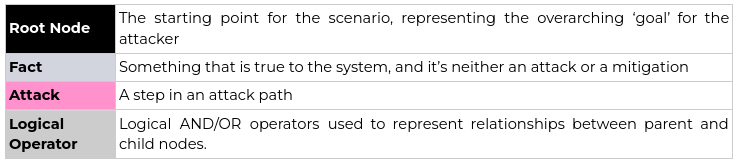
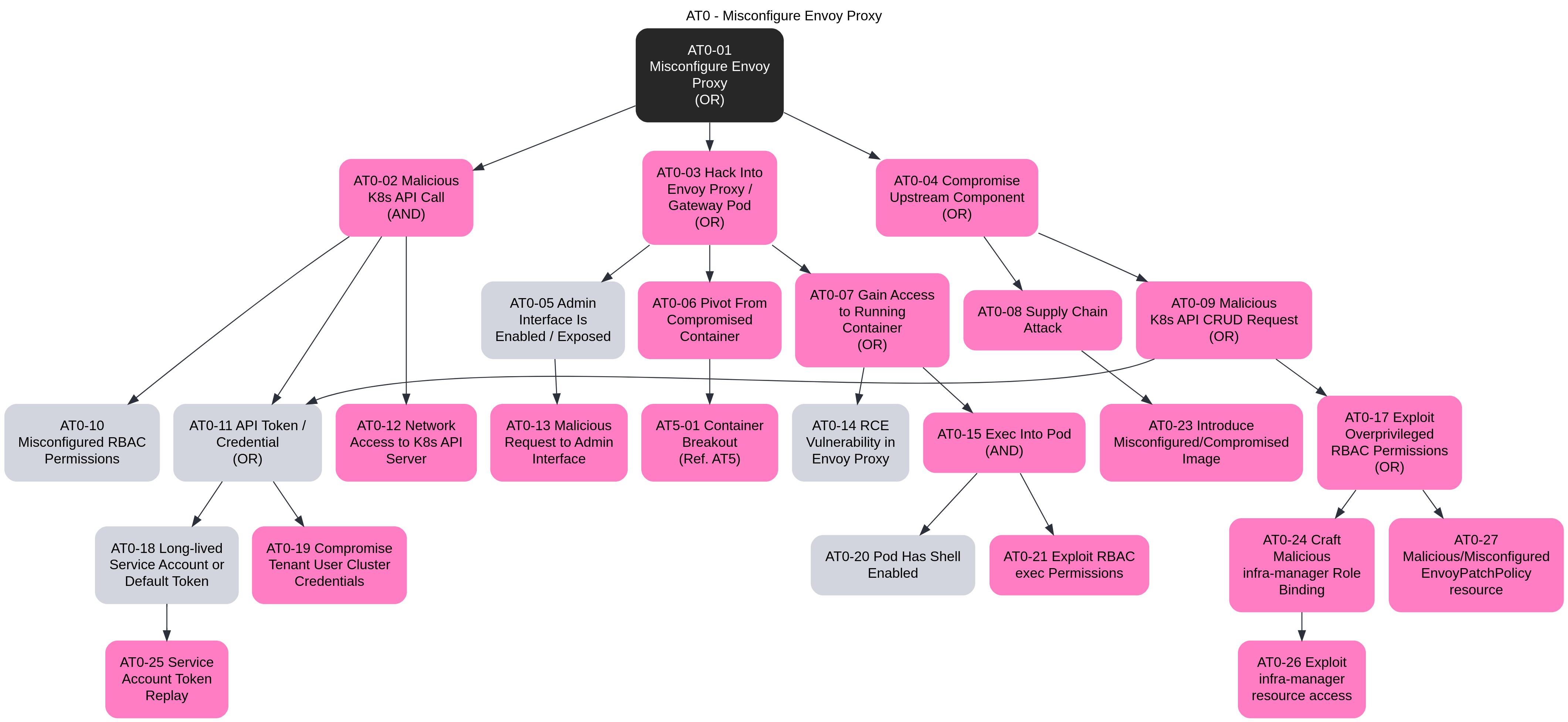
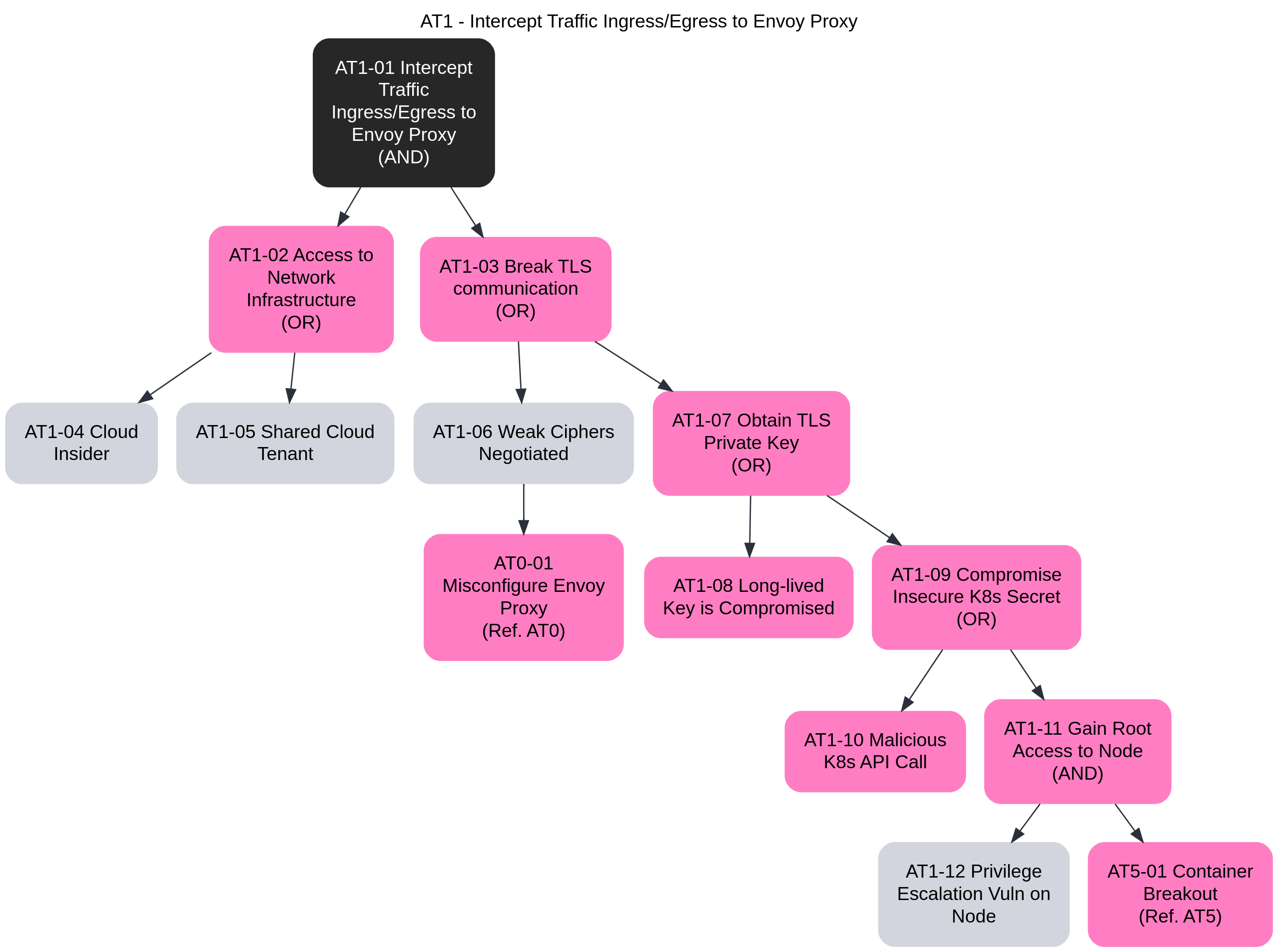
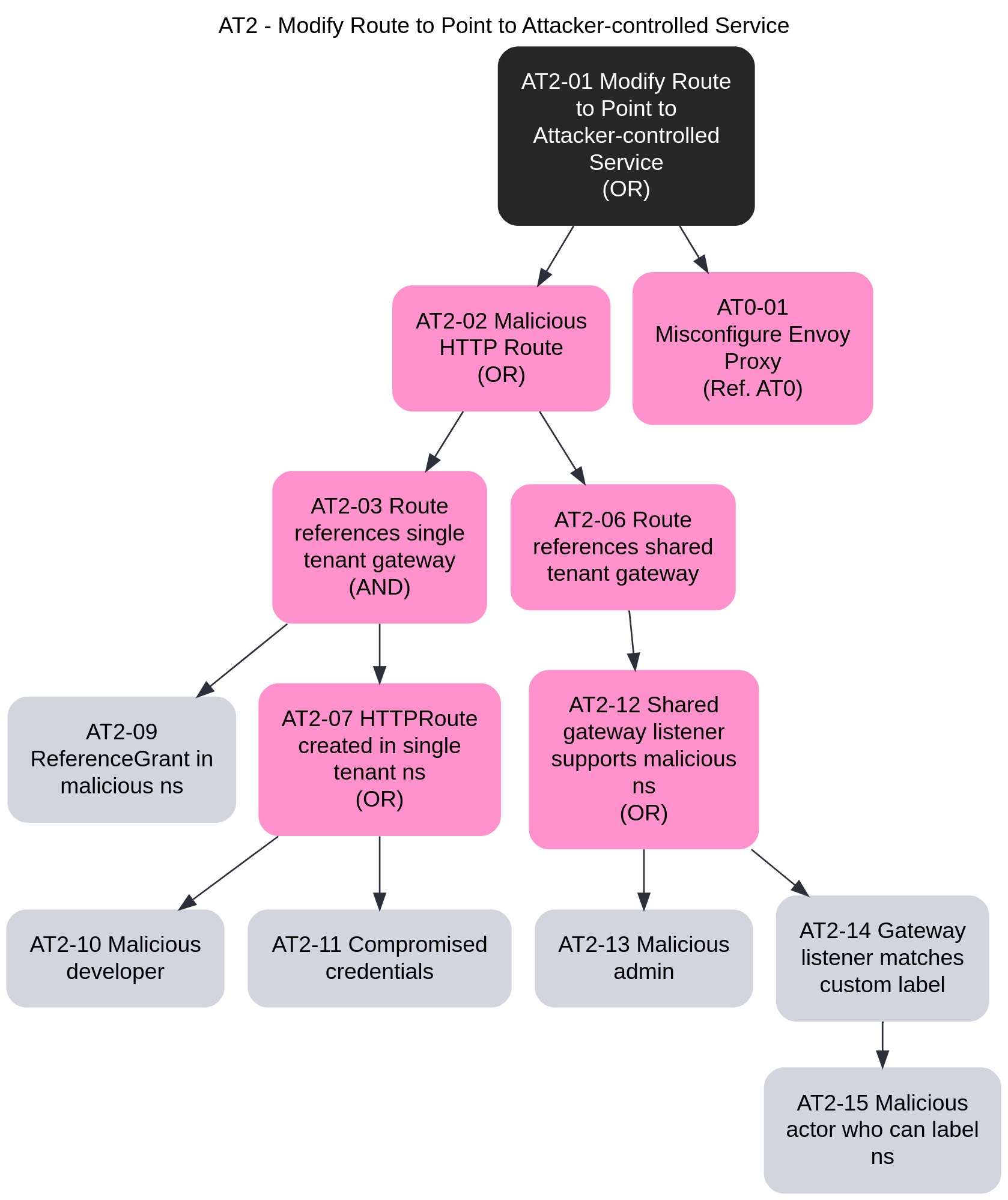
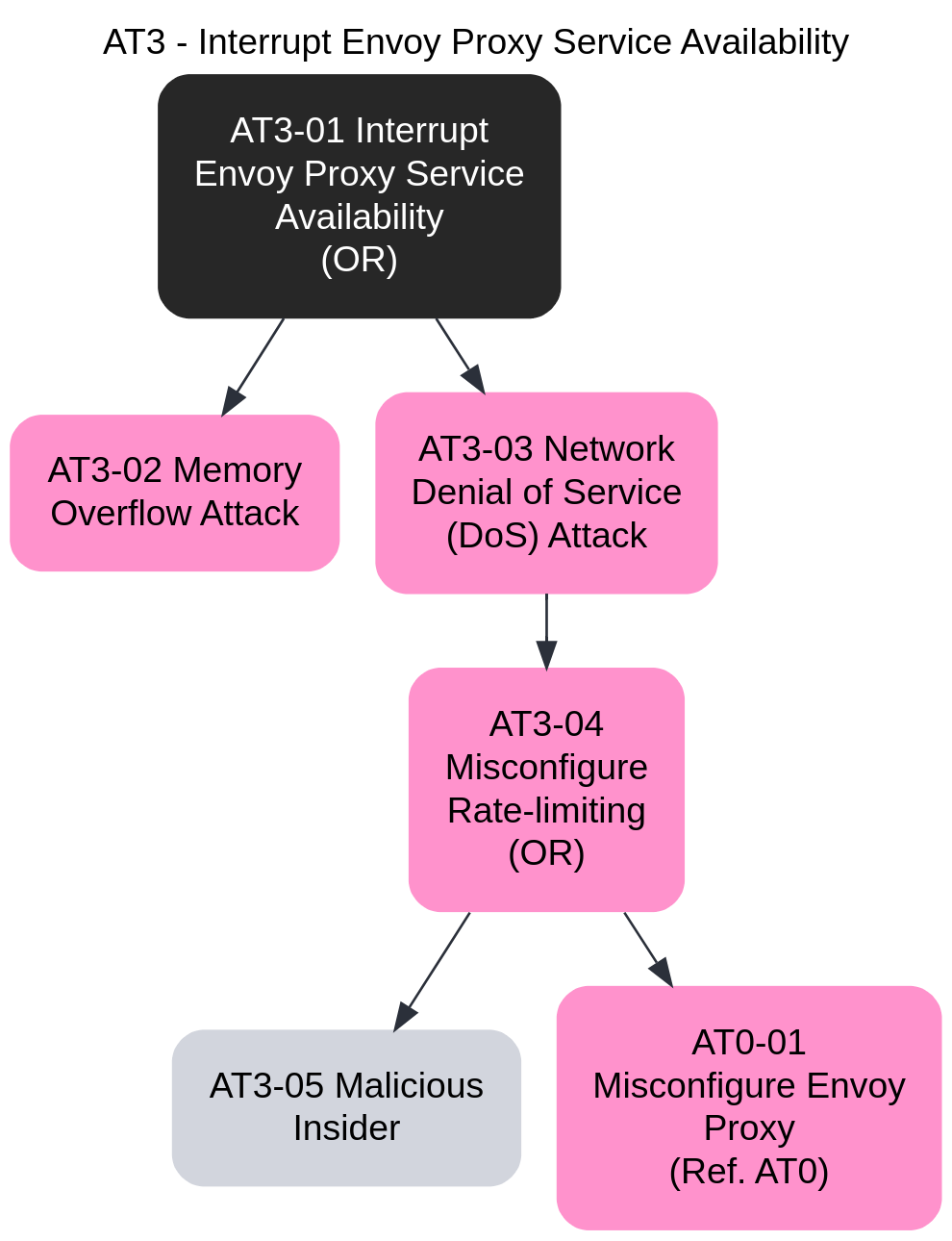
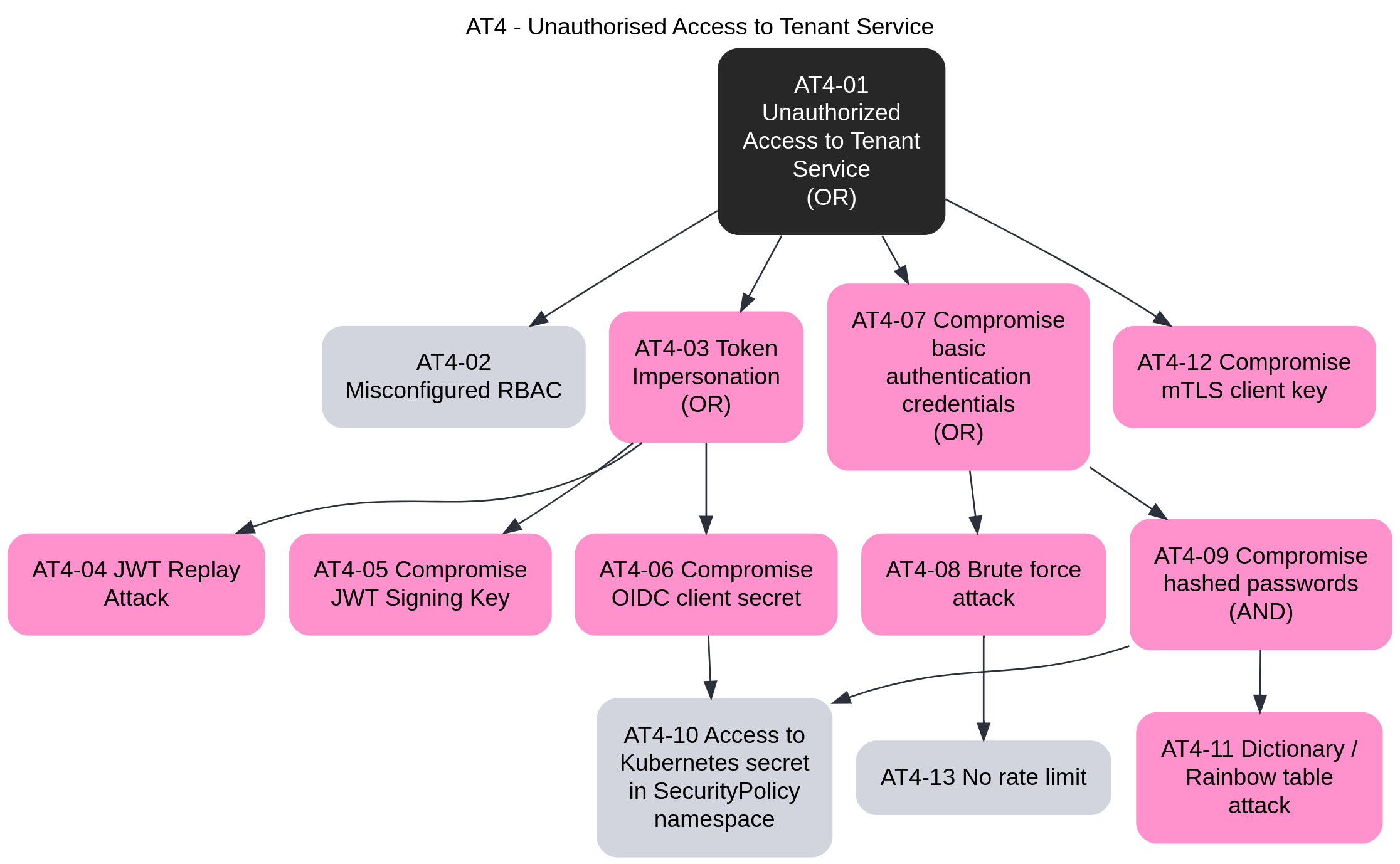
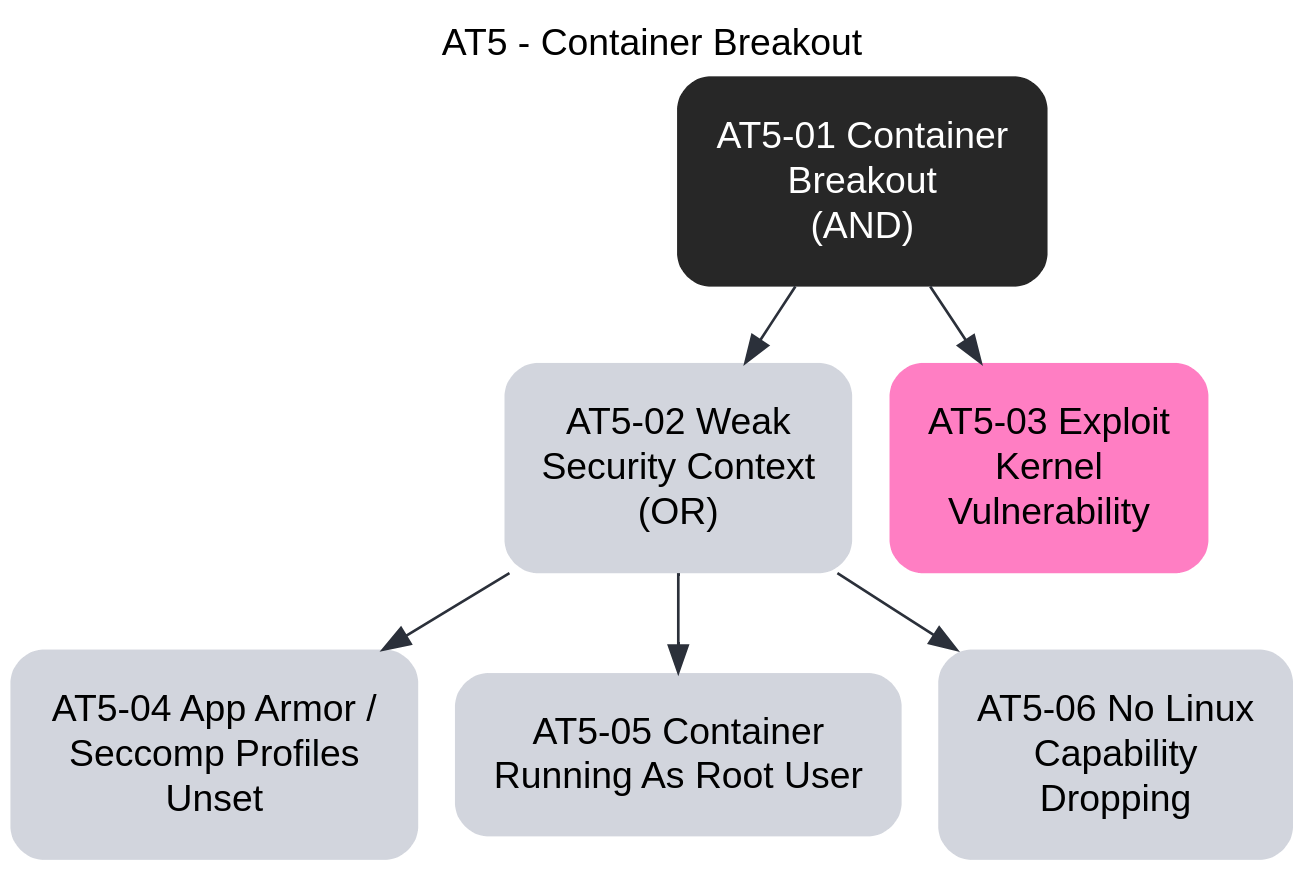
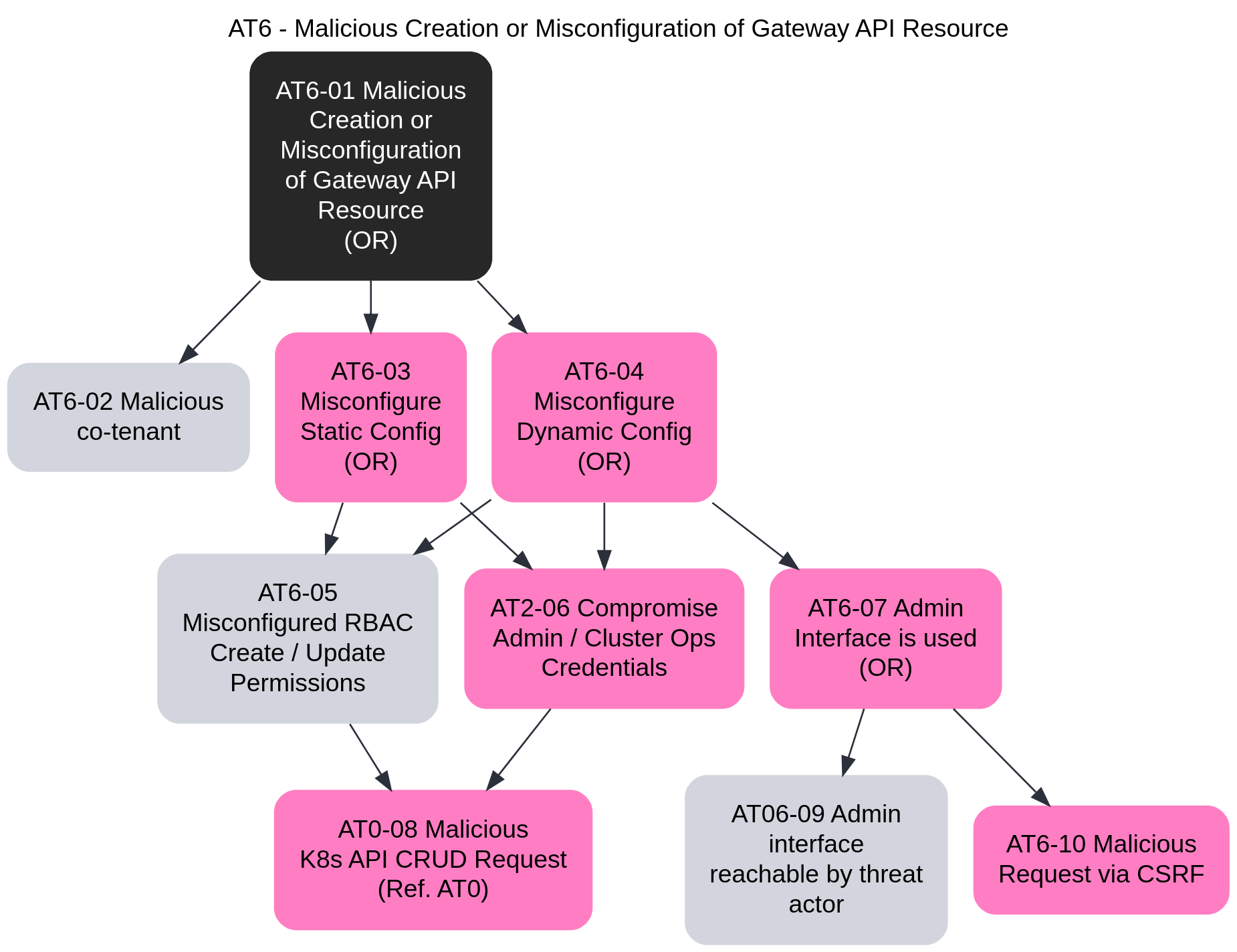
This task will walk through the steps required to configure TLS Passthrough via Envoy Gateway. Unlike configuring Secure Gateways, where the Gateway terminates the client TLS connection, TLS Passthrough allows the application itself to terminate the TLS connection, while the Gateway routes the requests to the application based on SNI headers.
Follow the steps from the Quickstart to install Envoy Gateway and the example manifest. Before proceeding, you should be able to query the example backend using HTTP.
Generate the certificates and keys used by the Service to terminate client TLS connections. For the application, we’ll deploy a sample echoserver app, with the certificates loaded in the application Pod.
Note: These certificates will not be used by the Gateway, but will remain in the application scope.
Create a root certificate and private key to sign certificates:
openssl req -x509 -sha256 -nodes -days 365 -newkey rsa:2048 -subj '/O=example Inc./CN=example.com' -keyout example.com.key -out example.com.crt
Create a certificate and a private key for passthrough.example.com:
openssl req -out passthrough.example.com.csr -newkey rsa:2048 -nodes -keyout passthrough.example.com.key -subj "/CN=passthrough.example.com/O=some organization"
openssl x509 -req -sha256 -days 365 -CA example.com.crt -CAkey example.com.key -set_serial 0 -in passthrough.example.com.csr -out passthrough.example.com.crt
Store the cert/keys in A Secret:
kubectl create secret tls server-certs --key=passthrough.example.com.key --cert=passthrough.example.com.crt
Deploy TLS Passthrough application Deployment, Service and TLSRoute:
kubectl apply -f https://raw.githubusercontent.com/envoyproxy/gateway/latest/examples/kubernetes/tls-passthrough.yaml
Patch the Gateway from the Quickstart to include a TLS listener that listens on port 6443 and is configured for
TLS mode Passthrough:
kubectl patch gateway eg --type=json --patch '
- op: add
path: /spec/listeners/-
value:
name: tls
protocol: TLS
hostname: passthrough.example.com
port: 6443
tls:
mode: Passthrough
'
Get the name of the Envoy service created the by the example Gateway:
export ENVOY_SERVICE=$(kubectl get svc -n envoy-gateway-system --selector=gateway.envoyproxy.io/owning-gateway-namespace=default,gateway.envoyproxy.io/owning-gateway-name=eg -o jsonpath='{.items[0].metadata.name}')
Port forward to the Envoy service:
kubectl -n envoy-gateway-system port-forward service/${ENVOY_SERVICE} 6043:6443 &
Curl the example app through Envoy proxy:
curl -v --resolve "passthrough.example.com:6043:127.0.0.1" https://passthrough.example.com:6043 \
--cacert passthrough.example.com.crt
You can also test the same functionality by sending traffic to the External IP of the Gateway:
export GATEWAY_HOST=$(kubectl get gateway/eg -o jsonpath='{.status.addresses[0].value}')
Curl the example app through the Gateway, e.g. Envoy proxy:
curl -v -HHost:passthrough.example.com --resolve "passthrough.example.com:6443:${GATEWAY_HOST}" \
--cacert example.com.crt https://passthrough.example.com:6443/get
Follow the steps from the Quickstart to uninstall Envoy Gateway and the example manifest.
Delete the Secret:
kubectl delete secret/server-certs
Checkout the Developer Guide to get involved in the project.
This guide will walk through the steps required to configure TLS Terminate mode for TCP traffic via Envoy Gateway. The guide uses a self-signed CA, so it should be used for testing and demonstration purposes only.
Follow the steps from the Quickstart to install Envoy Gateway.
Generate the certificates and keys used by the Gateway to terminate client TLS connections.
Create a root certificate and private key to sign certificates:
openssl req -x509 -sha256 -nodes -days 365 -newkey rsa:2048 -subj '/O=example Inc./CN=example.com' -keyout example.com.key -out example.com.crt
Create a certificate and a private key for www.example.com:
openssl req -out www.example.com.csr -newkey rsa:2048 -nodes -keyout www.example.com.key -subj "/CN=www.example.com/O=example organization"
openssl x509 -req -days 365 -CA example.com.crt -CAkey example.com.key -set_serial 0 -in www.example.com.csr -out www.example.com.crt
Store the cert/key in a Secret:
kubectl create secret tls example-cert --key=www.example.com.key --cert=www.example.com.crt
Install the TLS Termination for TCP example resources:
kubectl apply -f https://raw.githubusercontent.com/envoyproxy/gateway/latest/examples/kubernetes/tls-termination.yaml
Verify the Gateway status:
kubectl get gateway/eg -o yaml
Get the name of the Envoy service created the by the example Gateway:
export ENVOY_SERVICE=$(kubectl get svc -n envoy-gateway-system --selector=gateway.envoyproxy.io/owning-gateway-namespace=default,gateway.envoyproxy.io/owning-gateway-name=eg -o jsonpath='{.items[0].metadata.name}')
Port forward to the Envoy service:
kubectl -n envoy-gateway-system port-forward service/${ENVOY_SERVICE} 8443:443 &
Query the example app through Envoy proxy:
curl -v -HHost:www.example.com --resolve "www.example.com:8443:127.0.0.1" \
--cacert example.com.crt https://www.example.com:8443/get
Get the External IP of the Gateway:
export GATEWAY_HOST=$(kubectl get gateway/eg -o jsonpath='{.status.addresses[0].value}')
Query the example app through the Gateway:
curl -v -HHost:www.example.com --resolve "www.example.com:443:${GATEWAY_HOST}" \
--cacert example.com.crt https://www.example.com/get
This guide shows how to set up cert-manager to automatically create certificates and secrets for use by Envoy Gateway. It will first show how to enable the self-sign issuer, which is useful to test that cert-manager and Envoy Gateway can talk to each other. Then it shows how to use Let’s Encrypt’s staging environment. Changing to the Let’s Encrypt production environment is straight-forward after that.
kubectl.helm command.curl command or similar for testing HTTPS requests.www.example.com) must point to the Gateway’s external IP(s).Follow the steps from the Quickstart to install Envoy Gateway and the example manifest. Before proceeding, you should be able to query the example backend using HTTP.
This is a summary of cert-manager Installation with Helm.
Installing cert-manager is straight-forward, but currently (v1.12) requires setting a feature gate to enable the Gateway API support.
$ helm repo add jetstack https://charts.jetstack.io
$ helm upgrade --install --create-namespace --namespace cert-manager --set installCRDs=true --set featureGates=ExperimentalGatewayAPISupport=true cert-manager jetstack/cert-manager
You should now have cert-manager running with nothing to do:
$ kubectl wait --for=condition=Available deployment -n cert-manager --all
deployment.apps/cert-manager condition met
deployment.apps/cert-manager-cainjector condition met
deployment.apps/cert-manager-webhook condition met
$ kubectl get -n cert-manager deployment
NAME READY UP-TO-DATE AVAILABLE AGE
cert-manager 1/1 1 1 42m
cert-manager-cainjector 1/1 1 1 42m
cert-manager-webhook 1/1 1 1 42m
cert-manager can have any number of issuer configurations. The simplest issuer type is SelfSigned. It simply takes the certificate request and signs it with the private key it generates for the TLS Secret.
Self-signed certificates don't provide any help in establishing trust between certificates.
However, they are great for initial testing, due to their simplicity.
To install self-signing, run
$ kubectl apply -f - <<EOF
apiVersion: cert-manager.io/v1
kind: ClusterIssuer
metadata:
name: selfsigned
spec:
selfSigned: {}
EOF
We now have to patch the example Gateway to reference cert-manager:
$ kubectl patch gateway/eg --patch '
metadata:
annotations:
cert-manager.io/cluster-issuer: selfsigned
cert-manager.io/common-name: "Hello World!"
spec:
listeners:
- name: https
protocol: HTTPS
hostname: www.example.com
port: 443
tls:
mode: Terminate
certificateRefs:
- kind: Secret
name: eg-https
' --type=merge
You could instead create a new Gateway serving HTTPS, if you’d prefer. cert-manager doesn’t care, but we’ll keep it all together in this guide.
Nowadays, X.509 certificates don’t use the subject Common Name for hostname matching, so you can set it to whatever you want, or leave it empty. The important parts here are
hostname, which is required (but see #6051 for computing it based on attached HTTPRoutes), andThe annotations are documented in Supported Annotations.
Patching the Gateway makes cert-manager create a self-signed certificate within a few seconds.
Eventually, the Gateway becomes Programmed again:
$ kubectl wait --for=condition=Programmed gateway/eg
gateway.gateway.networking.k8s.io/eg condition met
See Testing in Secure Gateways for the general idea.
Since we have a self-signed certificate, curl will by default reject it, requiring the -k flag:
$ curl -kv -HHost:www.example.com https://127.0.0.1/get
...
* Server certificate:
* subject: CN=Hello World!
...
< HTTP/2 200
...
This explains cert-manager Concepts in an Envoy Gateway context.
In the interaction between the two, cert-manager does all the heavy lifting.
It subscribes to changes to Gateway resources (using the gateway-shim component.)
For any Gateway it finds, it looks for any TLS listeners, and the associated tls.certificateRefs.
Note that while Gateway API supports multiple refs here, Envoy Gateway only uses one.
cert-manager also looks at the hostname of the listener to figure out which hosts the certificate is expected to cover.
More than one listener can use the same certificate Secret, which means cert-manager needs to find all listeners using the same Secret before deciding what to do.
If the certificatRef points to a valid certificate, given the hostnames found in listeners, cert-manager has nothing to do.
If there is no valid certificate, or it is about to expire, cert-manager’s gateway-shim creates a Certificate resource, or updates the existing one.
cert-manager then follows the Certificate Lifecycle.
To know how to issue the certificate, an ClusterIssuer is configured, and referenced through annotations on the Gateway resource, which you did above.
Once a matching ClusterIssuer is found, that plugin does what needs to be done to acquire a signed certificate.
In the case of the ACME protocol (used by Let’s Encrypt), cert-manager can also use an HTTP Gateway to solve the HTTP-01 challenge type. This is the other side of cert-manager’s Gateway API support: the ACME issuer creates a temporary HTTPRoute, lets the ACME server(s) query it, and deletes it again.
cert-manager then updates the Secret that the Gateway’s listener points to in tls.certificateRefs.
Envoy Gateway picks up that the Secret has changed, and reloads the corresponding Envoy Proxy Deployments with the new private key and certificate.
As you can imagine, cert-manager requires quite broad permissions to update Secrets in any namespace, so the security-minded reader may want to look at the RBAC resources the Helm chart creates.
We will start using the Let’s Encrypt staging environment, to spare their production environment. Our Gateway already contains an HTTP listener, so we will use that for the HTTP-01 challenges.
$ CERT_MANAGER_CONTACT_EMAIL=$(git config user.email) # Or whatever...
$ kubectl apply -f - <<EOF
apiVersion: cert-manager.io/v1
kind: ClusterIssuer
metadata:
name: letsencrypt-staging
spec:
acme:
server: https://acme-staging-v02.api.letsencrypt.org/directory
email: "$CERT_MANAGER_CONTACT_EMAIL"
privateKeySecretRef:
name: letsencrypt-staging-account-key
solvers:
- http01:
gatewayHTTPRoute:
parentRefs:
- kind: Gateway
name: eg
namespace: default
EOF
The important parts are
spec.acme with a server URI and contact email address, andCheck the account registration process using the Ready condition:
$ kubectl wait --for=condition=Ready clusterissuer/letsencrypt-staging
$ kubectl describe clusterissuer/letsencrypt-staging
...
Status:
Acme:
Uri: https://acme-staging-v02.api.letsencrypt.org/acme/acct/123456789
Conditions:
Message: The ACME account was registered with the ACME server
Reason: ACMEAccountRegistered
Status: True
Type: Ready
...
Now we’re ready to update the Gateway annotation to use this issuer instead:
$ kubectl annotate --overwrite gateway/eg cert-manager.io/cluster-issuer=letsencrypt-staging
The Gateway should be picked up by cert-manager, which will create a new certificate for you, and replace the Secret.
You should see a new CertificateRequest to track:
$ kubectl get certificaterequest
NAME APPROVED DENIED READY ISSUER REQUESTOR AGE
eg-https-xxxxx True True selfsigned system:serviceaccount:cert-manager:cert-manager 42m
eg-https-xxxxx True True letsencrypt-staging system:serviceaccount:cert-manager:cert-manager 42m
We still require the -k flag, since the Let’s Encrypt staging environment CA is not widely trusted.
$ curl -kv -HHost:www.example.com https://127.0.0.1/get
...
* Server certificate:
* subject: CN=Hello World!
* issuer: C=US; O=(STAGING) Let's Encrypt; CN=(STAGING) Ersatz Edamame E1
...
< HTTP/2 200
...
Changing to the production environment is just a matter of replacing the server URI:
$ CERT_MANAGER_CONTACT_EMAIL=$(git config user.email) # Or whatever...
$ kubectl apply -f - <<EOF
apiVersion: cert-manager.io/v1
kind: ClusterIssuer
metadata:
name: letsencrypt
spec:
acme:
server: https://acme-v02.api.letsencrypt.org/directory # Removed "-staging".
email: "$CERT_MANAGER_CONTACT_EMAIL"
privateKeySecretRef:
name: letsencrypt-account-key # Removed "-staging".
solvers:
- http01:
gatewayHTTPRoute:
parentRefs:
- kind: Gateway
name: eg
namespace: default
EOF
And now you can update the Gateway listener to point to letsencrypt instead:
$ kubectl annotate --overwrite gateway/eg cert-manager.io/cluster-issuer=letsencrypt
As before, track it by looking at CertificateRequests.
Once the certificate has been replaced, we should finally be able to get rid of the -k flag:
$ curl -v -HHost:www.example.com --resolve www.example.com:127.0.0.1 https://www.example.com/get
...
* Server certificate:
* subject: CN=Hello World!
* issuer: C=US; O=Let's Encrypt; CN=R3
...
< HTTP/2 200
...
You probably want to set the cert-manager.io/revision-history-limit annotation on your Gateway to make cert-manager prune the CertificateRequest history.
cert-manager deletes unused Certificate resources, and they are updated in-place when possible, so there should be no need for cleaning up Certificate resources.
The deletion is based on whether a Gateway still holds a tls.certificateRefs that requires the Certificate.
If you remove a TLS listener from a Gateway, you may still have a Secret lingering. cert-manager can clean it up using a flag.
We have used ClusterIssuer resources in this tutorial. They are not bound to any namespace, and will read annotations from Gateways in any namespace. You could also use Issuer, which is bound to a namespace. This is useful e.g. if you want to use different ACME accounts for different namespaces.
If you change the issuer kind, you also need to change the annotation key from cert-manager.io/clusterissuer to cert-manager.io/issuer.
The ExternalDNS controller maintains DNS records based on Kubernetes resources. Together with cert-manager, this can be used to fully automate hostname management. It can use various source resources, among them Gateway Routes. Just specify a Gateway Route resource, let ExternalDNS create the domain records, and then cert-manager the TLS certificate.
The tutorial on Gateway API uses kubectl. They also have a Helm chart, which is easier to customize. The only thing relevant to Envoy Gateway is to set the sources:
# values.yaml
sources:
- gateway-httproute
- gateway-grpcroute
- gateway-tcproute
- gateway-tlsroute
- gateway-udproute
You can monitor progress in several ways:
The Issuer has a Ready condition (though this is rather boring for the selfSigned type):
$ kubectl get issuer --all-namespaces
NAMESPACE NAME READY AGE
default selfsigned True 42m
The Gateway will say when it has an invalid certificate:
$ kubectl describe gateway/eg
...
Conditions:
Message: Secret default/eg-https does not exist.
Reason: InvalidCertificateRef
Status: False
Type: ResolvedRefs
...
Message: Listener is invalid, see other Conditions for details.
Reason: Invalid
Status: False
Type: Programmed
...
Events:
Type Reason Age From Message
---- ------ ---- ---- -------
Warning BadConfig 42m cert-manager-gateway-shim Skipped a listener block: spec.listeners[1].hostname: Required value: the hostname cannot be empty
The main question is if cert-manager has picked up on the Gateway.
I.e., has it created a Certificate for it?
The above describe contains an event from cert-manager-gateway-shim telling you of one such issue.
Be aware that if you have a non-TLS listener in the Gateway, like we did, there will be events saying it is not eligible, which is of course expected.
Another option is looking at Deployment logs.
The cert-manager logs are not very verbose by default, but setting the Helm value global.logLevel to 6 will enable all debug logs (the default is 2.)
This will make them verbose enough to say why a Gateway wasn’t considered (e.g. missing hostname, or tls.mode is not Terminate.)
$ kubectl logs -n cert-manager deployment/cert-manager
...
Simply listing Certificate resources may be useful, even if it just gives a yes/no answer:
$ kubectl get certificate --all-namespaces
NAMESPACE NAME READY SECRET AGE
default eg-https True eg-https 42m
If there is a Certificate, then the gateway-shim has recognized the Gateway.
But is there a CertificateRequest for it?
(BTW, don’t confuse this with a CertificateSigningRequest, which is a Kubernetes core resource type representing the same thing.)
$ kubectl get certificaterequest --all-namespaces
NAMESPACE NAME APPROVED DENIED READY ISSUER REQUESTOR AGE
default eg-https-xxxxx True True selfsigned system:serviceaccount:cert-manager:cert-manager 42m
The ACME issuer also has Order and Challenge resources to watch:
$ kubectl get order --all-namespaces -o wide
NAME STATE ISSUER REASON AGE
order.acme.cert-manager.io/envoy-https-xxxxx-123456789 pending letsencrypt-staging 42m
$ kubectl get challenge --all-namespaces
NAME STATE DOMAIN AGE
challenge.acme.cert-manager.io/envoy-https-xxxxx-123456789-1234567890 pending www.example.com 42m
Using kubetctl get -o wide or kubectl describe on the Challenge will explain its state more.
$ kubectl get order --all-namespaces -o wide
NAME STATE ISSUER REASON AGE
order.acme.cert-manager.io/envoy-https-xxxxx-123456789 valid letsencrypt-staging 42m
Finally, since cert-manager creates the Secret referenced by the Gateway listener as its last step, we can also look for that:
$ kubectl get secret secret/eg-https
NAME TYPE DATA AGE
eg-https kubernetes.io/tls 3 42m
helm uninstall --namespace cert-manager cert-managercert-manager namespace: kubectl delete namespace/cert-managerhttps listener from gateway/eg.secret/eg-https.This task explains the usage of the EnvoyPatchPolicy API. Note: This API is meant for users extremely familiar with Envoy xDS semantics. Also before considering this API for production use cases, please be aware that this API is unstable and the outcome may change across versions. Use at your own risk.
The EnvoyPatchPolicy API allows user to modify the output xDS configuration generated by Envoy Gateway intended for EnvoyProxy, using JSON Patch semantics.
This API was introduced to allow advanced users to be able to leverage Envoy Proxy functionality not exposed by Envoy Gateway APIs today.
By default EnvoyPatchPolicy is disabled. Lets enable it in the EnvoyGateway startup configuration
The default installation of Envoy Gateway installs a default EnvoyGateway configuration and attaches it
using a ConfigMap. In the next step, we will update this resource to enable EnvoyPatchPolicy.
cat <<EOF | kubectl apply -f -
apiVersion: v1
kind: ConfigMap
metadata:
name: envoy-gateway-config
namespace: envoy-gateway-system
data:
envoy-gateway.yaml: |
apiVersion: gateway.envoyproxy.io/v1alpha1
kind: EnvoyGateway
provider:
type: Kubernetes
gateway:
controllerName: gateway.envoyproxy.io/gatewayclass-controller
extensionApis:
enableEnvoyPatchPolicy: true
EOF
ConfigMap, you will need to restart the envoy-gateway deployment so the configuration kicks inkubectl rollout restart deployment envoy-gateway -n envoy-gateway-system
Use EnvoyProxy’s Local Reply Modification feature to return a custom response back to the client when
the status code is 404
Apply the configuration
cat <<EOF | kubectl apply -f -
apiVersion: gateway.envoyproxy.io/v1alpha1
kind: EnvoyPatchPolicy
metadata:
name: custom-response-patch-policy
namespace: default
spec:
targetRef:
group: gateway.networking.k8s.io
kind: Gateway
name: eg
namespace: default
type: JSONPatch
jsonPatches:
- type: "type.googleapis.com/envoy.config.listener.v3.Listener"
# The listener name is of the form <GatewayNamespace>/<GatewayName>/<GatewayListenerName>
name: default/eg/http
operation:
op: add
path: "/default_filter_chain/filters/0/typed_config/local_reply_config"
value:
mappers:
- filter:
status_code_filter:
comparison:
op: EQ
value:
default_value: 404
runtime_key: key_b
status_code: 406
body:
inline_string: "could not find what you are looking for"
EOF
When mergeGateways is enabled, there will be one Envoy deployment for all Gateways in the cluster. Then the EnvoyPatchPolicy should target a specific GatewayClass.
cat <<EOF | kubectl apply -f -
apiVersion: gateway.envoyproxy.io/v1alpha1
kind: EnvoyPatchPolicy
metadata:
name: custom-response-patch-policy
namespace: default
spec:
targetRef:
group: gateway.networking.k8s.io
kind: GatewayClass
name: eg
namespace: default
type: JSONPatch
jsonPatches:
- type: "type.googleapis.com/envoy.config.listener.v3.Listener"
# The listener name is of the form <GatewayNamespace>/<GatewayName>/<GatewayListenerName>
name: default/eg/http
operation:
op: add
path: "/default_filter_chain/filters/0/typed_config/local_reply_config"
value:
mappers:
- filter:
status_code_filter:
comparison:
op: EQ
value:
default_value: 404
runtime_key: key_b
status_code: 406
body:
inline_string: "could not find what you are looking for"
EOF
/getkubectl patch httproute backend --type=json --patch '
- op: add
path: /spec/rules/0/matches/0/path/value
value: /get
'
/get$ curl --header "Host: www.example.com" http://localhost:8888/find
Handling connection for 8888
could not find what you are looking for
Status subresource should have information about the status of the resource. Make sure
Accepted=True and Programmed=True conditions are set to ensure that the policy has been
applied to Envoy Proxy.apiVersion: gateway.envoyproxy.io/v1alpha1
kind: EnvoyPatchPolicy
metadata:
annotations:
kubectl.kubernetes.io/last-applied-configuration: |
{"apiVersion":"gateway.envoyproxy.io/v1alpha1","kind":"EnvoyPatchPolicy","metadata":{"annotations":{},"name":"custom-response-patch-policy","namespace":"default"},"spec":{"jsonPatches":[{"name":"default/eg/http","operation":{"op":"add","path":"/default_filter_chain/filters/0/typed_config/local_reply_config","value":{"mappers":[{"body":{"inline_string":"could not find what you are looking for"},"filter":{"status_code_filter":{"comparison":{"op":"EQ","value":{"default_value":404}}}}}]}},"type":"type.googleapis.com/envoy.config.listener.v3.Listener"}],"priority":0,"targetRef":{"group":"gateway.networking.k8s.io","kind":"Gateway","name":"eg","namespace":"default"},"type":"JSONPatch"}}
creationTimestamp: "2023-07-31T21:47:53Z"
generation: 1
name: custom-response-patch-policy
namespace: default
resourceVersion: "10265"
uid: a35bda6e-a0cc-46d7-a63a-cee765174bc3
spec:
jsonPatches:
- name: default/eg/http
operation:
op: add
path: /default_filter_chain/filters/0/typed_config/local_reply_config
value:
mappers:
- body:
inline_string: could not find what you are looking for
filter:
status_code_filter:
comparison:
op: EQ
value:
default_value: 404
type: type.googleapis.com/envoy.config.listener.v3.Listener
priority: 0
targetRef:
group: gateway.networking.k8s.io
kind: Gateway
name: eg
namespace: default
type: JSONPatch
status:
conditions:
- lastTransitionTime: "2023-07-31T21:48:19Z"
message: EnvoyPatchPolicy has been accepted.
observedGeneration: 1
reason: Accepted
status: "True"
type: Accepted
- lastTransitionTime: "2023-07-31T21:48:19Z"
message: successfully applied patches.
reason: Programmed
status: "True"
type: Programmed
This API will always be an unstable API and the same outcome cannot be guaranteed across versions for these reasons
name field of resources.Resource metrics for Gateway API objects are available using the Gateway API State Metrics project. The project also provides example dashboard for visualising the metrics using Grafana, and example alerts using Prometheus & Alertmanager.
Follow the steps from the Quickstart to install Envoy Gateway and the example manifest. Before proceeding, you should be able to query the example backend using HTTP.
Run the following commands to install the metrics stack, with the Gateway API State Metrics configuration, on your kubernetes cluster:
kubectl apply --server-side -f https://raw.githubusercontent.com/Kuadrant/gateway-api-state-metrics/main/config/examples/kube-prometheus/bundle_crd.yaml
kubectl apply -f https://raw.githubusercontent.com/Kuadrant/gateway-api-state-metrics/main/config/examples/kube-prometheus/bundle.yaml
To access the Prometheus UI, wait for the statefulset to be ready, then use the port-forward command:
# This first command may fail if the statefulset has not been created yet.
# In that case, try again until you get a message like 'Waiting for 2 pods to be ready...'
# or 'statefulset rolling update complete 2 pods...'
kubectl -n monitoring rollout status --watch --timeout=5m statefulset/prometheus-k8s
kubectl -n monitoring port-forward service/prometheus-k8s 9090:9090 > /dev/null &
Navigate to http://localhost:9090.
Metrics can be queried from the ‘Graph’ tab e.g. gatewayapi_gateway_created
See the Gateway API State Metrics README for the full list of Gateway API metrics available.
Alerts can be seen in the ‘Alerts’ tab. Gateway API specific alerts will be grouped under the ‘gateway-api.rules’ heading.
Note: Alerts are defined in a PrometheusRules custom resource in the ‘monitoring’ namespace. You can modify the alert rules by updating this resource.
To view the dashboards in Grafana, wait for the deployment to be ready, then use the port-forward command:
kubectl -n monitoring wait --timeout=5m deployment/grafana --for=condition=Available
kubectl -n monitoring port-forward service/grafana 3000:3000 > /dev/null &
Navigate to http://localhost:3000 and sign in with admin/admin.
The Gateway API State dashboards will be available in the ‘Default’ folder and tagged with ‘gateway-api’.
See the Gateway API State Metrics README for further information on available dashboards.
Note: Dashboards are loaded from configmaps. You can modify the dashboards in the Grafana UI, however you will need to export them from the UI and update the json in the configmaps to persist changes.
Envoy Gateway provides observability for the ControlPlane and the underlying EnvoyProxy instances. This guide show you how to config proxy observability, includes metrics, logs, and traces.
Follow the steps from the Quickstart to install Envoy Gateway and the example manifest. Before proceeding, you should be able to query the example backend using HTTP.
FluentBit is used to collect logs from the EnvoyProxy instances and forward them to Loki. Install FluentBit:
helm repo add fluent https://fluent.github.io/helm-charts
helm repo update
helm upgrade --install fluent-bit fluent/fluent-bit -f https://raw.githubusercontent.com/envoyproxy/gateway/latest/examples/fluent-bit/helm-values.yaml -n monitoring --create-namespace --version 0.30.4
Loki is used to store logs. Install Loki:
kubectl apply -f https://raw.githubusercontent.com/envoyproxy/gateway/latest/examples/loki/loki.yaml -n monitoring
Tempo is used to store traces. Install Tempo:
helm repo add grafana https://grafana.github.io/helm-charts
helm repo update
helm upgrade --install tempo grafana/tempo -f https://raw.githubusercontent.com/envoyproxy/gateway/latest/examples/tempo/helm-values.yaml -n monitoring --create-namespace --version 1.3.1
OpenTelemetry Collector offers a vendor-agnostic implementation of how to receive, process and export telemetry data. Install OTel-Collector:
helm repo add open-telemetry https://open-telemetry.github.io/opentelemetry-helm-charts
helm repo update
helm upgrade --install otel-collector open-telemetry/opentelemetry-collector -f https://raw.githubusercontent.com/envoyproxy/gateway/latest/examples/otel-collector/helm-values.yaml -n monitoring --create-namespace --version 0.60.0
Expose endpoints:
LOKI_IP=$(kubectl get svc loki -n monitoring -o jsonpath='{.status.loadBalancer.ingress[0].ip}')
TEMPO_IP=$(kubectl get svc tempo -n monitoring -o jsonpath='{.status.loadBalancer.ingress[0].ip}')
By default, Envoy Gateway expose metrics with prometheus endpoint.
Verify metrics:
export ENVOY_POD_NAME=$(kubectl get pod -n envoy-gateway-system --selector=gateway.envoyproxy.io/owning-gateway-namespace=default,gateway.envoyproxy.io/owning-gateway-name=eg -o jsonpath='{.items[0].metadata.name}')
kubectl port-forward pod/$ENVOY_POD_NAME -n envoy-gateway-system 19001:19001
# check metrics
curl localhost:19001/stats/prometheus | grep "default/backend/rule/0/match/0-www"
You can disable metrics by setting the telemetry.metrics.prometheus.disable to true in the EnvoyProxy CRD.
kubectl apply -f https://raw.githubusercontent.com/envoyproxy/gateway/latest/examples/kubernetes/metric/disable-prometheus.yaml
Envoy Gateway can send metrics to OpenTelemetry Sink. Send metrics to OTel-Collector:
kubectl apply -f https://raw.githubusercontent.com/envoyproxy/gateway/latest/examples/kubernetes/metric/otel-sink.yaml
Verify OTel-Collector metrics:
export OTEL_POD_NAME=$(kubectl get pod -n monitoring --selector=app.kubernetes.io/name=opentelemetry-collector -o jsonpath='{.items[0].metadata.name}')
kubectl port-forward pod/$OTEL_POD_NAME -n monitoring 19001:19001
# check metrics
curl localhost:19001/metrics | grep "default/backend/rule/0/match/0-www"
If custom format string is not specified, Envoy Gateway uses the following default format:
{"start_time":"%START_TIME%","method":"%REQ(:METHOD)%","x-envoy-origin-path":"%REQ(X-ENVOY-ORIGINAL-PATH?:PATH)%","protocol":"%PROTOCOL%","response_code":"%RESPONSE_CODE%","response_flags":"%RESPONSE_FLAGS%","response_code_details":"%RESPONSE_CODE_DETAILS%","connection_termination_details":"%CONNECTION_TERMINATION_DETAILS%","upstream_transport_failure_reason":"%UPSTREAM_TRANSPORT_FAILURE_REASON%","bytes_received":"%BYTES_RECEIVED%","bytes_sent":"%BYTES_SENT%","duration":"%DURATION%","x-envoy-upstream-service-time":"%RESP(X-ENVOY-UPSTREAM-SERVICE-TIME)%","x-forwarded-for":"%REQ(X-FORWARDED-FOR)%","user-agent":"%REQ(USER-AGENT)%","x-request-id":"%REQ(X-REQUEST-ID)%",":authority":"%REQ(:AUTHORITY)%","upstream_host":"%UPSTREAM_HOST%","upstream_cluster":"%UPSTREAM_CLUSTER%","upstream_local_address":"%UPSTREAM_LOCAL_ADDRESS%","downstream_local_address":"%DOWNSTREAM_LOCAL_ADDRESS%","downstream_remote_address":"%DOWNSTREAM_REMOTE_ADDRESS%","requested_server_name":"%REQUESTED_SERVER_NAME%","route_name":"%ROUTE_NAME%"}
Note: Envoy Gateway disable envoy headers by default, you can enable it by setting
EnableEnvoyHeaderstotruein the ClientTrafficPolicy CRD.
Verify logs from loki:
curl -s "http://$LOKI_IP:3100/loki/api/v1/query_range" --data-urlencode "query={job=\"fluentbit\"}" | jq '.data.result[0].values'
If you want to disable it, set the telemetry.accesslog.disable to true in the EnvoyProxy CRD.
kubectl apply -f https://raw.githubusercontent.com/envoyproxy/gateway/latest/examples/kubernetes/accesslog/disable-accesslog.yaml
Envoy Gateway can send logs to OpenTelemetry Sink.
kubectl apply -f https://raw.githubusercontent.com/envoyproxy/gateway/latest/examples/kubernetes/accesslog/otel-accesslog.yaml
Verify logs from loki:
curl -s "http://$LOKI_IP:3100/loki/api/v1/query_range" --data-urlencode "query={exporter=\"OTLP\"}" | jq '.data.result[0].values'
By default, Envoy Gateway doesn’t send traces to OpenTelemetry Sink.
You can enable traces by setting the telemetry.tracing in the EnvoyProxy CRD.
Note: Envoy Gateway use 100% sample rate, which means all requests will be traced. This may cause performance issues.
kubectl apply -f https://raw.githubusercontent.com/envoyproxy/gateway/latest/examples/kubernetes/tracing/default.yaml
Verify traces from tempo:
curl -s "http://$TEMPO_IP:3100/api/search" --data-urlencode "q={ component=envoy }" | jq .traces
curl -s "http://$TEMPO_IP:3100/api/traces/<trace_id>" | jq
Envoy Gateway provides support for exposing Envoy Proxy metrics to a Prometheus instance. This guide shows you how to visualise the metrics exposed to prometheus using grafana.
Follow the steps from the Quickstart to install Envoy Gateway and the example manifest. Before proceeding, you should be able to query the example backend using HTTP.
Follow the steps from the Proxy Observability to enable prometheus metrics.
Prometheus is used to scrape metrics from the Envoy Proxy instances. Install Prometheus:
helm repo add prometheus-community https://prometheus-community.github.io/helm-charts
helm repo update
helm upgrade --install prometheus prometheus-community/prometheus -n monitoring --create-namespace
Grafana is used to visualise the metrics exposed by the envoy proxy instances. Install Grafana:
helm repo add grafana https://grafana.github.io/helm-charts
helm repo update
helm upgrade --install grafana grafana/grafana -f https://raw.githubusercontent.com/envoyproxy/gateway/latest/examples/grafana/helm-values.yaml -n monitoring --create-namespace
Expose endpoints:
GRAFANA_IP=$(kubectl get svc grafana -n monitoring -o jsonpath='{.status.loadBalancer.ingress[0].ip}')
To visualise metrics from Prometheus, we have to connect Grafana with Prometheus. If you installed Grafana from the command from prerequisites sections, the prometheus datasource should be already configured.
You can also add the data source manually by following the instructions from Grafana Docs.
You can access the Grafana instance by visiting http://{GRAFANA_IP}, derived in prerequisites.
To log in to Grafana, use the credentials admin:admin.
Envoy Gateway has examples of dashboard for you to get started:
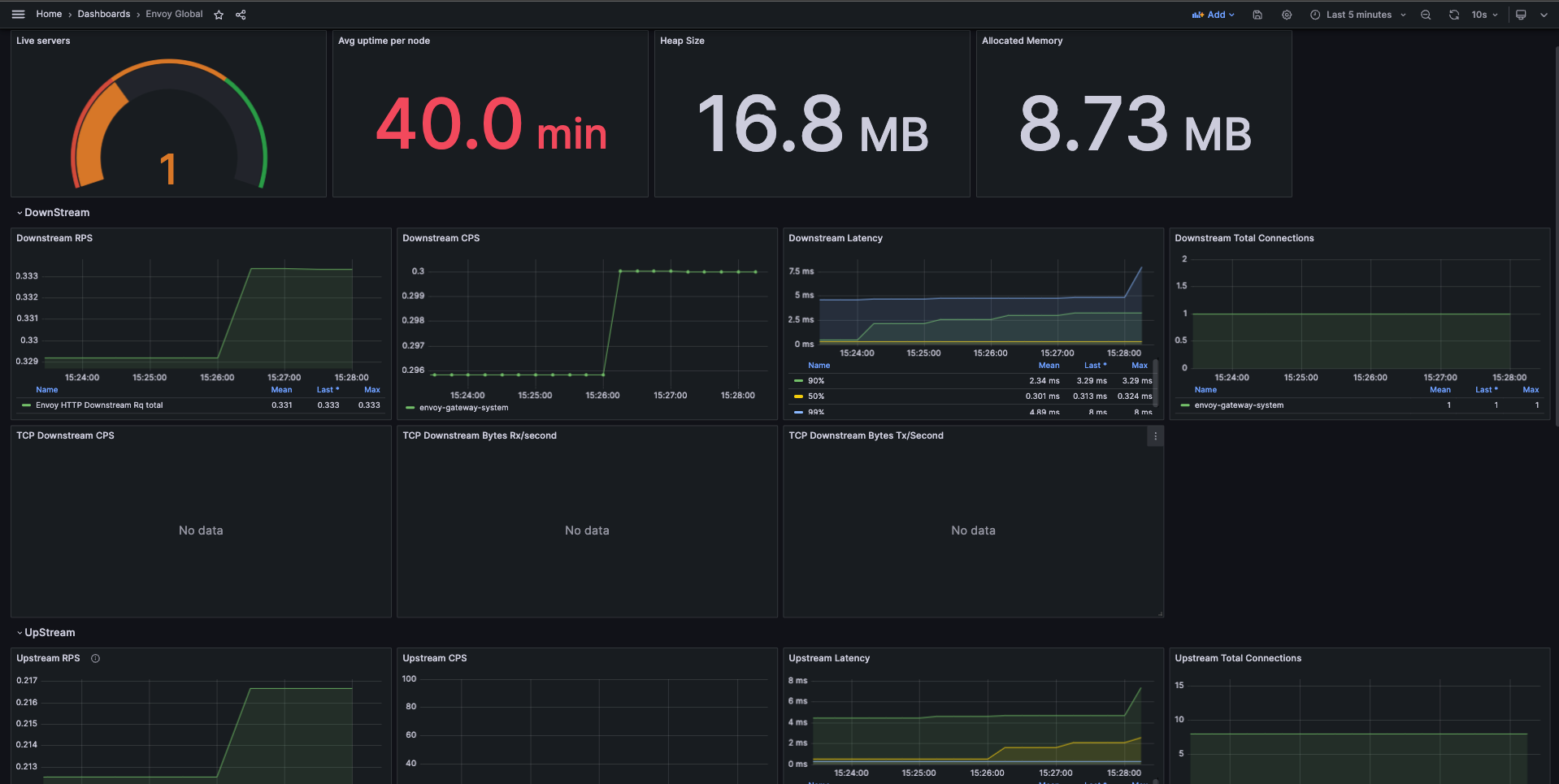
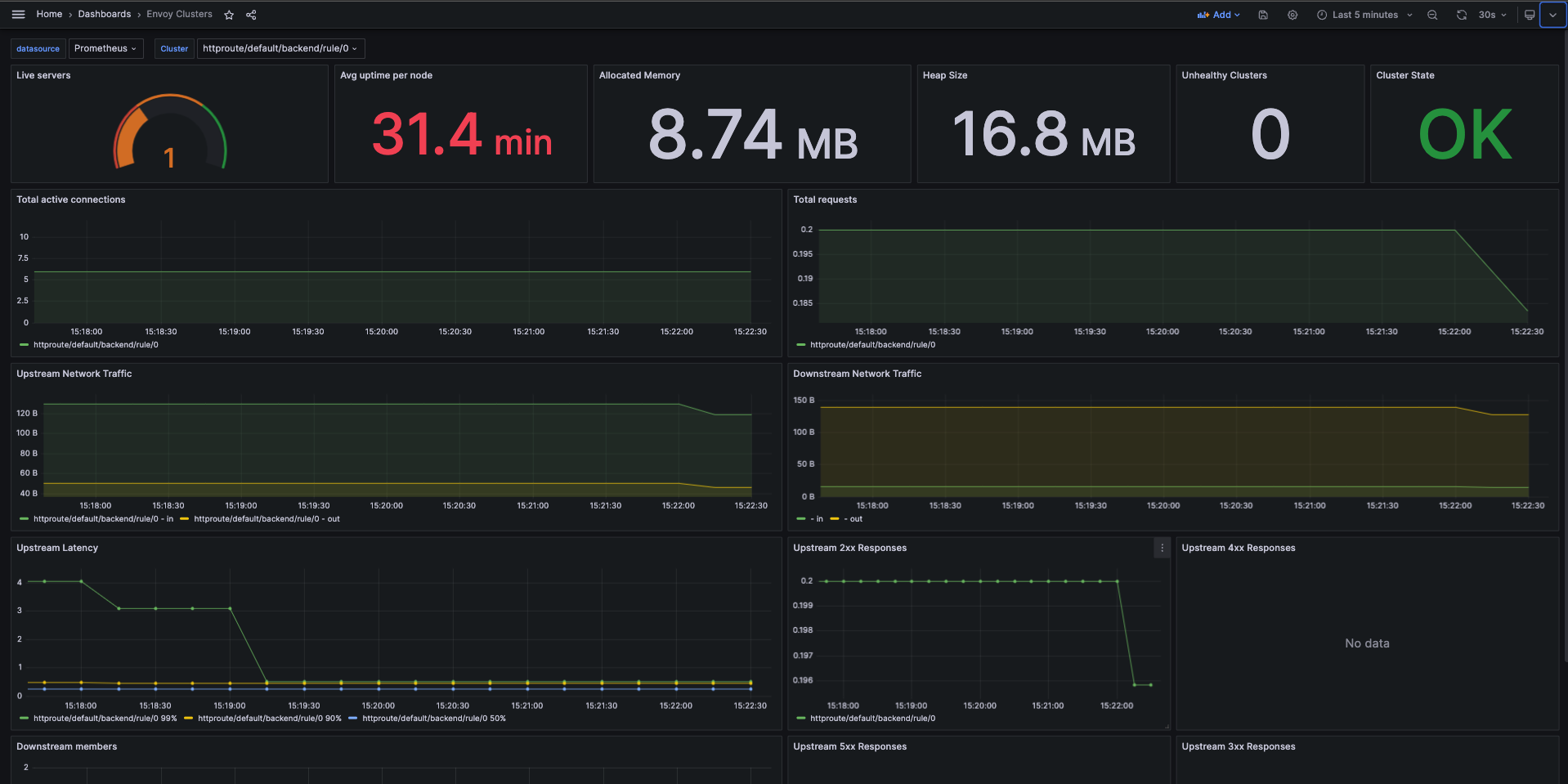
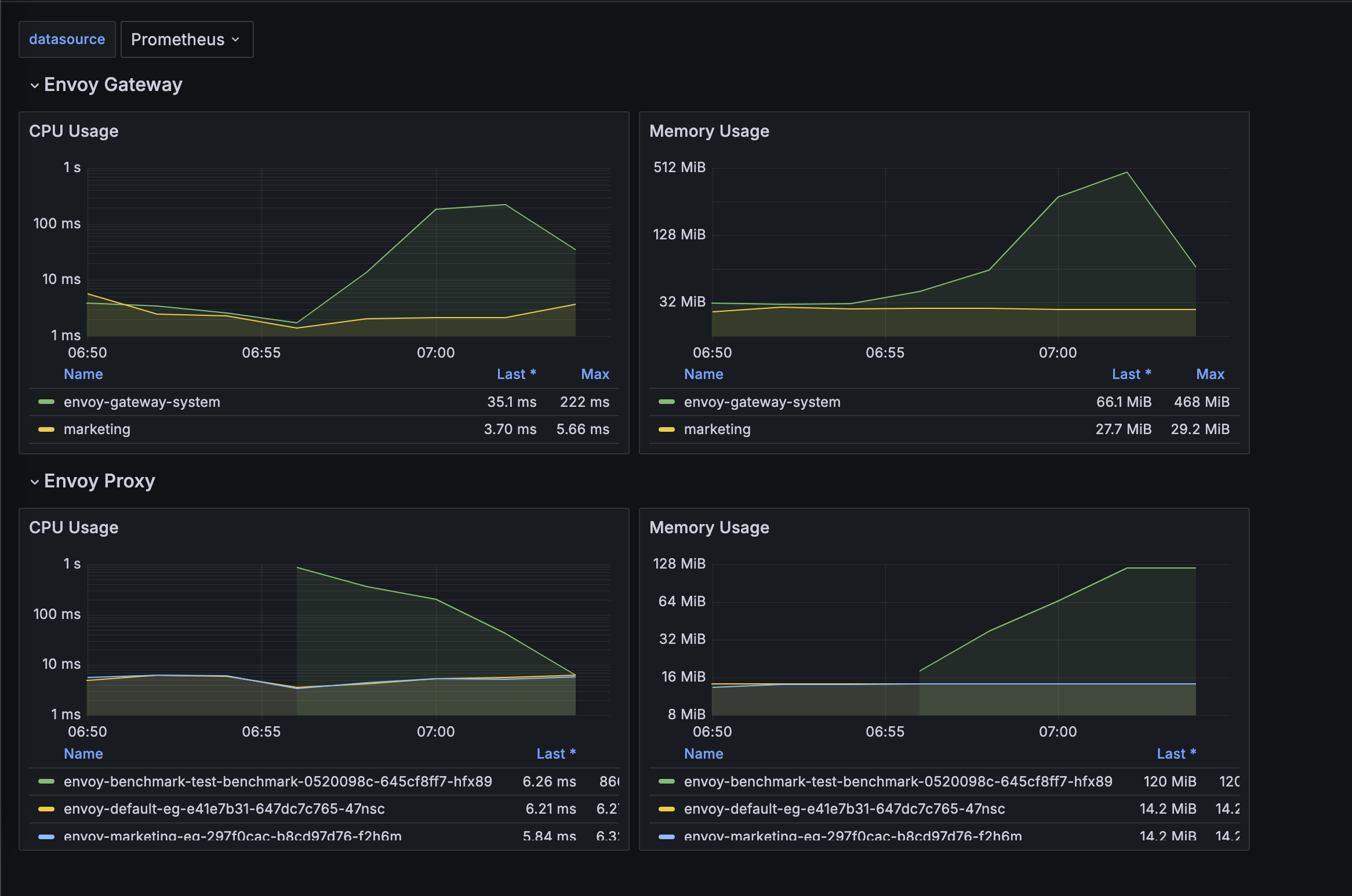
You can load the above dashboards in your Grafana to get started. Please refer to Grafana docs for importing dashboards.
Envoy Gateway provides an EnvoyProxy CRD that can be linked to the ParametersRef in GatewayClass, allowing cluster admins to customize the managed EnvoyProxy Deployment and Service. To learn more about GatewayClass and ParametersRef, please refer to Gateway API documentation.
Follow the steps from the Quickstart to install Envoy Gateway and the example manifest. Before proceeding, you should be able to query the example backend using HTTP.
First, you need to add ParametersRef in GatewayClass, and refer to EnvoyProxy Config:
cat <<EOF | kubectl apply -f -
apiVersion: gateway.networking.k8s.io/v1
kind: GatewayClass
metadata:
name: eg
spec:
controllerName: gateway.envoyproxy.io/gatewayclass-controller
parametersRef:
group: gateway.envoyproxy.io
kind: EnvoyProxy
name: custom-proxy-config
namespace: envoy-gateway-system
EOF
Save and apply the following resource to your cluster:
---
apiVersion: gateway.networking.k8s.io/v1
kind: GatewayClass
metadata:
name: eg
spec:
controllerName: gateway.envoyproxy.io/gatewayclass-controller
parametersRef:
group: gateway.envoyproxy.io
kind: EnvoyProxy
name: custom-proxy-config
namespace: envoy-gateway-system
You can customize the EnvoyProxy Deployment Replicas via EnvoyProxy Config like:
cat <<EOF | kubectl apply -f -
apiVersion: gateway.envoyproxy.io/v1alpha1
kind: EnvoyProxy
metadata:
name: custom-proxy-config
namespace: envoy-gateway-system
spec:
provider:
type: Kubernetes
kubernetes:
envoyDeployment:
replicas: 2
EOF
Save and apply the following resource to your cluster:
---
apiVersion: gateway.envoyproxy.io/v1alpha1
kind: EnvoyProxy
metadata:
name: custom-proxy-config
namespace: envoy-gateway-system
spec:
provider:
type: Kubernetes
kubernetes:
envoyDeployment:
replicas: 2
After you apply the config, you should see the replicas of envoyproxy changes to 2. And also you can dynamically change the value.
kubectl get deployment -l gateway.envoyproxy.io/owning-gateway-name=eg -n envoy-gateway-system
You can customize the EnvoyProxy Image via EnvoyProxy Config like:
cat <<EOF | kubectl apply -f -
apiVersion: gateway.envoyproxy.io/v1alpha1
kind: EnvoyProxy
metadata:
name: custom-proxy-config
namespace: envoy-gateway-system
spec:
provider:
type: Kubernetes
kubernetes:
envoyDeployment:
container:
image: envoyproxy/envoy:v1.25-latest
EOF
Save and apply the following resource to your cluster:
---
apiVersion: gateway.envoyproxy.io/v1alpha1
kind: EnvoyProxy
metadata:
name: custom-proxy-config
namespace: envoy-gateway-system
spec:
provider:
type: Kubernetes
kubernetes:
envoyDeployment:
container:
image: envoyproxy/envoy:v1.25-latest
After applying the config, you can get the deployment image, and see it has changed.
You can customize the EnvoyProxy Pod Annotations via EnvoyProxy Config like:
cat <<EOF | kubectl apply -f -
apiVersion: gateway.envoyproxy.io/v1alpha1
kind: EnvoyProxy
metadata:
name: custom-proxy-config
namespace: envoy-gateway-system
spec:
provider:
type: Kubernetes
kubernetes:
envoyDeployment:
pod:
annotations:
custom1: deploy-annotation1
custom2: deploy-annotation2
EOF
Save and apply the following resource to your cluster:
---
apiVersion: gateway.envoyproxy.io/v1alpha1
kind: EnvoyProxy
metadata:
name: custom-proxy-config
namespace: envoy-gateway-system
spec:
provider:
type: Kubernetes
kubernetes:
envoyDeployment:
pod:
annotations:
custom1: deploy-annotation1
custom2: deploy-annotation2
After applying the config, you can get the envoyproxy pods, and see new annotations has been added.
You can customize the EnvoyProxy Deployment Resources via EnvoyProxy Config like:
cat <<EOF | kubectl apply -f -
apiVersion: gateway.envoyproxy.io/v1alpha1
kind: EnvoyProxy
metadata:
name: custom-proxy-config
namespace: envoy-gateway-system
spec:
provider:
type: Kubernetes
kubernetes:
envoyDeployment:
container:
resources:
requests:
cpu: 150m
memory: 640Mi
limits:
cpu: 500m
memory: 1Gi
EOF
Save and apply the following resource to your cluster:
---
apiVersion: gateway.envoyproxy.io/v1alpha1
kind: EnvoyProxy
metadata:
name: custom-proxy-config
namespace: envoy-gateway-system
spec:
provider:
type: Kubernetes
kubernetes:
envoyDeployment:
container:
resources:
requests:
cpu: 150m
memory: 640Mi
limits:
cpu: 500m
memory: 1Gi
You can customize the EnvoyProxy Deployment Env via EnvoyProxy Config like:
cat <<EOF | kubectl apply -f -
apiVersion: gateway.envoyproxy.io/v1alpha1
kind: EnvoyProxy
metadata:
name: custom-proxy-config
namespace: envoy-gateway-system
spec:
provider:
type: Kubernetes
kubernetes:
envoyDeployment:
container:
env:
- name: env_a
value: env_a_value
- name: env_b
value: env_b_value
EOF
Save and apply the following resource to your cluster:
---
apiVersion: gateway.envoyproxy.io/v1alpha1
kind: EnvoyProxy
metadata:
name: custom-proxy-config
namespace: envoy-gateway-system
spec:
provider:
type: Kubernetes
kubernetes:
envoyDeployment:
container:
env:
- name: env_a
value: env_a_value
- name: env_b
value: env_b_value
Envoy Gateway has provided two initial
envENVOY_GATEWAY_NAMESPACEandENVOY_POD_NAMEfor envoyproxy container.
After applying the config, you can get the envoyproxy deployment, and see resources has been changed.
You can customize the EnvoyProxy Deployment Volumes or VolumeMounts via EnvoyProxy Config like:
cat <<EOF | kubectl apply -f -
apiVersion: gateway.envoyproxy.io/v1alpha1
kind: EnvoyProxy
metadata:
name: custom-proxy-config
namespace: envoy-gateway-system
spec:
provider:
type: Kubernetes
kubernetes:
envoyDeployment:
container:
volumeMounts:
- mountPath: /certs
name: certs
readOnly: true
pod:
volumes:
- name: certs
secret:
secretName: envoy-cert
EOF
Save and apply the following resource to your cluster:
---
apiVersion: gateway.envoyproxy.io/v1alpha1
kind: EnvoyProxy
metadata:
name: custom-proxy-config
namespace: envoy-gateway-system
spec:
provider:
type: Kubernetes
kubernetes:
envoyDeployment:
container:
volumeMounts:
- mountPath: /certs
name: certs
readOnly: true
pod:
volumes:
- name: certs
secret:
secretName: envoy-cert
After applying the config, you can get the envoyproxy deployment, and see resources has been changed.
You can customize the EnvoyProxy Service Annotations via EnvoyProxy Config like:
cat <<EOF | kubectl apply -f -
apiVersion: gateway.envoyproxy.io/v1alpha1
kind: EnvoyProxy
metadata:
name: custom-proxy-config
namespace: envoy-gateway-system
spec:
provider:
type: Kubernetes
kubernetes:
envoyService:
annotations:
custom1: svc-annotation1
custom2: svc-annotation2
EOF
Save and apply the following resource to your cluster:
---
apiVersion: gateway.envoyproxy.io/v1alpha1
kind: EnvoyProxy
metadata:
name: custom-proxy-config
namespace: envoy-gateway-system
spec:
provider:
type: Kubernetes
kubernetes:
envoyService:
annotations:
custom1: svc-annotation1
custom2: svc-annotation2
After applying the config, you can get the envoyproxy service, and see annotations has been added.
You can customize the EnvoyProxy bootstrap config via EnvoyProxy Config. There are two ways to customize it:
cat <<EOF | kubectl apply -f -
apiVersion: gateway.envoyproxy.io/v1alpha1
kind: EnvoyProxy
metadata:
name: custom-proxy-config
namespace: envoy-gateway-system
spec:
bootstrap:
type: Replace
value: |
admin:
access_log:
- name: envoy.access_loggers.file
typed_config:
"@type": type.googleapis.com/envoy.extensions.access_loggers.file.v3.FileAccessLog
path: /dev/null
address:
socket_address:
address: 127.0.0.1
port_value: 20000
dynamic_resources:
ads_config:
api_type: DELTA_GRPC
transport_api_version: V3
grpc_services:
- envoy_grpc:
cluster_name: xds_cluster
set_node_on_first_message_only: true
lds_config:
ads: {}
resource_api_version: V3
cds_config:
ads: {}
resource_api_version: V3
static_resources:
clusters:
- connect_timeout: 10s
load_assignment:
cluster_name: xds_cluster
endpoints:
- lb_endpoints:
- endpoint:
address:
socket_address:
address: envoy-gateway
port_value: 18000
typed_extension_protocol_options:
"envoy.extensions.upstreams.http.v3.HttpProtocolOptions":
"@type": "type.googleapis.com/envoy.extensions.upstreams.http.v3.HttpProtocolOptions"
"explicit_http_config":
"http2_protocol_options": {}
name: xds_cluster
type: STRICT_DNS
transport_socket:
name: envoy.transport_sockets.tls
typed_config:
"@type": type.googleapis.com/envoy.extensions.transport_sockets.tls.v3.UpstreamTlsContext
common_tls_context:
tls_params:
tls_maximum_protocol_version: TLSv1_3
tls_certificate_sds_secret_configs:
- name: xds_certificate
sds_config:
path_config_source:
path: "/sds/xds-certificate.json"
resource_api_version: V3
validation_context_sds_secret_config:
name: xds_trusted_ca
sds_config:
path_config_source:
path: "/sds/xds-trusted-ca.json"
resource_api_version: V3
layered_runtime:
layers:
- name: runtime-0
rtds_layer:
rtds_config:
ads: {}
resource_api_version: V3
name: runtime-0
EOF
Save and apply the following resource to your cluster:
---
apiVersion: gateway.envoyproxy.io/v1alpha1
kind: EnvoyProxy
metadata:
name: custom-proxy-config
namespace: envoy-gateway-system
spec:
bootstrap:
type: Replace
value: |
admin:
access_log:
- name: envoy.access_loggers.file
typed_config:
"@type": type.googleapis.com/envoy.extensions.access_loggers.file.v3.FileAccessLog
path: /dev/null
address:
socket_address:
address: 127.0.0.1
port_value: 20000
dynamic_resources:
ads_config:
api_type: DELTA_GRPC
transport_api_version: V3
grpc_services:
- envoy_grpc:
cluster_name: xds_cluster
set_node_on_first_message_only: true
lds_config:
ads: {}
resource_api_version: V3
cds_config:
ads: {}
resource_api_version: V3
static_resources:
clusters:
- connect_timeout: 10s
load_assignment:
cluster_name: xds_cluster
endpoints:
- lb_endpoints:
- endpoint:
address:
socket_address:
address: envoy-gateway
port_value: 18000
typed_extension_protocol_options:
"envoy.extensions.upstreams.http.v3.HttpProtocolOptions":
"@type": "type.googleapis.com/envoy.extensions.upstreams.http.v3.HttpProtocolOptions"
"explicit_http_config":
"http2_protocol_options": {}
name: xds_cluster
type: STRICT_DNS
transport_socket:
name: envoy.transport_sockets.tls
typed_config:
"@type": type.googleapis.com/envoy.extensions.transport_sockets.tls.v3.UpstreamTlsContext
common_tls_context:
tls_params:
tls_maximum_protocol_version: TLSv1_3
tls_certificate_sds_secret_configs:
- name: xds_certificate
sds_config:
path_config_source:
path: "/sds/xds-certificate.json"
resource_api_version: V3
validation_context_sds_secret_config:
name: xds_trusted_ca
sds_config:
path_config_source:
path: "/sds/xds-trusted-ca.json"
resource_api_version: V3
layered_runtime:
layers:
- name: runtime-0
rtds_layer:
rtds_config:
ads: {}
resource_api_version: V3
name: runtime-0
You can use egctl translate to get the default xDS Bootstrap configuration used by Envoy Gateway.
After applying the config, the bootstrap config will be overridden by the new config you provided.
Any errors in the configuration will be surfaced as status within the GatewayClass resource.
You can also validate this configuration using egctl translate.
You can enable Horizontal Pod Autoscaler for EnvoyProxy Deployment. However, before enabling the HPA for EnvoyProxy, please ensure that the metrics-server component is installed in the cluster.
Once confirmed, you can apply it via EnvoyProxy Config as shown below:
cat <<EOF | kubectl apply -f -
apiVersion: gateway.envoyproxy.io/v1alpha1
kind: EnvoyProxy
metadata:
name: custom-proxy-config
namespace: envoy-gateway-system
spec:
provider:
type: Kubernetes
kubernetes:
envoyHpa:
minReplicas: 2
maxReplicas: 10
metrics:
- resource:
name: cpu
target:
averageUtilization: 60
type: Utilization
type: Resource
EOF
Save and apply the following resource to your cluster:
---
apiVersion: gateway.envoyproxy.io/v1alpha1
kind: EnvoyProxy
metadata:
name: custom-proxy-config
namespace: envoy-gateway-system
spec:
provider:
type: Kubernetes
kubernetes:
envoyHpa:
minReplicas: 2
maxReplicas: 10
metrics:
- resource:
name: cpu
target:
averageUtilization: 60
type: Utilization
type: Resource
After applying the config, the EnvoyProxy HPA (Horizontal Pod Autoscaler) is generated. However, upon activating the EnvoyProxy’s HPA, the Envoy Gateway will no longer reference the replicas field specified in the envoyDeployment, as outlined here.
You can customize the EnvoyProxy Command line options via spec.extraArgs in EnvoyProxy Config.
For example, the following configuration will add --disable-extensions arg in order to disable envoy.access_loggers/envoy.access_loggers.wasm extension:
cat <<EOF | kubectl apply -f -
apiVersion: gateway.envoyproxy.io/v1alpha1
kind: EnvoyProxy
metadata:
name: custom-proxy-config
namespace: envoy-gateway-system
spec:
extraArgs:
- --disable-extensions envoy.access_loggers/envoy.access_loggers.wasm
EOF
Save and apply the following resource to your cluster:
---
apiVersion: gateway.envoyproxy.io/v1alpha1
kind: EnvoyProxy
metadata:
name: custom-proxy-config
namespace: envoy-gateway-system
spec:
extraArgs:
- --disable-extensions envoy.access_loggers/envoy.access_loggers.wasm
You can customize the EnvoyProxy using patches.
For example, the following configuration will add resource limits to the envoy and the shutdown-manager containers in the envoyproxy deployment:
cat <<EOF | kubectl apply -f -
apiVersion: gateway.envoyproxy.io/v1alpha1
kind: EnvoyProxy
metadata:
name: eg
namespace: envoy-gateway-system
spec:
provider:
type: Kubernetes
kubernetes:
envoyDeployment:
patch:
type: StrategicMerge
value:
spec:
template:
spec:
containers:
- name: envoy
resources:
limits:
cpu: 500m
memory: 1024Mi
- name: shutdown-manager
resources:
limits:
cpu: 200m
memory: 1024Mi
EOF
Save and apply the following resource to your cluster:
---
apiVersion: gateway.envoyproxy.io/v1alpha1
kind: EnvoyProxy
metadata:
name: eg
namespace: envoy-gateway-system
spec:
provider:
type: Kubernetes
kubernetes:
envoyDeployment:
patch:
type: StrategicMerge
value:
spec:
template:
spec:
containers:
- name: envoy
resources:
limits:
cpu: 500m
memory: 1024Mi
- name: shutdown-manager
resources:
limits:
cpu: 200m
memory: 1024Mi
After applying the configuration, you will see the change in both containers in the envoyproxy deployment.
If you’ve instantiated multiple GatewayClasses, you can also run separate Envoy Gateway controllers in different namespaces, linking a GatewayClass to each of them for multi-tenancy. Please follow the example Multi-tenancy.
By default, each Gateway has its own dedicated set of Envoy Proxy and its configurations. However, for some deployments, it may be more convenient to merge listeners across multiple Gateways and deploy a single Envoy Proxy fleet.
This can help to efficiently utilize the infra resources in the cluster and manage them in a centralized manner, or have a single IP address for all of the listeners.
Setting the mergeGateways field in the EnvoyProxy resource linked to GatewayClass will result in merging all Gateway listeners under one GatewayClass resource.
Please follow the example Merged gateways deployment.
Service & HTTPRoute in all namespaces
and creates managed data plane resources such as EnvoyProxy Deployment in the namespace where Envoy Gateway is running.EnvoyGateway.provider.kubernetes.watch.namespaces or EnvoyGateway.provider.kubernetes.watch.namespaceSelector and creates managed data plane resources in the namespace where Envoy Gateway is running.A tenant is a group within an organization (e.g. a team or department) who shares organizational resources. We recommend
each tenant deploy their own Envoy Gateway controller in their respective namespace. Below is an example of deploying Envoy Gateway
by the marketing and product teams in separate namespaces.
Lets deploy Envoy Gateway in the marketing namespace and also watch resources only in this namespace. We are also setting the controller name to a unique string here gateway.envoyproxy.io/marketing-gatewayclass-controller.
helm install \
--set config.envoyGateway.gateway.controllerName=gateway.envoyproxy.io/marketing-gatewayclass-controller \
--set config.envoyGateway.provider.kubernetes.watch.type=Namespaces \
--set config.envoyGateway.provider.kubernetes.watch.namespaces={marketing} \
eg-marketing oci://docker.io/envoyproxy/gateway-helm \
--version v1.0.2 -n marketing --create-namespace
Lets create a GatewayClass linked to the marketing team’s Envoy Gateway controller, and as well other resources linked to it, so the backend application operated by this team can be exposed to external clients.
cat <<EOF | kubectl apply -f -
apiVersion: gateway.networking.k8s.io/v1
kind: GatewayClass
metadata:
name: eg-marketing
spec:
controllerName: gateway.envoyproxy.io/marketing-gatewayclass-controller
---
apiVersion: gateway.networking.k8s.io/v1
kind: Gateway
metadata:
name: eg
namespace: marketing
spec:
gatewayClassName: eg-marketing
listeners:
- name: http
protocol: HTTP
port: 8080
---
apiVersion: v1
kind: ServiceAccount
metadata:
name: backend
namespace: marketing
---
apiVersion: v1
kind: Service
metadata:
name: backend
namespace: marketing
labels:
app: backend
service: backend
spec:
ports:
- name: http
port: 3000
targetPort: 3000
selector:
app: backend
---
apiVersion: apps/v1
kind: Deployment
metadata:
name: backend
namespace: marketing
spec:
replicas: 1
selector:
matchLabels:
app: backend
version: v1
template:
metadata:
labels:
app: backend
version: v1
spec:
serviceAccountName: backend
containers:
- image: gcr.io/k8s-staging-gateway-api/echo-basic:v20231214-v1.0.0-140-gf544a46e
imagePullPolicy: IfNotPresent
name: backend
ports:
- containerPort: 3000
env:
- name: POD_NAME
valueFrom:
fieldRef:
fieldPath: metadata.name
- name: NAMESPACE
valueFrom:
fieldRef:
fieldPath: metadata.namespace
---
apiVersion: gateway.networking.k8s.io/v1
kind: HTTPRoute
metadata:
name: backend
namespace: marketing
spec:
parentRefs:
- name: eg
hostnames:
- "www.marketing.example.com"
rules:
- backendRefs:
- group: ""
kind: Service
name: backend
port: 3000
weight: 1
matches:
- path:
type: PathPrefix
value: /
EOF
Lets port forward to the generated envoy proxy service in the marketing namespace and send a request to it.
export ENVOY_SERVICE=$(kubectl get svc -n marketing --selector=gateway.envoyproxy.io/owning-gateway-namespace=marketing,gateway.envoyproxy.io/owning-gateway-name=eg -o jsonpath='{.items[0].metadata.name}')
kubectl -n marketing port-forward service/${ENVOY_SERVICE} 8888:8080 &
curl --verbose --header "Host: www.marketing.example.com" http://localhost:8888/get
* Trying 127.0.0.1:8888...
* Connected to localhost (127.0.0.1) port 8888 (#0)
> GET /get HTTP/1.1
> Host: www.marketing.example.com
> User-Agent: curl/7.86.0
> Accept: */*
>
Handling connection for 8888
* Mark bundle as not supporting multiuse
< HTTP/1.1 200 OK
< content-type: application/json
< x-content-type-options: nosniff
< date: Thu, 20 Apr 2023 19:19:42 GMT
< content-length: 521
< x-envoy-upstream-service-time: 0
< server: envoy
<
{
"path": "/get",
"host": "www.marketing.example.com",
"method": "GET",
"proto": "HTTP/1.1",
"headers": {
"Accept": [
"*/*"
],
"User-Agent": [
"curl/7.86.0"
],
"X-Envoy-Expected-Rq-Timeout-Ms": [
"15000"
],
"X-Envoy-Internal": [
"true"
],
"X-Forwarded-For": [
"10.1.0.157"
],
"X-Forwarded-Proto": [
"http"
],
"X-Request-Id": [
"c637977c-458a-48ae-92b3-f8c429849322"
]
},
"namespace": "marketing",
"ingress": "",
"service": "",
"pod": "backend-74888f465f-bcs8f"
* Connection #0 to host localhost left intact
product namespace and also watch resources only in this namespace.helm install \
--set config.envoyGateway.gateway.controllerName=gateway.envoyproxy.io/product-gatewayclass-controller \
--set config.envoyGateway.provider.kubernetes.watch.type=Namespaces \
--set config.envoyGateway.provider.kubernetes.watch.namespaces={product} \
eg-product oci://docker.io/envoyproxy/gateway-helm \
--version v1.0.2 -n product --create-namespace
Lets create a GatewayClass linked to the product team’s Envoy Gateway controller, and as well other resources linked to it, so the backend application operated by this team can be exposed to external clients.
cat <<EOF | kubectl apply -f -
apiVersion: gateway.networking.k8s.io/v1
kind: GatewayClass
metadata:
name: eg-product
spec:
controllerName: gateway.envoyproxy.io/product-gatewayclass-controller
---
apiVersion: gateway.networking.k8s.io/v1
kind: Gateway
metadata:
name: eg
namespace: product
spec:
gatewayClassName: eg-product
listeners:
- name: http
protocol: HTTP
port: 8080
---
apiVersion: v1
kind: ServiceAccount
metadata:
name: backend
namespace: product
---
apiVersion: v1
kind: Service
metadata:
name: backend
namespace: product
labels:
app: backend
service: backend
spec:
ports:
- name: http
port: 3000
targetPort: 3000
selector:
app: backend
---
apiVersion: apps/v1
kind: Deployment
metadata:
name: backend
namespace: product
spec:
replicas: 1
selector:
matchLabels:
app: backend
version: v1
template:
metadata:
labels:
app: backend
version: v1
spec:
serviceAccountName: backend
containers:
- image: gcr.io/k8s-staging-gateway-api/echo-basic:v20231214-v1.0.0-140-gf544a46e
imagePullPolicy: IfNotPresent
name: backend
ports:
- containerPort: 3000
env:
- name: POD_NAME
valueFrom:
fieldRef:
fieldPath: metadata.name
- name: NAMESPACE
valueFrom:
fieldRef:
fieldPath: metadata.namespace
---
apiVersion: gateway.networking.k8s.io/v1
kind: HTTPRoute
metadata:
name: backend
namespace: product
spec:
parentRefs:
- name: eg
hostnames:
- "www.product.example.com"
rules:
- backendRefs:
- group: ""
kind: Service
name: backend
port: 3000
weight: 1
matches:
- path:
type: PathPrefix
value: /
EOF
Lets port forward to the generated envoy proxy service in the product namespace and send a request to it.
export ENVOY_SERVICE=$(kubectl get svc -n product --selector=gateway.envoyproxy.io/owning-gateway-namespace=product,gateway.envoyproxy.io/owning-gateway-name=eg -o jsonpath='{.items[0].metadata.name}')
kubectl -n product port-forward service/${ENVOY_SERVICE} 8889:8080 &
curl --verbose --header "Host: www.product.example.com" http://localhost:8889/get
* Trying 127.0.0.1:8889...
* Connected to localhost (127.0.0.1) port 8889 (#0)
> GET /get HTTP/1.1
> Host: www.product.example.com
> User-Agent: curl/7.86.0
> Accept: */*
>
Handling connection for 8889
* Mark bundle as not supporting multiuse
< HTTP/1.1 200 OK
< content-type: application/json
< x-content-type-options: nosniff
< date: Thu, 20 Apr 2023 19:20:17 GMT
< content-length: 517
< x-envoy-upstream-service-time: 0
< server: envoy
<
{
"path": "/get",
"host": "www.product.example.com",
"method": "GET",
"proto": "HTTP/1.1",
"headers": {
"Accept": [
"*/*"
],
"User-Agent": [
"curl/7.86.0"
],
"X-Envoy-Expected-Rq-Timeout-Ms": [
"15000"
],
"X-Envoy-Internal": [
"true"
],
"X-Forwarded-For": [
"10.1.0.156"
],
"X-Forwarded-Proto": [
"http"
],
"X-Request-Id": [
"39196453-2250-4331-b756-54003b2853c2"
]
},
"namespace": "product",
"ingress": "",
"service": "",
"pod": "backend-74888f465f-64fjs"
* Connection #0 to host localhost left intact
With the below command you can ensure that you are no able to access the marketing team’s backend exposed using the www.marketing.example.com hostname
and the product team’s data plane.
curl --verbose --header "Host: www.marketing.example.com" http://localhost:8889/get
* Trying 127.0.0.1:8889...
* Connected to localhost (127.0.0.1) port 8889 (#0)
> GET /get HTTP/1.1
> Host: www.marketing.example.com
> User-Agent: curl/7.86.0
> Accept: */*
>
Handling connection for 8889
* Mark bundle as not supporting multiuse
< HTTP/1.1 404 Not Found
< date: Thu, 20 Apr 2023 19:22:13 GMT
< server: envoy
< content-length: 0
<
* Connection #0 to host localhost left intact
In this example, we will deploy GatewayClass
apiVersion: gateway.networking.k8s.io/v1
kind: GatewayClass
metadata:
name: merged-eg
spec:
controllerName: gateway.envoyproxy.io/gatewayclass-controller
parametersRef:
group: gateway.envoyproxy.io
kind: EnvoyProxy
name: custom-proxy-config
namespace: envoy-gateway-system
with a referenced EnvoyProxy resource configured to enable merged Gateways deployment mode.
apiVersion: gateway.envoyproxy.io/v1alpha1
kind: EnvoyProxy
metadata:
name: custom-proxy-config
namespace: envoy-gateway-system
spec:
mergeGateways: true
Deploy resources on your cluster from the example.
kubectl apply -f https://raw.githubusercontent.com/envoyproxy/gateway/latest/examples/kubernetes/merged-gateways.yaml
Verify that Gateways are deployed and programmed
kubectl get gateways -n default
NAMESPACE NAME CLASS ADDRESS PROGRAMMED AGE
default merged-eg-1 merged-eg 172.18.255.202 True 2m4s
default merged-eg-2 merged-eg 172.18.255.202 True 2m4s
default merged-eg-3 merged-eg 172.18.255.202 True 2m4s
Verify that HTTPRoutes are deployed
kubectl get httproute -n default
NAMESPACE NAME HOSTNAMES AGE
default hostname1-route ["www.merged1.com"] 2m4s
default hostname2-route ["www.merged2.com"] 2m4s
default hostname3-route ["www.merged3.com"] 2m4s
If you take a look at the deployed Envoy Proxy service you would notice that all of the Gateway listeners ports are added to that service.
kubectl get service -n envoy-gateway-system
NAME TYPE CLUSTER-IP EXTERNAL-IP PORT(S) AGE
envoy-gateway ClusterIP 10.96.141.4 <none> 18000/TCP,18001/TCP 6m43s
envoy-gateway-metrics-service ClusterIP 10.96.113.191 <none> 19001/TCP 6m43s
envoy-merged-eg-668ac7ae LoadBalancer 10.96.48.255 172.18.255.202 8081:30467/TCP,8082:31793/TCP,8080:31153/TCP 3m17s
There should be also one deployment (envoy-merged-eg-668ac7ae-775f9865d-55zhs) for every Gateway and its name should reference the name of the GatewayClass.
kubectl get pods -n envoy-gateway-system
NAME READY STATUS RESTARTS AGE
envoy-gateway-5d998778f6-wr6m9 1/1 Running 0 6m43s
envoy-merged-eg-668ac7ae-775f9865d-55zhs 2/2 Running 0 3m17s
Get the name of the merged gateways Envoy service:
export ENVOY_SERVICE=$(kubectl get svc -n envoy-gateway-system --selector=gateway.envoyproxy.io/owning-gatewayclass=merged-eg -o jsonpath='{.items[0].metadata.name}')
Fetch external IP of the service:
export GATEWAY_HOST=$(kubectl get svc/${ENVOY_SERVICE} -n envoy-gateway-system -o jsonpath='{.status.loadBalancer.ingress[0].ip}')
In certain environments, the load balancer may be exposed using a hostname, instead of an IP address. If so, replace
ip in the above command with hostname.
Curl the route hostname-route2 through Envoy proxy:
curl --header "Host: www.merged2.com" http://$GATEWAY_HOST:8081/example2
{
"path": "/example2",
"host": "www.merged2.com",
"method": "GET",
"proto": "HTTP/1.1",
"headers": {
"Accept": [
"*/*"
],
"User-Agent": [
"curl/8.4.0"
],
"X-Envoy-Internal": [
"true"
],
"X-Forwarded-For": [
"172.18.0.2"
],
"X-Forwarded-Proto": [
"http"
],
"X-Request-Id": [
"deed2767-a483-4291-9429-0e256ab3a65f"
]
},
"namespace": "default",
"ingress": "",
"service": "",
"pod": "merged-backend-64ddb65fd7-ttv5z"
}
Curl the route hostname-route1 through Envoy proxy:
curl --header "Host: www.merged1.com" http://$GATEWAY_HOST:8080/example
{
"path": "/example",
"host": "www.merged1.com",
"method": "GET",
"proto": "HTTP/1.1",
"headers": {
"Accept": [
"*/*"
],
"User-Agent": [
"curl/8.4.0"
],
"X-Envoy-Internal": [
"true"
],
"X-Forwarded-For": [
"172.18.0.2"
],
"X-Forwarded-Proto": [
"http"
],
"X-Request-Id": [
"20a53440-6327-4c3c-bc8b-8e79e7311043"
]
},
"namespace": "default",
"ingress": "",
"service": "",
"pod": "merged-backend-64ddb65fd7-ttv5z"
}
Install the GatewayClass, Gateway, HTTPRoute and example app from Quickstart example:
kubectl apply -f https://github.com/envoyproxy/gateway/releases/download/latest/quickstart.yaml -n default
Lets create also and additional Gateway linked to the GatewayClass and backend application from Quickstart example.
cat <<EOF | kubectl apply -f -
apiVersion: gateway.networking.k8s.io/v1
kind: Gateway
metadata:
name: eg-2
namespace: default
spec:
gatewayClassName: eg
listeners:
- name: http
protocol: HTTP
port: 8080
---
apiVersion: gateway.networking.k8s.io/v1
kind: HTTPRoute
metadata:
name: eg-2
namespace: default
spec:
parentRefs:
- name: eg-2
hostnames:
- "www.quickstart.example.com"
rules:
- backendRefs:
- group: ""
kind: Service
name: backend
port: 3000
weight: 1
matches:
- path:
type: PathPrefix
value: /
EOF
Verify that Gateways are deployed and programmed
kubectl get gateways -n default
NAME CLASS ADDRESS PROGRAMMED AGE
eg eg 172.18.255.203 True 114s
eg-2 eg 172.18.255.204 True 89s
merged-eg-1 merged-eg 172.18.255.202 True 8m33s
merged-eg-2 merged-eg 172.18.255.202 True 8m33s
merged-eg-3 merged-eg 172.18.255.202 True 8m33s
Verify that HTTPRoutes are deployed
kubectl get httproute -n default
NAMESPACE NAME HOSTNAMES AGE
default backend ["www.example.com"] 2m29s
default eg-2 ["www.quickstart.example.com"] 87s
default hostname1-route ["www.merged1.com"] 10m4s
default hostname2-route ["www.merged2.com"] 10m4s
default hostname3-route ["www.merged3.com"] 10m4s
Verify that services are now deployed separately.
kubectl get service -n envoy-gateway-system
NAME TYPE CLUSTER-IP EXTERNAL-IP PORT(S) AGE
envoy-default-eg-2-7e515b2f LoadBalancer 10.96.121.46 172.18.255.204 8080:32705/TCP 3m27s
envoy-default-eg-e41e7b31 LoadBalancer 10.96.11.244 172.18.255.203 80:31930/TCP 2m26s
envoy-gateway ClusterIP 10.96.141.4 <none> 18000/TCP,18001/TCP 14m25s
envoy-gateway-metrics-service ClusterIP 10.96.113.191 <none> 19001/TCP 14m25s
envoy-merged-eg-668ac7ae LoadBalancer 10.96.243.32 172.18.255.202 8082:31622/TCP,8080:32262/TCP,8081:32305/TCP 10m59s
There should be two deployments for each of newly deployed Gateway and its name should reference the name of the namespace and the Gateway.
kubectl get pods -n envoy-gateway-system
NAME READY STATUS RESTARTS AGE
envoy-default-eg-2-7e515b2f-8c98fdf88-p6jhg 2/2 Running 0 3m27s
envoy-default-eg-e41e7b31-6f998d85d7-jpvmj 2/2 Running 0 2m26s
envoy-gateway-5d998778f6-wr6m9 1/1 Running 0 14m25s
envoy-merged-eg-668ac7ae-5958f7b7f6-9h9v2 2/2 Running 0 10m59s
Get the name of the merged gateways Envoy service:
export DEFAULT_ENVOY_SERVICE=$(kubectl get svc -n envoy-gateway-system --selector=gateway.envoyproxy.io/owning-gateway-namespace=default,gateway.envoyproxy.io/owning-gateway-name=eg -o jsonpath='{.items[0].metadata.name}')
Fetch external IP of the service:
export DEFAULT_GATEWAY_HOST=$(kubectl get svc/${DEFAULT_ENVOY_SERVICE} -n envoy-gateway-system -o jsonpath='{.status.loadBalancer.ingress[0].ip}')
Curl the route Quickstart backend route through Envoy proxy:
curl --header "Host: www.example.com" http://$DEFAULT_GATEWAY_HOST
{
"path": "/",
"host": "www.example.com",
"method": "GET",
"proto": "HTTP/1.1",
"headers": {
"Accept": [
"*/*"
],
"User-Agent": [
"curl/8.4.0"
],
"X-Envoy-Internal": [
"true"
],
"X-Forwarded-For": [
"172.18.0.2"
],
"X-Forwarded-Proto": [
"http"
],
"X-Request-Id": [
"70a40595-67a1-4776-955b-2dee361baed7"
]
},
"namespace": "default",
"ingress": "",
"service": "",
"pod": "backend-96f75bbf-6w67z"
}
Curl the route hostname-route3 through Envoy proxy:
curl --header "Host: www.merged3.com" http://$GATEWAY_HOST:8082/example3
{
"path": "/example3",
"host": "www.merged3.com",
"method": "GET",
"proto": "HTTP/1.1",
"headers": {
"Accept": [
"*/*"
],
"User-Agent": [
"curl/8.4.0"
],
"X-Envoy-Internal": [
"true"
],
"X-Forwarded-For": [
"172.18.0.2"
],
"X-Forwarded-Proto": [
"http"
],
"X-Request-Id": [
"47aeaef3-abb5-481a-ab92-c2ae3d0862d6"
]
},
"namespace": "default",
"ingress": "",
"service": "",
"pod": "merged-backend-64ddb65fd7-k84gv"
}
egctl is a command line tool to provide additional functionality for Envoy Gateway users.
This subcommand allows users to translate from an input configuration type to an output configuration type.
The translate subcommand can translate Kubernetes resources to:
Gateway API resources This is useful in order to see how validation would occur if these resources were applied to Kubernetes.
Use the --to gateway-api parameter to translate to Gateway API resources.
Envoy Gateway intermediate representation (IR) This represents Envoy Gateway’s translation of the Gateway API resources.
Use the --to ir parameter to translate to Envoy Gateway intermediate representation.
Envoy Proxy xDS This is the xDS configuration provided to Envoy Proxy.
Use the --to xds parameter to translate to Envoy Proxy xDS.
In the below example, we will translate the Kubernetes resources (including the Gateway API resources) into xDS resources.
cat <<EOF | egctl x translate --from gateway-api --to xds -f -
apiVersion: gateway.networking.k8s.io/v1
kind: GatewayClass
metadata:
name: eg
spec:
controllerName: gateway.envoyproxy.io/gatewayclass-controller
---
apiVersion: gateway.networking.k8s.io/v1
kind: Gateway
metadata:
name: eg
namespace: default
spec:
gatewayClassName: eg
listeners:
- name: http
protocol: HTTP
port: 80
---
apiVersion: v1
kind: Namespace
metadata:
name: default
---
apiVersion: v1
kind: Service
metadata:
name: backend
namespace: default
labels:
app: backend
service: backend
spec:
clusterIP: "1.1.1.1"
type: ClusterIP
ports:
- name: http
port: 3000
targetPort: 3000
protocol: TCP
selector:
app: backend
---
apiVersion: gateway.networking.k8s.io/v1
kind: HTTPRoute
metadata:
name: backend
namespace: default
spec:
parentRefs:
- name: eg
hostnames:
- "www.example.com"
rules:
- backendRefs:
- group: ""
kind: Service
name: backend
port: 3000
weight: 1
matches:
- path:
type: PathPrefix
value: /
EOF
configKey: default-eg
configs:
- '@type': type.googleapis.com/envoy.admin.v3.BootstrapConfigDump
bootstrap:
admin:
accessLog:
- name: envoy.access_loggers.file
typedConfig:
'@type': type.googleapis.com/envoy.extensions.access_loggers.file.v3.FileAccessLog
path: /dev/null
address:
socketAddress:
address: 127.0.0.1
portValue: 19000
dynamicResources:
cdsConfig:
apiConfigSource:
apiType: DELTA_GRPC
grpcServices:
- envoyGrpc:
clusterName: xds_cluster
setNodeOnFirstMessageOnly: true
transportApiVersion: V3
resourceApiVersion: V3
ldsConfig:
apiConfigSource:
apiType: DELTA_GRPC
grpcServices:
- envoyGrpc:
clusterName: xds_cluster
setNodeOnFirstMessageOnly: true
transportApiVersion: V3
resourceApiVersion: V3
layeredRuntime:
layers:
- name: runtime-0
rtdsLayer:
name: runtime-0
rtdsConfig:
apiConfigSource:
apiType: DELTA_GRPC
grpcServices:
- envoyGrpc:
clusterName: xds_cluster
transportApiVersion: V3
resourceApiVersion: V3
staticResources:
clusters:
- connectTimeout: 10s
loadAssignment:
clusterName: xds_cluster
endpoints:
- lbEndpoints:
- endpoint:
address:
socketAddress:
address: envoy-gateway
portValue: 18000
name: xds_cluster
transportSocket:
name: envoy.transport_sockets.tls
typedConfig:
'@type': type.googleapis.com/envoy.extensions.transport_sockets.tls.v3.UpstreamTlsContext
commonTlsContext:
tlsCertificateSdsSecretConfigs:
- name: xds_certificate
sdsConfig:
pathConfigSource:
path: /sds/xds-certificate.json
resourceApiVersion: V3
tlsParams:
tlsMaximumProtocolVersion: TLSv1_3
validationContextSdsSecretConfig:
name: xds_trusted_ca
sdsConfig:
pathConfigSource:
path: /sds/xds-trusted-ca.json
resourceApiVersion: V3
type: STRICT_DNS
typedExtensionProtocolOptions:
envoy.extensions.upstreams.http.v3.HttpProtocolOptions:
'@type': type.googleapis.com/envoy.extensions.upstreams.http.v3.HttpProtocolOptions
explicitHttpConfig:
http2ProtocolOptions: {}
- '@type': type.googleapis.com/envoy.admin.v3.ClustersConfigDump
dynamicActiveClusters:
- cluster:
'@type': type.googleapis.com/envoy.config.cluster.v3.Cluster
commonLbConfig:
localityWeightedLbConfig: {}
connectTimeout: 10s
dnsLookupFamily: V4_ONLY
loadAssignment:
clusterName: default-backend-rule-0-match-0-www.example.com
endpoints:
- lbEndpoints:
- endpoint:
address:
socketAddress:
address: 1.1.1.1
portValue: 3000
loadBalancingWeight: 1
loadBalancingWeight: 1
locality: {}
name: default-backend-rule-0-match-0-www.example.com
outlierDetection: {}
type: STATIC
- '@type': type.googleapis.com/envoy.admin.v3.ListenersConfigDump
dynamicListeners:
- activeState:
listener:
'@type': type.googleapis.com/envoy.config.listener.v3.Listener
accessLog:
- filter:
responseFlagFilter:
flags:
- NR
name: envoy.access_loggers.file
typedConfig:
'@type': type.googleapis.com/envoy.extensions.access_loggers.file.v3.FileAccessLog
path: /dev/stdout
address:
socketAddress:
address: 0.0.0.0
portValue: 10080
defaultFilterChain:
filters:
- name: envoy.filters.network.http_connection_manager
typedConfig:
'@type': type.googleapis.com/envoy.extensions.filters.network.http_connection_manager.v3.HttpConnectionManager
accessLog:
- name: envoy.access_loggers.file
typedConfig:
'@type': type.googleapis.com/envoy.extensions.access_loggers.file.v3.FileAccessLog
path: /dev/stdout
httpFilters:
- name: envoy.filters.http.router
typedConfig:
'@type': type.googleapis.com/envoy.extensions.filters.http.router.v3.Router
rds:
configSource:
apiConfigSource:
apiType: DELTA_GRPC
grpcServices:
- envoyGrpc:
clusterName: xds_cluster
setNodeOnFirstMessageOnly: true
transportApiVersion: V3
resourceApiVersion: V3
routeConfigName: default-eg-http
statPrefix: http
upgradeConfigs:
- upgradeType: websocket
useRemoteAddress: true
name: default-eg-http
- '@type': type.googleapis.com/envoy.admin.v3.RoutesConfigDump
dynamicRouteConfigs:
- routeConfig:
'@type': type.googleapis.com/envoy.config.route.v3.RouteConfiguration
name: default-eg-http
virtualHosts:
- domains:
- www.example.com
name: default-eg-http-www.example.com
routes:
- match:
prefix: /
route:
cluster: default-backend-rule-0-match-0-www.example.com
resourceType: all
You can also use the --type/-t flag to retrieve specific output types. In the below example, we will translate the Kubernetes resources (including the Gateway API resources) into xDS route resources.
cat <<EOF | egctl x translate --from gateway-api --to xds -t route -f -
apiVersion: gateway.networking.k8s.io/v1
kind: GatewayClass
metadata:
name: eg
spec:
controllerName: gateway.envoyproxy.io/gatewayclass-controller
---
apiVersion: gateway.networking.k8s.io/v1
kind: Gateway
metadata:
name: eg
namespace: default
spec:
gatewayClassName: eg
listeners:
- name: http
protocol: HTTP
port: 80
---
apiVersion: v1
kind: Namespace
metadata:
name: default
---
apiVersion: v1
kind: Service
metadata:
name: backend
namespace: default
labels:
app: backend
service: backend
spec:
clusterIP: "1.1.1.1"
type: ClusterIP
ports:
- name: http
port: 3000
targetPort: 3000
protocol: TCP
selector:
app: backend
---
apiVersion: gateway.networking.k8s.io/v1
kind: HTTPRoute
metadata:
name: backend
namespace: default
spec:
parentRefs:
- name: eg
hostnames:
- "www.example.com"
rules:
- backendRefs:
- group: ""
kind: Service
name: backend
port: 3000
weight: 1
matches:
- path:
type: PathPrefix
value: /
EOF
'@type': type.googleapis.com/envoy.admin.v3.RoutesConfigDump
configKey: default-eg
dynamicRouteConfigs:
- routeConfig:
'@type': type.googleapis.com/envoy.config.route.v3.RouteConfiguration
name: default-eg-http
virtualHosts:
- domains:
- www.example.com
name: default-eg-http
routes:
- match:
prefix: /
route:
cluster: default-backend-rule-0-match-0-www.example.com
resourceType: route
You can pass the --add-missing-resources flag to use dummy non Gateway API resources instead of specifying them explicitly.
For example, this will provide the similar result as the above:
cat <<EOF | egctl x translate --add-missing-resources --from gateway-api --to gateway-api -t route -f -
apiVersion: gateway.networking.k8s.io/v1
kind: GatewayClass
metadata:
name: eg
spec:
controllerName: gateway.envoyproxy.io/gatewayclass-controller
---
apiVersion: gateway.networking.k8s.io/v1
kind: Gateway
metadata:
name: eg
namespace: default
spec:
gatewayClassName: eg
listeners:
- name: http
protocol: HTTP
port: 80
---
apiVersion: gateway.networking.k8s.io/v1
kind: HTTPRoute
metadata:
name: backend
namespace: default
spec:
parentRefs:
- name: eg
hostnames:
- "www.example.com"
rules:
- backendRefs:
- group: ""
kind: Service
name: backend
port: 3000
weight: 1
matches:
- path:
type: PathPrefix
value: /
EOF
You can see the output contains a EnvoyProxy resource that can be used as a starting point to modify the xDS bootstrap resource for the managed Envoy Proxy fleet.
envoyProxy:
metadata:
creationTimestamp: null
name: default-envoy-proxy
namespace: envoy-gateway-system
spec:
bootstrap: |
admin:
access_log:
- name: envoy.access_loggers.file
typed_config:
"@type": type.googleapis.com/envoy.extensions.access_loggers.file.v3.FileAccessLog
path: /dev/null
address:
socket_address:
address: 127.0.0.1
port_value: 19000
dynamic_resources:
ads_config:
api_type: DELTA_GRPC
transport_api_version: V3
grpc_services:
- envoy_grpc:
cluster_name: xds_cluster
set_node_on_first_message_only: true
lds_config:
ads: {}
resource_api_version: V3
cds_config:
ads: {}
resource_api_version: V3
static_resources:
clusters:
- connect_timeout: 10s
load_assignment:
cluster_name: xds_cluster
endpoints:
- lb_endpoints:
- endpoint:
address:
socket_address:
address: envoy-gateway
port_value: 18000
typed_extension_protocol_options:
"envoy.extensions.upstreams.http.v3.HttpProtocolOptions":
"@type": "type.googleapis.com/envoy.extensions.upstreams.http.v3.HttpProtocolOptions"
"explicit_http_config":
"http2_protocol_options": {}
name: xds_cluster
type: STRICT_DNS
transport_socket:
name: envoy.transport_sockets.tls
typed_config:
"@type": type.googleapis.com/envoy.extensions.transport_sockets.tls.v3.UpstreamTlsContext
common_tls_context:
tls_params:
tls_maximum_protocol_version: TLSv1_3
tls_certificate_sds_secret_configs:
- name: xds_certificate
sds_config:
path_config_source:
path: "/sds/xds-certificate.json"
resource_api_version: V3
validation_context_sds_secret_config:
name: xds_trusted_ca
sds_config:
path_config_source:
path: "/sds/xds-trusted-ca.json"
resource_api_version: V3
layered_runtime:
layers:
- name: runtime-0
rtds_layer:
rtds_config:
ads: {}
resource_api_version: V3
name: runtime-0
logging: {}
status: {}
gatewayClass:
metadata:
creationTimestamp: null
name: eg
namespace: envoy-gateway-system
spec:
controllerName: gateway.envoyproxy.io/gatewayclass-controller
parametersRef:
group: gateway.envoyproxy.io
kind: EnvoyProxy
name: default-envoy-proxy
namespace: envoy-gateway-system
status:
conditions:
- lastTransitionTime: "2023-04-19T20:30:46Z"
message: Valid GatewayClass
reason: Accepted
status: "True"
type: Accepted
gateways:
- metadata:
creationTimestamp: null
name: eg
namespace: default
spec:
gatewayClassName: eg
listeners:
- name: http
port: 80
protocol: HTTP
status:
listeners:
- attachedRoutes: 1
conditions:
- lastTransitionTime: "2023-04-19T20:30:46Z"
message: Sending translated listener configuration to the data plane
reason: Programmed
status: "True"
type: Programmed
- lastTransitionTime: "2023-04-19T20:30:46Z"
message: Listener has been successfully translated
reason: Accepted
status: "True"
type: Accepted
name: http
supportedKinds:
- group: gateway.networking.k8s.io
kind: HTTPRoute
- group: gateway.networking.k8s.io
kind: GRPCRoute
httpRoutes:
- metadata:
creationTimestamp: null
name: backend
namespace: default
spec:
hostnames:
- www.example.com
parentRefs:
- name: eg
rules:
- backendRefs:
- group: ""
kind: Service
name: backend
port: 3000
weight: 1
matches:
- path:
type: PathPrefix
value: /
status:
parents:
- conditions:
- lastTransitionTime: "2023-04-19T20:30:46Z"
message: Route is accepted
reason: Accepted
status: "True"
type: Accepted
- lastTransitionTime: "2023-04-19T20:30:46Z"
message: Resolved all the Object references for the Route
reason: ResolvedRefs
status: "True"
type: ResolvedRefs
controllerName: gateway.envoyproxy.io/gatewayclass-controller
parentRef:
name: eg
Sometimes you might find that egctl doesn’t provide an expected result. For example, the following example provides an empty route resource:
cat <<EOF | egctl x translate --from gateway-api --type route --to xds -f -
apiVersion: gateway.networking.k8s.io/v1
kind: GatewayClass
metadata:
name: eg
spec:
controllerName: gateway.envoyproxy.io/gatewayclass-controller
---
apiVersion: gateway.networking.k8s.io/v1
kind: Gateway
metadata:
name: eg
spec:
gatewayClassName: eg
listeners:
- name: tls
protocol: TLS
port: 8443
---
apiVersion: gateway.networking.k8s.io/v1
kind: HTTPRoute
metadata:
name: backend
spec:
parentRefs:
- name: eg
rules:
- backendRefs:
- group: ""
kind: Service
name: backend
port: 3000
weight: 1
matches:
- path:
type: PathPrefix
value: /
EOF
xds:
envoy-gateway-system-eg:
'@type': type.googleapis.com/envoy.admin.v3.RoutesConfigDump
You can add an additional target gateway-api to show the processed Gateway API resources. For example, translating the above resources with the new argument shows that the HTTPRoute is rejected because there is no ready listener for it:
cat <<EOF | egctl x translate --from gateway-api --type route --to gateway-api,xds -f -
apiVersion: gateway.networking.k8s.io/v1
kind: GatewayClass
metadata:
name: eg
spec:
controllerName: gateway.envoyproxy.io/gatewayclass-controller
---
apiVersion: gateway.networking.k8s.io/v1
kind: Gateway
metadata:
name: eg
spec:
gatewayClassName: eg
listeners:
- name: tls
protocol: TLS
port: 8443
---
apiVersion: gateway.networking.k8s.io/v1
kind: HTTPRoute
metadata:
name: backend
spec:
parentRefs:
- name: eg
rules:
- backendRefs:
- group: ""
kind: Service
name: backend
port: 3000
weight: 1
matches:
- path:
type: PathPrefix
value: /
EOF
gatewayClass:
metadata:
creationTimestamp: null
name: eg
namespace: envoy-gateway-system
spec:
controllerName: gateway.envoyproxy.io/gatewayclass-controller
status:
conditions:
- lastTransitionTime: "2023-04-19T20:54:52Z"
message: Valid GatewayClass
reason: Accepted
status: "True"
type: Accepted
gateways:
- metadata:
creationTimestamp: null
name: eg
namespace: envoy-gateway-system
spec:
gatewayClassName: eg
listeners:
- name: tls
port: 8443
protocol: TLS
status:
listeners:
- attachedRoutes: 0
conditions:
- lastTransitionTime: "2023-04-19T20:54:52Z"
message: Listener must have TLS set when protocol is TLS.
reason: Invalid
status: "False"
type: Programmed
name: tls
supportedKinds:
- group: gateway.networking.k8s.io
kind: TLSRoute
httpRoutes:
- metadata:
creationTimestamp: null
name: backend
namespace: envoy-gateway-system
spec:
parentRefs:
- name: eg
rules:
- backendRefs:
- group: ""
kind: Service
name: backend
port: 3000
weight: 1
matches:
- path:
type: PathPrefix
value: /
status:
parents:
- conditions:
- lastTransitionTime: "2023-04-19T20:54:52Z"
message: There are no ready listeners for this parent ref
reason: NoReadyListeners
status: "False"
type: Accepted
- lastTransitionTime: "2023-04-19T20:54:52Z"
message: Service envoy-gateway-system/backend not found
reason: BackendNotFound
status: "False"
type: ResolvedRefs
controllerName: gateway.envoyproxy.io/gatewayclass-controller
parentRef:
name: eg
xds:
envoy-gateway-system-eg:
'@type': type.googleapis.com/envoy.admin.v3.RoutesConfigDump
This subcommand allows users to show the summary of the status of specific or all resource types, in order to quickly find out the status of any resources.
By default, egctl x status display all the conditions for one resource type. You can either add --quiet to only
display the latest condition, or add --verbose to display more details about current status.
GatewayClass, Gateway, HTTPRoute, GRPCRoute,
TLSRoute, TCPRoute, UDPRoute, BackendTLSPolicy,
BackendTrafficPolicy, ClientTrafficPolicy, EnvoyPatchPolicy, SecurityPolicy resource types and all.Some examples of this command after installing Multi-tenancy example manifest:
~ egctl x status gatewayclass
NAME TYPE STATUS REASON
eg-marketing Accepted True Accepted
eg-product Accepted True Accepted
~ egctl x status all -A
NAME TYPE STATUS REASON
gatewayclass/eg-marketing Accepted True Accepted
gatewayclass/eg-product Accepted True Accepted
NAMESPACE NAME TYPE STATUS REASON
marketing gateway/eg Programmed True Programmed
Accepted True Accepted
product gateway/eg Programmed True Programmed
Accepted True Accepted
NAMESPACE NAME TYPE STATUS REASON
marketing httproute/backend ResolvedRefs True ResolvedRefs
Accepted True Accepted
product httproute/backend ResolvedRefs True ResolvedRefs
Accepted True Accepted
~ egctl x status gateway --verbose --all-namespaces
NAMESPACE NAME TYPE STATUS REASON MESSAGE OBSERVED GENERATION LAST TRANSITION TIME
marketing eg Programmed True Programmed Address assigned to the Gateway, 1/1 envoy Deployment replicas available 1 2024-02-02 18:17:14 +0800 CST
Accepted True Accepted The Gateway has been scheduled by Envoy Gateway 1 2024-02-01 17:50:39 +0800 CST
product eg Programmed True Programmed Address assigned to the Gateway, 1/1 envoy Deployment replicas available 1 2024-02-02 18:17:14 +0800 CST
Accepted True Accepted The Gateway has been scheduled by Envoy Gateway 1 2024-02-01 17:52:42 +0800 CST
product namespace.~ egctl x status gateway --quiet -n product
NAME TYPE STATUS REASON
eg Programmed True Programmed
~ egctl x status httproute --quiet --all-namespaces
NAMESPACE NAME TYPE STATUS REASON
marketing backend ResolvedRefs True ResolvedRefs
product backend ResolvedRefs True ResolvedRefs
This subcommand streamlines the process for users to access the Envoy admin dashboard. By executing the following command:
egctl x dashboard envoy-proxy -n envoy-gateway-system envoy-engw-eg-a9c23fbb-558f94486c-82wh4
You will see the following output:
egctl x dashboard envoy-proxy -n envoy-gateway-system envoy-engw-eg-a9c23fbb-558f94486c-82wh4
http://localhost:19000
the Envoy admin dashboard will automatically open in your default web browser. This eliminates the need to manually locate and expose the admin port.
Helm is a package manager for Kubernetes that automates the release and management of software on Kubernetes.
Envoy Gateway can be installed via a Helm chart with a few simple steps, depending on if you are deploying for the first time, upgrading Envoy Gateway from an existing installation, or migrating from Envoy Gateway.
The Envoy Gateway Helm chart is hosted by DockerHub.
It is published at oci://docker.io/envoyproxy/gateway-helm.
We use v1.0.2 as the latest development version.
You can visit Envoy Gateway Helm Chart for more releases.
Envoy Gateway is typically deployed to Kubernetes from the command line. If you don’t have Kubernetes, you should use kind to create one.
Install the Gateway API CRDs and Envoy Gateway:
helm install eg oci://docker.io/envoyproxy/gateway-helm --version v1.0.2 -n envoy-gateway-system --create-namespace
Wait for Envoy Gateway to become available:
kubectl wait --timeout=5m -n envoy-gateway-system deployment/envoy-gateway --for=condition=Available
Install the GatewayClass, Gateway, HTTPRoute and example app:
kubectl apply -f https://github.com/envoyproxy/gateway/releases/download/latest/quickstart.yaml -n default
Note: quickstart.yaml defines that Envoy Gateway will listen for
traffic on port 80 on its globally-routable IP address, to make it easy to use
browsers to test Envoy Gateway. When Envoy Gateway sees that its Listener is
using a privileged port (<1024), it will map this internally to an
unprivileged port, so that Envoy Gateway doesn’t need additional privileges.
It’s important to be aware of this mapping, since you may need to take it into
consideration when debugging.
Some of the quick ways of using the helm install command for envoy gateway installation are below.
helm install eg oci://docker.io/envoyproxy/gateway-helm --version v1.0.2 -n envoy-gateway-system --create-namespace --set deployment.replicas=2
If you have installed your cluster with different domain name you can use below command.
helm install eg oci://docker.io/envoyproxy/gateway-helm --version v1.0.2 -n envoy-gateway-system --create-namespace --set kubernetesClusterDomain=<domain name>
Note: Above are some of the ways we can directly use for customization of our installation. But if you are looking for more complex changes values.yaml comes to rescue.
deployment:
envoyGateway:
resources:
limits:
cpu: 700m
memory: 128Mi
requests:
cpu: 10m
memory: 64Mi
ports:
- name: grpc
port: 18005
targetPort: 18000
- name: ratelimit
port: 18006
targetPort: 18001
config:
envoyGateway:
logging:
level:
default: debug
Here we have made three changes to our values.yaml file. Increase the resources limit for cpu to 700m, changed the port for grpc to 18005 and for ratelimit to 18006 and also updated the logging level to debug.
You can use the below command to install the envoy gateway using values.yaml file.
helm install eg oci://docker.io/envoyproxy/gateway-helm --version v1.0.2 -n envoy-gateway-system --create-namespace -f values.yaml
These are the ports used by Envoy Gateway and the managed Envoy Proxy.
| Envoy Gateway | Address | Port | Configurable |
|---|---|---|---|
| Xds EnvoyProxy Server | 0.0.0.0 | 18000 | No |
| Xds RateLimit Server | 0.0.0.0 | 18001 | No |
| Admin Server | 127.0.0.1 | 19000 | Yes |
| Metrics Server | 0.0.0.0 | 19001 | No |
| Health Check | 127.0.0.1 | 8081 | No |
| Envoy Proxy | Address | Port |
|---|---|---|
| Admin Server | 127.0.0.1 | 19000 |
| Heath Check | 0.0.0.0 | 19001 |
In this guide, we’ll walk you through installing Envoy Gateway in your Kubernetes cluster.
The manual install process does not allow for as much control over configuration as the Helm install method, so if you need more control over your Envoy Gateway installation, it is recommended that you use helm.
Envoy Gateway is designed to run in Kubernetes for production. The most essential requirements are:
kubectl command-line toolEnvoy Gateway is typically deployed to Kubernetes from the command line. If you don’t have Kubernetes, you should use kind to create one.
In your terminal, run the following command:
kubectl apply --server-side -f https://github.com/envoyproxy/gateway/releases/download/v1.0.2/install.yaml
Next Steps
Envoy Gateway should now be successfully installed and running, but in order to experience more abilities of Envoy Gateway, you can refer to Tasks.
egctl is a command line tool to provide additional functionality for Envoy Gateway users.This task shows how to install the egctl CLI. egctl can be installed either from source, or from pre-built binary releases.
The Envoy Gateway project provides two ways to fetch and install egctl. These are the official methods to get egctl releases. Installation through those methods can be found below the official methods.
Every release of egctl provides binary releases for a variety of OSes. These binary versions can be manually downloaded and installed.
From there, you should be able to run: egctl help.
egctl now has an installer script that will automatically grab the latest release version of egctl and install it locally.
You can fetch that script, and then execute it locally. It’s well documented so that you can read through it and understand what it is doing before you run it.
curl -fsSL -o get-egctl.sh https://gateway.envoyproxy.io/get-egctl.sh
chmod +x get-egctl.sh
# get help info of the
bash get-egctl.sh --help
# install the latest development version of egctl
bash VERSION=latest get-egctl.sh
Yes, you can just use the below command if you want to live on the edge.
curl -fsSL https://gateway.envoyproxy.io/get-egctl.sh | VERSION=latest bash
You can also install egctl using homebrew:
brew install egctl
Envoy Gateway establishes a secure TLS connection for control plane communication between Envoy Gateway pods and the Envoy Proxy fleet. The TLS Certificates used here are self signed and generated using a job that runs before envoy gateway is created, and these certs and mounted on to the envoy gateway and envoy proxy pods.
In this guide, we’ll walk you through configuring custom certs for control plane auth.
We use Cert-Manager to manage the certificates. You can install it by following the official guide.
First you need to set up the CA issuer, in this guide, we use the selfsigned-issuer as an example.
You should not use the self-signed issuer in production, you should use a real CA issuer.
cat <<EOF | kubectl apply -f -
apiVersion: cert-manager.io/v1
kind: Issuer
metadata:
labels:
app.kubernetes.io/name: envoy-gateway
name: selfsigned-issuer
namespace: envoy-gateway-system
spec:
selfSigned: {}
---
apiVersion: cert-manager.io/v1
kind: Certificate
metadata:
name: envoy-gateway-ca
namespace: envoy-gateway-system
spec:
isCA: true
commonName: envoy-gateway
secretName: envoy-gateway-ca
privateKey:
algorithm: RSA
size: 2048
issuerRef:
name: selfsigned-issuer
kind: Issuer
group: cert-manager.io
---
apiVersion: cert-manager.io/v1
kind: Issuer
metadata:
labels:
app.kubernetes.io/name: envoy-gateway
name: eg-issuer
namespace: envoy-gateway-system
spec:
ca:
secretName: envoy-gateway-ca
EOF
Create a cert for envoy gateway controller, the cert will be stored in secret envoy-gatewy.
cat<<EOF | kubectl apply -f -
apiVersion: cert-manager.io/v1
kind: Certificate
metadata:
labels:
app.kubernetes.io/name: envoy-gateway
name: envoy-gateway
namespace: envoy-gateway-system
spec:
commonName: envoy-gateway
dnsNames:
- "envoy-gateway"
- "envoy-gateway.envoy-gateway-system"
- "envoy-gateway.envoy-gateway-system.svc"
- "envoy-gateway.envoy-gateway-system.svc.cluster.local"
issuerRef:
kind: Issuer
name: eg-issuer
usages:
- "digital signature"
- "data encipherment"
- "key encipherment"
- "content commitment"
secretName: envoy-gateway
EOF
Create a cert for envoy proxy, the cert will be stored in secret envoy.
cat<<EOF | kubectl apply -f -
apiVersion: cert-manager.io/v1
kind: Certificate
metadata:
labels:
app.kubernetes.io/name: envoy-gateway
name: envoy
namespace: envoy-gateway-system
spec:
commonName: "*"
dnsNames:
- "*.envoy-gateway-system"
issuerRef:
kind: Issuer
name: eg-issuer
usages:
- "digital signature"
- "data encipherment"
- "key encipherment"
- "content commitment"
secretName: envoy
EOF
Create a cert for rate limit, the cert will be stored in secret envoy-rate-limit.
cat<<EOF | kubectl apply -f -
apiVersion: cert-manager.io/v1
kind: Certificate
metadata:
labels:
app.kubernetes.io/name: envoy-gateway
name: envoy-rate-limit
namespace: envoy-gateway-system
spec:
commonName: "*"
dnsNames:
- "*.envoy-gateway-system"
issuerRef:
kind: Issuer
name: eg-issuer
usages:
- "digital signature"
- "data encipherment"
- "key encipherment"
- "content commitment"
secretName: envoy-rate-limit
EOF
Now you can follow the helm chart installation guide to install envoy gateway with custom certs.


The Helm chart for Envoy Gateway
Homepage: https://gateway.envoyproxy.io/
| Name | Url | |
|---|---|---|
| envoy-gateway-steering-committee | https://github.com/envoyproxy/gateway/blob/main/GOVERNANCE.md | |
| envoy-gateway-maintainers | https://github.com/envoyproxy/gateway/blob/main/CODEOWNERS |
| Key | Type | Default | Description |
|---|---|---|---|
| certgen.job.annotations | object | {} | |
| certgen.job.resources | object | {} | |
| certgen.job.ttlSecondsAfterFinished | int | 0 | |
| certgen.rbac.annotations | object | {} | |
| certgen.rbac.labels | object | {} | |
| config.envoyGateway.gateway.controllerName | string | "gateway.envoyproxy.io/gatewayclass-controller" | |
| config.envoyGateway.logging.level.default | string | "info" | |
| config.envoyGateway.provider.type | string | "Kubernetes" | |
| createNamespace | bool | false | |
| deployment.envoyGateway.image.repository | string | "${ImageRepository}" | |
| deployment.envoyGateway.image.tag | string | "${ImageTag}" | |
| deployment.envoyGateway.imagePullPolicy | string | "Always" | |
| deployment.envoyGateway.imagePullSecrets | list | [] | |
| deployment.envoyGateway.resources.limits.cpu | string | "500m" | |
| deployment.envoyGateway.resources.limits.memory | string | "1024Mi" | |
| deployment.envoyGateway.resources.requests.cpu | string | "100m" | |
| deployment.envoyGateway.resources.requests.memory | string | "256Mi" | |
| deployment.pod.affinity | object | {} | |
| deployment.pod.annotations | object | {} | |
| deployment.pod.labels | object | {} | |
| deployment.ports[0].name | string | "grpc" | |
| deployment.ports[0].port | int | 18000 | |
| deployment.ports[0].targetPort | int | 18000 | |
| deployment.ports[1].name | string | "ratelimit" | |
| deployment.ports[1].port | int | 18001 | |
| deployment.ports[1].targetPort | int | 18001 | |
| deployment.replicas | int | 1 | |
| envoyGatewayMetricsService.port | int | 19001 | |
| kubernetesClusterDomain | string | "cluster.local" |
Package v1alpha1 contains API schema definitions for the gateway.envoyproxy.io API group.
Underlying type: string
ALPNProtocol specifies the protocol to be negotiated using ALPN
Appears in:
ActiveHealthCheck defines the active health check configuration. EG supports various types of active health checking including HTTP, TCP.
Appears in:
| Field | Type | Required | Description |
|---|---|---|---|
timeout | Duration | false | Timeout defines the time to wait for a health check response. |
interval | Duration | false | Interval defines the time between active health checks. |
unhealthyThreshold | integer | false | UnhealthyThreshold defines the number of unhealthy health checks required before a backend host is marked unhealthy. |
healthyThreshold | integer | false | HealthyThreshold defines the number of healthy health checks required before a backend host is marked healthy. |
type | ActiveHealthCheckerType | true | Type defines the type of health checker. |
http | HTTPActiveHealthChecker | false | HTTP defines the configuration of http health checker. It’s required while the health checker type is HTTP. |
tcp | TCPActiveHealthChecker | false | TCP defines the configuration of tcp health checker. It’s required while the health checker type is TCP. |
ActiveHealthCheckPayload defines the encoding of the payload bytes in the payload.
Appears in:
| Field | Type | Required | Description |
|---|---|---|---|
type | ActiveHealthCheckPayloadType | true | Type defines the type of the payload. |
text | string | false | Text payload in plain text. |
binary | integer array | false | Binary payload base64 encoded. |
Underlying type: string
ActiveHealthCheckPayloadType is the type of the payload.
Appears in:
Underlying type: string
ActiveHealthCheckerType is the type of health checker.
Appears in:
Appears in:
| Field | Type | Required | Description |
|---|---|---|---|
baseInterval | Duration | true | BaseInterval is the base interval between retries. |
maxInterval | Duration | false | MaxInterval is the maximum interval between retries. This parameter is optional, but must be greater than or equal to the base_interval if set. The default is 10 times the base_interval |
BackendTrafficPolicy allows the user to configure the behavior of the connection between the Envoy Proxy listener and the backend service.
Appears in:
| Field | Type | Required | Description |
|---|---|---|---|
apiVersion | string | gateway.envoyproxy.io/v1alpha1 | |
kind | string | BackendTrafficPolicy | |
metadata | ObjectMeta | true | Refer to Kubernetes API documentation for fields of metadata. |
spec | BackendTrafficPolicySpec | true | spec defines the desired state of BackendTrafficPolicy. |
BackendTrafficPolicyList contains a list of BackendTrafficPolicy resources.
| Field | Type | Required | Description |
|---|---|---|---|
apiVersion | string | gateway.envoyproxy.io/v1alpha1 | |
kind | string | BackendTrafficPolicyList | |
metadata | ListMeta | true | Refer to Kubernetes API documentation for fields of metadata. |
items | BackendTrafficPolicy array | true |
spec defines the desired state of BackendTrafficPolicy.
Appears in:
| Field | Type | Required | Description |
|---|---|---|---|
targetRef | PolicyTargetReferenceWithSectionName | true | targetRef is the name of the resource this policy is being attached to. This Policy and the TargetRef MUST be in the same namespace for this Policy to have effect and be applied to the Gateway. |
rateLimit | RateLimitSpec | false | RateLimit allows the user to limit the number of incoming requests to a predefined value based on attributes within the traffic flow. |
loadBalancer | LoadBalancer | false | LoadBalancer policy to apply when routing traffic from the gateway to the backend endpoints |
proxyProtocol | ProxyProtocol | false | ProxyProtocol enables the Proxy Protocol when communicating with the backend. |
tcpKeepalive | TCPKeepalive | false | TcpKeepalive settings associated with the upstream client connection. Disabled by default. |
healthCheck | HealthCheck | false | HealthCheck allows gateway to perform active health checking on backends. |
faultInjection | FaultInjection | false | FaultInjection defines the fault injection policy to be applied. This configuration can be used to inject delays and abort requests to mimic failure scenarios such as service failures and overloads |
circuitBreaker | CircuitBreaker | false | Circuit Breaker settings for the upstream connections and requests. If not set, circuit breakers will be enabled with the default thresholds |
retry | Retry | false | Retry provides more advanced usage, allowing users to customize the number of retries, retry fallback strategy, and retry triggering conditions. If not set, retry will be disabled. |
timeout | Timeout | false | Timeout settings for the backend connections. |
compression | Compression array | false | The compression config for the http streams. |
BasicAuth defines the configuration for the HTTP Basic Authentication.
Appears in:
| Field | Type | Required | Description |
|---|---|---|---|
users | SecretObjectReference | true | The Kubernetes secret which contains the username-password pairs in htpasswd format, used to verify user credentials in the “Authorization” header. This is an Opaque secret. The username-password pairs should be stored in the key “.htpasswd”. As the key name indicates, the value needs to be the htpasswd format, for example: “user1:{SHA}hashed_user1_password”. Right now, only SHA hash algorithm is supported. Reference to https://httpd.apache.org/docs/2.4/programs/htpasswd.html for more details. Note: The secret must be in the same namespace as the SecurityPolicy. |
Underlying type: string
BootstrapType defines the types of bootstrap supported by Envoy Gateway.
Appears in:
CORS defines the configuration for Cross-Origin Resource Sharing (CORS).
Appears in:
| Field | Type | Required | Description |
|---|---|---|---|
allowOrigins | Origin array | true | AllowOrigins defines the origins that are allowed to make requests. |
allowMethods | string array | true | AllowMethods defines the methods that are allowed to make requests. |
allowHeaders | string array | true | AllowHeaders defines the headers that are allowed to be sent with requests. |
exposeHeaders | string array | true | ExposeHeaders defines the headers that can be exposed in the responses. |
maxAge | Duration | true | MaxAge defines how long the results of a preflight request can be cached. |
allowCredentials | boolean | true | AllowCredentials indicates whether a request can include user credentials like cookies, authentication headers, or TLS client certificates. |
CircuitBreaker defines the Circuit Breaker configuration.
Appears in:
| Field | Type | Required | Description |
|---|---|---|---|
maxConnections | integer | false | The maximum number of connections that Envoy will establish to the referenced backend defined within a xRoute rule. |
maxPendingRequests | integer | false | The maximum number of pending requests that Envoy will queue to the referenced backend defined within a xRoute rule. |
maxParallelRequests | integer | false | The maximum number of parallel requests that Envoy will make to the referenced backend defined within a xRoute rule. |
maxParallelRetries | integer | false | The maximum number of parallel retries that Envoy will make to the referenced backend defined within a xRoute rule. |
maxRequestsPerConnection | integer | false | The maximum number of requests that Envoy will make over a single connection to the referenced backend defined within a xRoute rule. Default: unlimited. |
ClaimToHeader defines a configuration to convert JWT claims into HTTP headers
Appears in:
| Field | Type | Required | Description |
|---|---|---|---|
header | string | true | Header defines the name of the HTTP request header that the JWT Claim will be saved into. |
claim | string | true | Claim is the JWT Claim that should be saved into the header : it can be a nested claim of type (eg. “claim.nested.key”, “sub”). The nested claim name must use dot “.” to separate the JSON name path. |
ClientIPDetectionSettings provides configuration for determining the original client IP address for requests.
Appears in:
| Field | Type | Required | Description |
|---|---|---|---|
xForwardedFor | XForwardedForSettings | false | XForwardedForSettings provides configuration for using X-Forwarded-For headers for determining the client IP address. |
customHeader | CustomHeaderExtensionSettings | false | CustomHeader provides configuration for determining the client IP address for a request based on a trusted custom HTTP header. This uses the the custom_header original IP detection extension. Refer to https://www.envoyproxy.io/docs/envoy/latest/api-v3/extensions/http/original_ip_detection/custom_header/v3/custom_header.proto for more details. |
Appears in:
| Field | Type | Required | Description |
|---|---|---|---|
http | HTTPClientTimeout | false | Timeout settings for HTTP. |
ClientTrafficPolicy allows the user to configure the behavior of the connection between the downstream client and Envoy Proxy listener.
Appears in:
| Field | Type | Required | Description |
|---|---|---|---|
apiVersion | string | gateway.envoyproxy.io/v1alpha1 | |
kind | string | ClientTrafficPolicy | |
metadata | ObjectMeta | true | Refer to Kubernetes API documentation for fields of metadata. |
spec | ClientTrafficPolicySpec | true | Spec defines the desired state of ClientTrafficPolicy. |
ClientTrafficPolicyList contains a list of ClientTrafficPolicy resources.
| Field | Type | Required | Description |
|---|---|---|---|
apiVersion | string | gateway.envoyproxy.io/v1alpha1 | |
kind | string | ClientTrafficPolicyList | |
metadata | ListMeta | true | Refer to Kubernetes API documentation for fields of metadata. |
items | ClientTrafficPolicy array | true |
ClientTrafficPolicySpec defines the desired state of ClientTrafficPolicy.
Appears in:
| Field | Type | Required | Description |
|---|---|---|---|
targetRef | PolicyTargetReferenceWithSectionName | true | TargetRef is the name of the Gateway resource this policy is being attached to. This Policy and the TargetRef MUST be in the same namespace for this Policy to have effect and be applied to the Gateway. TargetRef |
tcpKeepalive | TCPKeepalive | false | TcpKeepalive settings associated with the downstream client connection. If defined, sets SO_KEEPALIVE on the listener socket to enable TCP Keepalives. Disabled by default. |
enableProxyProtocol | boolean | false | EnableProxyProtocol interprets the ProxyProtocol header and adds the Client Address into the X-Forwarded-For header. Note Proxy Protocol must be present when this field is set, else the connection is closed. |
clientIPDetection | ClientIPDetectionSettings | false | ClientIPDetectionSettings provides configuration for determining the original client IP address for requests. |
http3 | HTTP3Settings | false | HTTP3 provides HTTP/3 configuration on the listener. |
tls | TLSSettings | false | TLS settings configure TLS termination settings with the downstream client. |
path | PathSettings | false | Path enables managing how the incoming path set by clients can be normalized. |
http1 | HTTP1Settings | false | HTTP1 provides HTTP/1 configuration on the listener. |
headers | HeaderSettings | false | HeaderSettings provides configuration for header management. |
timeout | ClientTimeout | false | Timeout settings for the client connections. |
ClientValidationContext holds configuration that can be used to validate the client initiating the TLS connection to the Gateway. By default, no client specific configuration is validated.
Appears in:
| Field | Type | Required | Description |
|---|---|---|---|
caCertificateRefs | SecretObjectReference array | false | CACertificateRefs contains one or more references to Kubernetes objects that contain TLS certificates of the Certificate Authorities that can be used as a trust anchor to validate the certificates presented by the client. A single reference to a Kubernetes ConfigMap or a Kubernetes Secret, with the CA certificate in a key named ca.crt is currently supported.References to a resource in different namespace are invalid UNLESS there is a ReferenceGrant in the target namespace that allows the certificate to be attached. |
Compression defines the config of enabling compression. This can help reduce the bandwidth at the expense of higher CPU.
Appears in:
| Field | Type | Required | Description |
|---|---|---|---|
type | CompressorType | true | CompressorType defines the compressor type to use for compression. |
gzip | GzipCompressor | false | The configuration for GZIP compressor. |
Underlying type: string
CompressorType defines the types of compressor library supported by Envoy Gateway.
Appears in:
ConsistentHash defines the configuration related to the consistent hash load balancer policy
Appears in:
| Field | Type | Required | Description |
|---|---|---|---|
type | ConsistentHashType | true |
Underlying type: string
ConsistentHashType defines the type of input to hash on.
Appears in:
CustomHeader provides configuration for determining the client IP address for a request based on a trusted custom HTTP header. This uses the the custom_header original IP detection extension. Refer to https://www.envoyproxy.io/docs/envoy/latest/api-v3/extensions/http/original_ip_detection/custom_header/v3/custom_header.proto for more details.
Appears in:
| Field | Type | Required | Description |
|---|---|---|---|
name | string | true | Name of the header containing the original downstream remote address, if present. |
failClosed | boolean | false | FailClosed is a switch used to control the flow of traffic when client IP detection fails. If set to true, the listener will respond with 403 Forbidden when the client IP address cannot be determined. |
Appears in:
| Field | Type | Required | Description |
|---|---|---|---|
type | CustomTagType | true | Type defines the type of custom tag. |
literal | LiteralCustomTag | true | Literal adds hard-coded value to each span. It’s required when the type is “Literal”. |
environment | EnvironmentCustomTag | true | Environment adds value from environment variable to each span. It’s required when the type is “Environment”. |
requestHeader | RequestHeaderCustomTag | true | RequestHeader adds value from request header to each span. It’s required when the type is “RequestHeader”. |
Underlying type: string
Appears in:
EnvironmentCustomTag adds value from environment variable to each span.
Appears in:
| Field | Type | Required | Description |
|---|---|---|---|
name | string | true | Name defines the name of the environment variable which to extract the value from. |
defaultValue | string | false | DefaultValue defines the default value to use if the environment variable is not set. |
EnvoyGateway is the schema for the envoygateways API.
| Field | Type | Required | Description |
|---|---|---|---|
apiVersion | string | gateway.envoyproxy.io/v1alpha1 | |
kind | string | EnvoyGateway | |
gateway | Gateway | false | Gateway defines desired Gateway API specific configuration. If unset, default configuration parameters will apply. |
provider | EnvoyGatewayProvider | false | Provider defines the desired provider and provider-specific configuration. If unspecified, the Kubernetes provider is used with default configuration parameters. |
logging | EnvoyGatewayLogging | false | Logging defines logging parameters for Envoy Gateway. |
admin | EnvoyGatewayAdmin | false | Admin defines the desired admin related abilities. If unspecified, the Admin is used with default configuration parameters. |
telemetry | EnvoyGatewayTelemetry | false | Telemetry defines the desired control plane telemetry related abilities. If unspecified, the telemetry is used with default configuration. |
rateLimit | RateLimit | false | RateLimit defines the configuration associated with the Rate Limit service deployed by Envoy Gateway required to implement the Global Rate limiting functionality. The specific rate limit service used here is the reference implementation in Envoy. For more details visit https://github.com/envoyproxy/ratelimit. This configuration is unneeded for “Local” rate limiting. |
extensionManager | ExtensionManager | false | ExtensionManager defines an extension manager to register for the Envoy Gateway Control Plane. |
extensionApis | ExtensionAPISettings | false | ExtensionAPIs defines the settings related to specific Gateway API Extensions implemented by Envoy Gateway |
EnvoyGatewayAdmin defines the Envoy Gateway Admin configuration.
Appears in:
| Field | Type | Required | Description |
|---|---|---|---|
address | EnvoyGatewayAdminAddress | false | Address defines the address of Envoy Gateway Admin Server. |
enableDumpConfig | boolean | false | EnableDumpConfig defines if enable dump config in Envoy Gateway logs. |
enablePprof | boolean | false | EnablePprof defines if enable pprof in Envoy Gateway Admin Server. |
EnvoyGatewayAdminAddress defines the Envoy Gateway Admin Address configuration.
Appears in:
| Field | Type | Required | Description |
|---|---|---|---|
port | integer | false | Port defines the port the admin server is exposed on. |
host | string | false | Host defines the admin server hostname. |
EnvoyGatewayCustomProvider defines configuration for the Custom provider.
Appears in:
| Field | Type | Required | Description |
|---|---|---|---|
resource | EnvoyGatewayResourceProvider | true | Resource defines the desired resource provider. This provider is used to specify the provider to be used to retrieve the resource configurations such as Gateway API resources |
infrastructure | EnvoyGatewayInfrastructureProvider | true | Infrastructure defines the desired infrastructure provider. This provider is used to specify the provider to be used to provide an environment to deploy the out resources like the Envoy Proxy data plane. |
EnvoyGatewayFileResourceProvider defines configuration for the File Resource provider.
Appears in:
| Field | Type | Required | Description |
|---|---|---|---|
paths | string array | true | Paths are the paths to a directory or file containing the resource configuration. Recursive sub directories are not currently supported. |
EnvoyGatewayHostInfrastructureProvider defines configuration for the Host Infrastructure provider.
Appears in:
EnvoyGatewayInfrastructureProvider defines configuration for the Custom Infrastructure provider.
Appears in:
| Field | Type | Required | Description |
|---|---|---|---|
type | InfrastructureProviderType | true | Type is the type of infrastructure providers to use. Supported types are “Host”. |
host | EnvoyGatewayHostInfrastructureProvider | false | Host defines the configuration of the Host provider. Host provides runtime deployment of the data plane as a child process on the host environment. |
EnvoyGatewayKubernetesProvider defines configuration for the Kubernetes provider.
Appears in:
| Field | Type | Required | Description |
|---|---|---|---|
rateLimitDeployment | KubernetesDeploymentSpec | false | RateLimitDeployment defines the desired state of the Envoy ratelimit deployment resource. If unspecified, default settings for the managed Envoy ratelimit deployment resource are applied. |
watch | KubernetesWatchMode | false | Watch holds configuration of which input resources should be watched and reconciled. |
deploy | KubernetesDeployMode | false | Deploy holds configuration of how output managed resources such as the Envoy Proxy data plane should be deployed |
overwriteControlPlaneCerts | boolean | false | OverwriteControlPlaneCerts updates the secrets containing the control plane certs, when set. |
Underlying type: string
EnvoyGatewayLogComponent defines a component that supports a configured logging level.
Appears in:
EnvoyGatewayLogging defines logging for Envoy Gateway.
Appears in:
| Field | Type | Required | Description |
|---|---|---|---|
level | object (keys:EnvoyGatewayLogComponent, values:LogLevel) | true | Level is the logging level. If unspecified, defaults to “info”. EnvoyGatewayLogComponent options: default/provider/gateway-api/xds-translator/xds-server/infrastructure/global-ratelimit. LogLevel options: debug/info/error/warn. |
EnvoyGatewayMetricSink defines control plane metric sinks where metrics are sent to.
Appears in:
| Field | Type | Required | Description |
|---|---|---|---|
type | MetricSinkType | true | Type defines the metric sink type. EG control plane currently supports OpenTelemetry. |
openTelemetry | EnvoyGatewayOpenTelemetrySink | true | OpenTelemetry defines the configuration for OpenTelemetry sink. It’s required if the sink type is OpenTelemetry. |
EnvoyGatewayMetrics defines control plane push/pull metrics configurations.
Appears in:
| Field | Type | Required | Description |
|---|---|---|---|
sinks | EnvoyGatewayMetricSink array | true | Sinks defines the metric sinks where metrics are sent to. |
prometheus | EnvoyGatewayPrometheusProvider | true | Prometheus defines the configuration for prometheus endpoint. |
Appears in:
| Field | Type | Required | Description |
|---|---|---|---|
host | string | true | Host define the sink service hostname. |
protocol | string | true | Protocol define the sink service protocol. |
port | integer | false | Port defines the port the sink service is exposed on. |
EnvoyGatewayPrometheusProvider will expose prometheus endpoint in pull mode.
Appears in:
| Field | Type | Required | Description |
|---|---|---|---|
disable | boolean | true | Disable defines if disables the prometheus metrics in pull mode. |
EnvoyGatewayProvider defines the desired configuration of a provider.
Appears in:
| Field | Type | Required | Description |
|---|---|---|---|
type | ProviderType | true | Type is the type of provider to use. Supported types are “Kubernetes”. |
kubernetes | EnvoyGatewayKubernetesProvider | false | Kubernetes defines the configuration of the Kubernetes provider. Kubernetes provides runtime configuration via the Kubernetes API. |
custom | EnvoyGatewayCustomProvider | false | Custom defines the configuration for the Custom provider. This provider allows you to define a specific resource provider and a infrastructure provider. |
EnvoyGatewayResourceProvider defines configuration for the Custom Resource provider.
Appears in:
| Field | Type | Required | Description |
|---|---|---|---|
type | ResourceProviderType | true | Type is the type of resource provider to use. Supported types are “File”. |
file | EnvoyGatewayFileResourceProvider | false | File defines the configuration of the File provider. File provides runtime configuration defined by one or more files. |
EnvoyGatewaySpec defines the desired state of Envoy Gateway.
Appears in:
| Field | Type | Required | Description |
|---|---|---|---|
gateway | Gateway | false | Gateway defines desired Gateway API specific configuration. If unset, default configuration parameters will apply. |
provider | EnvoyGatewayProvider | false | Provider defines the desired provider and provider-specific configuration. If unspecified, the Kubernetes provider is used with default configuration parameters. |
logging | EnvoyGatewayLogging | false | Logging defines logging parameters for Envoy Gateway. |
admin | EnvoyGatewayAdmin | false | Admin defines the desired admin related abilities. If unspecified, the Admin is used with default configuration parameters. |
telemetry | EnvoyGatewayTelemetry | false | Telemetry defines the desired control plane telemetry related abilities. If unspecified, the telemetry is used with default configuration. |
rateLimit | RateLimit | false | RateLimit defines the configuration associated with the Rate Limit service deployed by Envoy Gateway required to implement the Global Rate limiting functionality. The specific rate limit service used here is the reference implementation in Envoy. For more details visit https://github.com/envoyproxy/ratelimit. This configuration is unneeded for “Local” rate limiting. |
extensionManager | ExtensionManager | false | ExtensionManager defines an extension manager to register for the Envoy Gateway Control Plane. |
extensionApis | ExtensionAPISettings | false | ExtensionAPIs defines the settings related to specific Gateway API Extensions implemented by Envoy Gateway |
EnvoyGatewayTelemetry defines telemetry configurations for envoy gateway control plane. Control plane will focus on metrics observability telemetry and tracing telemetry later.
Appears in:
| Field | Type | Required | Description |
|---|---|---|---|
metrics | EnvoyGatewayMetrics | true | Metrics defines metrics configuration for envoy gateway. |
EnvoyJSONPatchConfig defines the configuration for patching a Envoy xDS Resource using JSONPatch semantic
Appears in:
| Field | Type | Required | Description |
|---|---|---|---|
type | EnvoyResourceType | true | Type is the typed URL of the Envoy xDS Resource |
name | string | true | Name is the name of the resource |
operation | JSONPatchOperation | true | Patch defines the JSON Patch Operation |
EnvoyPatchPolicy allows the user to modify the generated Envoy xDS resources by Envoy Gateway using this patch API
Appears in:
| Field | Type | Required | Description |
|---|---|---|---|
apiVersion | string | gateway.envoyproxy.io/v1alpha1 | |
kind | string | EnvoyPatchPolicy | |
metadata | ObjectMeta | true | Refer to Kubernetes API documentation for fields of metadata. |
spec | EnvoyPatchPolicySpec | true | Spec defines the desired state of EnvoyPatchPolicy. |
EnvoyPatchPolicyList contains a list of EnvoyPatchPolicy resources.
| Field | Type | Required | Description |
|---|---|---|---|
apiVersion | string | gateway.envoyproxy.io/v1alpha1 | |
kind | string | EnvoyPatchPolicyList | |
metadata | ListMeta | true | Refer to Kubernetes API documentation for fields of metadata. |
items | EnvoyPatchPolicy array | true |
EnvoyPatchPolicySpec defines the desired state of EnvoyPatchPolicy.
Appears in:
| Field | Type | Required | Description |
|---|---|---|---|
type | EnvoyPatchType | true | Type decides the type of patch. Valid EnvoyPatchType values are “JSONPatch”. |
jsonPatches | EnvoyJSONPatchConfig array | false | JSONPatch defines the JSONPatch configuration. |
targetRef | PolicyTargetReference | true | TargetRef is the name of the Gateway API resource this policy is being attached to. By default attaching to Gateway is supported and when mergeGateways is enabled it should attach to GatewayClass. This Policy and the TargetRef MUST be in the same namespace for this Policy to have effect and be applied to the Gateway TargetRef |
priority | integer | true | Priority of the EnvoyPatchPolicy. If multiple EnvoyPatchPolicies are applied to the same TargetRef, they will be applied in the ascending order of the priority i.e. int32.min has the highest priority and int32.max has the lowest priority. Defaults to 0. |
Underlying type: string
EnvoyPatchType specifies the types of Envoy patching mechanisms.
Appears in:
EnvoyProxy is the schema for the envoyproxies API.
| Field | Type | Required | Description |
|---|---|---|---|
apiVersion | string | gateway.envoyproxy.io/v1alpha1 | |
kind | string | EnvoyProxy | |
metadata | ObjectMeta | true | Refer to Kubernetes API documentation for fields of metadata. |
spec | EnvoyProxySpec | true | EnvoyProxySpec defines the desired state of EnvoyProxy. |
EnvoyProxyKubernetesProvider defines configuration for the Kubernetes resource provider.
Appears in:
| Field | Type | Required | Description |
|---|---|---|---|
envoyDeployment | KubernetesDeploymentSpec | false | EnvoyDeployment defines the desired state of the Envoy deployment resource. If unspecified, default settings for the managed Envoy deployment resource are applied. |
envoyService | KubernetesServiceSpec | false | EnvoyService defines the desired state of the Envoy service resource. If unspecified, default settings for the managed Envoy service resource are applied. |
envoyHpa | KubernetesHorizontalPodAutoscalerSpec | false | EnvoyHpa defines the Horizontal Pod Autoscaler settings for Envoy Proxy Deployment. Once the HPA is being set, Replicas field from EnvoyDeployment will be ignored. |
EnvoyProxyProvider defines the desired state of a resource provider.
Appears in:
| Field | Type | Required | Description |
|---|---|---|---|
type | ProviderType | true | Type is the type of resource provider to use. A resource provider provides infrastructure resources for running the data plane, e.g. Envoy proxy, and optional auxiliary control planes. Supported types are “Kubernetes”. |
kubernetes | EnvoyProxyKubernetesProvider | false | Kubernetes defines the desired state of the Kubernetes resource provider. Kubernetes provides infrastructure resources for running the data plane, e.g. Envoy proxy. If unspecified and type is “Kubernetes”, default settings for managed Kubernetes resources are applied. |
EnvoyProxySpec defines the desired state of EnvoyProxy.
Appears in:
| Field | Type | Required | Description |
|---|---|---|---|
provider | EnvoyProxyProvider | false | Provider defines the desired resource provider and provider-specific configuration. If unspecified, the “Kubernetes” resource provider is used with default configuration parameters. |
logging | ProxyLogging | true | Logging defines logging parameters for managed proxies. |
telemetry | ProxyTelemetry | false | Telemetry defines telemetry parameters for managed proxies. |
bootstrap | ProxyBootstrap | false | Bootstrap defines the Envoy Bootstrap as a YAML string. Visit https://www.envoyproxy.io/docs/envoy/latest/api-v3/config/bootstrap/v3/bootstrap.proto#envoy-v3-api-msg-config-bootstrap-v3-bootstrap to learn more about the syntax. If set, this is the Bootstrap configuration used for the managed Envoy Proxy fleet instead of the default Bootstrap configuration set by Envoy Gateway. Some fields within the Bootstrap that are required to communicate with the xDS Server (Envoy Gateway) and receive xDS resources from it are not configurable and will result in the EnvoyProxy resource being rejected. Backward compatibility across minor versions is not guaranteed. We strongly recommend using egctl x translate to generate a EnvoyProxy resource with the Bootstrap field set to the default Bootstrap configuration used. You can edit this configuration, and rerun egctl x translate to ensure there are no validation errors. |
concurrency | integer | false | Concurrency defines the number of worker threads to run. If unset, it defaults to the number of cpuset threads on the platform. |
extraArgs | string array | false | ExtraArgs defines additional command line options that are provided to Envoy. More info: https://www.envoyproxy.io/docs/envoy/latest/operations/cli#command-line-options Note: some command line options are used internally(e.g. –log-level) so they cannot be provided here. |
mergeGateways | boolean | false | MergeGateways defines if Gateway resources should be merged onto the same Envoy Proxy Infrastructure. Setting this field to true would merge all Gateway Listeners under the parent Gateway Class. This means that the port, protocol and hostname tuple must be unique for every listener. If a duplicate listener is detected, the newer listener (based on timestamp) will be rejected and its status will be updated with a “Accepted=False” condition. |
shutdown | ShutdownConfig | false | Shutdown defines configuration for graceful envoy shutdown process. |
Underlying type: string
EnvoyResourceType specifies the type URL of the Envoy resource.
Appears in:
ExtAuth defines the configuration for External Authorization.
Appears in:
| Field | Type | Required | Description |
|---|---|---|---|
grpc | GRPCExtAuthService | true | GRPC defines the gRPC External Authorization service. Either GRPCService or HTTPService must be specified, and only one of them can be provided. |
http | HTTPExtAuthService | true | HTTP defines the HTTP External Authorization service. Either GRPCService or HTTPService must be specified, and only one of them can be provided. |
headersToExtAuth | string array | false | HeadersToExtAuth defines the client request headers that will be included in the request to the external authorization service. Note: If not specified, the default behavior for gRPC and HTTP external authorization services is different due to backward compatibility reasons. All headers will be included in the check request to a gRPC authorization server. Only the following headers will be included in the check request to an HTTP authorization server: Host, Method, Path, Content-Length, and Authorization. And these headers will always be included to the check request to an HTTP authorization server by default, no matter whether they are specified in HeadersToExtAuth or not. |
ExtensionAPISettings defines the settings specific to Gateway API Extensions.
Appears in:
| Field | Type | Required | Description |
|---|---|---|---|
enableEnvoyPatchPolicy | boolean | true | EnableEnvoyPatchPolicy enables Envoy Gateway to reconcile and implement the EnvoyPatchPolicy resources. |
ExtensionHooks defines extension hooks across all supported runners
Appears in:
| Field | Type | Required | Description |
|---|---|---|---|
xdsTranslator | XDSTranslatorHooks | true | XDSTranslator defines all the supported extension hooks for the xds-translator runner |
ExtensionManager defines the configuration for registering an extension manager to the Envoy Gateway control plane.
Appears in:
| Field | Type | Required | Description |
|---|---|---|---|
resources | GroupVersionKind array | false | Resources defines the set of K8s resources the extension will handle. |
hooks | ExtensionHooks | true | Hooks defines the set of hooks the extension supports |
service | ExtensionService | true | Service defines the configuration of the extension service that the Envoy Gateway Control Plane will call through extension hooks. |
ExtensionService defines the configuration for connecting to a registered extension service.
Appears in:
| Field | Type | Required | Description |
|---|---|---|---|
host | string | true | Host define the extension service hostname. |
port | integer | false | Port defines the port the extension service is exposed on. |
tls | ExtensionTLS | false | TLS defines TLS configuration for communication between Envoy Gateway and the extension service. |
ExtensionTLS defines the TLS configuration when connecting to an extension service
Appears in:
| Field | Type | Required | Description |
|---|---|---|---|
certificateRef | SecretObjectReference | true | CertificateRef contains a references to objects (Kubernetes objects or otherwise) that contains a TLS certificate and private keys. These certificates are used to establish a TLS handshake to the extension server. CertificateRef can only reference a Kubernetes Secret at this time. |
FaultInjection defines the fault injection policy to be applied. This configuration can be used to inject delays and abort requests to mimic failure scenarios such as service failures and overloads
Appears in:
| Field | Type | Required | Description |
|---|---|---|---|
delay | FaultInjectionDelay | false | If specified, a delay will be injected into the request. |
abort | FaultInjectionAbort | false | If specified, the request will be aborted if it meets the configuration criteria. |
FaultInjectionAbort defines the abort fault injection configuration
Appears in:
| Field | Type | Required | Description |
|---|---|---|---|
httpStatus | integer | false | StatusCode specifies the HTTP status code to be returned |
grpcStatus | integer | false | GrpcStatus specifies the GRPC status code to be returned |
percentage | float | false | Percentage specifies the percentage of requests to be aborted. Default 100%, if set 0, no requests will be aborted. Accuracy to 0.0001%. |
FaultInjectionDelay defines the delay fault injection configuration
Appears in:
| Field | Type | Required | Description |
|---|---|---|---|
fixedDelay | Duration | true | FixedDelay specifies the fixed delay duration |
percentage | float | false | Percentage specifies the percentage of requests to be delayed. Default 100%, if set 0, no requests will be delayed. Accuracy to 0.0001%. |
Appears in:
| Field | Type | Required | Description |
|---|---|---|---|
path | string | true | Path defines the file path used to expose envoy access log(e.g. /dev/stdout). |
GRPCExtAuthService defines the gRPC External Authorization service The authorization request message is defined in https://www.envoyproxy.io/docs/envoy/latest/api-v3/service/auth/v3/external_auth.proto
Appears in:
| Field | Type | Required | Description |
|---|---|---|---|
backendRef | BackendObjectReference | true | BackendRef references a Kubernetes object that represents the backend server to which the authorization request will be sent. Only service Kind is supported for now. |
Gateway defines the desired Gateway API configuration of Envoy Gateway.
Appears in:
| Field | Type | Required | Description |
|---|---|---|---|
controllerName | string | false | ControllerName defines the name of the Gateway API controller. If unspecified, defaults to “gateway.envoyproxy.io/gatewayclass-controller”. See the following for additional details: https://gateway-api.sigs.k8s.io/references/spec/#gateway.networking.k8s.io/v1.GatewayClass |
GlobalRateLimit defines global rate limit configuration.
Appears in:
| Field | Type | Required | Description |
|---|---|---|---|
rules | RateLimitRule array | true | Rules are a list of RateLimit selectors and limits. Each rule and its associated limit is applied in a mutually exclusive way. If a request matches multiple rules, each of their associated limits get applied, so a single request might increase the rate limit counters for multiple rules if selected. The rate limit service will return a logical OR of the individual rate limit decisions of all matching rules. For example, if a request matches two rules, one rate limited and one not, the final decision will be to rate limit the request. |
GroupVersionKind unambiguously identifies a Kind. It can be converted to k8s.io/apimachinery/pkg/runtime/schema.GroupVersionKind
Appears in:
| Field | Type | Required | Description |
|---|---|---|---|
group | string | true | |
version | string | true | |
kind | string | true |
GzipCompressor defines the config for the Gzip compressor. The default values can be found here: https://www.envoyproxy.io/docs/envoy/latest/api-v3/extensions/compression/gzip/compressor/v3/gzip.proto#extension-envoy-compression-gzip-compressor
Appears in:
HTTP10Settings provides HTTP/1.0 configuration on the listener.
Appears in:
| Field | Type | Required | Description |
|---|---|---|---|
useDefaultHost | boolean | false | UseDefaultHost defines if the HTTP/1.0 request is missing the Host header, then the hostname associated with the listener should be injected into the request. If this is not set and an HTTP/1.0 request arrives without a host, then it will be rejected. |
HTTP1Settings provides HTTP/1 configuration on the listener.
Appears in:
| Field | Type | Required | Description |
|---|---|---|---|
enableTrailers | boolean | false | EnableTrailers defines if HTTP/1 trailers should be proxied by Envoy. |
preserveHeaderCase | boolean | false | PreserveHeaderCase defines if Envoy should preserve the letter case of headers. By default, Envoy will lowercase all the headers. |
http10 | HTTP10Settings | false | HTTP10 turns on support for HTTP/1.0 and HTTP/0.9 requests. |
HTTP3Settings provides HTTP/3 configuration on the listener.
Appears in:
HTTPActiveHealthChecker defines the settings of http health check.
Appears in:
| Field | Type | Required | Description |
|---|---|---|---|
path | string | true | Path defines the HTTP path that will be requested during health checking. |
method | string | false | Method defines the HTTP method used for health checking. Defaults to GET |
expectedStatuses | HTTPStatus array | false | ExpectedStatuses defines a list of HTTP response statuses considered healthy. Defaults to 200 only |
expectedResponse | ActiveHealthCheckPayload | false | ExpectedResponse defines a list of HTTP expected responses to match. |
Appears in:
| Field | Type | Required | Description |
|---|---|---|---|
requestReceivedTimeout | Duration | false | The duration envoy waits for the complete request reception. This timer starts upon request initiation and stops when either the last byte of the request is sent upstream or when the response begins. |
HTTPExtAuthService defines the HTTP External Authorization service
Appears in:
| Field | Type | Required | Description |
|---|---|---|---|
backendRef | BackendObjectReference | true | BackendRef references a Kubernetes object that represents the backend server to which the authorization request will be sent. Only service Kind is supported for now. |
path | string | true | Path is the path of the HTTP External Authorization service. If path is specified, the authorization request will be sent to that path, or else the authorization request will be sent to the root path. |
headersToBackend | string array | false | HeadersToBackend are the authorization response headers that will be added to the original client request before sending it to the backend server. Note that coexisting headers will be overridden. If not specified, no authorization response headers will be added to the original client request. |
Underlying type: integer
HTTPStatus defines the http status code.
Appears in:
Appears in:
| Field | Type | Required | Description |
|---|---|---|---|
connectionIdleTimeout | Duration | false | The idle timeout for an HTTP connection. Idle time is defined as a period in which there are no active requests in the connection. Default: 1 hour. |
maxConnectionDuration | Duration | false | The maximum duration of an HTTP connection. Default: unlimited. |
Underlying type: string
HeaderMatchType specifies the semantics of how HTTP header values should be compared. Valid HeaderMatchType values are “Exact”, “RegularExpression”, and “Distinct”.
Appears in:
HeaderSettings providess configuration options for headers on the listener.
Appears in:
| Field | Type | Required | Description |
|---|---|---|---|
enableEnvoyHeaders | boolean | false | EnableEnvoyHeaders configures Envoy Proxy to add the “X-Envoy-” headers to requests and responses. |
HealthCheck configuration to decide which endpoints are healthy and can be used for routing.
Appears in:
| Field | Type | Required | Description |
|---|---|---|---|
active | ActiveHealthCheck | false | Active health check configuration |
passive | PassiveHealthCheck | false | Passive passive check configuration |
Underlying type: string
InfrastructureProviderType defines the types of custom infrastructure providers supported by Envoy Gateway.
Appears in:
JSONPatchOperation defines the JSON Patch Operation as defined in https://datatracker.ietf.org/doc/html/rfc6902
Appears in:
| Field | Type | Required | Description |
|---|---|---|---|
op | JSONPatchOperationType | true | Op is the type of operation to perform |
path | string | true | Path is the location of the target document/field where the operation will be performed Refer to https://datatracker.ietf.org/doc/html/rfc6901 for more details. |
from | string | false | From is the source location of the value to be copied or moved. Only valid for move or copy operations Refer to https://datatracker.ietf.org/doc/html/rfc6901 for more details. |
value | JSON | false | Value is the new value of the path location. The value is only used by the add and replace operations. |
Underlying type: string
JSONPatchOperationType specifies the JSON Patch operations that can be performed.
Appears in:
JWT defines the configuration for JSON Web Token (JWT) authentication.
Appears in:
| Field | Type | Required | Description |
|---|---|---|---|
providers | JWTProvider array | true | Providers defines the JSON Web Token (JWT) authentication provider type. When multiple JWT providers are specified, the JWT is considered valid if any of the providers successfully validate the JWT. For additional details, see https://www.envoyproxy.io/docs/envoy/latest/configuration/http/http_filters/jwt_authn_filter.html. |
JWTExtractor defines a custom JWT token extraction from HTTP request. If specified, Envoy will extract the JWT token from the listed extractors (headers, cookies, or params) and validate each of them. If any value extracted is found to be an invalid JWT, a 401 error will be returned.
Appears in:
| Field | Type | Required | Description |
|---|---|---|---|
headers | JWTHeaderExtractor array | false | Headers represents a list of HTTP request headers to extract the JWT token from. |
cookies | string array | false | Cookies represents a list of cookie names to extract the JWT token from. |
params | string array | false | Params represents a list of query parameters to extract the JWT token from. |
JWTHeaderExtractor defines an HTTP header location to extract JWT token
Appears in:
| Field | Type | Required | Description |
|---|---|---|---|
name | string | true | Name is the HTTP header name to retrieve the token |
valuePrefix | string | false | ValuePrefix is the prefix that should be stripped before extracting the token. The format would be used by Envoy like “{ValuePrefix} |
JWTProvider defines how a JSON Web Token (JWT) can be verified.
Appears in:
| Field | Type | Required | Description |
|---|---|---|---|
name | string | true | Name defines a unique name for the JWT provider. A name can have a variety of forms, including RFC1123 subdomains, RFC 1123 labels, or RFC 1035 labels. |
issuer | string | false | Issuer is the principal that issued the JWT and takes the form of a URL or email address. For additional details, see https://tools.ietf.org/html/rfc7519#section-4.1.1 for URL format and https://rfc-editor.org/rfc/rfc5322.html for email format. If not provided, the JWT issuer is not checked. |
audiences | string array | false | Audiences is a list of JWT audiences allowed access. For additional details, see https://tools.ietf.org/html/rfc7519#section-4.1.3. If not provided, JWT audiences are not checked. |
remoteJWKS | RemoteJWKS | true | RemoteJWKS defines how to fetch and cache JSON Web Key Sets (JWKS) from a remote HTTP/HTTPS endpoint. |
claimToHeaders | ClaimToHeader array | false | ClaimToHeaders is a list of JWT claims that must be extracted into HTTP request headers For examples, following config: The claim must be of type; string, int, double, bool. Array type claims are not supported |
recomputeRoute | boolean | false | RecomputeRoute clears the route cache and recalculates the routing decision. This field must be enabled if the headers generated from the claim are used for route matching decisions. If the recomputation selects a new route, features targeting the new matched route will be applied. |
extractFrom | JWTExtractor | false | ExtractFrom defines different ways to extract the JWT token from HTTP request. If empty, it defaults to extract JWT token from the Authorization HTTP request header using Bearer schema or access_token from query parameters. |
KubernetesContainerSpec defines the desired state of the Kubernetes container resource.
Appears in:
| Field | Type | Required | Description |
|---|---|---|---|
env | EnvVar array | false | List of environment variables to set in the container. |
resources | ResourceRequirements | false | Resources required by this container. More info: https://kubernetes.io/docs/concepts/configuration/manage-resources-containers/ |
securityContext | SecurityContext | false | SecurityContext defines the security options the container should be run with. If set, the fields of SecurityContext override the equivalent fields of PodSecurityContext. More info: https://kubernetes.io/docs/tasks/configure-pod-container/security-context/ |
image | string | false | Image specifies the EnvoyProxy container image to be used, instead of the default image. |
volumeMounts | VolumeMount array | false | VolumeMounts are volumes to mount into the container’s filesystem. Cannot be updated. |
KubernetesDeployMode holds configuration for how to deploy managed resources such as the Envoy Proxy data plane fleet.
Appears in:
KubernetesDeploymentSpec defines the desired state of the Kubernetes deployment resource.
Appears in:
| Field | Type | Required | Description |
|---|---|---|---|
patch | KubernetesPatchSpec | false | Patch defines how to perform the patch operation to deployment |
replicas | integer | false | Replicas is the number of desired pods. Defaults to 1. |
strategy | DeploymentStrategy | false | The deployment strategy to use to replace existing pods with new ones. |
pod | KubernetesPodSpec | false | Pod defines the desired specification of pod. |
container | KubernetesContainerSpec | false | Container defines the desired specification of main container. |
initContainers | Container array | false | List of initialization containers belonging to the pod. More info: https://kubernetes.io/docs/concepts/workloads/pods/init-containers/ |
KubernetesHorizontalPodAutoscalerSpec defines Kubernetes Horizontal Pod Autoscaler settings of Envoy Proxy Deployment. When HPA is enabled, it is recommended that the value in KubernetesDeploymentSpec.replicas be removed, otherwise Envoy Gateway will revert back to this value every time reconciliation occurs. See k8s.io.autoscaling.v2.HorizontalPodAutoScalerSpec.
Appears in:
| Field | Type | Required | Description |
|---|---|---|---|
minReplicas | integer | false | minReplicas is the lower limit for the number of replicas to which the autoscaler can scale down. It defaults to 1 replica. |
maxReplicas | integer | true | maxReplicas is the upper limit for the number of replicas to which the autoscaler can scale up. It cannot be less that minReplicas. |
metrics | MetricSpec array | false | metrics contains the specifications for which to use to calculate the desired replica count (the maximum replica count across all metrics will be used). If left empty, it defaults to being based on CPU utilization with average on 80% usage. |
behavior | HorizontalPodAutoscalerBehavior | false | behavior configures the scaling behavior of the target in both Up and Down directions (scaleUp and scaleDown fields respectively). If not set, the default HPAScalingRules for scale up and scale down are used. See k8s.io.autoscaling.v2.HorizontalPodAutoScalerBehavior. |
KubernetesPatchSpec defines how to perform the patch operation
Appears in:
| Field | Type | Required | Description |
|---|---|---|---|
type | MergeType | false | Type is the type of merge operation to perform By default, StrategicMerge is used as the patch type. |
value | JSON | true | Object contains the raw configuration for merged object |
KubernetesPodSpec defines the desired state of the Kubernetes pod resource.
Appears in:
| Field | Type | Required | Description |
|---|---|---|---|
annotations | object (keys:string, values:string) | false | Annotations are the annotations that should be appended to the pods. By default, no pod annotations are appended. |
labels | object (keys:string, values:string) | false | Labels are the additional labels that should be tagged to the pods. By default, no additional pod labels are tagged. |
securityContext | PodSecurityContext | false | SecurityContext holds pod-level security attributes and common container settings. Optional: Defaults to empty. See type description for default values of each field. |
affinity | Affinity | false | If specified, the pod’s scheduling constraints. |
tolerations | Toleration array | false | If specified, the pod’s tolerations. |
volumes | Volume array | false | Volumes that can be mounted by containers belonging to the pod. More info: https://kubernetes.io/docs/concepts/storage/volumes |
imagePullSecrets | LocalObjectReference array | false | ImagePullSecrets is an optional list of references to secrets in the same namespace to use for pulling any of the images used by this PodSpec. If specified, these secrets will be passed to individual puller implementations for them to use. More info: https://kubernetes.io/docs/concepts/containers/images#specifying-imagepullsecrets-on-a-pod |
nodeSelector | object (keys:string, values:string) | false | NodeSelector is a selector which must be true for the pod to fit on a node. Selector which must match a node’s labels for the pod to be scheduled on that node. More info: https://kubernetes.io/docs/concepts/configuration/assign-pod-node/ |
topologySpreadConstraints | TopologySpreadConstraint array | false | TopologySpreadConstraints describes how a group of pods ought to spread across topology domains. Scheduler will schedule pods in a way which abides by the constraints. All topologySpreadConstraints are ANDed. |
KubernetesServiceSpec defines the desired state of the Kubernetes service resource.
Appears in:
| Field | Type | Required | Description |
|---|---|---|---|
annotations | object (keys:string, values:string) | false | Annotations that should be appended to the service. By default, no annotations are appended. |
type | ServiceType | false | Type determines how the Service is exposed. Defaults to LoadBalancer. Valid options are ClusterIP, LoadBalancer and NodePort. “LoadBalancer” means a service will be exposed via an external load balancer (if the cloud provider supports it). “ClusterIP” means a service will only be accessible inside the cluster, via the cluster IP. “NodePort” means a service will be exposed on a static Port on all Nodes of the cluster. |
loadBalancerClass | string | false | LoadBalancerClass, when specified, allows for choosing the LoadBalancer provider implementation if more than one are available or is otherwise expected to be specified |
allocateLoadBalancerNodePorts | boolean | false | AllocateLoadBalancerNodePorts defines if NodePorts will be automatically allocated for services with type LoadBalancer. Default is “true”. It may be set to “false” if the cluster load-balancer does not rely on NodePorts. If the caller requests specific NodePorts (by specifying a value), those requests will be respected, regardless of this field. This field may only be set for services with type LoadBalancer and will be cleared if the type is changed to any other type. |
loadBalancerIP | string | false | LoadBalancerIP defines the IP Address of the underlying load balancer service. This field may be ignored if the load balancer provider does not support this feature. This field has been deprecated in Kubernetes, but it is still used for setting the IP Address in some cloud providers such as GCP. |
externalTrafficPolicy | ServiceExternalTrafficPolicy | false | ExternalTrafficPolicy determines the externalTrafficPolicy for the Envoy Service. Valid options are Local and Cluster. Default is “Local”. “Local” means traffic will only go to pods on the node receiving the traffic. “Cluster” means connections are loadbalanced to all pods in the cluster. |
patch | KubernetesPatchSpec | false | Patch defines how to perform the patch operation to the service |
KubernetesWatchMode holds the configuration for which input resources to watch and reconcile.
Appears in:
| Field | Type | Required | Description |
|---|---|---|---|
type | KubernetesWatchModeType | true | Type indicates what watch mode to use. KubernetesWatchModeTypeNamespaces and KubernetesWatchModeTypeNamespaceSelector are currently supported By default, when this field is unset or empty, Envoy Gateway will watch for input namespaced resources from all namespaces. |
namespaces | string array | true | Namespaces holds the list of namespaces that Envoy Gateway will watch for namespaced scoped resources such as Gateway, HTTPRoute and Service. Note that Envoy Gateway will continue to reconcile relevant cluster scoped resources such as GatewayClass that it is linked to. Precisely one of Namespaces and NamespaceSelector must be set. |
namespaceSelector | LabelSelector | true | NamespaceSelector holds the label selector used to dynamically select namespaces. Envoy Gateway will watch for namespaces matching the specified label selector. Precisely one of Namespaces and NamespaceSelector must be set. |
Underlying type: string
KubernetesWatchModeType defines the type of KubernetesWatchMode
Appears in:
LiteralCustomTag adds hard-coded value to each span.
Appears in:
| Field | Type | Required | Description |
|---|---|---|---|
value | string | true | Value defines the hard-coded value to add to each span. |
LoadBalancer defines the load balancer policy to be applied.
Appears in:
| Field | Type | Required | Description |
|---|---|---|---|
type | LoadBalancerType | true | Type decides the type of Load Balancer policy. Valid LoadBalancerType values are “ConsistentHash”, “LeastRequest”, “Random”, “RoundRobin”, |
consistentHash | ConsistentHash | false | ConsistentHash defines the configuration when the load balancer type is set to ConsistentHash |
slowStart | SlowStart | false | SlowStart defines the configuration related to the slow start load balancer policy. If set, during slow start window, traffic sent to the newly added hosts will gradually increase. Currently this is only supported for RoundRobin and LeastRequest load balancers |
Underlying type: string
LoadBalancerType specifies the types of LoadBalancer.
Appears in:
LocalRateLimit defines local rate limit configuration.
Appears in:
| Field | Type | Required | Description |
|---|---|---|---|
rules | RateLimitRule array | false | Rules are a list of RateLimit selectors and limits. If a request matches multiple rules, the strictest limit is applied. For example, if a request matches two rules, one with 10rps and one with 20rps, the final limit will be based on the rule with 10rps. |
Underlying type: string
LogLevel defines a log level for Envoy Gateway and EnvoyProxy system logs.
Appears in:
Underlying type: string
Appears in:
OIDC defines the configuration for the OpenID Connect (OIDC) authentication.
Appears in:
| Field | Type | Required | Description |
|---|---|---|---|
provider | OIDCProvider | true | The OIDC Provider configuration. |
clientID | string | true | The client ID to be used in the OIDC Authentication Request. |
clientSecret | SecretObjectReference | true | The Kubernetes secret which contains the OIDC client secret to be used in the Authentication Request. This is an Opaque secret. The client secret should be stored in the key “client-secret”. |
scopes | string array | false | The OIDC scopes to be used in the Authentication Request. The “openid” scope is always added to the list of scopes if not already specified. |
redirectURL | string | true | The redirect URL to be used in the OIDC Authentication Request. If not specified, uses the default redirect URI “%REQ(x-forwarded-proto)%://%REQ(:authority)%/oauth2/callback” |
logoutPath | string | true | The path to log a user out, clearing their credential cookies. If not specified, uses a default logout path “/logout” |
OIDCProvider defines the OIDC Provider configuration.
Appears in:
| Field | Type | Required | Description |
|---|---|---|---|
issuer | string | true | The OIDC Provider’s issuer identifier. Issuer MUST be a URI RFC 3986 [RFC3986] with a scheme component that MUST be https, a host component, and optionally, port and path components and no query or fragment components. |
authorizationEndpoint | string | false | The OIDC Provider’s authorization endpoint. If not provided, EG will try to discover it from the provider’s Well-Known Configuration Endpoint. |
tokenEndpoint | string | false | The OIDC Provider’s token endpoint. If not provided, EG will try to discover it from the provider’s Well-Known Configuration Endpoint. |
TODO: consider reuse ExtensionService?
Appears in:
| Field | Type | Required | Description |
|---|---|---|---|
host | string | true | Host define the extension service hostname. |
port | integer | false | Port defines the port the extension service is exposed on. |
resources | object (keys:string, values:string) | false | Resources is a set of labels that describe the source of a log entry, including envoy node info. It’s recommended to follow semantic conventions. |
Underlying type: string
Origin is defined by the scheme (protocol), hostname (domain), and port of the URL used to access it. The hostname can be “precise” which is just the domain name or “wildcard” which is a domain name prefixed with a single wildcard label such as “.example.com”. In addition to that a single wildcard (with or without scheme) can be configured to match any origin. For example, the following are valid origins: - https://foo.example.com - https://.example.com - http://foo.example.com:8080 - http://.example.com:8080 - https://
Appears in:
PassiveHealthCheck defines the configuration for passive health checks in the context of Envoy’s Outlier Detection, see https://www.envoyproxy.io/docs/envoy/latest/intro/arch_overview/upstream/outlier
Appears in:
| Field | Type | Required | Description |
|---|---|---|---|
splitExternalLocalOriginErrors | boolean | false | SplitExternalLocalOriginErrors enables splitting of errors between external and local origin. |
interval | Duration | false | Interval defines the time between passive health checks. |
consecutiveLocalOriginFailures | integer | false | ConsecutiveLocalOriginFailures sets the number of consecutive local origin failures triggering ejection. Parameter takes effect only when split_external_local_origin_errors is set to true. |
consecutiveGatewayErrors | integer | false | ConsecutiveGatewayErrors sets the number of consecutive gateway errors triggering ejection. |
consecutive5XxErrors | integer | false | Consecutive5xxErrors sets the number of consecutive 5xx errors triggering ejection. |
baseEjectionTime | Duration | false | BaseEjectionTime defines the base duration for which a host will be ejected on consecutive failures. |
maxEjectionPercent | integer | false | MaxEjectionPercent sets the maximum percentage of hosts in a cluster that can be ejected. |
Underlying type: string
PathEscapedSlashAction determines the action for requests that contain %2F, %2f, %5C, or %5c sequences in the URI path.
Appears in:
PathSettings provides settings that managing how the incoming path set by clients is handled.
Appears in:
| Field | Type | Required | Description |
|---|---|---|---|
escapedSlashesAction | PathEscapedSlashAction | false | EscapedSlashesAction determines how %2f, %2F, %5c, or %5C sequences in the path URI should be handled. The default is UnescapeAndRedirect. |
disableMergeSlashes | boolean | false | DisableMergeSlashes allows disabling the default configuration of merging adjacent slashes in the path. Note that slash merging is not part of the HTTP spec and is provided for convenience. |
Appears in:
| Field | Type | Required | Description |
|---|---|---|---|
timeout | Duration | false | Timeout is the timeout per retry attempt. |
backOff | BackOffPolicy | false | Backoff is the backoff policy to be applied per retry attempt. gateway uses a fully jittered exponential back-off algorithm for retries. For additional details, see https://www.envoyproxy.io/docs/envoy/latest/configuration/http/http_filters/router_filter#config-http-filters-router-x-envoy-max-retries |
Underlying type: string
ProviderType defines the types of providers supported by Envoy Gateway.
Appears in:
Appears in:
| Field | Type | Required | Description |
|---|---|---|---|
disable | boolean | true | Disable disables access logging for managed proxies if set to true. |
settings | ProxyAccessLogSetting array | false | Settings defines accesslog settings for managed proxies. If unspecified, will send default format to stdout. |
ProxyAccessLogFormat defines the format of accesslog. By default accesslogs are written to standard output.
Appears in:
| Field | Type | Required | Description |
|---|---|---|---|
type | ProxyAccessLogFormatType | true | Type defines the type of accesslog format. |
text | string | false | Text defines the text accesslog format, following Envoy accesslog formatting, It’s required when the format type is “Text”. Envoy command operators may be used in the format. The format string documentation provides more information. |
json | object (keys:string, values:string) | false | JSON is additional attributes that describe the specific event occurrence. Structured format for the envoy access logs. Envoy command operators can be used as values for fields within the Struct. It’s required when the format type is “JSON”. |
Underlying type: string
Appears in:
Appears in:
| Field | Type | Required | Description |
|---|---|---|---|
format | ProxyAccessLogFormat | true | Format defines the format of accesslog. |
sinks | ProxyAccessLogSink array | true | Sinks defines the sinks of accesslog. |
ProxyAccessLogSink defines the sink of accesslog.
Appears in:
| Field | Type | Required | Description |
|---|---|---|---|
type | ProxyAccessLogSinkType | true | Type defines the type of accesslog sink. |
file | FileEnvoyProxyAccessLog | false | File defines the file accesslog sink. |
openTelemetry | OpenTelemetryEnvoyProxyAccessLog | false | OpenTelemetry defines the OpenTelemetry accesslog sink. |
Underlying type: string
Appears in:
ProxyBootstrap defines Envoy Bootstrap configuration.
Appears in:
| Field | Type | Required | Description |
|---|---|---|---|
type | BootstrapType | false | Type is the type of the bootstrap configuration, it should be either Replace or Merge. If unspecified, it defaults to Replace. |
value | string | true | Value is a YAML string of the bootstrap. |
Underlying type: string
ProxyLogComponent defines a component that supports a configured logging level.
Appears in:
ProxyLogging defines logging parameters for managed proxies.
Appears in:
| Field | Type | Required | Description |
|---|---|---|---|
level | object (keys:ProxyLogComponent, values:LogLevel) | true | Level is a map of logging level per component, where the component is the key and the log level is the value. If unspecified, defaults to “default: warn”. |
ProxyMetricSink defines the sink of metrics. Default metrics sink is OpenTelemetry.
Appears in:
| Field | Type | Required | Description |
|---|---|---|---|
type | MetricSinkType | true | Type defines the metric sink type. EG currently only supports OpenTelemetry. |
openTelemetry | ProxyOpenTelemetrySink | false | OpenTelemetry defines the configuration for OpenTelemetry sink. It’s required if the sink type is OpenTelemetry. |
Appears in:
| Field | Type | Required | Description |
|---|---|---|---|
prometheus | ProxyPrometheusProvider | true | Prometheus defines the configuration for Admin endpoint /stats/prometheus. |
sinks | ProxyMetricSink array | true | Sinks defines the metric sinks where metrics are sent to. |
matches | StringMatch array | true | Matches defines configuration for selecting specific metrics instead of generating all metrics stats that are enabled by default. This helps reduce CPU and memory overhead in Envoy, but eliminating some stats may after critical functionality. Here are the stats that we strongly recommend not disabling: cluster_manager.warming_clusters, cluster.<cluster_name>.membership_total,cluster.<cluster_name>.membership_healthy, cluster.<cluster_name>.membership_degraded,reference https://github.com/envoyproxy/envoy/issues/9856, https://github.com/envoyproxy/envoy/issues/14610 |
enableVirtualHostStats | boolean | true | EnableVirtualHostStats enables envoy stat metrics for virtual hosts. |
Appears in:
| Field | Type | Required | Description |
|---|---|---|---|
host | string | true | Host define the service hostname. |
port | integer | false | Port defines the port the service is exposed on. |
Appears in:
| Field | Type | Required | Description |
|---|---|---|---|
disable | boolean | true | Disable the Prometheus endpoint. |
ProxyProtocol defines the configuration related to the proxy protocol when communicating with the backend.
Appears in:
| Field | Type | Required | Description |
|---|---|---|---|
version | ProxyProtocolVersion | true | Version of ProxyProtol Valid ProxyProtocolVersion values are “V1” “V2” |
Underlying type: string
ProxyProtocolVersion defines the version of the Proxy Protocol to use.
Appears in:
Appears in:
| Field | Type | Required | Description |
|---|---|---|---|
accessLog | ProxyAccessLog | false | AccessLogs defines accesslog parameters for managed proxies. If unspecified, will send default format to stdout. |
tracing | ProxyTracing | false | Tracing defines tracing configuration for managed proxies. If unspecified, will not send tracing data. |
metrics | ProxyMetrics | true | Metrics defines metrics configuration for managed proxies. |
Appears in:
| Field | Type | Required | Description |
|---|---|---|---|
samplingRate | integer | false | SamplingRate controls the rate at which traffic will be selected for tracing if no prior sampling decision has been made. Defaults to 100, valid values [0-100]. 100 indicates 100% sampling. |
customTags | object (keys:string, values:CustomTag) | true | CustomTags defines the custom tags to add to each span. If provider is kubernetes, pod name and namespace are added by default. |
provider | TracingProvider | true | Provider defines the tracing provider. Only OpenTelemetry is supported currently. |
RateLimit defines the configuration associated with the Rate Limit Service used for Global Rate Limiting.
Appears in:
| Field | Type | Required | Description |
|---|---|---|---|
backend | RateLimitDatabaseBackend | true | Backend holds the configuration associated with the database backend used by the rate limit service to store state associated with global ratelimiting. |
timeout | Duration | false | Timeout specifies the timeout period for the proxy to access the ratelimit server If not set, timeout is 20ms. |
failClosed | boolean | true | FailClosed is a switch used to control the flow of traffic when the response from the ratelimit server cannot be obtained. If FailClosed is false, let the traffic pass, otherwise, don’t let the traffic pass and return 500. If not set, FailClosed is False. |
telemetry | RateLimitTelemetry | false | Telemetry defines telemetry configuration for RateLimit. |
RateLimitDatabaseBackend defines the configuration associated with the database backend used by the rate limit service.
Appears in:
| Field | Type | Required | Description |
|---|---|---|---|
type | RateLimitDatabaseBackendType | true | Type is the type of database backend to use. Supported types are: * Redis: Connects to a Redis database. |
redis | RateLimitRedisSettings | false | Redis defines the settings needed to connect to a Redis database. |
Underlying type: string
RateLimitDatabaseBackendType specifies the types of database backend to be used by the rate limit service.
Appears in:
Appears in:
| Field | Type | Required | Description |
|---|---|---|---|
prometheus | RateLimitMetricsPrometheusProvider | true | Prometheus defines the configuration for prometheus endpoint. |
Appears in:
| Field | Type | Required | Description |
|---|---|---|---|
disable | boolean | true | Disable the Prometheus endpoint. |
RateLimitRedisSettings defines the configuration for connecting to redis database.
Appears in:
| Field | Type | Required | Description |
|---|---|---|---|
url | string | true | URL of the Redis Database. |
tls | RedisTLSSettings | false | TLS defines TLS configuration for connecting to redis database. |
RateLimitRule defines the semantics for matching attributes from the incoming requests, and setting limits for them.
Appears in:
| Field | Type | Required | Description |
|---|---|---|---|
clientSelectors | RateLimitSelectCondition array | false | ClientSelectors holds the list of select conditions to select specific clients using attributes from the traffic flow. All individual select conditions must hold True for this rule and its limit to be applied. If no client selectors are specified, the rule applies to all traffic of the targeted Route. If the policy targets a Gateway, the rule applies to each Route of the Gateway. Please note that each Route has its own rate limit counters. For example, if a Gateway has two Routes, and the policy has a rule with limit 10rps, each Route will have its own 10rps limit. |
limit | RateLimitValue | true | Limit holds the rate limit values. This limit is applied for traffic flows when the selectors compute to True, causing the request to be counted towards the limit. The limit is enforced and the request is ratelimited, i.e. a response with 429 HTTP status code is sent back to the client when the selected requests have reached the limit. |
RateLimitSelectCondition specifies the attributes within the traffic flow that can be used to select a subset of clients to be ratelimited. All the individual conditions must hold True for the overall condition to hold True.
Appears in:
| Field | Type | Required | Description |
|---|---|---|---|
headers | HeaderMatch array | false | Headers is a list of request headers to match. Multiple header values are ANDed together, meaning, a request MUST match all the specified headers. At least one of headers or sourceCIDR condition must be specified. |
sourceCIDR | SourceMatch | false | SourceCIDR is the client IP Address range to match on. At least one of headers or sourceCIDR condition must be specified. |
RateLimitSpec defines the desired state of RateLimitSpec.
Appears in:
| Field | Type | Required | Description |
|---|---|---|---|
type | RateLimitType | true | Type decides the scope for the RateLimits. Valid RateLimitType values are “Global” or “Local”. |
global | GlobalRateLimit | false | Global defines global rate limit configuration. |
local | LocalRateLimit | false | Local defines local rate limit configuration. |
Appears in:
| Field | Type | Required | Description |
|---|---|---|---|
metrics | RateLimitMetrics | true | Metrics defines metrics configuration for RateLimit. |
Underlying type: string
RateLimitType specifies the types of RateLimiting.
Appears in:
Underlying type: string
RateLimitUnit specifies the intervals for setting rate limits. Valid RateLimitUnit values are “Second”, “Minute”, “Hour”, and “Day”.
Appears in:
RateLimitValue defines the limits for rate limiting.
Appears in:
| Field | Type | Required | Description |
|---|---|---|---|
requests | integer | true | |
unit | RateLimitUnit | true |
RedisTLSSettings defines the TLS configuration for connecting to redis database.
Appears in:
| Field | Type | Required | Description |
|---|---|---|---|
certificateRef | SecretObjectReference | false | CertificateRef defines the client certificate reference for TLS connections. Currently only a Kubernetes Secret of type TLS is supported. |
RemoteJWKS defines how to fetch and cache JSON Web Key Sets (JWKS) from a remote HTTP/HTTPS endpoint.
Appears in:
| Field | Type | Required | Description |
|---|---|---|---|
uri | string | true | URI is the HTTPS URI to fetch the JWKS. Envoy’s system trust bundle is used to validate the server certificate. |
RequestHeaderCustomTag adds value from request header to each span.
Appears in:
| Field | Type | Required | Description |
|---|---|---|---|
name | string | true | Name defines the name of the request header which to extract the value from. |
defaultValue | string | false | DefaultValue defines the default value to use if the request header is not set. |
Underlying type: string
ResourceProviderType defines the types of custom resource providers supported by Envoy Gateway.
Appears in:
Retry defines the retry strategy to be applied.
Appears in:
| Field | Type | Required | Description |
|---|---|---|---|
numRetries | integer | false | NumRetries is the number of retries to be attempted. Defaults to 2. |
retryOn | RetryOn | false | RetryOn specifies the retry trigger condition. If not specified, the default is to retry on connect-failure,refused-stream,unavailable,cancelled,retriable-status-codes(503). |
perRetry | PerRetryPolicy | false | PerRetry is the retry policy to be applied per retry attempt. |
Appears in:
| Field | Type | Required | Description |
|---|---|---|---|
triggers | TriggerEnum array | false | Triggers specifies the retry trigger condition(Http/Grpc). |
httpStatusCodes | HTTPStatus array | false | HttpStatusCodes specifies the http status codes to be retried. The retriable-status-codes trigger must also be configured for these status codes to trigger a retry. |
SecurityPolicy allows the user to configure various security settings for a Gateway.
Appears in:
| Field | Type | Required | Description |
|---|---|---|---|
apiVersion | string | gateway.envoyproxy.io/v1alpha1 | |
kind | string | SecurityPolicy | |
metadata | ObjectMeta | true | Refer to Kubernetes API documentation for fields of metadata. |
spec | SecurityPolicySpec | true | Spec defines the desired state of SecurityPolicy. |
SecurityPolicyList contains a list of SecurityPolicy resources.
| Field | Type | Required | Description |
|---|---|---|---|
apiVersion | string | gateway.envoyproxy.io/v1alpha1 | |
kind | string | SecurityPolicyList | |
metadata | ListMeta | true | Refer to Kubernetes API documentation for fields of metadata. |
items | SecurityPolicy array | true |
SecurityPolicySpec defines the desired state of SecurityPolicy.
Appears in:
| Field | Type | Required | Description |
|---|---|---|---|
targetRef | PolicyTargetReferenceWithSectionName | true | TargetRef is the name of the Gateway resource this policy is being attached to. This Policy and the TargetRef MUST be in the same namespace for this Policy to have effect and be applied to the Gateway. |
cors | CORS | false | CORS defines the configuration for Cross-Origin Resource Sharing (CORS). |
basicAuth | BasicAuth | false | BasicAuth defines the configuration for the HTTP Basic Authentication. |
jwt | JWT | false | JWT defines the configuration for JSON Web Token (JWT) authentication. |
oidc | OIDC | false | OIDC defines the configuration for the OpenID Connect (OIDC) authentication. |
extAuth | ExtAuth | false | ExtAuth defines the configuration for External Authorization. |
Underlying type: string
ServiceExternalTrafficPolicy describes how nodes distribute service traffic they receive on one of the Service’s “externally-facing” addresses (NodePorts, ExternalIPs, and LoadBalancer IPs.
Appears in:
Underlying type: string
ServiceType string describes ingress methods for a service
Appears in:
ShutdownConfig defines configuration for graceful envoy shutdown process.
Appears in:
| Field | Type | Required | Description |
|---|---|---|---|
drainTimeout | Duration | false | DrainTimeout defines the graceful drain timeout. This should be less than the pod’s terminationGracePeriodSeconds. If unspecified, defaults to 600 seconds. |
minDrainDuration | Duration | false | MinDrainDuration defines the minimum drain duration allowing time for endpoint deprogramming to complete. If unspecified, defaults to 5 seconds. |
SlowStart defines the configuration related to the slow start load balancer policy.
Appears in:
| Field | Type | Required | Description |
|---|---|---|---|
window | Duration | true | Window defines the duration of the warm up period for newly added host. During slow start window, traffic sent to the newly added hosts will gradually increase. Currently only supports linear growth of traffic. For additional details, see https://www.envoyproxy.io/docs/envoy/latest/api-v3/config/cluster/v3/cluster.proto#config-cluster-v3-cluster-slowstartconfig |
Underlying type: string
Appears in:
StringMatch defines how to match any strings. This is a general purpose match condition that can be used by other EG APIs that need to match against a string.
Appears in:
| Field | Type | Required | Description |
|---|---|---|---|
type | StringMatchType | false | Type specifies how to match against a string. |
value | string | true | Value specifies the string value that the match must have. |
Underlying type: string
StringMatchType specifies the semantics of how a string value should be compared. Valid MatchType values are “Exact”, “Prefix”, “Suffix”, “RegularExpression”.
Appears in:
TCPActiveHealthChecker defines the settings of tcp health check.
Appears in:
| Field | Type | Required | Description |
|---|---|---|---|
send | ActiveHealthCheckPayload | false | Send defines the request payload. |
receive | ActiveHealthCheckPayload | false | Receive defines the expected response payload. |
TCPKeepalive define the TCP Keepalive configuration.
Appears in:
| Field | Type | Required | Description |
|---|---|---|---|
probes | integer | false | The total number of unacknowledged probes to send before deciding the connection is dead. Defaults to 9. |
idleTime | Duration | false | The duration a connection needs to be idle before keep-alive probes start being sent. The duration format is Defaults to 7200s. |
interval | Duration | false | The duration between keep-alive probes. Defaults to 75s. |
Appears in:
| Field | Type | Required | Description |
|---|---|---|---|
connectTimeout | Duration | false | The timeout for network connection establishment, including TCP and TLS handshakes. Default: 10 seconds. |
Appears in:
| Field | Type | Required | Description |
|---|---|---|---|
minVersion | TLSVersion | false | Min specifies the minimal TLS protocol version to allow. The default is TLS 1.2 if this is not specified. |
maxVersion | TLSVersion | false | Max specifies the maximal TLS protocol version to allow The default is TLS 1.3 if this is not specified. |
ciphers | string array | false | Ciphers specifies the set of cipher suites supported when negotiating TLS 1.0 - 1.2. This setting has no effect for TLS 1.3. In non-FIPS Envoy Proxy builds the default cipher list is: - [ECDHE-ECDSA-AES128-GCM-SHA256|ECDHE-ECDSA-CHACHA20-POLY1305] - [ECDHE-RSA-AES128-GCM-SHA256|ECDHE-RSA-CHACHA20-POLY1305] - ECDHE-ECDSA-AES256-GCM-SHA384 - ECDHE-RSA-AES256-GCM-SHA384 In builds using BoringSSL FIPS the default cipher list is: - ECDHE-ECDSA-AES128-GCM-SHA256 - ECDHE-RSA-AES128-GCM-SHA256 - ECDHE-ECDSA-AES256-GCM-SHA384 - ECDHE-RSA-AES256-GCM-SHA384 |
ecdhCurves | string array | false | ECDHCurves specifies the set of supported ECDH curves. In non-FIPS Envoy Proxy builds the default curves are: - X25519 - P-256 In builds using BoringSSL FIPS the default curve is: - P-256 |
signatureAlgorithms | string array | false | SignatureAlgorithms specifies which signature algorithms the listener should support. |
alpnProtocols | ALPNProtocol array | false | ALPNProtocols supplies the list of ALPN protocols that should be exposed by the listener. By default h2 and http/1.1 are enabled. Supported values are: - http/1.0 - http/1.1 - h2 |
clientValidation | ClientValidationContext | false | ClientValidation specifies the configuration to validate the client initiating the TLS connection to the Gateway listener. |
Underlying type: string
TLSVersion specifies the TLS version
Appears in:
Timeout defines configuration for timeouts related to connections.
Appears in:
| Field | Type | Required | Description |
|---|---|---|---|
tcp | TCPTimeout | false | Timeout settings for TCP. |
http | HTTPTimeout | false | Timeout settings for HTTP. |
Appears in:
| Field | Type | Required | Description |
|---|---|---|---|
type | TracingProviderType | true | Type defines the tracing provider type. EG currently only supports OpenTelemetry. |
host | string | true | Host define the provider service hostname. |
port | integer | false | Port defines the port the provider service is exposed on. |
Underlying type: string
Appears in:
Underlying type: string
TriggerEnum specifies the conditions that trigger retries.
Appears in:
Underlying type: string
XDSTranslatorHook defines the types of hooks that an Envoy Gateway extension may support for the xds-translator
Appears in:
XDSTranslatorHooks contains all the pre and post hooks for the xds-translator runner.
Appears in:
| Field | Type | Required | Description |
|---|---|---|---|
pre | XDSTranslatorHook array | true | |
post | XDSTranslatorHook array | true |
XForwardedForSettings provides configuration for using X-Forwarded-For headers for determining the client IP address.
Appears in:
| Field | Type | Required | Description |
|---|---|---|---|
numTrustedHops | integer | false | NumTrustedHops controls the number of additional ingress proxy hops from the right side of XFF HTTP headers to trust when determining the origin client’s IP address. Refer to https://www.envoyproxy.io/docs/envoy/latest/configuration/http/http_conn_man/headers#x-forwarded-for for more details. |
